How to choose ddr5 ram requires understanding how memory bandwidth, latency, and system compatibility impact your everyday computing. Upgrading your gaming PC build with next-generation memory delivers higher speeds and lower power consumption. In this guide, we break down essential specifications to help you pick the best kit for your budget.
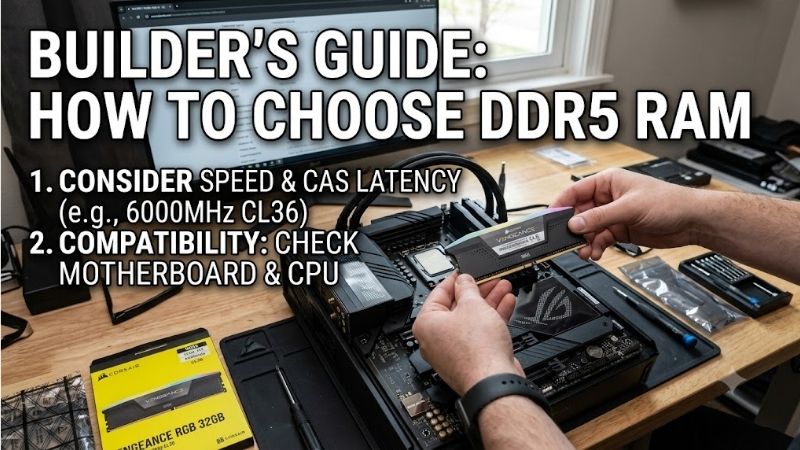
How to Choose the Right DDR5 RAM
Selecting the right memory components requires balancing speed, capacity, and system stability. By learning how to choose ddr5 ram effectively, you can maximize your PC performance without overspending on features you do not need. Below are the key technical aspects you should evaluate before making your final purchase decision.
Understanding DDR5 Frequency and Transfer Speed
Higher transfer rates mean your system can process data much faster across demanding applications. A higher DDR5 frequency delivers massive bandwidth improvements over older memory standards, making complex tasks far smoother. Modern kits range from 4800MT/s to over 7200MT/s, providing options for every user level and system build.
For most gaming setups and creative workstations, a sweet spot speed of 6000MT/s offers optimal stability and cost performance. Keep in mind that higher speeds may require manual tuning or advanced BIOS configurations. When learning how to choose ddr5 ram, prioritizing a balance between raw speed and system stability is vital.
Analyzing CAS Latency and Timings
Memory latency determines how quickly the module responds to instructions sent by the processor. Lower CAS latency ratings indicate faster response times, which directly impacts gaming frame rates and system responsiveness. While DDR5 has higher latency numbers than DDR4, its increased bandwidth effectively offsets this difference.
When evaluating memory modules, look for kits labeled with CL30 or CL36 at 6000MT/s speed ratings. Lower latency kits usually cost more, so balancing latency against your overall budget is essential. Choosing low-latency RAM ensures that your system processes small data packets rapidly, improving overall multitasking.
Determining the Right Memory Capacity
Selecting the appropriate memory capacity depends entirely on your primary workloads and multitasking habits. A standard 32GB setup is now the sweet spot for modern gaming and heavy productivity tasks. Knowing a key factor in how to choose ddr5 ram is matching capacity to your workload prevents memory bottlenecks during heavy use.
While 16GB is acceptable for entry-level setups, demanding titles and content creation tools benefit greatly from 32GB or 64GB. Higher capacities ensure smooth performance during video editing, 3D rendering, and running multiple background applications. Plan your memory capacity carefully to keep your system future-proof.
Checking Motherboard and CPU Compatibility
Before buying any RAM module, verify motherboard compatibility to avoid hardware conflicts or boot failures. Both Intel 12th-14th Gen and AMD Ryzen 7000/9000 series processors support DDR5, but motherboard support varies by model. Always check the motherboard Qualified Vendor List (QVL) to confirm certified memory kits.
Physical dimensions also matter, especially if you install large air coolers that might obstruct memory slots. Low-profile memory modules fit easily under bulky coolers, while tall modules with large heatspreaders need extra clearance. Double-checking physical dimensions saves you from frustrating installation hassles.
Evaluating Overclocking Profiles (XMP 3.0 vs EXPO)
Pre-configured memory profiles allow users to achieve advertised speeds with a single BIOS toggle. Intel XMP 3.0 enables easy one-click overclocking on Intel platforms, offering customizable profiles for enthusiasts. AMD EXPO provides tailored memory tuning specifically optimized for AMD Ryzen processors to maximize efficiency.
Many premium memory kits support both standards, giving builders maximum flexibility across different CPU platforms. Enabling these profiles ensures your memory runs at its rated speed rather than slow default fallback speeds. Always enable your profile in the BIOS immediately after completing your hardware installation.
| DDR5 RAM Model | Target Speed | CAS Latency | Profile Support | Best Use Case |
| Corsair Dominator Platinum | 5600MT/s – 7200MT/s | CL30 – CL36 | Intel XMP 3.0 / AMD EXPO | Premium Enthusiast Builds |
| Corsair Vengeance DDR5 | 5200MT/s – 6400MT/s | CL36 – CL40 | Intel XMP 3.0 / AMD EXPO | Budget & Stealth PC Builds |
| G.Skill Trident Z5 Neo | 6000MT/s | CL30 – CL36 | AMD EXPO | AMD Ryzen Gaming Rigs |
| TEAMGROUP T-Force Delta | 6000MT/s – 7200MT/s | CL30 – CL38 | Intel XMP 3.0 | High-Speed RGB Gaming |
| Crucial Pro DDR5 | 5600MT/s | CL46 | Intel XMP 3.0 / AMD EXPO | Workstations & Non-RGB |
| Kingston Fury Beast | 5200MT/s – 6000MT/s | CL36 – CL40 | Intel XMP 3.0 / AMD EXPO | Versatile All-Rounder Builds |
Top Picks
Finding top-tier RAM modules on Amazon requires analyzing real-world reliability, cooling efficiency, and value. As you decide how to choose ddr5 ram for your rig, comparing validated user hardware helps narrow down the top options. Here are our top recommended memory kits that deliver high stability and performance.
Corsair Dominator Platinum RGB DDR5
Designed for high-end enthusiasts and RGB lovers, this kit offers premium build quality and stunning illumination. An integrated forged aluminum heat spreader manages thermals efficiently during heavy workloads. Its patented DHX cooling technology keeps temperatures low while pushing top-tier clock speeds reliably.
However, its tall height can interfere with large CPU air coolers, and it carries a premium price tag. The ICUE software integration provides deep customization, making it worth the cost for custom builds. Overall, it remains a flagship choice for enthusiasts wanting top aesthetic design and premium performance.
Corsair Vengeance DDR5
Ideal for budget-conscious builders who want solid performance without extra flash, this dual-channel kit delivers outstanding stability. Its compact design ensures compatibility with almost any CPU cooler clearance. Built-in voltage regulation makes overclocking via software straightforward and reliable for daily use.
On the downside, the minimalist heatspreader lacks RGB lighting, which may disappoint visual-focused builders. Nonetheless, its competitive pricing and reliable memory chips make it a smart purchase. It stands out as one of the most reliable and affordable options for mid-range gaming builds.
G.Skill Trident Z5 Neo DDR5
Engineered specifically for AMD Ryzen platforms, this kit features full AMD EXPO profile support for optimized memory tuning. It provides tight timings and low latency at 6000MT/s speeds right out of the box. If you want to know how to choose ddr5 ram with low latencies, this model offers phenomenal performance.
The sharp heatsink edges require careful handling during installation, and price points can fluctuate. High-speed stability is excellent across all major AM5 motherboards. If you are building a modern AMD system, this memory kit delivers incredible value and top-notch gaming responsiveness.
TEAMGROUP T-Force Delta RGB DDR5
Crafted for gamers who want bold RGB aesthetics and extreme speed, this kit boasts impressive clock speed options up to 7200MT/s. Its 120-degree ultra-wide lighting bar delivers vivid RGB effects synchronized across motherboard software. High-quality IC chips ensure steady high-frequency operation during gaming.
However, running at maximum frequencies demands high power consumption and motherboard support. The aggressive stealth design looks fantastic inside tempered glass PC cases. It remains a top recommendation for gamers seeking eye-catching illumination combined with high-bandwidth throughput.
Crucial Pro DDR5
Built for workstation users and minimalist builders, this memory kit emphasizes plug-and-play reliability over flashy aesthetics. It offers generous memory capacity variants that operate seamlessly without complex manual BIOS tuning. Its low-profile matte black heatspreader fits easily into space-constrained cases.
It lacks RGB lighting and features conservative timings compared to enthusiast gaming kits. Nevertheless, Micron quality engineering guarantees rock-solid long-term stability under heavy workloads. It is the perfect choice for professional creators who value steady system uptime above all else.
Kingston Fury Beast DDR5
A versatile choice for both Intel and AMD users, this memory module supports Intel XMP 3.0 alongside automatic plug-and-play overclocking. Its slim heat sink design allows easy clearance under large CPU cooling fans. The integrated infrared sync technology ensures uniform lighting effects across both modules.
Higher speed variants can get expensive, and extreme overclockers might want lower latency timings. Despite this, its multi-platform profile support makes installation effortless for beginner PC builders. It serves as a highly dependable and stylish RAM option for almost any modern desktop build.
Frequently Asked Questions
Upgrading your desktop system with next-gen RAM often raises technical questions regarding performance benefits and installation. Answering common questions about how to choose ddr5 ram helps clear up confusion prior to purchasing hardware. Below are helpful answers to the most frequent inquiries from PC builders.
Is DDR5 RAM worth it for gaming?
Yes, upgrading to DDR5 provides noticeable frame rate improvements in modern CPU-intensive video games. Higher bandwidth allows your processor to feed data rapidly to your graphics card during complex scenes. Investing in DDR5 for a new gaming PC build ensures your system handles demanding modern titles with ease.
While older systems running DDR4 remain usable, new desktop platforms fully require DDR5 memory modules. Buying into DDR5 now provides an easy upgrade path for future processor generations. The overall performance uplift makes it worth the investment for any new gaming setup.
Can I mix different DDR5 RAM kits?
Mixing different memory kits is generally discouraged because varying speeds and timings lead to instability. Even modules from the same manufacturer can use different internal memory chips across production runs. For guaranteed stability, always purchase a matching multi-stick kit packaged together by the factory.
If you must mix different modules, your system will automatically default to the speed of the slowest stick. You may also face memory errors or boot failures when enabling XMP or EXPO profiles. Stick to dual-channel matching pairs to maintain consistent memory performance across all applications.
What speed DDR5 RAM should I buy?
A DDR5 frequency of 6000MT/s with CL30 or CL36 timing is ideal for most desktop PC builders today. This speed offers optimal stability on both Intel and AMD platforms without requiring extreme voltage tuning. Higher speeds like 7200MT/s provide minimal gaming gains while increasing system instability risk.
Budget builders can safely opt for 5200MT/s or 5600MT/s kits to save money without sacrificing stability. Gamers and content creators looking for peak performance should focus on the 6000MT/s target range. It hits the perfect balance between price, system compatibility, and high-speed data transfer rates.
Does DDR5 RAM require special CPU support?
Yes, DDR5 memory requires a compatible processor and a motherboard with dedicated DDR5 memory slots. Intel 12th Gen Core processors and newer, along with AMD Ryzen 7000 and 9000 series CPUs, support DDR5. Older CPU architectures cannot physically or electronically support DDR5 RAM modules due to pin differences.
DDR5 modules also feature a different physical notch placement than DDR4 modules to prevent accidental insertion. Make sure your motherboard explicitly lists DDR5 support in its spec sheet before buying RAM. Verifying processor compatibility guarantees a smooth and successful custom PC assembly.
Final Thoughts
Ultimately, understanding how to choose ddr5 ram comes down to balancing speed, low latency, and platform support. By targeting a reliable 6000MT/s kit with solid timings and adequate capacity, you will unlock fast clock speed performance. Invest in a quality kit today to build a future-proof PC that handles any task.