- Top Pick: AMD RYZEN 7 9800X3D 8-Core, 16-Thread Desktop Processor
- Best Value: MSI GeForce RTX 5070 Ti 16G Ventus 3X OC Graphics Card – RTX 5070 Ti GPU, 16GB GDDR7 (28Gbps/256-bit), PCIe 5.0 – Triple Fan Thermal Design (3 x TORX Fan 5.0) – HDMI 2.1b, DisplayPort 2.1b
- Premium Choice: ASUS ROG Strix B850-F Gaming WiFi AMD AM5 B850-F ATX Motherboard 16+2+2 Power Stages, AI PC, DDR5 AEMP, WiFi 7, 4X M.2, PCIe® 5.0, Total Support of 19 USB, 20Gbps Type-C®, AI Networking II, Aura Sync
VRChat is the hardest game to build for that nobody benchmarks. Its Unity engine renders forty user-made avatars with unoptimized shaders, dynamic bones, and 4K textures in a single world, and it does it twice for VR at 90 frames per second. That makes it brutally CPU-bound in populated instances, hungry for VRAM in avatar-heavy worlds, and demanding of RAM as texture caches pile up over a long night. A build for it needs the fastest single-thread processor available, a GPU with 16GB of memory, and 64GB of RAM, which is unusual for a gaming PC and exactly right here. This build targets a steady 90 fps in VR on a Quest 3 or Index in busy worlds and high-refresh desktop play.
Parts List
| Part | Model | Approx. price | Why |
|---|---|---|---|
| CPU | AMD Ryzen 7 9800X3D | Varies | Best single-thread and cache for Unity avatars |
| GPU | MSI GeForce RTX 5070 Ti Ventus 3X OC 16G | Varies | 16GB for avatar textures, strong VR performance |
| Motherboard | ASUS ROG Strix B850-F Gaming WiFi | Varies | Premium VRM, USB for headsets, Wi-Fi 7 |
| RAM | G.Skill Trident Z5 Neo RGB 64GB DDR5-6000 CL30 | Varies | 64GB for long sessions in avatar-heavy worlds |
| SSD | WD Black SN850X 2TB | Varies | Fast DRAM drive for the growing avatar cache |
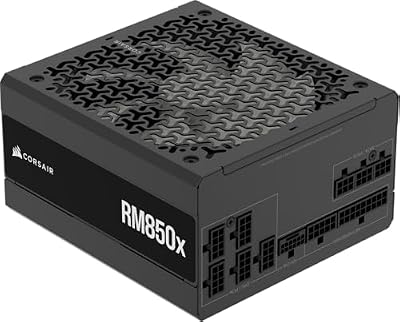
| PSU | Corsair RM850x | Varies | Premium quiet unit with 12V-2×6 |
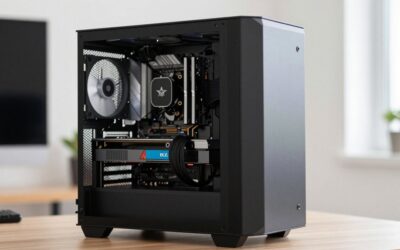
| Case | Lian Li Lancool 216 | Varies | Huge 160mm intakes for a hot GPU |
AMD Ryzen 7 9800X3D

VRChat lives on Unity’s main thread, and the Ryzen 7 9800X3D’s combination of Zen 5 single-thread speed and 96MB of L3 cache is the best available answer. TechPowerUp, Gamers Nexus, and Hardware Unboxed all placed it at the top of their gaming charts, typically 15-25 percent ahead of the non-X3D 9700X and further ahead in cache-sensitive engines, which is exactly what a world full of dynamic-bone avatars is. It ships without a cooler, so plan a dual-tower or 240mm liquid cooler. Swap option: the Ryzen 7 7800X3D to save money with a 5-10 percent performance step down.
As an Amazon Associate we earn from qualifying purchases at no extra cost to you.





MSI GeForce RTX 5070 Ti Ventus 3X OC 16G
VR at 90 fps renders two high-resolution views, and avatar-heavy worlds can push VRAM past 12GB, so the RTX 5070 Ti’s 16GB and strong rasterization are the right fit. TechPowerUp and Tom’s Hardware placed it 20-30 percent ahead of the RTX 5070, and NVIDIA’s VR driver support and encoder for Quest Link are mature. MSI’s Ventus 3X cooler is quiet and around 300mm long. Swap option: the Sapphire Pulse Radeon RX 9070 XT 16GB for similar rasterization at a lower price if you use a wired headset and do not need NVENC for Quest Link.
ASUS ROG Strix B850-F Gaming WiFi
VR headsets, trackers, and base stations consume USB ports and bandwidth, and the ROG Strix B850-F Gaming WiFi delivers a generous rear panel with USB4, plus a premium VRM for the 9800X3D, a PCIe 5.0 x16 slot, PCIe 5.0 M.2, Wi-Fi 7, and 2.5-gigabit Ethernet. ASUS’s BIOS enables EXPO with one click and its USB controller stability matters for tracking. Swap option: the MSI MAG B850 Tomahawk WiFi to save money if you use a single headset without full-body tracking.
G.Skill Trident Z5 Neo RGB 64GB DDR5-6000 CL30
VRChat’s memory use grows through a session as avatar and world textures cache, and 32GB can be exhausted in a large event after a few hours, so 64GB is the correct choice here. G.Skill’s Trident Z5 Neo delivers it as two 32GB EXPO-certified sticks at the Ryzen sweet spot of DDR5-6000 CL30, keeping a two-DIMM configuration that runs at full speed. Check cooler clearance for the heatspreader. Swap option: a plain 64GB kit at the same speed if you do not want RGB or run a very large air cooler.
WD Black SN850X 2TB
VRChat’s local cache of downloaded avatars and worlds grows large quickly, and the SN850X’s DRAM cache and strong random performance keep world loading fast. Two terabytes hold Windows, VRChat, a large cache allocation, and other VR titles. It runs warm under sustained load, so mount it under the board’s included heatsink. Swap option: the Samsung 990 Pro 2TB if cheaper on the day, or a 4TB SN850X if you keep a very large cache and library.
Corsair RM850x
The RTX 5070 Ti is rated around 300W and the 9800X3D adds up to 120W, so the Corsair RM850x runs at a quiet, efficient 55-60 percent load. Its premium fan and capacitors make it among the quietest units available, which matters when you are wearing a headset and a mic. It is fully modular, ATX 3.1 compliant, 80 Plus Gold rated, and includes a native 12V-2×6 cable. Swap option: the Corsair RM1000x if you plan on an RTX 5090 in the future.
Lian Li Lancool 216
The Lancool 216’s two massive 160mm front intake fans move a great deal of air at low noise, which is ideal for a 300W GPU running for hours while you stand in a VR world. It supports graphics cards up to roughly 392mm and CPU coolers up to about 180mm, includes a rear fan, and offers an optional PCIe-slot fan bracket for GPU cooling. Build quality and cable routing are excellent. Swap option: the Fractal Design North if you want a quieter, furniture-like look at a slightly higher price.
Compatibility Check
Socket: the Ryzen 7 9800X3D and ASUS ROG Strix B850-F Gaming WiFi are both AM5, and B850 boards ship with Zen 5 support. RAM type: AM5 is DDR5 only and the 64GB Trident Z5 Neo kit is EXPO-certified for DDR5-6000 in a two-DIMM layout, which keeps the memory controller at full speed. PSU headroom: the RTX 5070 Ti is rated around 300W and the 9800X3D around 120W at peak, so the system sits near 480W and the RM850x’s native 12V-2×6 cable plugs directly into the card. GPU length: the MSI Ventus 3X RTX 5070 Ti is about 300mm, well inside the Lancool 216’s roughly 392mm clearance. Case clearance: a dual-tower cooler up to about 180mm or a 240mm top radiator fits, and the SN850X mounts under the board’s PCIe 5.0 M.2 heatsink.
Expected Performance
1080p
VRChat on desktop is CPU-bound: expect roughly 90-144 fps in populated worlds and lower in 40-avatar events regardless of GPU, based on the 9800X3D’s positioning in Hardware Unboxed’s testing. Half-Life: Alyx runs well above 200 fps. Beat Saber is capped by refresh rate. Cyberpunk 2077 ultra without ray tracing lands near 160-180 fps per TechPowerUp’s RTX 5070 Ti review.
1440p
VRChat holds the same CPU-limited 90-144 fps in populated worlds. In VR on a Quest 3 at native resolution, expect a steady 90 fps in most worlds with dips in avatar-dense events. Half-Life: Alyx in VR at high holds 90 fps locked. Cyberpunk 2077 ultra without ray tracing runs roughly 125-145 fps.
4K
VRChat on a 4K desktop display remains CPU-limited in populated worlds at roughly 80-120 fps, with the GPU finally working in large mirror-heavy worlds. Half-Life: Alyx runs above 120 fps. Cyberpunk 2077 ultra without ray tracing lands near 70-85 fps natively and past 100 with DLSS 4 quality.
Upgrade Path
The CPU is already the best available for VRChat and will not need replacing for years; a future Ryzen X3D part is a drop-in. The GPU path is an RTX 5080 or RTX 5090 for higher supersampling in VR, with the RM850x covering the RTX 5080 and the RM1000x needed for the RTX 5090. The 64GB memory kit and 2TB drive already exceed the game’s needs, and storage expands through the board’s additional M.2 slots. The case and motherboard carry forward indefinitely.
FAQ
Is VRChat CPU or GPU bound?
CPU-bound in populated worlds because Unity processes every avatar’s bones and shaders on the main thread. The GPU matters in VR resolution and in worlds with many mirrors.
How much RAM does VRChat need?
Thirty-two gigabytes works for casual use, but long sessions in avatar-heavy events can exhaust it as textures cache. Sixty-four gigabytes is the comfortable choice for this build.
Why 16GB of VRAM for VRChat?
Unoptimized avatars with 4K textures in a 40-person world can push VRAM past 12GB, especially in VR. Sixteen gigabytes avoids texture swapping and stutter.
Can this build run VRChat on a Quest 3 at 90 fps?
Yes in most worlds at native resolution. Avatar-dense events will still dip because of the CPU limit, which affects every PC; this build minimizes those dips.
Sources and Methodology
The frame-rate ranges in this guide are approximate and reflect the relative positioning of the RTX 5070 Ti and Ryzen 7 9800X3D in launch reviews published by TechPowerUp, Hardware Unboxed, Gamers Nexus, Tom’s Hardware, and TechSpot, including their Cyberpunk 2077 results. VRChat is not benchmarked by those outlets, so we mapped their gaming and cache-sensitivity rankings onto the game’s well-documented CPU-bound Unity behavior. None of these figures were measured by this site, and VRChat results vary enormously with world, avatar count, and headset. Prices are approximate and fluctuate.
Top picks from this guide
 SandiskWD_BLACK SN850X 2TB NVMe SSD with Heatsink - M.2 2280,…$438 \xc2\xb7 98/100
 Lian LiLIAN LI LANCOOL 216 RGB Black ATX Mid-Tower Case, 2x160mm…$100 \xc2\xb7 98/100
 AMDAMD RYZEN 7 9800X3D 8-Core, 16-Thread Desktop Processor$444 \xc2\xb7 95/100
 CorsairCORSAIR RM850x ATX 3.1 PCIe 5.1 Ready Fully Modular 850W…$140 \xc2\xb7 95/100