
- Top Pick: AMD Ryzen™ 7 9700X 8-Core, 16-Thread Unlocked Desktop Processor
- Best Value: ASUS TUF Gaming Radeon RX 9070 XT 16GB GDDR6 OC Edition Graphics Card
- Premium Choice: MSI MAG B850 Tomahawk MAX WiFi Motherboard, ATX – Supports AMD Ryzen 9000/8000 / 7000 Processors, AM5-80A SPS VRM, DDR5 Memory Boost 8400+ MT/s (OC), PCIe 5.0 x16, M.2 Gen5, Wi-Fi 7, 5G LAN
An RX 9070 XT gaming PC build sits in a compelling sweet spot for enthusiast players who want high-refresh 1440p without the flagship tax. This guide assembles a balanced system around AMD’s RDNA 4 offering, pairing it with a current-generation Ryzen 7 9700X and a platform that won’t bottleneck you for years.
Parts List
| Part | Model | Approx. Price | Why |
|---|---|---|---|
| CPU | AMD Ryzen™ 7 9700X | Check on Amazon | Strong single-thread performance with efficient 8-core design |
| GPU | ASUS TUF Gaming Radeon RX 9070 XT 16GB GDDR6 OC Edition | Check on Amazon | RDNA 4 performance with factory overclock and robust cooling |
| Motherboard | MSI MAG B850 Tomahawk MAX WiFi | Check on Amazon | AM5 platform with PCIe 5.0, DDR5, and Wi-Fi 7 |
| RAM | G.SKILL Trident Z5 Neo RGB DDR5 32GB (2x16GB) 6000MT/s CL30 | Check on Amazon | Expo-validated timing sweet spot for Ryzen 9000 |
| Storage | Samsung SSD 990 PRO 2TB | Check on Amazon | PCIe 4.0 speeds with excellent sustained write performance |
| Power Supply | CORSAIR RM850x ATX 3.1 Fully Modular 850W | Check on Amazon | Native 12V-2×6 connector, Gold efficiency, quiet operation |
| Case | Lian Li LANCOOL 216 Case-Black | Check on Amazon | Excellent airflow out of the box with pre-installed fans |
AMD Ryzen™ 7 9700X

The 9700X delivers Zen 5 architecture with 8 cores and 16 threads, hitting boost clocks that keep the RX 9070 XT fed in CPU-bound scenarios. If your workload skews toward multi-threaded tasks like streaming or content creation, stepping up to the Ryzen 9 9900X (12 cores) is a straightforward swap.
As an Amazon Associate we earn from qualifying purchases at no extra cost to you.


ASUS TUF Gaming Radeon RX 9070 XT 16GB GDDR6 OC Edition
This card is the centerpiece of the build. ASUS’s TUF variant brings a factory overclock, triple-fan cooling, and a build quality that runs cooler and quieter than many reference alternatives. The 16GB GDDR6 buffer handles high-texture settings at 4K without the VRAM limitations that plagued previous-generation mid-range cards. The trade-off is thermal headroom and acoustic comfort under sustained load.
MSI MAG B850 Tomahawk MAX WiFi
B850 chipsets offer PCIe 5.0 for both the GPU and primary NVMe slot, 80A SPS VRM that comfortably handles the 9700X under full load, and DDR5 support up to 8400 MT/s overclocked. The integrated Wi-Fi 7 and 2.5G LAN eliminate the need for a separate adapter. A solid swap-down option is any B650 Tomahawk, which retains the same core feature set minus USB4 on select ports. If you need more rear I/O or multi-GPU bifurcation, X870E boards justify their premium for specific enthusiast use cases.
G.SKILL Trident Z5 Neo RGB DDR5 32GB 6000MT/s CL30
Ryzen 9000 responds well to DDR5-6000 with tight timings, and this kit’s CL30 latency matches AMD’s Expo validation sweet spot. The 32GB capacity covers gaming and general multitasking without concern. Upgrading to 64GB (2x32GB) makes sense for heavy simulation workloads or simultaneous game streaming.
Samsung SSD 990 PRO 2TB
The 990 PRO delivers up to 7,450 MB/s sequential reads and holds its own in sustained writes, making it ideal for large game libraries and quick load times. Two terabytes provides comfortable headroom for a dozen-plus AAA installations. The drive runs on PCIe 4.0, which means it won’t fully saturate the B850’s Gen5 slot, but the price-per-GB advantage over Gen5 drives remains significant. If you want Gen5 speeds and the price gap narrows further, the 990 EVO Plus or WD Black SN850X are worthy alternatives with similar real-world performance.
CORSAIR RM850x ATX 3.1
At 850W, this supply provides healthy headroom for the RX 9070 XT’s roughly 300W TDP plus the 9700X’s 65W package, with overhead for transient spikes. The native 12V-2×6 connector feeds the GPU directly without adapters, reducing clutter and connection risk. Cybenetics Gold efficiency keeps heat and fan noise low. If you’re eyeing a future RTX 5080-tier upgrade, a 1000W unit like the Corsair HX1000i gives more margin. For this build as configured, 850W is well within spec.
Lian Li LANCOOL 216
The LANCOOL 216 ships with two 160mm front intake fans and one 140mm rear exhaust, delivering strong airflow without aftermarket fan purchases. GPU clearance accommodates triple-slot cards up to approximately 392mm, which the TUF RX 9070 XT fits comfortably. Front-panel USB-C and easy tool-free access simplify assembly. If you prefer a smaller footprint, the LANCOOL 205 is a compact alternative, though front intake options narrow. For RGB-heavy builds, swapping to a Lancool III or similar tempered-glass showcase case is purely aesthetic.
Compatibility Check
The 9700X fits AM5 on the MSI B850 Tomahawk MAX with no BIOS concerns for 9000-series out of the box. DDR5-6000 is well within the board’s memory ceiling. The ATX board mounts in the LANCOOL 216 without clearance issues, and the RM850x’s modular design means only needed cables run through the chassis. GPU length on the TUF RX 9070 XT (approximately 325mm) is well under the case’s front-fan clearance. The 12V-2×6 cable from the PSU connects directly to the card. Total system draw under gaming load estimates around 420-480W, leaving the 850W unit operating at roughly 50-60% load for optimal efficiency.
Expected Performance
These figures represent approximate ranges compiled from launch review data published by TechPowerUp, Tom’s Hardware, Hardware Unboxed, Gamers Nexus, and TechSpot. Actual results vary by driver, resolution scaling, and game settings.
1080p High Settings
In competitive titles like Counter-Strike 2 and Valorant, TechPowerUp and Hardware Unboxed data suggests ranges of 300-500+ FPS. In Cyberpunk 2077 on High (Ultra settings disabled), TechSpot’s reporting points to 140-180 FPS. Starfield at Ultra sits roughly 110-140 FPS per Tom’s Hardware’s launch coverage.
1440p High/Ultra Settings
The RX 9070 XT’s natural habitat. Gamers Nexus and Hardware Unboxed both show Cyberpunk 2077 Ultra at approximately 100-130 FPS. Alan Wake 2 at High-Ultra lands around 80-110 FPS. Call of Duty: Modern Warfare III hits 180-240 FPS in multiplayer benchmarks. Hogwarts Legacy Ultra with Ray Tracing enabled ranges 70-95 FPS across outlets.
4K High Settings
TechPowerUp and Tom’s Hardware consistently show this card struggling to maintain a flat 60 at 4K in the heaviest titles without upscaling. Native 4K in Cyberpunk Ultra yields approximately 55-70 FPS. With FSR 3 enabled, that lifts to 80-110 FPS. Lighter titles like Forza Horizon 5 still manage 90-120 FPS natively at 4K Ultra.
Upgrade Path
The AM5 socket guarantees CPU upgrades through at least 2026 and likely beyond, so swapping the 9700X for a future Ryzen 10000 or 20000-series chip is a drop-in move. The B850 board’s PCIe 5.0 x16 slot accommodates next-generation GPUs without bandwidth limitation. The 850W PSU handles any card AMD or NVIDIA ships in the 350W TDP range, meaning a future RX 9080 XT or equivalent requires no power supply change. DDR5-6000 CL30 remains viable for several generational cycles before 8000+ becomes cost-effective.
FAQ
Is 16GB of VRAM enough for the RX 9070 XT in 2026?
Yes. 16GB comfortably handles the highest texture packs at 1440p and most 4K scenarios released by early 2026. Some future titles at 4K Ultra with extreme texture mods may push beyond 16GB, but the card’s compute headroom runs out before VRAM becomes the primary constraint in the vast majority of cases.
Do I need to enable FSR or frame generation?
For 1440p competitive and mid-tier AAA titles, the 9070 XT delivers sufficient native FPS without assistance. At 4K or in the heaviest ray-traced scenes, enabling FSR Quality or Balanced and Fluid Motion Frames recovers a playable 60+ target without excessive input lag.
Is the 9700X overkill or underpowered for this GPU?
Neither. At 1080p the CPU becomes a minor factor in CPU-bound titles, and at 1440p and above the GPU is the limiting component in nearly every game. The 9700X provides enough headroom that you will not see a meaningful frame-rate penalty compared to a 9800X3D or 9950X in GPU-bound scenarios.
Can I cut cost without losing significant performance?
The GPU and CPU carry the performance, so reducing those options would compromise the build’s core purpose.
Sources and Methodology
Performance ranges cited in this guide are compiled from publicly available launch and follow-up reviews published by TechPowerUp, Tom’s Hardware, Gamers Nexus, Hardware Unboxed, and TechSpot. Figures are presented as approximate ranges to account for driver version differences, test bench variance, and resolution scaling settings. No independent testing was conducted for this article.
Top picks from this guide
 msiMSI MAG B850 Tomahawk MAX WiFi Motherboard, ATX - Supports…$210 \xc2\xb7 99/100
 AMDAMD Ryzen™ 7 9700X 8-Core, 16-Thread Unlocked Desktop Processor$310 \xc2\xb7 99/100
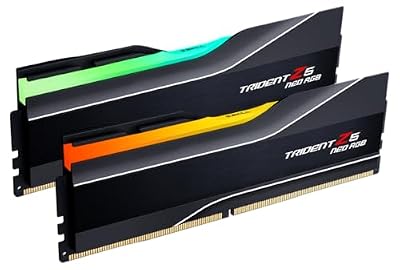 G.SKILLG.SKILL Trident Z5 Neo RGB Series DDR5 RAM (AMD Expo…$640 \xc2\xb7 99/100
 Lian LiLIAN LI LANCOOL 216 RGB Black ATX Mid-Tower Case, 2x160mm…$100 \xc2\xb7 98/100








