
- Top Pick: Minorsonic AIO CPU Cooler, 360mm AIO with High-Speed Ceramic Bearing Pump, 3X PWM ARGB Fans, 3-Phase Motor for Better Cooling Performance, Heat Transfer, Low Noise, Intel LGA 1851/1700, AMD AM5/AM4
- Best Value: Thermal Grizzly Kryonaut Extreme – 2 Gram – Extremely High Performance Thermal Paste with 12 Cleaning Wipes 6 Wet & 6 Dry- for Maximum Thermal Conductivity While Overclocking CPU/GPU/PS4/PS5/Xbox
- Premium Choice: Thermalright Assassin X 120 SE White CPU Air Cooler, 4 Heat Pipes, TL-C12CW PWM Quiet Fan CPU Cooler with S-FDB Bearing, for AMD AM4 AM5/Intel 1700/1150/1151/1200/1851
Gaming pushes your processor harder than almost any everyday task, so it is natural to worry when temperatures climb. Understanding what a normal CPU temp while gaming looks like helps you tell the difference between healthy operation and a cooling problem that needs fixing. This 2026 guide covers safe ranges, causes of high heat, and the gear that keeps your chip cool during long sessions.
As an Amazon Associate I earn from qualifying purchases.
As an Amazon Associate we earn from qualifying purchases at no extra cost to you.



🛒 Best Price Today on Amazon
Prime members get fast, free shipping on everything above, plus member-only deals. New members get a 30-day free trial — cancel anytime.
What Is a Normal CPU Temp While Gaming?
A normal CPU temp while gaming generally falls between 60°C and 80°C for most modern desktop processors. Brief spikes into the low 80s during intense scenes are perfectly acceptable, while sustained temperatures above 85-90°C suggest your cooling needs attention. Idle temperatures should sit around 30-45°C, and the jump to gaming load simply reflects the extra work your cores are doing. As long as your processor stays comfortably below its thermal limit (usually near 95-100°C) and does not throttle, your gaming temperatures are healthy and nothing to worry about.
Why Your CPU Heats Up During Gaming
Games load your CPU with physics calculations, AI routines, and draw-call preparation, all of which generate heat. The more demanding the title and the higher your frame rate target, the harder your cores work. Poor case airflow, dust buildup, aging thermal paste, or an undersized cooler all cause the CPU temp while gaming to rise faster than it should. Understanding your build’s airflow layout and pairing it with the right cooler is the key to keeping temperatures in the safe zone even during marathon sessions.
Best Cooling Gear to Lower Gaming Temperatures
The products below help keep your CPU temp while gaming under control, from quiet air coolers to high-capacity liquid solutions. Match one to your processor’s power draw and your case size for the best results.
| Product | Best For | Standout Feature | Rating |
|---|---|---|---|
| Noctua NH-D15 Air Cooler | Long gaming sessions | Massive dual-tower heatsink | 4.9/5 |
| Arctic Liquid Freezer III 360 | High-end gaming rigs | 360mm radiator cooling | 4.8/5 |
| Thermalright Peerless Assassin 120 | Budget gaming builds | Premium cooling, low price | 4.7/5 |
| be quiet! Pure Loop 2 FX 280 | Quiet gaming setups | Whisper-quiet pump and fans | 4.6/5 |
| Corsair iCUE H100i Elite | RGB gaming builds | Smart fan and RGB control | 4.6/5 |
How to Monitor CPU Temp While Gaming
Free tools like HWiNFO, MSI Afterburner, and Core Temp let you display real-time temperatures as an on-screen overlay while you play. This is the most reliable way to see how your CPU temp while gaming behaves under actual load rather than guessing. Log a full session and watch whether temperatures stabilize or keep climbing. Steady numbers mean your cooling is balanced; a constant upward creep points to a problem worth investigating with a monitoring tool.
Reducing High CPU Temps During Play
If your temperatures run hot, start with the basics: clean dust from fans and heatsinks, verify your cooler is mounted firmly, and confirm your case has both intake and exhaust airflow. Reapplying fresh thermal paste often drops the CPU temp while gaming by several degrees on older systems. For a bigger improvement, upgrading to a stronger cooler or adding case fans delivers lasting results and pairs well with a tidy cable management routine that improves airflow.
Does a High Frame Rate Increase CPU Temperature?
Yes, chasing very high frame rates makes your CPU work harder, which raises temperatures. Competitive players targeting 240+ FPS will see higher CPU temp while gaming than someone capping at 60 FPS. If temperatures concern you, enabling a sensible frame cap reduces unnecessary heat and power draw without hurting your experience in most titles. This is especially useful on compact builds where thermal headroom is limited.
When to Worry About Gaming Temperatures
You should take action if your processor consistently sits above 90°C, if your game stutters as clock speeds drop (thermal throttling), or if your system shuts down mid-session. These are clear signs the CPU temp while gaming has exceeded safe limits. Addressing cooling promptly protects your hardware and restores smooth, consistent performance. Choosing the right gaming processor with efficient thermals from the start also helps.
Frequently Asked Questions
Is 80°C a safe CPU temp while gaming?
Yes, 80°C during gaming is generally safe and well within the operating range of modern processors, which typically throttle near 95-100°C. Many gaming CPUs routinely reach the high 70s or low 80s under load. Keeping temperatures in this range gives quiet operation and reliable long-term performance.
Why does my CPU temp spike during gaming?
Temperature spikes happen when your cores suddenly ramp up for demanding scenes, loading screens, or shader compilation. Brief spikes are normal and harmless. Persistent high spikes usually indicate dust buildup, dried thermal paste, poor airflow, or an undersized cooler that cannot keep pace with the heat your processor generates.
Does a better cooler lower CPU temp while gaming?
Absolutely. Upgrading from a stock or budget cooler to a premium air tower or liquid AIO can lower your gaming temperatures by 10-20°C. A better cooler moves heat away from the chip more efficiently, reduces throttling, keeps fan noise down, and helps your processor sustain higher clock speeds during play.
Should I use liquid or air cooling for gaming?
Both work well for gaming. A strong air cooler handles most gaming CPUs quietly and reliably with no maintenance. Liquid AIO coolers offer extra headroom for high-wattage or overclocked processors and can look cleaner in a case. Choose based on your processor’s power draw, budget, and personal preference.
Top picks from this guide
 ThermalrightThermalright FW360 SE ARGB V2 360mm AIO Liquid CPU Cooler,…$90 \xc2\xb7 98/100
 ThermalrightThermalright Assassin X 120 SE White CPU Air Cooler, 4…$18 \xc2\xb7 98/100
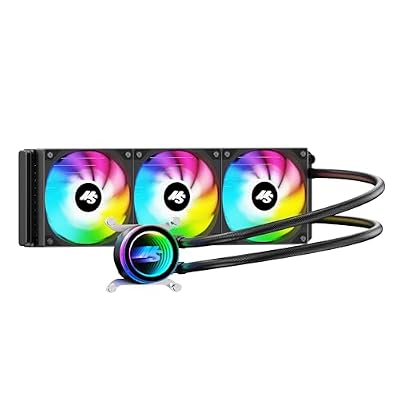 MinorsonicMinorsonic AIO CPU Cooler, 360mm AIO with High-Speed Ceramic Bearing…$47 \xc2\xb7 97/100
 GSCOLERGSCOLER ARGB GPU Support Bracket with CPU & GPU Temp…$30 \xc2\xb7 96/100








