
The best gaming PC for video editing has to juggle two demanding jobs that pull hardware in opposite directions: gaming wants fast single-core grunt and GPU bandwidth, while editing wants maximum multi-core throughput, plenty of fast VRAM for GPU-accelerated rendering, and a lot of RAM. In 2026, RTX 50-series cards with 8th-gen NVENC plus GPU-accelerated rendering (Premiere Pro, DaVinci Resolve, Blender) genuinely turn high-end prebuilt gaming PCs into capable editing workstations. Here are the dual-purpose picks worth your money.
As an Amazon Associate we earn from qualifying purchases at no extra cost to you.




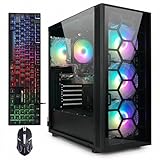
| PC | CPU | GPU / VRAM | RAM | Best For | Price |
|---|---|---|---|---|---|
| ZOTAC MEK 5090 | Core i9-14900K | RTX 5090 32GB | 64GB DDR5 | 8K editing + 4K gaming | $4,999 |
| STORMCRAFT Phantom | Ryzen 7 9800X3D | RTX 5080 16GB | 32GB DDR5 | 4K editing + 4K gaming | $2,999 |
| MSI Aegis AI | Core Ultra 9 285K | RTX 5070 Ti 16GB | 32GB DDR5 | 4K editing + 1440p gaming | $2,799 |
| ZOTAC MEK 5070 Ti | Ryzen 7 9700X | RTX 5070 Ti 16GB | 32GB DDR5 | 4K editing + 1440p gaming | $2,399 |
🛒 Best Price Today on Amazon
Prime members get fast, free shipping on everything above, plus member-only deals. New members get a 30-day free trial — cancel anytime.
Start 30-Day Prime Free Trial →See Today’s Amazon DealsVideo Editing Hardware Requirements in 2026
Modern editing in DaVinci Resolve, Adobe Premiere Pro and Final Cut Pro leans heavily on the GPU. For 4K H.264/H.265 work, any RTX 50-series card plays back in real time. For 4K RAW (BRAW, R3D, ArriRAW), VRAM is what matters — 16GB+ is strongly recommended once you stack on effects and color grading. For 8K and dense timelines, the 32GB VRAM on an RTX 5090 gives you the smoothest ride. CPU multi-core grunt drives export speed — more cores, faster final renders.
Best Video Editing + Gaming PC: MSI Aegis AI
If you game as well as edit, the MSI Aegis AI at $2,799 strikes the best balance. The Core Ultra 9 285K’s 24 cores (8P + 16E) chews through Premiere Pro and DaVinci Resolve export renders — right up there with dedicated workstation CPUs on 4K jobs. The RTX 5070 Ti 16GB handles real-time 4K GPU-accelerated effects, grading and rendering without leaning on proxies. The 32GB DDR5 keeps big timelines with multiple 4K streams happy. And once the work’s done, the RTX 5070 Ti is a strong 1440p gaming card.


msi Aegis R2 AI Gaming Desktop: Intel Core Ultra 9 285, Geforce RTX 5070Ti, 32GB DDR5, 2TB M.2 NVMe SSD, Air Cooling, USB Type C, VR-Ready, Window 11 Home: C2NVR9-1452US


As an Amazon Associate we earn from qualifying purchases. Product prices and availability are accurate as of the date/time indicated.
Best Premium: ZOTAC MEK RTX 5090
For creators cutting 6K–8K footage, working with RED RAW or ARRI files, or rendering GPU-heavy VFX, the ZOTAC MEK RTX 5090 at $4,999 brings workstation-grade muscle at a gaming PC price. The RTX 5090’s 32GB GDDR7 wipes out VRAM ceilings for dense effects stacks, and 64GB of system RAM swallows the biggest project caches. The Core i9-14900K’s 24 cores turn in competitive render times. For serious dual-purpose work, this is the obvious pick.
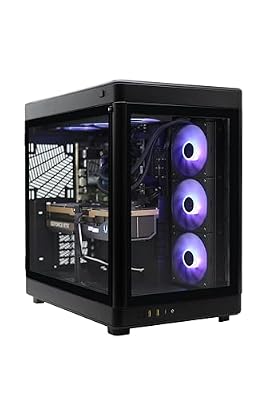
ZOTAC MEK Gaming PC Desktop, NVIDIA GeForce RTX 5090 32GB GDDR7, AMD Ryzen 7 9700X Up to 5.5GHz, 32GB DDR5, 2TB NVMe SSD, 1200W 80+ Gold PSU, WiFi 7, Windows 11 Pro


As an Amazon Associate we earn from qualifying purchases. Product prices and availability are accurate as of the date/time indicated.
Frequently Asked Questions
What specs matter most for video editing?
Editing rewards a strong multi-core CPU, plenty of RAM, and fast NVMe storage more than a maxed-out GPU. A Ryzen 9 or Core Ultra 9 speeds renders and timeline scrubbing, 32GB to 64GB keeps large projects smooth, and NVMe drives cut import and export waits.
How much RAM do I need for 4K video editing?
32GB is the practical minimum for 4K work, and 64GB is ideal if you use many layers, effects, or run other apps alongside your editor. More RAM lets the software cache timelines and previews, reducing stutter and crashes when handling large, high-resolution footage.
Does the GPU matter for editing or just gaming?
The GPU accelerates effects, color grading, and encoding through hardware like NVENC, so a capable card noticeably speeds exports and playback. For a dual-purpose gaming and editing machine, a strong GPU serves both roles, though editing benefits more from CPU cores and RAM than raw gaming power.
Do I need a specific CPU brand for editing?
No, both AMD Ryzen 9 and Intel Core Ultra chips excel at editing. Intel’s Quick Sync can speed certain encode workflows, while AMD often leads in raw multi-core render throughput. Choose based on your editing software’s benchmarks and your gaming needs rather than brand loyalty.
Is NVMe storage important for editing?
Very. Fast PCIe NVMe drives dramatically cut file import, cache, and export times versus SATA or hard drives, keeping 4K timelines responsive. A common setup uses one NVMe drive for the operating system and apps and a second large drive for active project media.
Ready to decide? Our #1 pick for 2026 is the ZOTAC MEK 5090.
Live price & availability on Amazon.
Top picks from this guide
 STGAubronSTGAubron Gaming PC Desktop,Core I7,RX 580 8G,16G RAM,1T SSD |…$522 \xc2\xb7 99/100msimsi Aegis R2 AI Gaming Desktop: Intel Core Ultra 9…$2,441 \xc2\xb7 99/100
 STGAubronSTGAubron Gaming PC Desktop,Core I7,RTX 2060 6G,32G RAM,2TB SSD |…$733 \xc2\xb7 99/100
 STGAubronSTGAubron Gaming PC Desktop,Core I7,GTX 1660Ti 6G,16G RAM,512G SSD |…$489 \xc2\xb7 97/100








