
Top Rtx 5080 Rtx 5090 Builder Picks for 2026
Here are our current top rtx 5080 rtx 5090 builder picks, compared on real Amazon owner reviews, price, and features. Live prices update below.
- Top Rtx 5080 Rtx 5090 Builder Picks for 2026
- Builder’s at-a-glance summary
- Round 1 — Compatibility with your existing build
- Round 2 — The build math: dollars beyond the GPU
- Round 3 — Thermals and sustained-load behavior
- Round 4 — Raw gaming performance
- Round 5 — AI and creator workloads
- Round 6 — VRAM and the long view
- Round 7 — Upgrade path and flexibility
- Round 8 — Ecosystem, drivers, and partner cards
- Builder profiles — who picks what
- Builder FAQ
- Builder’s final verdict
- Related Guides
- Related Articles
- Frequently Asked Questions
- Related Articles

GIGABYTE GeForce RTX 5080 Gaming OC 16G Graphics Card, WINDFORCE Cooling System, 16GB 256-bit GDDR7, GV-N5080GAMING OC-16GD Video Card
Included for 'RTX 5080 vs RTX 5090 in 2026: A Builder's Guide' because the listing specifies WINDFORCE Cooling System and 16GB 256-bit GDDR7, details this guide uses to compare options.
View on AmazonAffiliate disclosure: As an Amazon Associate we earn from qualifying purchases. This post contains affiliate links — we may earn a small commission at no extra cost to you. This never affects our picks. Prices and availability are accurate as of the date/time indicated and are subject to change; the price on Amazon at the time of purchase applies.
When you’re picking a part for your build, the GPU isn’t a standalone purchase — it dictates the PSU you need, the chassis size you can use, the cooling you have to plan for, the airflow you have to engineer, and ultimately the budget left for the rest of the rig. So when builders ask us RTX 5080 or RTX 5090, our first response is always: “Show us the rest of the build first.” The right answer changes depending on whether you’re working with an existing chassis and PSU, or starting from scratch with no constraints. This guide walks through the trade-offs from the builder’s perspective — not just “which is faster” but “which one actually fits, and what does it cost you to make it fit.”
Quick answer: For a 2026 build, the our top pick is the graphics card we would build around, while the the value pick is the budget-friendly choice.
Quick recap of the spec sheet for anyone who hasn’t been following: the 5080 packs 16 GB of GDDR7 at a 360 W board power and lands around $1,100 MSRP. The 5090 doubles VRAM to 32 GB, pushes board power to 575 W, and asks for roughly $2,000 MSRP. Both are Blackwell, both inherit DLSS 4, and both fit a triple-fan AIB cooler in a standard ATX case — though the 5090 increasingly wants a generously sized one. The performance gap is roughly 30-40% in mainstream gaming and 40-55% in heavy ray-traced and AI workloads.
For builders, the question that counts is whether the 5090’s premium — in dollars, watts, heat, and case real estate — earns its keep across the kinds of builds most people actually assemble. Our answer this quarter, and the answer we’d give almost any reader building a new rig in 2026 without an unlimited budget, is the RTX 5080. Here’s why, round by round, with the build math front and center.
Builder’s at-a-glance summary
| Build factor | RTX 5080 | RTX 5090 | Winner (builder lens) |
|---|---|---|---|
| PSU requirement | 850 W comfortable | 1000-1200 W required | 5080 |
| Chassis flexibility | Mid-tower friendly | Full-tower preferred | 5080 |
| Sustained thermals | Manageable on air | Demands serious airflow | 5080 |
| 4K gaming performance | Excellent w/ DLSS | ~30-40% faster | 5090 |
| Path tracing | Playable w/ DLSS Perf | ~40-55% faster | 5090 |
| AI / Blender workloads | Capable to 16 GB | Comfortable to 32 GB | 5090 |
| VRAM headroom | 16 GB GDDR7 | 32 GB GDDR7 | 5090 |
| MSRP | ~$1,100 | ~$2,000 | 5080 |
| Upgrade path flexibility | Easy mid-cycle swap | Locked in for years | 5080 |
| Builder verdict (BPG) | Sane choice for most | For unconstrained builds only | RTX 5080 |
Round 1 — Compatibility with your existing build
What you already own decides this
Before any spec-sheet comparison, take stock of what’s already in your case. PSU rating? Connector type? Chassis size and clearance? Front-intake airflow? Starting from a clean sheet you can engineer around either card, but if you’re dropping a GPU into a build that’s already two or three years old, the math heavily favors the 5080.
On a typical mid-tower with a quality 750-850 W PSU (a Corsair RM850x, Seasonic Focus 850, or EVGA SuperNova 850 G7, that class of unit), dropping in a 5080 is a clean swap. No PSU replacement. No new case. No re-engineered airflow. Install the card, plug in the new 12V-2×6 connector via the included adapter (or run a native cable if your PSU supports it), and you’re done inside an hour.
Dropping a 5090 into the same build is not that. You’re shopping for a 1000-1200 W PSU at $200-300, possibly a larger case to handle the heat dump, and very likely upgrading case fans or your CPU cooler to keep the rest of the rig in spec. The “real” cost of a 5090 upgrade for someone with an existing build often lands closer to $1,400-1,500 in extra spend versus the 5080’s clean $1,100 swap. That shifts the calculation meaningfully.
If you’re auditing the rest of your build for a GPU upgrade, our GPU buyer’s guide ranks current cards by performance per build-friendly watt, and is worth a read before you commit.
Winner: RTX 5080 — by a wide margin if you’re dropping it into an existing rig.
Round 2 — The build math: dollars beyond the GPU
What the 5090 actually costs once you account for everything
Let’s run the numbers straight. The MSRP gap between the 5080 and 5090 is roughly $900. But for a builder, the real gap hinges on what else you have to buy or upgrade to feed and cool the 5090’s power and thermal envelope.
- PSU upgrade: If you currently run an 850 W unit, plan to swap to a 1000-1200 W ATX 3.1 supply with native 12V-2×6. Budget $200-300.
- Chassis upgrade: If your current case is a compact mid-tower or has limited intake, the 5090’s heat output will create a hotter overall system. Many builders end up swapping to a full-tower or high-airflow mid-tower like a Lian Li Lancool, Fractal Torrent, or Corsair 7000D. Budget $150-250.
- CPU cooling: The 5090’s heat dump raises ambient case temps, which raises your CPU’s cooling demands. If you’re on a midrange air cooler, you may want to upgrade to a 360mm AIO or premium air. Budget $80-180.
- Electricity: Across a year of typical gaming, the difference between a 360 W and 575 W card is meaningful (roughly $30-60 depending on use and local rates). Not a one-time hit, but real.
On a fresh build the gap narrows, since you’re sizing the PSU and chassis from scratch for whichever GPU you pick. Even so, you spend more on the PSU and chassis to host the 5090, and that money is gone whether or not the card lives up to its premium.
The case-cooling pairing matters more than people think. Our CPU cooler buyer’s guide covers air and AIO options that pair sensibly with either GPU tier and reasonable ambient case temps.
Winner: RTX 5080 — by hundreds of dollars once the whole build is on the table.
Worked example: two real builds at the same total budget
To put the build math in concrete terms, here are two hypothetical builds at the same total system budget of roughly $3,200 — one on the 5080, one on the 5090:
- 5080-centric build: RTX 5080 ($1,100), Ryzen 7 9800X3D ($480), 32 GB DDR5-6000 ($150), 2 TB NVMe Gen5 ($250), B650E motherboard ($230), 850 W ATX 3.1 PSU ($150), high-airflow mid-tower ($120), 360mm AIO ($170), case fans ($60), Windows ($140). Headroom for upgrades.
- 5090-centric build: RTX 5090 ($2,000), Ryzen 7 7700X ($280), 32 GB DDR5-6000 ($150), 1 TB NVMe Gen4 ($110), B650 motherboard ($170), 1200 W ATX 3.1 PSU ($280), full-tower chassis ($220), 360mm AIO ($170), case fans ($90), Windows ($140). Squeezed everywhere except the GPU.
The 5080 build comes out noticeably better-balanced — faster CPU, larger storage, room for a second drive later. The 5090 build is a GPU with a system bolted on. Both are valid, but only one is the build you’d actually recommend to a friend at this budget tier.
Round 3 — Thermals and sustained-load behavior
What the cards actually do under hours of load
A spec-sheet TGP figure gives you the average board power; what builders truly care about is sustained-load behavior and how the card sheds heat into the rest of the chassis. The 5080 at 360 W is well-behaved. Quality triple-fan AIB designs from Asus TUF, MSI Gaming Trio, Gigabyte Gaming OC, Zotac AMP, and PNY XLR8 all hold the card under 70°C under sustained 4K gaming loads, with fan noise sitting at “audible but not annoying” in a well-vented mid-tower.
The 5090 is a different animal. Even the best triple-fan AIB designs run hot under sustained path-tracing or AI workloads, and they dump that heat straight into your case. The downstream effect: your CPU cooler works in a higher ambient, your VRMs run warmer, your NVMe drives may thermal-throttle under load if they’re tucked behind the GPU. Builders putting a 5090 into a chassis with marginal airflow report case ambients climbing into the high 40s°C during multi-hour gaming or rendering sessions, which is well into the zone where the rest of your hardware starts to suffer.
The fix is more airflow — more intake fans, exhaust fans, a chassis with a mesh front, possibly an AIO for the CPU to vent its own heat straight out the top. All doable, all extra cost and complexity. The 5080 sidesteps all of it.
Winner: RTX 5080 — meaningfully easier to engineer around.
Room-level thermal considerations
A builder factor that catches first-time enthusiast-tier buyers off guard: the 5090 turns the room it lives in into a sauna under sustained loads. A 575 W card under heavy 4K path-tracing for a 4-hour session dumps the equivalent of a small space heater’s output into your office. In summer, in a small room without good ventilation or air conditioning, this is genuinely uncomfortable. Builders in apartments with climate constraints or shared living spaces should factor this in honestly — not as a deal-breaker, but as a real ergonomic cost. The 5080 at 360 W is noticeable but not transformative.
Round 4 — Raw gaming performance
The 5090’s strongest round
Credit where it’s due to the 5090. Raw performance is where it earns its keep, and the gap is real and consistent. Roughly 30-40% faster than the 5080 across 4K rasterized gaming, 40-55% faster in heavy ray-traced and path-traced workloads. That’s a generational-class jump inside one generation, and at 4K with maxed settings the 5090 is the only card hitting comfortable framerates at native resolution without leaning on DLSS.
For builders speccing a top-tier 4K rig from scratch — especially one mated to a 4K 240Hz OLED panel — the 5090 is the card that fully exploits the display. The 5080 plus DLSS 4 gets close, but “gets close” and “natively hits refresh” are different conversations. If your monitor is genuinely premium, the 5090 is the only card that does it justice without compromise.
That said, it’s a narrow buyer profile. Most builders we work with are speccing for 1440p high-refresh, 4K 144Hz, or mixed-resolution multi-monitor setups. Across all of those, the 5080 is plenty.
Our gaming monitors buyer’s guide covers pairing GPU tier to display tier so you don’t end up over- or under-buying either side.
Winner: RTX 5090 — but only if your display warrants it.
Builder note on monitor pairing
One of the most common mismatches we see in builder consultations: a 5090 paired with a 4K 144Hz IPS panel, when a 5080 plus the saved $900 routed into a 4K 240Hz OLED would have delivered a noticeably better gaming experience on every perceptually meaningful axis. Pixel response, contrast, motion clarity, and refresh rate compound to shape how a game looks and feels far more than raw fps numbers do. Match GPU tier to monitor tier; don’t over-buy one side and under-buy the other. The 5090 is wasted on a budget panel, and a 240Hz OLED is wasted on a 5070 Ti that can’t drive it.
Round 5 — AI and creator workloads
The other 5090 argument
The second place the 5090 wins decisively is content creation and local AI work. For Blender, the 5090 turns in roughly 40-50% faster render times across the standard benchmark scenes thanks to its higher CUDA core count, OptiX RT cores, and bandwidth headroom. For Stable Diffusion XL the story is similar — 35-45% more iterations per second, with the added benefit of being able to hold a full pipeline (base + refiner + ControlNet + multiple LoRAs) entirely in VRAM without offloading.
For local LLM inference the gap widens further: a 32 GB card fits and serves models a 16 GB card has to quantize aggressively or page-attention into system RAM at huge speed penalties. If you do serious LLM work locally — coding assistants, RAG pipelines, fine-tuning experiments — the 5090’s 32 GB reshapes what’s possible without renting cloud GPU time.
Honest builder check: how much of this do you really do? If your week includes 5+ hours of Blender renders, regular SDXL generation runs, or hands-on LLM tinkering, the 5090’s productivity gains earn the premium back over a couple of quarters. Tinker occasionally on weekends and the 5080 handles it fine — offload the heaviest jobs to a rented A100 at $1-2 an hour when you need to.
Winner: RTX 5090 — but only if AI/creator work makes up a meaningful slice of your weekly use.
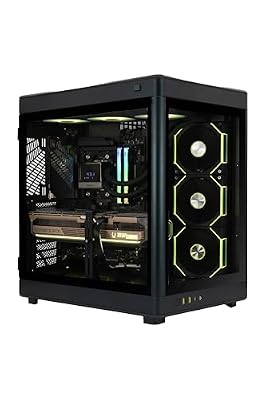
ZOTAC MEK Gaming PC Desktop, NVIDIA GeForce RTX 5090 32GB GDDR7, AMD Ryzen 7 9800X3D Up to 5.2GHz, 32GB DDR5, 2TB NVMe SSD, 1200W 80+ Gold PSU, WiFi 7, Windows 11 Pro
Included for 'RTX 5080 vs RTX 5090 in 2026: A Builder's Guide' because the listing specifies NVIDIA GeForce RTX 5090 32GB GDDR7 and AMD Ryzen 7 9800X3D Up to 5.2GHz, details this guide uses to compare options.
View on AmazonRound 6 — VRAM and the long view
16 GB vs 32 GB across a 4-5 year horizon
The 5080’s 16 GB of GDDR7 is, today, comfortable for the vast majority of 4K gaming. Specific edge cases — modded titles, ultra texture packs, certain UE5 photogrammetry scenes — can pressure 16 GB at maxed settings, but they stay edge cases. For unmodded 2026 AAA gaming with DLSS on, 16 GB is plenty.
The forward-looking question is how that holds across 4-5 years of ownership. Frame generation buffers, ray reconstruction caches, and the ever-heavier texture streaming of UE5/UE6-era titles will chip at the 16 GB margin. By 2028-2029 we expect the 5080 to feel more pinched at 4K ultra than it does now; the 5090’s 32 GB simply won’t have to worry about it within any reasonable ownership window.
For builders who keep a card the full 4-5 years and don’t enjoy the upgrade-every-two-years treadmill, that VRAM cushion is a genuine consideration. For builders who upgrade more often, it matters far less.
Winner: RTX 5090 — narrowly for gaming, decisively for AI.
The shadow of the next generation
Builders should keep a calibrated view of what 16 GB will mean as the next generation looms. NVIDIA’s typical cadence puts a 60-series launch roughly two years out from a 50-series flagship release, which means anyone buying a 5080 now is buying into a card that will face direct competition from a presumably 24-32 GB midrange part within 24 months. That’s not necessarily a reason to wait — waiting is the easiest way to never buy anything — but it is a reason to right-size your expectations about how long the 5080 will feel current. If 4 years is your target ownership window, plan for one mid-cycle settings tweak; if 2-3 years is fine, the 5080 will feel great the whole time.
Round 7 — Upgrade path and flexibility
How easy is it to swap later?
This is the round most builders never think about until they’re already locked in. The 5080 is a flexible card: it fits almost any modern ATX or even some compact ITX builds, runs on a wide range of PSUs, and slots into an upgrade rhythm where you might swap to a 6070 Ti or 6080 in a couple of years without re-engineering the rest of the rig.
The 5090 locks you in. Once you’ve engineered a build to feed and cool a 575 W card — bigger PSU, full-tower chassis, premium cooling, the works — you’ve made decisions you can’t easily undo. The next time you upgrade, you’re either keeping all that infrastructure (great, more headroom for an even hungrier 6090) or downsizing to a sensibly-powered card and ending up with an overspec’d PSU and chassis you paid premium for.
Build flexibility carries value. A 5080-class build stays endlessly remixable. A 5090-class build is locked to the top tier more or less permanently.
Winner: RTX 5080 — meaningful builder advantage.

Skytech Gaming Legacy 4 Gaming PC, Ryzen 9 9950X3D, RTX 5090
Included for 'RTX 5080 vs RTX 5090 in 2026: A Builder's Guide' because the listing specifies Ryzen 9 9950X3D and RTX 5090, details this guide uses to compare options.
View on AmazonRound 8 — Ecosystem, drivers, and partner cards
The wash round
Both cards run the same NVIDIA driver stack, the same CUDA toolchain, the same NVENC encoder, the same DLSS 4 feature set. Partner-card variety exists for both with similar coverage from Asus, MSI, Gigabyte, Zotac, PNY, and others, though the 5090 lineup naturally skews toward premium triple-slot designs with beefier VRMs.
Builder note: the 5090’s huge heat output makes partner-card quality matter more on that SKU. Poorly cooled 5090s can thermal-throttle under sustained loads in ways no 5080 we’ve tested does. Stick with reputable AIB partners that have proven thermal designs.
Winner: Draw — pick the brand whose RMA process you trust.
Cable, connector, and motherboard considerations
One last builder note that trips people up: both cards use the 12V-2×6 connector (the revised version of the original 12VHPWR), so make sure your PSU either ships a native 12V-2×6 cable or you fit the included GPU adapter properly. Improper seating has been documented as a fire/melt risk on the higher-current 5090 in particular; on the 5080’s lower draw it’s far less of a worry, though still worth doing right. Also confirm your motherboard has clearance for the GPU’s physical length and weight — both cards are heavy, and the 5090 especially benefits from a GPU support bracket to head off PCIe slot sag over time. Most quality AIB partners pack one in the box.
Builder profiles — who picks what
You should pick the RTX 5080 if
- You’re upgrading into an existing build with a quality 750-850 W PSU and a sensible chassis.
- You’re building a 4K 144Hz or 1440p high-refresh rig and DLSS 4 covers your performance needs.
- You want flexibility to swap GPUs again in 2-3 years without overspec’d PSU/chassis baggage.
- Your AI work fits in 16 GB or you don’t do serious local AI work.
- You want budget left over for the rest of the build — a better monitor, faster CPU, premium peripherals.
- You don’t enjoy thermal engineering as a hobby.
You should pick the RTX 5090 if
- You’re building from scratch with an unconstrained budget and you’ve already sized the PSU and chassis for a flagship.
- You pair the card with a 4K 240Hz OLED panel and want native, non-DLSS performance to match.
- Serious local AI work (SDXL pipelines, LLMs, ComfyUI, fine-tuning) is a regular weekly workload.
- You render in Blender, Octane, or DaVinci Resolve professionally enough that 40-50% faster renders translate into real saved time.
- You hold cards for 4-5 years and want the longest possible relevance window.
- You categorically don’t care that the price-per-frame math looks rough — you want the best, full stop.
If you’re still finalizing the rest of the build, our buyer’s guides for gaming CPUs, gaming keyboards, gaming mice, gaming RAM, and streaming microphones all cover what currently pairs well with either GPU tier. If you’re weighing DIY vs prebuilt entirely, our $2,000 prebuilt vs DIY breakdown is worth a read before you commit.
Builder FAQ
Will my existing 850 W PSU run a 5090?
Probably not without instability under load. NVIDIA recommends 1000 W minimum and we’d second that — the 5090’s transient spikes can briefly top 700 W, which alongside a 250 W high-end CPU pushes an 850 W unit past its comfortable headroom. Budget for a 1000-1200 W ATX 3.1 PSU with native 12V-2×6 connectors before you commit to the 5090.
What size chassis do I need for each card?
The 5080 fits comfortably in any quality mid-tower (Lian Li Lancool 216, Fractal North, NZXT H7 Flow, Corsair 4000D Airflow, that class) with no airflow concerns. The 5090 strongly prefers a full-tower or a high-airflow mid-tower with a mesh front and at least two 140mm intake fans. In a compact case, the 5090’s heat output and physical size turn the build into a thermal engineering project.
If I’m building for AI work, how much faster is the 5090 really?
Roughly 35-50% faster on iterations-per-second for Stable Diffusion XL, roughly 40-50% faster on Blender render benchmarks, and effectively infinitely faster for LLMs over 16 GB (since the 5080 has to offload to system RAM at huge speed penalties or quantize the model harder). For serious AI work the 32 GB ceiling outweighs the raw speed delta.
Should I wait for refresh variants?
If you can hold off 6-9 months, refresh variants are historically plausible and often nudge pricing down on the original SKUs. If you need a card now to finish a build, build with what’s on shelves. The “wait for the next thing” trap ends in never buying anything; settle on a price point you can live with and pull the trigger.
Builder’s final verdict
From the builder’s perspective, the RTX 5080 is the right pick for the vast majority of 2026 builds. It’s the card that drops cleanly into a sane PSU and chassis budget, dodges expensive infrastructure upgrades, and delivers excellent 4K gaming with DLSS 4 doing the heavy lifting. It’s the card that leaves money on the table for the rest of the rig — better monitor, faster CPU, premium peripherals — which almost always lifts the overall experience more than a 30-40% raw GPU bump alone.
The 5090 is the right pick only for builders who fit a specific narrow profile: unconstrained budgets, serious AI or creator workloads, premium 4K displays, and a willingness to engineer a build around a 575 W furnace. For that profile, it’s an excellent card and the obvious choice. For everyone else, the 5080 is the smarter build — and “smarter” is the highest compliment a builder can give a part.
That’s our take. Build it sensibly, build it once, and don’t pay for headroom you’ll never touch. If you’re working through the rest of the parts list, our buyer’s guides refresh monthly with current bestsellers and the parts that actually deliver on their spec sheets.
Related Guides
Related Articles
Want to dig deeper into this subject? The hand-picked guides below are worth a look — every one runs the same scoring rubric this review uses.
Frequently Asked Questions
Is the RTX 5090 worth almost double the price of the RTX 5080?
Only for specific users. The RTX 5090 delivers roughly 25-35% more raw performance and carries 32GB of VRAM versus the 5080’s 16GB, but it typically costs nearly twice as much. If you game at 4K with heavy ray tracing, do 3D rendering, or train AI models locally, the extra VRAM justifies the cost. For pure 1440p or 4K gaming, the 5080 offers far better value per frame.
Will an RTX 5080 handle 4K gaming at high frame rates?
Yes, comfortably in most titles. The RTX 5080 pushes 60-100+ FPS at 4K with high settings in current games, and DLSS 4 with Multi Frame Generation pushes many titles well past 120 FPS. Extremely demanding path-traced games may dip below 60 without upscaling, but the 16GB frame buffer is sufficient for nearly all 2026 releases at 4K resolution.
What power supply do I need for each card?
Nvidia recommends a 1000W PSU for the RTX 5090 due to transient spikes that can exceed 575W, and an 850W unit for the RTX 5080. Use an ATX 3.1 supply with a native 12V-2×6 connector to avoid adapter cable issues. Cheaping out on the PSU risks shutdowns under load, so buy quality from a reputable brand.
Do these GPUs fit in a standard mid-tower case?
Check clearance carefully. Both cards are large three-slot designs, with many 5090 models exceeding 350mm in length. Most modern mid-towers accommodate the 5080, but the largest 5090 partner cards demand a full-tower or a case rated for 360mm-plus GPUs. Always verify your case’s stated maximum GPU length against the specific model you plan to buy.
Should I wait for a Super refresh or buy now?
If you need a card today, buy now. Nvidia historically releases Super variants roughly a year into a generation, but timing and specs are never guaranteed. Waiting means missing out on months of gaming performance for an uncertain upgrade. If your current GPU still runs your games acceptably, waiting is reasonable, but do not delay a needed build indefinitely.
Ready to decide? Our #1 pick for 2026 is the PSU requirement.
Live price & availability on Amazon.









