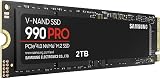
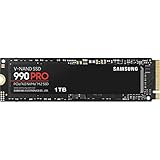
- Top Pick: Samsung SSD 990 PRO 2TB, PCIe 4.0 M.2 2280, Up to 7,450 MB/s
- Best Value: WD_Black SN7100 2TB NVMe SSD – Gen4 PCIe, M.2 2280, Up to 7,250 MB/s Read Speed, Up to 6,900 MB/s Write Speed, Next Gen TLC 3D NAND, for Laptops, Handheld Gaming Devices – WDS200T4X0E
- Premium Choice: Samsung SSD 9100 PRO 2TB, PCIe 5.0×4 M.2 2280, Up to 14,700MB/s
Walk into any PC build discussion in 2026 and the storage question comes up within the first five minutes: M.2 or SATA? The confusion is understandable, because the two names aren’t actually describing the same thing. SATA is an interface — a data connection with a hard ceiling of roughly 550 MB/s. M.2 is a physical slot, and when paired with the NVMe protocol over PCIe lanes, it lifts that ceiling by a factor of twenty or more. Most of the time, when people say “M.2,” they mean an M.2 NVMe drive, and that’s the comparison we’re making here.
That distinction matters more now than it did even two years ago. Modern titles routinely ship at 150–250 GB, texture streaming has become the default rather than the exception, and DirectStorage support has finally moved from tech-demo novelty to something you’ll find in a meaningful slice of AAA releases. Meanwhile, PCIe 5.0 drives have hit the mainstream and Gen4 pricing has dropped hard enough that the old “SATA is the budget pick” logic doesn’t hold up the way it used to. Here’s how the two actually compare, and where each still makes sense.
As an Amazon Associate we earn from qualifying purchases at no extra cost to you.


⚡ Save on Your Next PC — Amazon Prime
Prime members get fast free shipping on the systems above, plus early access to Prime Day & Black Friday PC deals. New members get a 30-day free trial.
Watch: M.2 vs SATA SSD: Which to Choose in 2026? — Video Review
Quick Verdict
For virtually every gaming PC built in the last five years, an M.2 NVMe drive is the correct choice — it’s faster, tidier, and no longer meaningfully more expensive per terabyte. SATA SSDs remain relevant in exactly two scenarios: you’re upgrading an older laptop or desktop with no free M.2 slot, or you need cheap bulk capacity for a game library where load times don’t matter much. If your motherboard has an open M.2 slot, use it.
Key Differences
- Bandwidth: SATA III tops out around 550 MB/s. Gen4 M.2 NVMe drives hit 7,000–7,450 MB/s, and Gen5 models push past 14,000 MB/s — a 13x to 27x difference in raw sequential throughput.
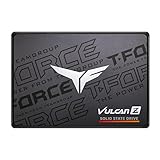
- Form factor: M.2 drives are gumstick-sized boards that screw directly into the motherboard with no cables. SATA SSDs are 2.5-inch bricks needing both a data cable and a power lead from the PSU.
- Real-world load times: The gap is real but smaller than the spec sheet suggests. Expect 20–40% faster level loads versus SATA in most titles, with far bigger gains in DirectStorage-enabled games and open-world texture streaming.
- Price per terabyte: Gen3 and entry-level Gen4 NVMe now sit within a few percent of SATA pricing at 1–2 TB. Gen5 still carries a genuine premium.
- Heat and power: SATA drives run cool and sip power. High-end Gen4 and Gen5 NVMe drives generate real heat and often need a heatsink — a consideration in laptops and small-form-factor builds.
- Slot availability: Motherboards typically offer four to six SATA ports but only two to four M.2 slots, and populating some of them can disable SATA ports or steal GPU lanes. Check your manual.
M.2 NVMe SSDs
This is where the market’s attention has been for years, and the product range reflects that. The Samsung 990 PRO 2TB remains the reference-grade Gen4 pick at up to 7,450 MB/s, with the endurance and controller maturity that make it a safe long-term OS drive. The WD_Black SN7100 2TB is the efficiency play — up to 7,250 MB/s read and 6,900 MB/s write from a DRAM-less design that runs noticeably cooler, which is why it’s a favourite in handhelds and thin laptops. The Crucial P310 2TB and Acer Predator GM7 2TB (7,400 MB/s) cover the value-Gen4 middle ground, both perfectly capable as game libraries or PS5 expansion drives.
At the top, the Samsung 9100 PRO 2TB runs PCIe 5.0 x4 at up to 14,700 MB/s. Be honest about whether you need it: outside of DirectStorage-heavy titles, large-file workflows, and content creation, you will not feel double the Gen4 speed while gaming. At the other end, the Silicon Power 2TB Gen3x4 is the sensible budget entry — around 3,500 MB/s, still six times SATA, and the best value-per-gigabyte option if your board only supports Gen3 anyway.
SATA SSDs
SATA isn’t obsolete, it’s just narrow. A 2.5-inch SATA SSD still delivers the single biggest upgrade any system can receive if it’s replacing a mechanical hard drive — random access times drop from milliseconds to microseconds, and that’s what makes a machine feel responsive. For a 2018-era laptop, an office desktop, or a console-adjacent media box, SATA does the job without fuss.
The practical case for SATA in 2026 is compatibility and cable-driven capacity. If your motherboard’s M.2 slots are already full, adding a 2 TB or 4 TB SATA drive for installed-but-not-currently-playing games costs you nothing in performance you’d actually notice. Older laptops with a single 2.5-inch bay and no M.2 slot have no other option. And SATA drives are trivially easy to move between machines or drop into an external enclosure.
Which Should You Buy?
- For a new gaming PC: Pick a Gen4 M.2 NVMe — the 990 PRO or Predator GM7 at 2 TB hits the sweet spot of speed, capacity, and price.
- For a PS5 or handheld: Pick M.2, prioritising thermals — the SN7100 or a heatsink-equipped Gen4 drive over a hot-running flagship.
- For a tight budget: Pick the Silicon Power Gen3x4 2TB if you have a slot; pick SATA only if you don’t.
- For future-proofing or creator work: Pick the Samsung 9100 PRO and its PCIe 5.0 headroom.
- For reviving an old laptop or adding bulk storage: Pick SATA — it’s cheap, cool, and the performance difference won’t register.
Frequently Asked Questions
Is every M.2 drive faster than SATA?
No. M.2 SATA drives exist — same slot, same 550 MB/s ceiling. Look for “NVMe” and a PCIe generation in the product name. Every drive listed above is NVMe.
Can I use an M.2 and a SATA SSD together?
Yes, and it’s a common setup: NVMe for Windows and current games, SATA for the overflow library. Just check whether your board disables specific SATA ports when an M.2 slot is populated.
Is PCIe 5.0 worth it for gaming in 2026?
Only marginally. Gen5 shines in DirectStorage titles and large-file work, but most games show single-digit percentage gains over Gen4. Spend the difference on capacity or your GPU instead.
Do M.2 SSDs need a heatsink?
Gen4 flagships and all Gen5 drives benefit from one, and most motherboards now include M.2 heatsinks. Gen3 and efficiency-focused Gen4 drives like the SN7100 generally run fine without.
Final Verdict
M.2 NVMe wins on merit, not just on paper — it’s faster, cleaner to install, and price parity with SATA has quietly arrived at the capacities gamers actually buy. Fit a 2 TB Gen4 drive as your primary and you’re set for this console generation; reach for Gen5 only if your workload genuinely demands it. SATA earns its place as the pragmatic second drive or the rescue plan for hardware that can’t take anything else, and there’s no shame in that — but it shouldn’t be the drive your games boot from.