- Top Pick: Honeycomb Alpha Flight Controls Yoke and Switch Panel
- Runner-up: Logitech G PRO Flight Yoke System
- Also consider: Thrustmaster TCA Yoke Pack Boeing Edition
A flight sim yoke changes how a desktop simulator feels. A Cessna, a Bonanza, and a Boeing all fly with a yoke in real life, so a wheel-shaped control matches the aircraft in a way no stick does. The right yoke turns takeoffs and landings into hand movements you learn by feel instead of keys you have to remember.
Choosing one comes down to a short list of decisions: yoke or stick, centering feel, sensors, whether a throttle comes in the box, desk mounting, and simulator and platform compatibility. This guide explains each choice, then covers five real yokes, from a compact budget model to a full Boeing-style system.
As an Amazon Associate, we earn from qualifying purchases.
Quick Answer
Pick a yoke, not a stick, if you mostly fly Cessnas, airliners, or other yoke-equipped aircraft. Look for 180 degrees of roll, a steel shaft, and Hall-effect sensors if you can get them. Make sure a throttle is included or budget for a separate quadrant, check that the yoke works with your simulator and platform, and measure your desk before ordering, since big units are wide and heavy.
Honeycomb Alpha Flight Controls Yoke and Switch Panel

The Honeycomb Alpha is the reference yoke for small-plane flying. It pairs a full-size yoke with a switch panel carrying the master, alternator, avionics, and light switches of a Cessna, plus a five-position ignition key for a cold-and-dark ignition. The steel shaft runs on two linear ball bearings, and the yoke turns through 180 degrees with a damped, self-centering feel.
What the Alpha does not include is a throttle. Power stays on the keyboard until you add a quadrant, so budget for one if you want the full cockpit. It is a PC-only unit, so console simmers need a different pick.
Confirm the exact listing. Honeycomb also sells a newer Alpha XPC, a different product that is not sold on Amazon right now, so match model AER-HONEY. The listing is a yoke and switch panel only, with no throttle quadrant and no rudder pedals.
Specs
- Model: AER-HONEY
- Compatibility: Windows PC
- Yoke rotation: 180 degrees
- Shaft: Solid steel with two linear ball bearings
- Switch panel: Master, alternator, avionics, and light switches; five-position ignition switch
Logitech G PRO Flight Yoke System

The Logitech G PRO Flight Yoke System is the sensible entry point for PC simmers. It is a yoke and throttle quadrant in one box: the yoke carries a POV hat switch, 14 buttons, and a three-position mode switch, and the separate three-lever quadrant covers throttle, prop, and mixture. Across both parts there are 75 programmable controls.
Two desk clamps come in the box, and the cables reach a normal desk setup: 5.9 feet for the yoke and just under 5 feet for the quadrant. The system is PC only, and rudder pedals are not included, so coordinated turns need pedals bought separately.
Check the model number on the listing. Logitech sold this yoke under the Saitek name for years, and an older regional listing under model 945-000004 is a different listing. The current model is 945-000067, and an optional software download is required for listed simulator support.
Specs
- Model: 945-000067
- Compatibility: Windows PC
- Yoke rotation: 180 degrees
- Shaft: Stainless steel
- Controls: 75 programmable controls across three modes; POV hat switch; 14 yoke buttons
- Throttle: Three-lever quadrant included
Thrustmaster TCA Yoke Pack Boeing Edition

The Thrustmaster TCA Yoke Pack Boeing Edition is the most complete yoke system here, and the pick for simmers who fly Boeing jets. The yoke and throttle quadrant are one-to-one scale replicas inspired by the Boeing 787, officially licensed by Boeing and Xbox. The yoke hangs on a pendular mechanism with 21 cm of pitch travel, so the pull from nose-down to nose-up is a long, deliberate movement rather than a twitch.
The throttle quadrant carries autopilot controls for altitude, speed, and heading, plus swappable levers for throttle, speed brake, and flaps. Hall-effect sensors read the axes without rubbing parts, and the spring tension is adjustable. Across both parts there are 35 programmable inputs.
This is a big, heavy unit. Thrustmaster lists the yoke at 6.7 kg and 38 cm tall, so it needs a solid desk edge that will not flex when you haul the nose up. There is no trim wheel, so taking pressure off the yoke in a climb means holding a trim button, and rudder controls are not built in at all, so pedals are a separate purchase.
Specs
- Model: 4460210
- Compatibility: PC, Xbox Series X|S, Xbox One
- Yoke rotation: 180 degrees
- Pitch travel: 21 cm on a pendular mechanism
- Sensors: Hall effect
- Throttle: Quadrant included, with autopilot panel and swappable levers
- Controls: 35 programmable inputs across both parts
Turtle Beach VelocityOne Flight Universal Control System
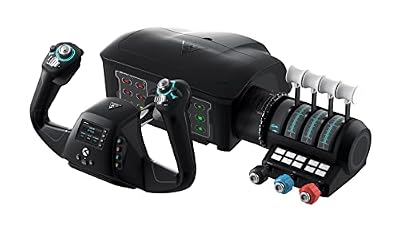
The Turtle Beach VelocityOne Flight is the all-in-one pick: yoke, modular throttle quadrant, trim wheel, and rudder controls in a single unit. The yoke handle turns through 180 degrees on a non-contact Hall-effect sensor, the quadrant carries two throttle levers and eight custom lever handles, and a color display sits on the panel for configuring profiles. It works on PC and Xbox, for simmers who fly on both.
One box doing everything has a cost in size. The unit is about 50 cm wide, so measure your desk before ordering, and the throttle levers are fixed into the unit rather than a separate quadrant you can slide where you like. Some owner reports mention a sticky feeling right around center when the unit is new, so check the return terms.
Note the sourcing here: the code below comes from the Canadian product information page and the manual listing rather than an explicit United States product information excerpt, so confirm the exact listing and a live offer. The system is not compatible with Xbox Cloud Gaming, and the rudder pedals are a separate purchase.
Specs
- Model: TBS-0715-02
- Compatibility: Xbox Series X|S, Xbox One, Windows 10 and 11 PCs
- Yoke rotation: 180 degrees
- Sensors: Non-contact Hall effect on the yoke; magnetic on the throttle
- Axes: 12 analog axes
- Throttle: Modular quadrant with trim wheel and custom lever handles
- Controls: Two POV switches, two four-way hat switches, 18 assignable throttle buttons
Honeycomb Alpha LITE Flight Controls

The Honeycomb Alpha LITE is the budget way into a proper yoke. It keeps the core of the full Alpha: 180 degrees of rotation, a self-centering mechanism, and a steel shaft, in a smaller unit for new pilots. The controls cover the essentials, with a POV switch, rocker switches, and programmable buttons on the grips, and it works with Microsoft Flight Simulator 2020 and 2024 on PC.
What the LITE gives up is everything around the yoke. There is no switch panel, no ignition key, and no throttle in the box, so power and engine ignition stay on the keyboard until you add hardware. The centering is spring-based rather than damped, so the feel is snappier than the full Alpha. For a first yoke on a tight budget, that is a fair trade.
This is the weakest sourcing in the guide. The code below comes from an Amazon product page link only, with no explicit product information excerpt seen, so confirm the exact listing and a live offer. Do not confuse it with the full Alpha, a different product with its own listing.
Specs
- Model: Alpha LITE
- Compatibility: Windows PC; Microsoft Flight Simulator 2020 and 2024
- Yoke rotation: 180 degrees
- Shaft: Steel
- Centering: Spring, self-centering
How to choose
Begin with the aircraft you fly most. Yokes suit Cessnas, Pipers, Bonanzas, and airliners, while sticks suit fighters, aerobatic aircraft, and helicopters. If your flying is mostly small planes and jets, a yoke is the right shape. If you split time between a Cessna and a fighter jet, a stick serves you better.
Next, decide how much hardware you want in the first box. A yoke-only unit costs less up front but leaves throttle and engine ignition on the keyboard. A yoke with a quadrant in the box costs more and takes more desk space, but it flies complete from day one. Rudder is the third piece: some yokes build it into the grips, most do not, and pedals are always a separate purchase.
Sensors and centering decide how the yoke feels over years of use. Hall-effect sensors read movement with magnets instead of parts that rub, so they stay consistent as the unit ages. Potentiometer sensors work well when new but can develop worn spots. Damped centering settles gently back to center, while spring centering snaps back harder, and damped centering suits small pitch corrections on approach.
Mounting and compatibility come last, and they cause the most returns. Check the desk clamp fit and the depth of your desk, confirm the yoke works with your simulator and your platform, and remember that a PC-only yoke cannot reach a console. Measure the width: larger units can crowd a keyboard off.
Who should skip
Skip a yoke if you mostly fly fighters, helicopters, or aerobatic aircraft, since those fly with a stick and a yoke will feel wrong in your hands. Skip one too if your desk is shallow or shared, because the larger yokes need a solid edge and real width, and a wobbling mount ruins it.
Skip the premium systems if you are not sure flight simulation is a lasting hobby. A budget yoke teaches the same pitch and roll for far less money, and you can move up once you know your aircraft. Finally, skip any yoke that does not list your simulator or platform as compatible.
Frequently Asked Questions
Is a yoke better than a stick for flight simulators?
It depends on the aircraft. A yoke matches Cessnas, airliners, and other yoke-equipped aircraft, while a stick matches fighters and helicopters. Pick the control that matches what you fly.
Do I need rudder pedals with a yoke?
Most yokes have no rudder control built in, so pedals are the usual answer for coordinated turns, crosswind landings, and taxiing straight. A few yokes build rudder controls into the grips, which works as a first step, but pedals give finer control once you fly regularly.
What is the difference between Hall-effect and potentiometer sensors?
Hall-effect sensors read the yoke position with magnets, so nothing rubs and the reading stays steady over time. Potentiometer sensors use a wiper on a track, which works well when new but can wear and develop dead spots after heavy use. Hall-effect sensors are the safer long-term choice.
Can I use a PC yoke on Xbox or PlayStation?
Only if the yoke lists that console as compatible. Some yokes work on PC and Xbox, one works on PC and PlayStation 5, and several are PC only. Check the compatibility line on the listing for your exact console.
Final verdict
For most PC simmers, the Honeycomb Alpha is the yoke to aim for, with the Logitech G PRO Flight Yoke System as the first purchase and the Alpha LITE as the budget way in. Boeing pilots should look at the Thrustmaster TCA Yoke Pack first, and simmers who fly on both PC and Xbox should look at the Turtle Beach VelocityOne Flight. Confirm the exact model on the listing and measure your desk before the yoke arrives.