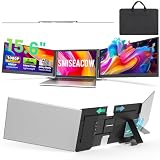
- Top Pick: 15.6" Laptop Screen Extender, 1080P FHD Triple Portable Monitor for Laptops, Ultra-Slim Travel Dual Monitor Fit for 12"-17.3" Laptops, USB-C Plug&Play Extended Screen Compatible with Win/Mac/Android
- Best Value: KEFEYA Laptop Screen Extender, 14" FHD 1080P IPS Laptop Monitor Extender Dual Screen, Portable Monitor for Laptops 13-17" with USB-C/HDMI Port, Plug n Play for Windows/Mac/Android/Switch/PS5
- Premium Choice: Laptop Screen Extender, 15.6'' 1080P FHD Laptop Monitor Extender with 235°Rotation Detachable Dual Monitor, Plug & Play, Triple Screen for 13"-17.3" Laptops Compatible with Mac/Wins/Android/Dex
Running a single laptop panel while juggling spreadsheets, chat windows, and a browser feels like squinting through a keyhole. A double monitor laptop setup, built around a clip-on screen extender rather than a bulky desktop display, hands you that second (or third) canvas without tethering you to a desk. These accessories snap onto your existing lid, draw power over USB-C, and fold away when you pack up.
I’ve spent years hauling portable displays through airports and coffee shops, and the current crop of extenders is genuinely usable for real work. Below I break down the standouts, then walk through how to pick the right one for your laptop size, ports, and workflow.
As an Amazon Associate we earn from qualifying purchases at no extra cost to you. Product prices and availability are accurate as of the date shown and are subject to change.







🎮 Get More From Your Setup — Free
Prime Gaming gives you free PC games every month, in-game loot, and a free Twitch channel sub — plus fast free shipping on all the gear above. New members get a 30-day free trial.
Watch: Double Monitor Laptop: Review & Buyer’s Guide — Video Review
How to Choose a Laptop Screen Extender
- Panel size and count: Match the extender to your laptop’s screen. A 15.6″ laptop pairs cleanly with 15.6″ wings; triple-screen kits add a third small panel that’s great for chat or monitoring but cramped for documents.
- Connection type: True plug-and-play USB-C (DisplayPort Alt Mode) is the least hassle. Some units need HDMI plus USB for power, and a few require a driver install on Windows or Mac.
- Weight and thickness: Anything under roughly 4 lbs and half an inch thick travels well. Heavier kits can overbalance a thin laptop when the wings are extended.
- Panel quality: Look for 1080p FHD IPS. Cheaper TN panels wash out at an angle, which defeats the purpose of side-mounted screens.
- Rotation and articulation: Screens that rotate 180–235° let you flip a display toward a colleague or into portrait for coding and long documents.
The Best Laptop Screen Extenders Reviewed
15.6″ Triple Portable Monitor (USB-C Plug & Play)
This ultra-slim triple setup fits 12″–17.3″ laptops and leans on straightforward USB-C connectivity. The 1080p FHD panels are bright enough for indoor work, and the travel-focused frame keeps things light. It’s a solid generalist pick if you want two extra screens without fiddling with drivers.
KEFEYA 14″ FHD Dual Screen Extender
The KEFEYA targets 13″–17″ laptops with a dual 14″ IPS layout and offers both USB-C and HDMI ports. That flexibility matters if your laptop’s USB-C doesn’t support video out. Console compatibility with Switch and PS5 is a nice bonus for after-hours use.
SMISEACOW Triple 15.6″ Extender
At just 0.18″ thick and 3.9 lbs, the SMISEACOW is one of the sleeker triple kits. The IPS panels hold color well off-axis, and plug-and-play setup keeps things simple across Windows, Mac, and Android. A dependable choice for multitaskers who move around.
VueForge 15.6″ Triple Monitor
VueForge uses a two-cable USB-C/HDMI approach and skews toward travelers who want an ultra-slim profile. It fits 13″–17.3″ laptops and covers the major operating systems. Setup is a touch more involved than single-cable rivals, but the build feels sturdy.
APILDELLA 14″ Dual Extender with Speaker
The APILDELLA stands out by baking in a speaker, handy for video calls on 13″–16″ laptops. It’s a plug-and-play dual panel that works across Mac, Windows, and Chrome. If audio-out matters and you don’t need a third screen, this is a thoughtful option.
Frequently Asked Questions
Do these extenders work with MacBooks?
Most do, but macOS handles external displays differently and some units need the manufacturer’s driver to enable the panels. Check that the model explicitly lists Mac support before buying.
Will one USB-C cable power the screens and send video?
Only if your laptop’s USB-C port supports DisplayPort Alt Mode with enough power delivery. Thin ultrabooks sometimes fall short, which is why dual-cable and HDMI-plus-USB models exist.
Are triple-screen kits too heavy for a thin laptop?
Extended, they shift the center of gravity backward. Most kits ship with a kickstand or counterweight, but on a very light laptop you may want to prop the base.
Can I use them in portrait mode?
Yes, if the model supports rotation. Panels that swivel 180° or more let you flip into portrait for coding, reading, or reviewing long documents.
Final Thoughts
For most people, the SMISEACOW Triple 15.6″ hits the best balance of slimness, color quality, and painless setup, while the KEFEYA 14″ is the smarter buy if you need HDMI flexibility or console support. Travelers chasing the lightest possible dual-screen rig should give the APILDELLA a close look for its built-in speaker.