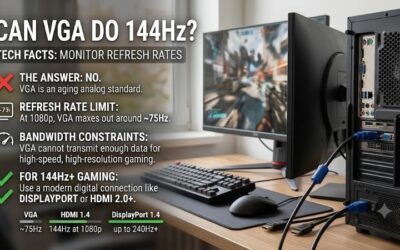
If you’re wondering can vga do 144hz, the practical answer is that you should not rely on a VGA connection for 144Hz gaming. Although analog VGA does not have one universal, fixed refresh rate limit, most modern 144Hz monitors restrict their VGA inputs to 60Hz or 75Hz, even when their HDMI or DisplayPort inputs support 144Hz. Before buying a new cable or adapter, you need to understand how VGA works, check the supported refresh rates of your exact monitor, and determine whether a digital connection would be a better solution.
- Can VGA do 144Hz at 1080p?
- Why VGA struggles with modern 144Hz gaming
- VGA vs HDMI vs DisplayPort for 144Hz gaming
- How to check whether your VGA monitor supports 144Hz
- Can a VGA to HDMI adapter enable 144Hz?
- What to do if your computer only has a VGA port
- Common mistakes when trying to get 144Hz over VGA
- Frequently asked questions about VGA and 144Hz
- Conclusion
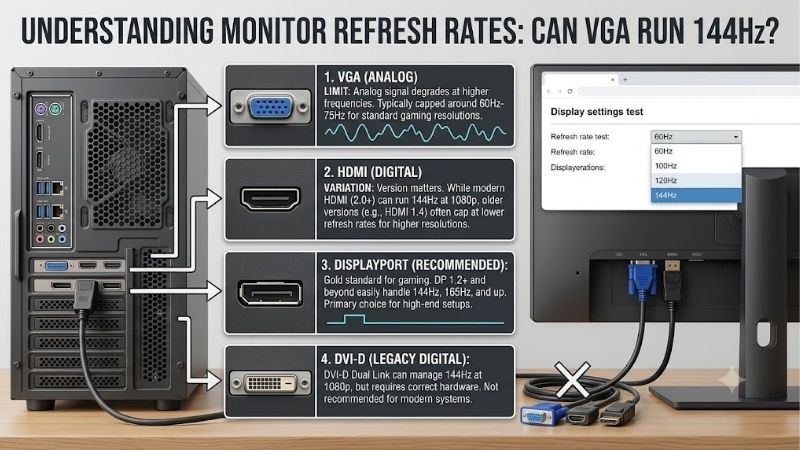
Can VGA do 144Hz at 1080p?
For most modern monitors, no. A VGA connection generally cannot deliver 1920 × 1080 at 144Hz as an officially supported display mode.
The important distinction is between theoretical analog signal capability and the operating modes manufacturers actually support.
Unlike HDMI and DisplayPort, traditional VGA does not have a single standardized digital data-rate ceiling that determines every possible resolution and refresh rate combination. Its usable performance depends on the signal generator, analog bandwidth, cable quality, receiver electronics, and display timing.
That does not mean an ordinary VGA port can reliably produce 144Hz.
Modern monitor manufacturers commonly specify substantially lower limits for VGA than for their digital inputs.
For example, ASRock lists the following supported vertical frequency ranges for its CL25FFB gaming monitor:
-
VGA: 48–75Hz
-
HDMI: 48–144Hz
ViewSonic similarly specifies 1920 × 1080 at 75Hz through VGA on its VA2450-HD monitor, while HDMI and DisplayPort can reach 144Hz through the monitor’s supported overclocking mode.
These manufacturer specifications demonstrate why a monitor advertised as 144Hz may still be limited to 75Hz when connected through VGA.
Can VGA do 144Hz at lower resolutions?
Lowering the resolution reduces the amount of image information transmitted per frame and may make higher analog refresh rates technically possible on certain equipment.
Historically, some CRT monitors and specialized analog video systems supported high refresh rates at reduced resolutions.
However, these examples do not establish compatibility with modern LCD gaming monitors.
A contemporary display may reject a 144Hz VGA signal even if the analog source can generate one. Its VGA input processing circuitry and supported timing table ultimately determine whether the signal is accepted.
Therefore, lowering the resolution to 1280 × 720 or 1024 × 768 does not guarantee that a modern VGA monitor will operate at 144Hz.
Why 144Hz support depends on the monitor input
A monitor’s advertised maximum refresh rate describes its supported operation under particular conditions, not necessarily through every connector.
Manufacturers may assign different refresh rate limits to VGA, HDMI, DisplayPort, and DVI inputs.
For instance, a monitor may support:
| Monitor input | Example supported maximum | Important consideration |
|---|---|---|
| VGA | 75Hz | Analog input limitation |
| HDMI | 144Hz | Depends on model and HDMI implementation |
| DisplayPort | 144Hz or higher | Depends on display and GPU capabilities |
| Dual-link DVI-D | 144Hz at 1080p on compatible older monitors | Requires compatible ports and cable |
These values illustrate real-world compatibility patterns rather than universal limits for each connection standard.
The monitor manual remains the deciding reference.
Why VGA struggles with modern 144Hz gaming
VGA was developed for analog video transmission, long before today’s high-resolution gaming displays became commonplace.
Understanding its limitations helps explain why manufacturers generally favor digital display connections for high refresh rates.
VGA transmits analog video signals
A traditional VGA connector carries separate analog red, green, and blue video signals along with synchronization signals.
The source graphics hardware generates an analog waveform, which the display processes to reconstruct the image.
Unlike a native digital display connection, the signal is susceptible to degradation from electrical interference, impedance mismatches, and signal loss.
The quality of the displayed image depends partly on how accurately the analog waveform reaches the monitor.
At higher resolutions and refresh rates, the required signal transitions become more demanding.
This can make poor cables, long cable runs, or limited receiver electronics more noticeable.
Higher refresh rates require higher pixel clocks
A video signal must deliver enough information to describe each frame at the requested resolution and refresh rate.
Consider two 1920 × 1080 configurations:
| Display mode | Active pixels per second |
|---|---|
| 1080p at 60Hz | Approximately 124.4 million |
| 1080p at 75Hz | Approximately 155.5 million |
| 1080p at 144Hz | Approximately 298.6 million |
These figures represent active image pixels only. Actual pixel clock requirements also account for horizontal and vertical blanking intervals.
Different timing standards may use different blanking overhead.
Therefore, the figures should not be interpreted as exact VGA bandwidth requirements or as proof that a particular analog connection can support a specific mode.
Nevertheless, they illustrate the increased signal demands associated with 144Hz operation.
Analog bandwidth is not the only limitation
Even if a graphics output can produce a sufficiently fast analog signal, the monitor must still accept and correctly process it.
Modern LCD displays contain digital processing systems that interpret incoming signals before presenting images on the panel.
A monitor’s VGA input may have a lower supported timing range than the LCD panel itself.
The manufacturer may restrict the analog input to preserve image quality, ensure stable operation, or accommodate the capabilities of its input hardware.
Consequently, buying a higher-quality VGA cable cannot bypass a monitor’s documented input limitations.
VGA vs HDMI vs DisplayPort for 144Hz gaming
For a modern 144Hz gaming monitor, a compatible digital connection is generally the more reliable choice.
HDMI and DisplayPort provide digitally defined video transmission and support various high-refresh modes, depending on their implementations.
Older dual-link DVI-D connections can also be suitable for certain 1080p 144Hz monitors.
VGA vs HDMI for 144Hz
HDMI is commonly supported by gaming monitors, graphics cards, laptops, and other consumer devices.
Certain HDMI 1.4 configurations can support 1080p at 144Hz, although actual compatibility depends on the specific hardware and display timings.
HDMI 2.0 offers additional transmission bandwidth and is commonly used for 1440p 144Hz configurations where both devices support the required mode.
HDMI 2.1 can accommodate more demanding resolutions and refresh rates when the source, display, cable, and supported features are compatible.
The HDMI version number alone is not sufficient evidence that every refresh rate will work.
Compared with VGA, HDMI also avoids analog image conversion when both devices use native HDMI connections.
VGA vs DisplayPort for 144Hz
DisplayPort is widely used on desktop gaming graphics cards and higher-refresh monitors.
DisplayPort 1.2 can support many 1080p and 1440p 144Hz configurations, provided that the monitor and graphics hardware expose compatible operating modes.
More demanding combinations may require newer DisplayPort capabilities or Display Stream Compression.
DisplayPort also commonly supports variable refresh rate functionality through compatible implementations.
For a gaming desktop, a direct DisplayPort connection is often the most straightforward solution when both the graphics card and monitor provide suitable ports.
However, DisplayPort is not automatically superior in every configuration. A properly supported HDMI connection can deliver the same 144Hz refresh rate.
Does dual-link DVI support 144Hz?
Yes. Dual-link DVI-D can support 1920 × 1080 at 144Hz on compatible hardware.
This is particularly relevant to older gaming monitors that were designed before high-refresh HDMI became common.
BenQ ZOWIE documents that its XL2411P supports 144Hz through DisplayPort and dual-link DVI-D.
That does not imply that every DVI connector supports 144Hz.
Single-link and dual-link DVI have different transmission capabilities, and both the graphics output and monitor input must support the required mode.
A cable labeled DVI is not enough to establish compatibility without checking the actual connection type.
How to check whether your VGA monitor supports 144Hz
Before replacing your existing VGA cable, verify whether your monitor officially supports the target refresh rate through its analog input.
This can prevent unnecessary purchases and avoid attempts to force unsupported display settings.
Find your exact monitor model
Look for the manufacturer label on the rear of the monitor or inspect the model information in its on-screen display.
Record the full model designation, including any suffix identifying a particular regional or hardware variant.
Next, locate the manufacturer’s official product specification or user manual.
Look for headings such as:
-
Input signal
-
Supported timings
-
Preset display modes
-
Horizontal scanning frequency
-
Vertical refresh frequency
-
Resolution and refresh rate support
Pay attention to whether the specifications distinguish between analog and digital inputs.
A general specification stating 144Hz may describe only the HDMI or DisplayPort capability.
Check supported timings for each connector
The input-specific timing table is more useful than the monitor’s marketing headline.
For example, ViewSonic’s VA2450-HD specifications explicitly identify VGA operation at 1920 × 1080 at 75Hz and HDMI/DisplayPort overclocked operation at 1920 × 1080 at 144Hz.
This distinction establishes that the monitor’s maximum advertised refresh rate does not apply universally to VGA.
If your monitor manual lists VGA support only through 75Hz, attempting to select 144Hz is outside the documented operating configuration.
If no input-specific specifications are available, contact the manufacturer rather than assuming compatibility.
Inspect Windows refresh rate options
Windows can help identify the modes made available by the active connection.
In Windows 11:
-
Right-click the desktop and choose Display settings.
-
Select System, then Display if necessary.
-
Open Advanced display.
-
Select the connected monitor.
-
Inspect the available choices under Choose a refresh rate.
Windows 10 provides similar controls through Advanced display settings and Display adapter properties.
If 144Hz does not appear, possible explanations include unsupported hardware, incomplete monitor identification, graphics driver problems, or limitations imposed by an adapter.
Do not interpret a missing refresh rate option as proof that the VGA cable alone is defective.
Can a VGA to HDMI adapter enable 144Hz?
A VGA-to-HDMI adapter does not automatically upgrade a VGA video signal into a genuine 144Hz-capable connection.
Adapters differ substantially in purpose, direction, circuitry, and supported output modes.
The original signal format and the adapter’s documented capabilities matter.
Understand conversion direction
HDMI-to-VGA and VGA-to-HDMI adapters perform different tasks.
An HDMI-to-VGA converter accepts digital HDMI video and produces analog VGA output.
A VGA-to-HDMI converter accepts analog VGA video and produces a digital HDMI signal.
These conversions generally require active electronics because VGA and HDMI use fundamentally different signaling methods.
Adapters may also have limits on the resolutions and refresh rates they can accept or produce.
A converter advertising 1080p compatibility should not be assumed to support 1080p at 144Hz.
Why an adapter cannot remove the VGA limitation
Suppose a computer’s VGA output produces a 1920 × 1080 signal at 60Hz.
A VGA-to-HDMI converter can digitize that signal for an HDMI monitor if the device supports the selected format.
However, conversion does not inherently create 144 unique source frames every second.
Even a hypothetical converter capable of outputting a 144Hz signal from a 60Hz input would need to repeat or synthesize frames. That would not provide the same experience as rendering and transmitting 144 distinct frames per second.
If your primary goal is genuine 144Hz gaming, use an appropriate native digital graphics output whenever possible.
Can HDMI to VGA achieve 144Hz?
An HDMI-to-VGA converter may support certain high-refresh analog output modes if its specifications explicitly allow them.
However, the VGA input on the receiving monitor must also support those modes.
The adapter cannot bypass a 75Hz VGA input limitation documented by the monitor manufacturer.
For typical consumer systems, choosing a direct HDMI or DisplayPort connection is more practical than searching for a specialized high-refresh VGA converter.
What to do if your computer only has a VGA port
Some older desktops and office computers provide VGA but lack modern digital video outputs.
Your available options depend on the computer’s hardware, expansion capabilities, and intended use.
Check for other video outputs
Inspect the computer’s rear or side panels for HDMI, DisplayPort, USB-C video output, or DVI.
A second connector may already provide the digital display capability needed for 144Hz.
On desktop systems with a dedicated graphics card, check the ports on the graphics card itself.
An HDMI or DisplayPort connector on the discrete GPU may be preferable to the motherboard’s VGA output.
On laptops, confirm whether USB-C supports video output before purchasing a USB-C-to-DisplayPort cable.
Not every USB-C port carries video.
Consider a compatible graphics card upgrade
If your desktop genuinely offers only VGA, installing a graphics card with suitable digital outputs may be an option.
Before buying a graphics card, verify:
-
Available motherboard expansion slots
-
Case clearance and card dimensions
-
Power supply capacity and connectors
-
Operating system and driver compatibility
-
Monitor input requirements
A graphics card upgrade may enable a digital 144Hz display connection, but it does not guarantee 144 FPS in modern games.
Actual gaming performance depends on the GPU, CPU, resolution, graphics settings, and individual game.
For older desktops, the cost and compatibility implications of a GPU upgrade should be evaluated against the value of replacing the system.
When keeping VGA makes sense
VGA remains useful for older monitors, classroom projectors, industrial displays, and basic office computers.
If your display operates reliably at 60Hz or 75Hz and your applications do not benefit substantially from higher refresh rates, replacement may be unnecessary.
A digital graphics upgrade is most justified when it solves an actual requirement, such as connecting a 144Hz gaming monitor through a supported input.
Common mistakes when trying to get 144Hz over VGA
Several troubleshooting approaches appear promising but fail to address the underlying compatibility issue.
Buying a premium VGA cable
A better-shielded cable may reduce interference or image degradation in an otherwise supported analog connection.
However, cable construction cannot change a monitor’s supported refresh rate modes.
If the VGA input is documented for 75Hz maximum operation, an expensive cable will not establish official 144Hz compatibility.
Forcing 144Hz with custom resolutions
Some graphics utilities let users create custom resolutions and refresh rates.
This can be useful for specialized display configurations, but forcing an unsupported analog mode may produce a blank screen, unstable synchronization, or visible image problems.
It may also cause frame skipping or other behavior that prevents the monitor from presenting the intended number of distinct updates.
Use only manufacturer-supported configurations unless you have a specific, technically justified reason to experiment.
Do not treat successful signal detection as proof that a display is operating correctly at an unsupported refresh rate.
Confusing FPS with monitor refresh rate
A game reporting 144 FPS does not prove the monitor is refreshing at 144Hz.
Frames per second describes how frequently the graphics system renders images.
Hertz describes how frequently the display updates its presented image.
A game may render 144 FPS while the display operates at 60Hz.
The extra rendered frames do not change the monitor’s physical refresh rate, although rendering behavior and latency can still vary depending on synchronization settings.
To verify refresh rate, inspect Windows Advanced display settings and the monitor’s signal information.
Assuming every 144Hz monitor supports every port
This is particularly important when comparing older and newer gaming monitors.
Some older models require dual-link DVI or DisplayPort for 144Hz.
Other monitors support 144Hz through HDMI but limit VGA to 75Hz.
The supported connection is model-specific.
Always check the input timing table before purchasing replacement cables, converters, or graphics hardware.
Frequently asked questions about VGA and 144Hz
Can VGA do 144Hz on an old CRT monitor?
Certain CRT displays can support high refresh rates through analog video connections at compatible resolutions and scan frequencies. However, CRT capabilities differ significantly from those of modern LCD gaming monitors. Check the CRT manufacturer’s supported timing specifications before attempting any high-refresh mode.
Can VGA support 120Hz?
Some specialized analog display systems may support 120Hz, particularly at lower resolutions. However, many modern LCD monitors restrict their VGA inputs to 60Hz or 75Hz. Whether 120Hz works depends on the exact source hardware, supported monitor timings, and analog signal quality.
Does VGA support 1080p at 75Hz?
Yes, some monitors officially support 1920 × 1080 at 75Hz through VGA. ViewSonic and ASRock provide examples of monitors with documented VGA operation at 75Hz. Nevertheless, support varies by model and should be verified in the manufacturer’s specifications.
Will a VGA cable reduce gaming FPS?
The cable does not directly determine how many frames your graphics processor renders. However, a VGA connection may limit the refresh rate available to the display. Consequently, a system rendering more than 75 FPS may still be presenting images through a 75Hz monitor signal.
Is HDMI always better than VGA for gaming?
For modern gaming monitors, HDMI is generally preferable because it provides a digital connection and commonly supports higher refresh rate modes. However, its capabilities depend on the specific HDMI implementation. A low-bandwidth HDMI connection cannot automatically deliver every resolution and refresh rate.
Do I need DisplayPort for 144Hz?
Not necessarily. Many monitors support 144Hz through compatible HDMI connections. Some older models also support 1080p 144Hz through dual-link DVI-D. DisplayPort is a convenient option, but the monitor and graphics card specifications determine whether it is required.
Can I make a 75Hz VGA monitor run at 144Hz?
There is no reliable, universally supported method to transform a 75Hz VGA input into a 144Hz input. Custom timing utilities cannot eliminate hardware limitations. If the manufacturer documents 75Hz as the maximum, use that supported mode or select another monitor connection.
Conclusion
VGA is not a practical connection choice for modern 144Hz gaming. While analog video does not have one universal refresh rate ceiling, most modern monitors restrict their VGA inputs to substantially lower frequencies. A monitor marketed as 144Hz may deliver that refresh rate only through HDMI, DisplayPort, or a compatible dual-link DVI connection. Before upgrading anything, check your monitor’s input-specific specifications and your computer’s available video outputs. If both devices support a suitable digital connection, using it directly is typically the simplest and most reliable solution.