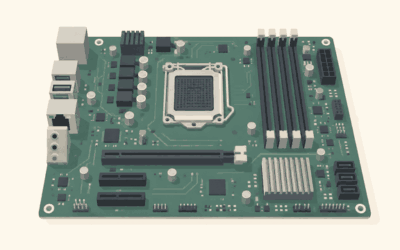
Prebuilt gaming PCs have shaken off their old reputation for overpriced parts and stingy power supplies. Today’s leading builders offer transparent specs, quality cooling, and genuine value, letting you skip the parts-picking and cable-routing entirely. But not every company delivers the same experience, so knowing which brands consistently ship well-balanced machines saves you money and frustration.
- Watch: Best Pre Built Gaming PC Companies — Video Review
- How to Choose a Prebuilt Gaming PC Company
- The Best Prebuilt Gaming PCs Reviewed
- Related Guides
- Best Pre Built Gaming PC Companies by Budget Tier
- Also Consider: More Pre Built Gaming PCs Worth a Look
- How We Chose These Pre Built Gaming PC Companies
- Pre Built Gaming PC Buying Guide: Thresholds That Matter
- Prebuilt vs Building Your Own: Which Costs Less?
- Which Pre Built Gaming PC Company Should You Choose?
- Pre Built Gaming PC Mistakes to Avoid
- Upgrade Path by Pre Built Gaming PC Company
- Setting Up a Pre Built Gaming PC After You Unbox It
- Warranty and Support: What to Check Before You Buy a Pre Built Gaming PC
- More Questions About Pre Built Gaming PC Companies
- Frequently Asked Questions
- Final Thoughts
- Related Articles
- Related Guides
We’ve rounded up standout prebuilt desktops from several respected names, spanning budget starters to flagship towers. Here are our top picks for 2026, plus a guide to choosing a prebuilt gaming PC company you can trust.

Prime
Best Seller
Updated October 2026 — specs and model names below reflect current listings.
Quick answer: the best pre built gaming PC companies in 2026 are iBUYPOWER, Skytech Gaming and CyberPowerPC for value, MSI and Lenovo for balanced mainstream builds, and Alienware, HP OMEN and Corsair for premium design and cooling. For most buyers, an RTX 5070 desktop such as the iBUYPOWER Element, Skytech Shadow 5 or MSI Aegis ZS2 is the best balance.
Three exact models to shortlist first: the iBUYPOWER Element with an Intel Core i7-14700F and RTX 5070, the Skytech Gaming PC Shadow 5 with a Ryzen 7 7700 and RTX 5070, and the MSI Aegis ZS2 with a Ryzen 7 8700F and RTX 5070. All three pair a 12GB RTX 5070 with 32GB of DDR5 and an NVMe SSD, the spec tier that suits high-refresh 1440p play in most current games.
| Company | Known for | Example model in this guide | Watch for |
|---|---|---|---|
| iBUYPOWER | Strong specs for the money, RGB cases | Element (i7-14700F, RTX 5070) | Component choices vary by SKU |
| CyberPowerPC | Wide range, many budget configurations | Gamer Xtreme VR (i5-14400F, RTX 5060 Ti) | Check PSU and RAM on each listing |
| Skytech Gaming | Liquid-cooled value builds | Shadow 5 (Ryzen 7, RTX 5070) | Some SKUs still use DDR4 |
| MSI | Clean builds from a motherboard maker | Aegis ZS2 (Ryzen 7 8700F, RTX 5070) | Air cooling on some models |
| Lenovo Legion | X3D processors in a polished case | Legion Tower 5 (7800X3D, RTX 5070) | Check PSU and board for upgrade headroom |
| Alienware | Distinctive design, Wi-Fi 7 | Aurora ACT1250 (Ultra 7 265F, RTX 5070) | Premium over equal-spec rivals |
| HP OMEN | Quiet, roomy tower | OMEN 45L (Ultra 7 265K, RTX 5070 Ti) | Check storage and RAM on base configs |
| Corsair | Liquid cooling and premium parts | Vengeance a5100 (7800X3D, RTX 5080) | High entry cost |
| ASUS ROG | Good compatibility and support | ROG G700 (Ultra 7 265F, RTX 5060 Ti) | Check which exact SKU you order |
Company reputation matters because a prebuilt is a bundle of parts you did not choose. The sections below sort each company by budget tier and give the spec line you can verify on the listing.
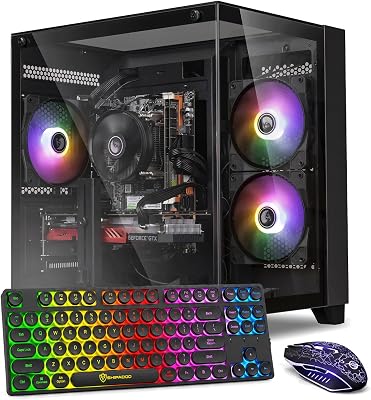
suevery Pre Built Gaming PC | M.2 NVMe 512G SSD | Radeon 4G Graphics Card | DDR4 16G RAM | AMD Ryzen5 6Cores 3.6G Up to 4.1G | Wi-Fi6 White Tower Gamer Desk top Computer

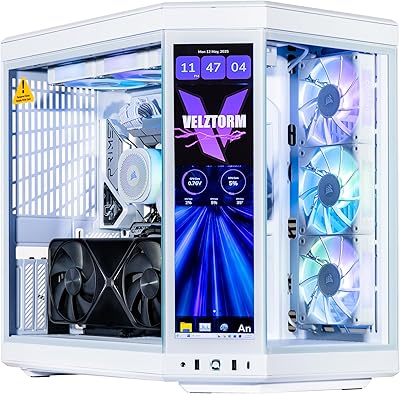


KOTIN Prebuilt Gaming PC RTX 5070 12GB, Ryzen 7 9700X, 32GB DDR5, 1TB SSD | 11.3in Smart Display, 850W 80+ Gold PSU, 360mm Liquid Cooler, WiFi 7, 1440p 4K ARGB Windows 11 Gaming Desktop Computer
Included for '22 Best Pre Built Gaming PC Companies' because the listing specifies Ryzen 7 9700X and 32GB DDR5, details this guide uses to compare options.
View on Amazon
OKAMUS Pre-Built PC, i5 CPU Up to 3.6GHz, Integrated Graphics Only, 256 GB M.2, 8 GB RAM Cheap Budget Gaming PC, RGB Fans x 3, Win 11 Home,WiFi 6 + BT 5.3, 400W PSU (i5+No GPU+8GB+256GB)
Included for '22 Best Pre Built Gaming PC Companies' because the listing specifies i5 CPU Up to 3.6GHz and Integrated Graphics Only, details this guide uses to compare options.
View on Amazon
KOTIN Prebuilt Gaming PC, Ryzen 5 9600X, 16GB DDR5, RTX 5060 8GB, 1TB SSD | Ryzen 5 Gaming Desktop, Digital Display CPU Cooler, 650W 80+ Gold PSU, WiFi 7, Assembled in USA, Windows 11 ARGB Tower
Included for '22 Best Pre Built Gaming PC Companies' because the listing specifies Ryzen 5 9600X and 16GB DDR5, details this guide uses to compare options.
View on Amazon
ZOTAC MEK Gaming PC Desktop, Ryzen 7 9800X3D, NVIDIA GeForce RTX 5080 16GB | 32GB DDR5, 2TB NVMe SSD, 850W 80+ Gold PSU, WiFi 6E, Windows 11 Pro, GDDR7, up to 5.2GHz
Included for '22 Best Pre Built Gaming PC Companies' because the listing specifies Ryzen 7 9800X3D and NVIDIA GeForce RTX 5080 16GB, details this guide uses to compare options.
View on Amazon🎮 Get More From Your Setup — Free
Prime Gaming gives you free PC games every month, in-game loot, and a free Twitch channel sub — plus fast free shipping on all the gear above. New members get a 30-day free trial.
Watch: Best Pre Built Gaming PC Companies — Video Review
How to Choose a Prebuilt Gaming PC Company
- Component quality: Look for name-brand power supplies, adequate cooling, and no bottlenecks between the CPU and GPU.
- Warranty and support: A solid warranty and accessible customer service protect your investment if something fails.
- Value for the specs: Compare the build’s price against the cost of the same components bought separately.
- Upgradeability: Standard parts and a roomy case make future GPU and storage upgrades painless.
- Reputation: Verified buyer reviews reveal real-world reliability and build consistency.
The Best Prebuilt Gaming PCs Reviewed
KOTIN RTX 5070 Prebuilt
KOTIN packs an RTX 5070, Ryzen 7 9700X, DDR5, and a 1TB SSD into a well-cooled tower, our top pick for high-refresh 1440p value.
ZOTAC MEK (RTX 5080)
The ZOTAC MEK steps into flagship territory with an RTX 5080 and Ryzen 7 9800X3D, a premium prebuilt aimed squarely at 4K gaming.
KOTIN Ryzen 5 (RTX 5060 Ti)
This more affordable KOTIN pairs a Ryzen 5 9600X with an RTX 5060 Ti, a smart mid-range choice for smooth 1080p and entry 1440p play.
suevery Pre-Built White Tower
With its clean white aesthetic, the suevery tower offers an approachable, style-forward option for gamers building a bright-themed setup.
OKAMUS Budget PC
For the tightest budgets, the OKAMUS with an i5 CPU and RGB fans handles light gaming and everyday tasks at an entry-level price.
Related Guides
- Best PC Building Tool Kits: Top Picks Reviewed and Compared (2026)
- PC Water Cooling Kit (2026)
- PCIe 4.0 Riser Cable (2026)
- Best Gaming PCs with RGB Lighting in 2026
Best Pre Built Gaming PC Companies by Budget Tier
The picks below add the well-known companies the list above is missing. Each one is a real, current desktop with its key specs on one line. Performance notes are estimates based on the GPU class, not measurements.
Entry tier: RTX 5060-class desktops
- Expect an 8GB graphics card that suits 1080p and tuned 1440p settings.
- Expect 16GB of DDR5 and a 1TB to 2TB PCIe 4.0 SSD.
- Expect Intel 14th-generation CPUs on some models, which sit on a platform with no further upgrade path.
- Expect a budget power supply, so check the wattage before adding a bigger GPU later.
CyberPowerPC Gamer Xtreme VR — Best for first-time buyers on a budget

CyberPowerPC Gamer Xtreme VR Gaming PC, Intel Core i5-14400F 2.5GHz, GeForce RTX 5060 Ti 8GB, 16GB DDR5, 2TB PCIe 4.0 SSD, WiFi Ready & Windows 11 Home (GXiVR8060A34)
Included for '22 Best Pre Built Gaming PC Companies' because the listing specifies Intel Core i5-14400F 2.5GHz and GeForce RTX 5060 Ti 8GB, details this guide uses to compare options.
View on AmazonSpecs: Intel Core i5-14400F · GeForce RTX 5060 Ti 8GB · 16GB DDR5 · 2TB PCIe 4.0 SSD · Windows 11 Home · model GXiVR8060A34
The CyberPowerPC Gamer Xtreme VR gives a first-time buyer a large 2TB SSD, which is rare at this tier. An RTX 5060 Ti 8GB is a solid 1080p card and can run 1440p with settings tuned down in VRAM-heavy games. The i5-14400F is a capable six-performance-core chip for gaming, though it sits on an older socket.
- Pros: big SSD, current-generation GPU, DDR5 memory
- Pros: easy first purchase from a well-known brand
- Pros: GPU suited to 1080p high-refresh play
- Cons: only 8GB of video memory
- Cons: Intel 14th-gen socket has no next-generation CPU upgrade
Skip it if… you plan to play new releases at 1440p ultra settings for years; choose an RTX 5070 desktop.
ASUS ROG G700 — Best for a clean build with a major component maker

ASUS ROG G700 (2025) Gaming Desktop PC, Intel® Core™ Ultra 7 265F Processor, NVIDIA® GeForce RTX™ 5060Ti, 1TB M.2 NVMe™ PCIe® 4 SSD, 32GB DDR5 RAM, Windows 11 Home, G700TF-AS776Ti
Included for '22 Best Pre Built Gaming PC Companies' because the listing specifies Intel® Core™ Ultra 7 265F Processor and NVIDIA® GeForce RTX™ 5060Ti, details this guide uses to compare options.
View on AmazonSpecs: Intel Core Ultra 7 265F · GeForce RTX 5060 Ti · 32GB DDR5 · 1TB M.2 NVMe PCIe 4 SSD · Windows 11 Home · model G700TF-AS776Ti
The ASUS ROG G700 stands out for its 32GB of DDR5 and a current Intel Core Ultra platform. That platform uses a newer socket than 14th-generation chips, so a CPU upgrade stays possible. The 5060 Ti keeps it in the entry-to-mid class, and the ASUS name brings a recognized support network.
- Pros: 32GB of DDR5, newer Intel platform
- Pros: ROG-branded system from a major component maker
- Pros: Windows 11 Home and 1TB PCIe 4.0 storage
- Cons: not the lowest cost per frame
- Cons: the 5060 Ti is not an RTX 5070
Skip it if… you want the lowest cost per frame; independent brands deliver more GPU for the money.
Mid tier: RTX 5070 desktops
- Expect a 12GB RTX 5070 aimed at high-refresh 1440p play.
- Expect 32GB of RAM and a 1TB NVMe SSD on most models.
- Expect a 750W-class power supply, which matches NVIDIA’s recommended system power for this card.
- Expect big differences in CPU choice, from Intel 14th-gen to Ryzen X3D chips.
iBUYPOWER Element — Best overall value for 1440p

iBUYPOWER Element Gaming PC Desktop Computer Intel Core i7 14700F CPU, NVIDIA GeForce RTX 5070 12GB GPU, 32GB DDR5 RAM, 1TB NVMe SSD, Windows 11 Home, Gamer Keyboard and Mouse - EBI7N5704
Included for '22 Best Pre Built Gaming PC Companies' because the listing specifies NVIDIA GeForce RTX 5070 12GB GPU and 32GB DDR5 RAM, details this guide uses to compare options.
View on AmazonSpecs: Intel Core i7-14700F · GeForce RTX 5070 12GB · 32GB DDR5 · 1TB NVMe SSD · Windows 11 Home · keyboard and mouse included · model EBI7N5704
The iBUYPOWER Element is the most balanced listing in this guide. The i7-14700F has 20 cores and plenty of multitasking headroom, and the RTX 5070 handles high-refresh 1440p in most current games. Keyboard and mouse are included, which helps first-time buyers.
- Pros: 20-core CPU, RTX 5070, 32GB of DDR5
- Pros: keyboard and mouse included
- Pros: strong cost-to-performance balance
- Cons: older Intel socket
- Cons: iBUYPOWER part choices vary between SKUs, so read the listing carefully
Skip it if… you want a Ryzen X3D chip for the best gaming-per-core performance.
Skytech Gaming PC Shadow 5 — Best liquid-cooled value

Skytech Gaming PC Shadow 5, Ryzen 7, RTX 5070, 32GB RAM, 1TB SSD | Windows 11, AMD 7700, NVIDIA 5070, NVMe SSD, DDR5 6000, 750W GOLD PSU, 360 ARGB AIO , Wi-Fi 5, Desktop
Included for '22 Best Pre Built Gaming PC Companies' because the listing specifies Ryzen 7 and RTX 5070, details this guide uses to compare options.
View on AmazonSpecs: AMD Ryzen 7 7700 · GeForce RTX 5070 · 32GB DDR5-6000 · 1TB SSD · 750W Gold PSU · 360mm ARGB liquid cooler · Wi-Fi 5
The Skytech Shadow 5 puts a 360mm all-in-one cooler and a Gold-rated power supply in a mid-priced box. Ryzen 7 7700 runs cool and sits on the AM5 socket, which leaves room for later CPU upgrades. DDR5-6000 is the memory sweet spot for AMD.
- Pros: AM5 platform, DDR5-6000, 360mm cooler
- Pros: 750W Gold PSU
- Pros: RTX 5070 at a mid-tier cost
- Cons: Wi-Fi 5 only
- Cons: Skytech sells other SKUs with DDR4, so confirm the exact model
Skip it if… you need Wi-Fi 6E or Wi-Fi 7; plan on a USB adapter or a different model.
MSI Aegis ZS2 — Best for a tidy mainstream tower

msi Aegis ZS2 5070 Gaming Tower Desktop, AMD Ryzen 7 8700F, GeForce RTX 5070, 32GB DDR5 1TB SSD, RGB Backlit Keyboard & Mouse, DP, HDMI, Support 3-Monitor 4K, LED Lighting, Wi-Fi 7, Windows 11 Home
Included for '22 Best Pre Built Gaming PC Companies' because the listing specifies AMD Ryzen 7 8700F and GeForce RTX 5070, details this guide uses to compare options.
View on AmazonSpecs: AMD Ryzen 7 8700F · GeForce RTX 5070 · 32GB DDR5 · 1TB SSD · Wi-Fi 7 · supports three 4K monitors · keyboard and mouse included
The MSI Aegis ZS2 is the pick for buyers who want a motherboard maker’s name on the box. The Ryzen 7 8700F is a capable eight-core chip on AM5, and Wi-Fi 7 is a small future-proofing bonus. Because MSI also builds motherboards and graphics cards, the parts are likely to work well together.
- Pros: AM5 platform, Wi-Fi 7, keyboard and mouse included
- Pros: supports multiple 4K monitors
- Pros: 32GB of DDR5
- Cons: 8700F has less cache than X3D chips
- Cons: the listing does not list an all-in-one cooler
Skip it if… you want a liquid-cooled build from the factory.
Lenovo Legion Tower 5 (2026) — Best for X3D gaming performance

Lenovo Legion Tower 5-2026 - Gaming Desktop - NVIDIA GeForce RTX 5070 - Ryzen 7 7800X3D - 32GB Memory - 1TB Storage - Windows 11 Home - Eclipse Black - Free 3 Months PC Game Pass
Included for '22 Best Pre Built Gaming PC Companies' because the listing specifies Gaming Desktop and NVIDIA GeForce RTX 5070, details this guide uses to compare options.
View on AmazonSpecs: AMD Ryzen 7 7800X3D · GeForce RTX 5070 · 32GB memory · 1TB storage · Windows 11 · Legion Tower 5 2026 edition
The Lenovo Legion Tower 5 is the only RTX 5070 desktop in this guide with a Ryzen 7 7800X3D, a chip known for high frame rates in CPU-limited games. It suits competitive and high-refresh players. Lenovo designs the case and cooling, so check the power supply and board before planning big GPU upgrades.
- Pros: 7800X3D for gaming-focused CPU speed
- Pros: RTX 5070 and 32GB of memory
- Pros: refined case and cooling from a major PC maker
- Cons: pricier than non-X3D RTX 5070 rivals
- Cons: limited information about upgrade parts on the listing
Skip it if… you plan to swap the power supply or motherboard; confirm the form factor first.
Alienware Aurora ACT1250 — Best for design and Wi-Fi 7

Alienware Aurora Gaming Desktop, RTX 5070, Intel Core Ultra 7 265F | 1TB SSD, 32GB DDR5, Wi‑Fi 7, Bluetooth, Killer 2.5Gb Ethernet, Windows 11 Home, Wired Keyboard, ACT1250
Included for '22 Best Pre Built Gaming PC Companies' because the listing specifies RTX 5070 and Intel Core Ultra 7 265F, details this guide uses to compare options.
View on AmazonSpecs: Intel Core Ultra 7 265F · GeForce RTX 5070 · 32GB DDR5 · 1TB SSD · Wi-Fi 7 · Killer 2.5Gb Ethernet · Windows 11 Home
The Alienware Aurora ACT1250 is a statement tower with fast networking: Wi-Fi 7, Bluetooth and 2.5Gb Ethernet. The Core Ultra 7 265F sits on Intel’s newer socket. Expect to pay more than equal-spec rivals, mostly for the design and brand.
- Pros: Wi-Fi 7 and 2.5Gb Ethernet
- Pros: newer Intel platform
- Pros: distinctive case design
- Cons: premium over equal-spec rivals
- Cons: the 265F is not the best gaming CPU for the price
Skip it if… your priority is the highest frame rate per dollar.
Premium tier: RTX 5070 Ti and RTX 5080 desktops
- Expect 16GB of video memory for 1440p ultra and 4K play.
- Expect 850W-class power supplies and larger cases.
- Expect liquid cooling and 2TB SSDs on top configurations.
- Expect the CPU to be a Core Ultra 7 or a Ryzen X3D, not a budget part.
HP OMEN 45L — Best for a quiet, roomy tower
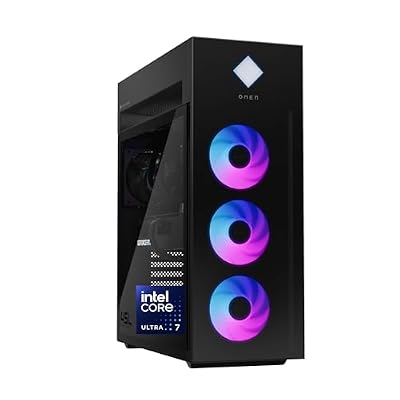
HP OMEN 45L Gaming Desktop, Intel Core Ultra 7 265K, 32 GB RAM, 1 TB SSD, NVIDIA GeForce RTX 5070 Ti, Windows 11 Pro, Microsoft Copilot, Tempered Glass, GT22-3060 (2025)
Included for '22 Best Pre Built Gaming PC Companies' because the listing specifies Intel Core Ultra 7 265K and 32 GB RAM, details this guide uses to compare options.
View on AmazonSpecs: Intel Core Ultra 7 265K · GeForce RTX 5070 Ti · 32GB RAM · 1TB SSD · Windows 11 Pro · tempered glass · model GT22-3060 (2025)
The HP OMEN 45L pairs an unlocked Core Ultra 7 265K with an RTX 5070 Ti, a combination that handles 1440p ultra and entry-level 4K gaming. The big 45-liter case helps airflow and quiet operation. Windows 11 Pro is a small plus for work-from-home users.
- Pros: RTX 5070 Ti with 16GB of video memory
- Pros: unlocked CPU, roomy case
- Pros: Windows 11 Pro
- Cons: only 1TB of storage on this listing
- Cons: priced above RTX 5070 rivals
Skip it if… you only play at 1080p or 1440p high; an RTX 5070 desktop costs less.
Corsair Vengeance a5100 — Best for liquid-cooled enthusiasts
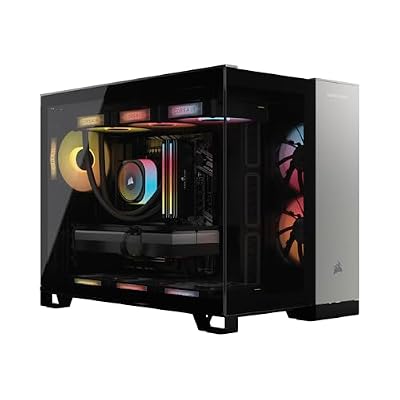
Corsair Vengeance a5100 Gaming PC – Liquid Cooled AMD Ryzen 7 7800X3D CPU – NVIDIA GeForce RTX 5080 GPU – 32GB Dominator Titanium RGB DDR5 Memory – 2TB M.2 SSD – Black
Included for '22 Best Pre Built Gaming PC Companies' because the listing specifies Liquid Cooled AMD Ryzen 7 7800X3D CPU and NVIDIA GeForce RTX 5080 GPU, details this guide uses to compare options.
View on AmazonSpecs: AMD Ryzen 7 7800X3D · GeForce RTX 5080 · 32GB Dominator Titanium RGB DDR5 · 2TB M.2 SSD · liquid-cooled CPU
The Corsair Vengeance a5100 is the most capable desktop in this guide. A 7800X3D and RTX 5080 target 4K gaming, and Corsair’s own Dominator Titanium memory and liquid cooler show the brand’s component focus. It is a high-end build, so only buy it if 4K or very high refresh is your goal.
- Pros: RTX 5080 and 7800X3D, a strong gaming pairing
- Pros: 2TB SSD and 32GB of Dominator Titanium memory
- Pros: liquid-cooled CPU and AM5 platform
- Cons: highest cost in this guide
- Cons: more power and space than most buyers need
Skip it if… you play at 1080p or 1440p; the extra GPU is wasted.
Also Consider: More Pre Built Gaming PCs Worth a Look
MSI Codex R2 — Best budget RTX 5070 from a known brand

msi Codex R2 Gaming Desktop PC | NVIDIA GeForce RTX 5070 12GB | Intel Core i5-14400F | 32GB DDR5 RAM | 1TB NVMe SSD | Air Cooling | Wi-Fi 6E | Windows 11 Home | VR Ready | D14NVP5-613US
Included for '22 Best Pre Built Gaming PC Companies' because the listing specifies NVIDIA GeForce RTX 5070 12GB and Intel Core i5-14400F, details this guide uses to compare options.
View on AmazonIntel Core i5-14400F · GeForce RTX 5070 12GB · 32GB DDR5 · 1TB NVMe SSD · air cooling · Wi-Fi 6E. A lean way into RTX 5070 gaming. Trade-off: air cooling and an older Intel socket.
KOTIN Ryzen 7 8700F RTX 5060 Ti — Best for streaming on a budget
KOTIN Gaming PC Desktop Ryzen 7 8700F, RTX 5060 Ti 8G, 32GB DDR5, 1TB SSD | Prebuilt Gaming Tower with WiFi 7, Windows 11 Home, DLSS 4, ARGB Cooling, 650W Gold PSU for 1080p/1440p PC Gaming & Streaming
Included for '22 Best Pre Built Gaming PC Companies' because the listing specifies RTX 5060 Ti 8G and 32GB DDR5, details this guide uses to compare options.
View on AmazonAMD Ryzen 7 8700F · RTX 5060 Ti 8GB · 32GB DDR5 · 1TB SSD · Wi-Fi 7 · 650W Gold PSU. The eight-core CPU and 32GB of RAM help with streaming and multitasking. Trade-off: KOTIN is a smaller brand with less support history than the big names.
CyberPowerPC Gamer Xtreme (RTX 5060) — Best for a tight budget

CyberPowerPC Gaming PC, Intel Core i5-14400F, GeForce RTX 5060 8GB | Gamer Xtreme, 16GB DDR5, 1TB PCIe 4.0 SSD, WiFi Ready & Windows 11 Home (GXiVR8060A47)
Included for '22 Best Pre Built Gaming PC Companies' because the listing specifies Intel Core i5-14400F and GeForce RTX 5060 8GB, details this guide uses to compare options.
View on AmazonIntel Core i5-14400F · GeForce RTX 5060 8GB · 16GB DDR5 · 1TB PCIe 4.0 SSD · Wi-Fi ready. Lowest-cost entry in this guide that still has a real RTX card. Trade-off: 8GB of VRAM and 16GB of RAM limit settings in newer games.
How We Chose These Pre Built Gaming PC Companies
This guide is based on research of current listings and maker data, not on benchmark runs. We compared current listings, maker spec sheets and independent buying guides, and we favored companies that publish clear parts lists. Selection criteria:
- Named, current-generation GPU (RTX 50-series or comparable) rather than vague graphics claims.
- At least 16GB of DDR5 and an NVMe SSD of 1TB or more on mainstream picks.
- A clearly stated power supply or cooler on the listing.
- Standard ATX or microATX parts where the maker states them.
- Brand coverage across value, mainstream and premium.
We left out office PCs with weak integrated graphics and any listing that did not name the CPU or GPU.
Pre Built Gaming PC Buying Guide: Thresholds That Matter
Match the GPU to your monitor
- 1080p at 144Hz: RTX 5060 or RX 9060 XT class is enough.
- 1440p at 144Hz or higher: aim for RTX 5070 or better.
- 4K gaming: RTX 5070 Ti is the practical floor; RTX 5080 is more comfortable.
Look for 16GB of video memory above the entry tier
8GB cards can run new games at tuned settings, but VRAM-heavy titles start to ask for more. RTX 5070 has 12GB, RTX 5070 Ti and RTX 5080 have 16GB. If you keep a PC for five years, favor more video memory.
Insist on 32GB of DDR5 for mainstream and premium picks
16GB works today, but 32GB gives headroom for streaming, browser tabs and modern open-world titles. Check that the memory is DDR5; some budget SKUs still use DDR4.
Check the power supply
NVIDIA’s recommended system power is roughly 750W for RTX 5070 and RTX 5070 Ti, and about 850W for RTX 5080. A Gold-rated unit from a known maker is a good sign. A listing with no PSU details is a risk.
Check the platform for upgrades
AM5 (Ryzen 7000 and 8000 series) and Intel’s newer Core Ultra platform both have more upgrade room than the older Intel 14th-generation socket. If you plan to change the CPU in three years, favor those.
Read the warranty and return terms
Warranty length varies by company, by seller and by whether you buy direct. Confirm the term on the exact listing, and check whether labor is covered, since that affects repair costs.
Prebuilt vs Building Your Own: Which Costs Less?
A prebuilt saves you time and gives you a single warranty. Building your own can cost less for the same parts and gives full control over the power supply and case, but it takes research and a few hours of assembly. In 2026, memory and graphics card pricing has been unsettled, so compare the cost of the same parts bought separately before you decide.
- Buy a prebuilt if: it lists named parts, a Gold PSU and standard connectors, and you want fast delivery with one support contact.
- Build your own if: you want a specific case, a particular PSU or an unusual part mix.
- Avoid: any listing that hides the CPU, motherboard or power supply model.
Which Pre Built Gaming PC Company Should You Choose?
- Best value for 1440p: iBUYPOWER Element or Skytech Shadow 5.
- Best entry-level: CyberPowerPC Gamer Xtreme VR.
- Best for competitive play: Lenovo Legion Tower 5 with the 7800X3D.
- Best design and networking: Alienware Aurora ACT1250.
- Best for 4K: Corsair Vengeance a5100 or HP OMEN 45L.
- Best mainstream choice: MSI Aegis ZS2.
Pre Built Gaming PC Mistakes to Avoid
Most bad prebuilt purchases come from the same few mistakes. Run through this list before you click buy.
Paying for a name instead of parts
A famous brand does not guarantee better components. Compare two listings with the same GPU and CPU and see what separates them: memory speed, SSD size, power supply rating and cooler type. If the premium buys only a case design, decide whether that is worth it to you.
Ignoring the CPU generation
Intel 14th-generation chips such as the i5-14400F and i7-14700F are fast for gaming today, but the socket has no newer processors to move up to. AM5 boards for Ryzen 7 7700, 8700F and 7800X3D, and Intel’s Core Ultra boards, give you a path to a better CPU later. If you keep a PC for six years, that matters.
Buying an 8GB graphics card for a long-term PC
The RTX 5060 Ti 8GB and RTX 5060 can still run new games, especially at 1080p. But as texture sizes grow, 8GB cards will need lower settings first. A 12GB RTX 5070 or a 16GB card is a safer purchase if the PC must last.
Skipping the power supply line
The power supply feeds every other part. A listing that says only “750W” without a rating or maker gives you no way to judge quality. Lines such as “750W Gold PSU” are better because they tell you the efficiency class.
Mixing up DDR4 and DDR5
Some budget SKUs from large sellers use DDR4. DDR4 is fine for light use, but it sits on an older platform and costs you upgrade options. Choose DDR5 for any new gaming PC.
Choosing a business or office tower
Some low-cost listings are office PCs with a weak integrated graphics chip and a gaming label. A real gaming PC needs a dedicated graphics card; look for a named RTX or Radeon RX model.
Upgrade Path by Pre Built Gaming PC Company
Upgrade room depends on the platform and the case more than the brand, but here are the practical points to check for each company in this guide.
- iBUYPOWER Element and MSI Codex R2: Intel 14th-generation CPUs. The GPU and storage are easy to upgrade, but the CPU is near the end of its socket’s life.
- Skytech Shadow 5 and MSI Aegis ZS2: AM5 platform. A later Ryzen CPU upgrade is possible, and the DDR5 memory carries over.
- Lenovo Legion Tower 5: AM5 with a 7800X3D already installed, so the CPU is an end-point. Look at the power supply before a large GPU swap.
- Alienware Aurora ACT1250 and ASUS ROG G700: Intel Core Ultra platform. The socket supports newer chips in the same family.
- HP OMEN 45L: an unlocked Core Ultra 7 265K, a large case and room for airflow upgrades.
- Corsair Vengeance a5100: AM5 with liquid cooling. Plan for the radiator size when changing coolers.
Whatever you buy, check that the PSU has spare PCIe power connectors and that the case has space for a longer graphics card.
Setting Up a Pre Built Gaming PC After You Unbox It
- Inspect the case for shipping damage and confirm the graphics card is seated and plugged in.
- Update Windows and install the latest graphics driver from the GPU maker’s site.
- Enable the memory profile (XMP or EXPO) in the BIOS if the RAM runs below its rated speed.
- Plug your monitor into the graphics card, not the motherboard.
- Remove preinstalled trial software you do not need.
- Register the warranty and keep your order records.
These six steps take less than an hour and catch most first-day problems.
Warranty and Support: What to Check Before You Buy a Pre Built Gaming PC
A prebuilt is only as good as the support behind it. Warranty terms change by model, by seller and by whether you buy direct from the company or through a retailer, so confirm the details for the exact desktop you pick.
- Length: find the stated term for parts and for labor. They are often different.
- Who services it: a maker that ships a box to its own repair center is different from a retailer that sends you back to the maker.
- Return window: a seller return period is your best protection against a dead-on-arrival graphics card or a loose cooler.
- Parts coverage: some warranties cover the whole system, others cover only certain components.
- Voided-warranty rules: read what happens if you open the case to add storage or memory. Many makers allow it, but a few require approved parts.
Support quality differs between companies, and independent reviews and forum threads are a better guide than any single rating. Verify the terms on the listing, because they change.
Keep your invoice, serial number and a few photos of the build as soon as it arrives. If a part fails in the first month, those records make a return or replacement much faster.
More Questions About Pre Built Gaming PC Companies
Which pre built gaming PC company is best?
iBUYPOWER, Skytech Gaming and CyberPowerPC are the best value pre built gaming PC companies in 2026, while Alienware, HP OMEN and Corsair lead on design and cooling. The best fit depends on your budget tier.
Is iBUYPOWER or CyberPowerPC better?
Neither wins every time, because both sell many SKUs with different parts. Compare the exact GPU, RAM, power supply and warranty on each listing instead of the brand name alone.
Are Skytech and CyberPowerPC reliable?
They are widely sold and use standard parts on many models, but quality control can vary by SKU. Read the parts list, choose a Gold-rated PSU and register the warranty.
What GPU should a 2026 prebuilt have?
An RTX 5070 is the best target for most players because it handles high-refresh 1440p. Choose an RTX 5060 Ti for 1080p on a budget and an RTX 5070 Ti or 5080 for 4K.
Is 16GB of RAM enough in a prebuilt?
16GB still runs most games, but 32GB is the safer choice for streaming and multitasking. Check that the RAM is DDR5 and that you can add more later.
Do prebuilt gaming PCs use proprietary parts?
Some do, especially from large PC makers, which can limit power supply and motherboard swaps. Smaller system builders more often use standard ATX parts. Read the listing before you buy.
How much should I spend on a prebuilt gaming PC?
Plan on a mid-range RTX 5070 desktop for most buyers. Entry RTX 5060 machines cost less but have less video memory, and premium RTX 5080 towers cost much more.
Frequently Asked Questions
Are prebuilt gaming PCs worth it?
For most buyers, yes. They save time, include warranties, and often match component costs, especially in the mid-range where value is strongest.
Which company is best for high-end gaming?
For flagship performance, the ZOTAC MEK with RTX 5080 leads this list, while KOTIN offers the best high-refresh value.
Can I upgrade a prebuilt later?
Yes, as long as the builder uses standard components and includes a capable power supply, GPU and storage upgrades are straightforward.
Do budget prebuilts play modern games?
Entry machines like the OKAMUS handle lighter and older titles at 1080p; for demanding new releases, step up to a dedicated GPU model.
Final Thoughts
The KOTIN RTX 5070 is our best overall prebuilt for balancing price and performance, while the ZOTAC MEK RTX 5080 is the pick for 4K enthusiasts. Budget-focused buyers will find the KOTIN Ryzen 5 and OKAMUS both offer sensible starting points.