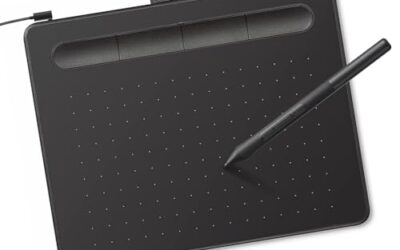
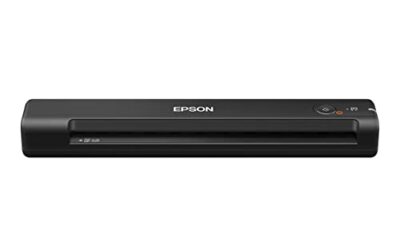
A pen tablet replaces the mouse with a stylus that your hand already knows how to use. Photo retouchers, illustrators, note-takers, and rhythm-game players all reach for one, and the market under 200 dollars is crowded with models from Wacom, Huion, and XPPen. Unlike a screen tablet, a pen tablet has no display, so you look at your monitor while the pen moves on a flat surface. That habit takes a few days to learn, and it shapes which size and features make sense.
This guide is for desktop and laptop users shopping for a first or second drawing tablet. The seven listings are mostly small and medium active areas with battery-free pens, and the deciding questions are size, wired versus Bluetooth, and shortcut keys. Whether you want to sketch, retouch photos, or play osu!, the same few specs separate a good fit from a frustrating one. Because every listing below uses a battery-free pen, the real differences are the surface size, the connection type, and how many shortcut buttons sit along the edge.
Quick Picks
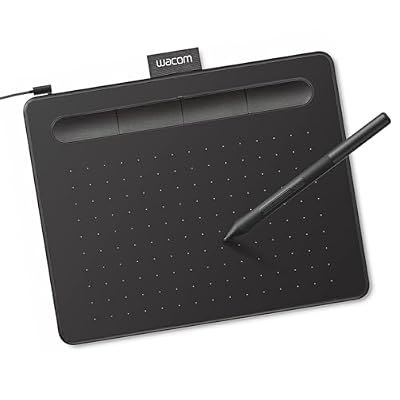
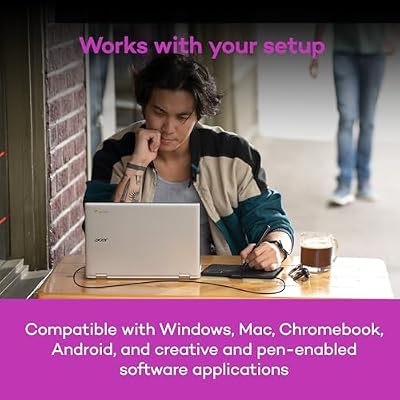
Wacom Intuos Small, Wired Graphic Drawing Tablet with Pen + Software | Battery-free pen, 4 ExpressKeys for shortcuts, works with Mac, Windows & Chromebook; Ideal for creators, students & teachers





As an Amazon Associate we earn from qualifying purchases. Product prices and availability are accurate as of the date/time indicated.

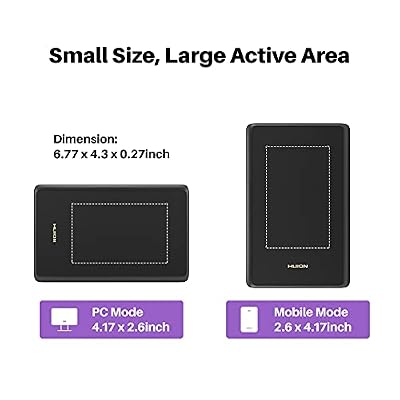
HUION Drawing Tablet H420X Graphics Tablet with 8192 Level Pen Pressure | Battery-Free Stylus, 4.17x2.6 IN Digital Art Tablet for OSU Game, Design, Drawing, Teaching, Work with PC, Mac, Linux, Mobile




As an Amazon Associate we earn from qualifying purchases. Product prices and availability are accurate as of the date/time indicated.

Drawing Tablet XPPen StarG640 Digital Graphic Tablet 6x4 Inch Art Tablet with Battery-Free Stylus Pen Tablet for Mac, Windows and Chromebook (Drawing/E-Learning/Remote-Working)


As an Amazon Associate we earn from qualifying purchases. Product prices and availability are accurate as of the date/time indicated.

HUION Inspiroy H640P 6x4 inch Drawing Tablet 8192 Pen Pressure | Battery-Free Stylus, Tilt, 6 Hot Keys, Work with Mac/PC/Android, Digital Art for Beginner, Drawing, Writing, Design, Teaching


As an Amazon Associate we earn from qualifying purchases. Product prices and availability are accurate as of the date/time indicated.

Wacom Intuos Medium, Bluetooth Graphic Drawing Tablet with Pen + Software | Battery-free pen, 4 ExpressKeys for shortcuts, works with Mac, Windows & Chromebook; Ideal for creators, students & teachers


As an Amazon Associate we earn from qualifying purchases. Product prices and availability are accurate as of the date/time indicated.

Wacom Intuos Small, Bluetooth Graphic Drawing Tablet with Pen + Software | Battery-free pen, 4 ExpressKeys for shortcuts, works with Mac, Windows & Chromebook; Ideal for creators, students & teachers


As an Amazon Associate we earn from qualifying purchases. Product prices and availability are accurate as of the date/time indicated.

HUION Inspiroy H950P 8x5 inch Drawing Tablet 8192 Pen Pressure | 8 Hot Keys, Battery-Free Stylus, Tilt, Android Support, Graphics Tablet for OSU, Animation, Painting, Art, Photo Editing


As an Amazon Associate we earn from qualifying purchases. Product prices and availability are accurate as of the date/time indicated.
| Product | Best for | Key spec from the title |
|---|---|---|
| Wacom Intuos Small (Wired) | First-time digital artists | Battery-free pen, 4 ExpressKeys |
| HUION H420X | Rhythm games and quick notes | 4.17×2.6 in, 8192 pressure levels |
| XPPen StarG640 | Compact desk drawing | 6×4 inch, battery-free stylus |
| HUION Inspiroy H640P | Beginners who want hot keys | 6×4 inch, tilt, 6 hot keys |
| Wacom Intuos Medium (Bluetooth) | Larger canvas, wireless | Bluetooth, 4 ExpressKeys |
| Wacom Intuos Small (Bluetooth) | Cable-free small tablet | Bluetooth, battery-free pen |
| HUION Inspiroy H950P | Roomier working area | 8×5 inch, 8 hot keys, tilt |
How to Choose
Active area and your monitor
Active area is the part of the tablet that tracks the pen. A small area of about 6×4 inches suits note-taking, signatures, and games where you move the pen in short strokes. An 8×5 inch area gives room for fuller arm movement in drawing and retouching. Larger areas feel more natural on big monitors but need more desk space. As a rule of thumb, pair the small sizes with laptops and 24-inch screens, and consider the 8×5 inch size for larger displays or detailed illustration work.
Pressure levels and tilt
8192 pressure levels is a common figure in this tier and is plenty for sketching. Tilt recognition lets the pen change a brush angle, which matters for shading in art programs. Battery-free pens never need charging, so ignore listings that make you charge a pen for no benefit. Pressure numbers above 8192 are mostly marketing at this level, because the difference is hard to feel in real drawing.
Wired or Bluetooth
A wired tablet draws power from the computer, has no lag from wireless pairing, and cannot run out of battery. Bluetooth models free you from a cable and let you move across the room or work on a lap. If you stay at a fixed desk, wired is simpler. If you travel with a laptop, wireless helps.
Shortcut keys and compatibility
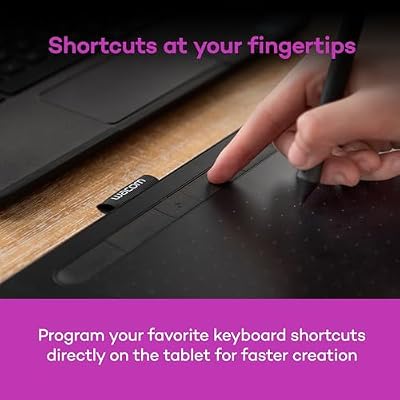
Express keys or hot keys let you map undo, brush size, and zoom to one press. Confirm that your operating system is supported, since some listings mention Android or Chromebook use alongside Windows and Mac. Budget tablets cut corners on surface texture and driver polish, so check software support before buying. Look at the manufacturer’s driver page and confirm your operating system version, since a tablet with good hardware but poor drivers can feel unreliable.
The 7 Best Options
Wacom Intuos Small (Wired)
The wired Intuos Small is a straightforward entry to drawing on a computer. The title lists a battery-free pen, four ExpressKeys for shortcuts, bundled software, and compatibility with Mac, Windows, and Chromebook. It suits students and beginners who want a recognizable brand and a no-fuss cabled connection. For people who want a tablet that simply works at a fixed desk, this is the most direct choice in the lineup. The bundled software mentioned in the title also lowers the barrier for someone who has never opened a drawing or photo program before, because there is something to practice with right away.
- Strength: Four ExpressKeys put shortcuts under your fingers.
- Strength: A battery-free pen that never needs charging.
- Trade-off: The small active area limits long, sweeping strokes.
Skip it if you want a cable-free tablet, a larger canvas, or more than four shortcut keys to map to your favorite commands.
HUION H420X
The H420X lists 8192 levels of pen pressure, a battery-free stylus, and a compact 4.17×2.6 inch active area, and the title explicitly mentions osu! alongside design and drawing. It suits rhythm-game players who want a tiny surface for fast wrist movement and anyone who needs a pen input for signing documents or quick sketches. Because the active area is so small, the pen travels very little, which many rhythm-game players prefer over a big surface that demands full arm motion.
- Strength: A very compact footprint that fits any desk.
- Strength: 8192 pressure levels and a battery-free pen.
- Trade-off: The tiny area is awkward for detailed illustration.
Skip it if you want room for full-arm drawing on a big monitor.
XPPen StarG640
The StarG640 offers a 6×4 inch area with a battery-free stylus and listed support for Mac, Windows, and Chromebook. It suits budget-minded beginners who want a small desk-friendly tablet that fits a laptop bag. The title points to drawing and also to everyday computer tasks such as annotating documents or editing photos. For a student on a tight budget, it covers the common jobs of taking handwritten notes, marking up PDFs, and sketching ideas for a project without needing anything fancier.
- Strength: A balanced 6×4 inch active area that suits laptops and small desks.
- Strength: Chromebook support alongside Windows and Mac.
- Trade-off: Fewer features are named than in rival Huion listings.
Skip it if you want hot keys and tilt listed in the title, since the Huion models mention both.
HUION Inspiroy H640P
The H640P pairs a 6×4 inch surface with 8192 pressure levels, a battery-free stylus, tilt support, and six hot keys. The listing says it works with Mac, PC, and Android. It suits beginners who want shortcuts and tilt in a small tablet, and who may also want to try drawing on an Android device. The mix of tilt and six hot keys makes it feel more like a full drawing tablet than the plainest small models, even though the active area is the same as other 6×4 inch listings.
- Strength: Six hot keys and tilt in a small form factor.
- Strength: Android support extends its use.
- Trade-off: The same compact area as cheaper tablets limits broad strokes.
Skip it if you want a bigger surface or a tablet with a wireless option.
Wacom Intuos Medium (Bluetooth)
The medium Intuos with Bluetooth gives a larger canvas than the small versions, along with a battery-free pen and four ExpressKeys. It suits artists who want more room for arm movement without a cable running across the desk. It also fits users who switch between a desktop and a laptop in different rooms. The medium size also suits photo editors who need to move the cursor across a wide monitor without lifting the pen and repositioning it every few seconds.
- Strength: Wireless Bluetooth freedom and a larger area.
- Strength: The pen needs no charging.
- Trade-off: It likely costs more than the small and wired versions.
Skip it if you want a smaller, cheaper wired tablet or never move away from one desk.
Wacom Intuos Small (Bluetooth)
This is the small Intuos with Bluetooth: a cable-free tablet with a battery-free pen, four ExpressKeys, and software included. It suits someone who wants a minimal desk setup, for example a person who works from a couch with a laptop. It keeps the compact size of the wired small unit while removing the cable. Writers, note-takers, and editors who move between a desk and a couch will appreciate that nothing needs to be plugged in to start working.
- Strength: Wireless connection in a compact size.
- Strength: Wacom pen and four ExpressKeys.
- Trade-off: Wireless operation means managing a battery, which the wired unit avoids.
Skip it if you want a never-charge wired setup.
HUION Inspiroy H950P
The H950P has an 8×5 inch area, 8192 pressure levels, eight hot keys, tilt, and a battery-free stylus, with Android support. It is for people who find 6×4 inches cramped and want a larger surface for drawing, retouching, and animation without crossing into a high price bracket. The eight hot keys give a lot of room to map brush, undo, zoom, and layer shortcuts, which speeds up work in art programs when you are not reaching for the keyboard.
- Strength: The largest active area in this lineup.
- Strength: Eight hot keys and tilt for faster shortcut work in art programs.
- Trade-off: It takes more desk space than the small models.
Skip it if you have a small desk, a laptop-only setup, or a bag that must hold the tablet every day.
Which One Fits Your Situation
You play rhythm games
The HUION H420X, with its tiny active area, fits the short, quick wrist movements these games demand. Players who prefer a bit more surface can step up to the 6×4 inch XPPen StarG640, which keeps the compact footprint but allows slightly larger sweeps.
You are learning to draw
The Wacom Intuos Small (Wired) and the HUION Inspiroy H640P give shortcut keys and a gentle learning curve at a small size. Start with short sketching sessions and let your hand-eye coordination catch up before judging the tablet.
You want more drawing room
The HUION Inspiroy H950P offers the roomiest surface, and the Wacom Intuos Medium is the Bluetooth alternative if you prefer wireless in 2026.
You work from a laptop on the move
The Wacom Intuos Small (Bluetooth) removes the cable and stays compact. It slides into a laptop sleeve, so a quick edit on a train table or in a cafe needs no cable at all.
Common Mistakes
- Choosing an area that is too small for a large monitor.
- Paying for Bluetooth you will never use at a fixed desk.
- Ignoring operating system and software support.
- Expecting to draw naturally without a few days of practice, since looking at the screen while the hand moves elsewhere feels odd at first.
- Overvaluing pressure levels beyond 8192, even though all the Huion listings here share that figure.
Related guides
- Usb C Kvm Switch For Two Laptops And Two Monitors
- Vertical Laptop Stand For Dual Laptop Desk Setup
- Nvme Enclosure With Active Cooling For Mac Mini
Frequently Asked Questions
What is the difference between a pen tablet and a pen display?
A pen tablet has no screen, so you watch the monitor while the pen moves on a flat surface. A pen display has a screen under the pen, which feels more direct but usually costs more and takes more desk space.
Is a small tablet enough for drawing?
Yes for beginners, notes, and signatures. For detailed illustration, many artists prefer the roomier 8×5 inch size, because larger movements are easier to control than tiny ones.
Do these pens need batteries?
The listings describe battery-free pens, so there is nothing to charge in the stylus. The tablet itself is a separate matter, because Bluetooth models need power while wired ones draw it from the computer.
Will a pen tablet work with a Chromebook?
Several listings mention Chromebook support, but confirm it for your model before buying.