A graphics tablet without a screen asks you to draw while looking at the monitor, which feels strange for about a week and then becomes second nature. That learning curve is the first thing to understand when searching for the best graphic drawing tablet under 200 dollars: every model here is a pen tablet, not a display, so the money goes into active area, pressure sensitivity, and shortcut keys rather than a built-in screen.
This guide is written for beginners, students, hobbyist illustrators, and people who play rhythm games or sign documents digitally. The nine picks span pocket-sized 6 by 4 inch pads up to 10 by 6 inch surfaces. As the 2026 shopping season shows, the budget bracket is crowded with near-identical specs, so the useful differences are size, ports, operating system support, and how many shortcut keys sit beside the pad. A few of these models also list Android support, which matters if you want to sketch on a phone or tablet as well as a desktop.
Quick Picks
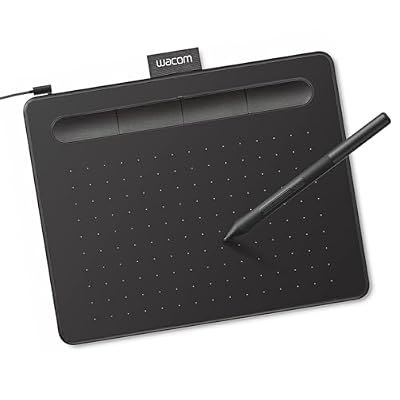
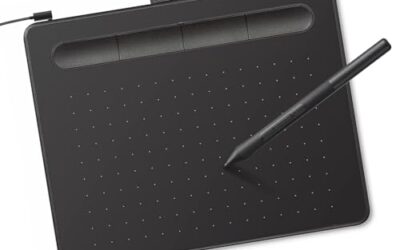
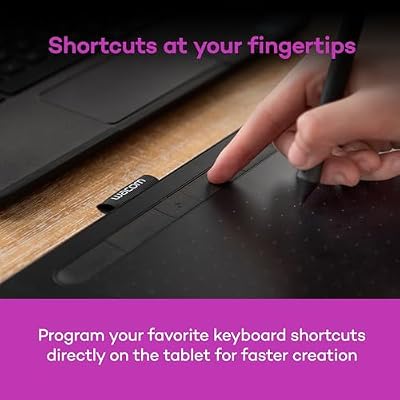
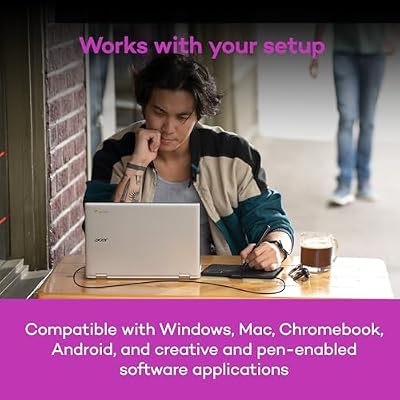
Wacom Intuos Small, Wired Graphic Drawing Tablet with Pen + Software | Battery-free pen, 4 ExpressKeys for shortcuts, works with Mac, Windows & Chromebook; Ideal for creators, students & teachers





As an Amazon Associate we earn from qualifying purchases. Product prices and availability are accurate as of the date/time indicated.

XOPPOX Graphics Drawing Tablet, 10×6 Inch Large Active Area with Battery-Free Stylus, 8192 Levels of Pen Pressure and 12 Hot Keys, Compatible with PC/Mac/Android for Painting, Design & Online Teaching


As an Amazon Associate we earn from qualifying purchases. Product prices and availability are accurate as of the date/time indicated.

HUION Inspiroy H1060P Graphics Drawing Tablet, 10 x 6.25 In, 12+16 Hot Keys | 8192 Pressure Levels, Battery-Free Stylus, Digital Art Tablet Works with Mac, Windows PC and Android
As an Amazon Associate we earn from qualifying purchases. Product prices and availability are accurate as of the date/time indicated.

HUION Inspiroy H950P 8x5 inch Drawing Tablet 8192 Pen Pressure | 8 Hot Keys, Battery-Free Stylus, Tilt, Android Support, Graphics Tablet for OSU, Animation, Painting, Art, Photo Editing


As an Amazon Associate we earn from qualifying purchases. Product prices and availability are accurate as of the date/time indicated.

UGEE Drawing Tablet Graphics, M708 V2 Upgrade PC&Computer&Android Device,10x6 Inch Ultra Thin Large Graphic for PC, Pad with 8 Hot Keys Upgrade 16384 Level Battery-Free Stylus for Unleash Creativity


As an Amazon Associate we earn from qualifying purchases. Product prices and availability are accurate as of the date/time indicated.

UGEE M708 Drawing Tablet, 10x6 inch Large Space for Digital Drawing | 8 Hot Keys, Passive Stylus of 16384 Levels Pressure, Digital Graphics Art Tablet, For PC Paint, Design, Art Creation Sketch


As an Amazon Associate we earn from qualifying purchases. Product prices and availability are accurate as of the date/time indicated.

Drawing Tablet XPPen StarG640 Digital Graphic Tablet 6x4 Inch Art Tablet with Battery-Free Stylus Pen Tablet for Mac, Windows and Chromebook (Drawing/E-Learning/Remote-Working)


As an Amazon Associate we earn from qualifying purchases. Product prices and availability are accurate as of the date/time indicated.

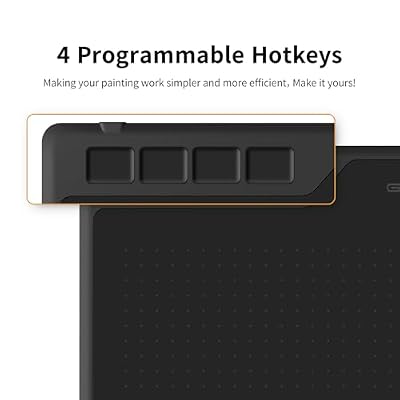
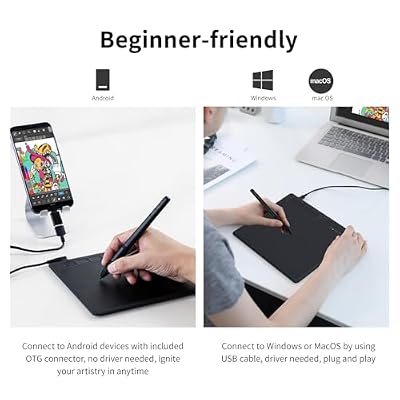
GAOMON S620 Graphics Drawing Tablet, 6.5x4, 8192 Pressure & 4 Hot Keys | Battery-Free Stylus, Ultra-Slim & Portable, for Beginners, Students & Creators in Digital Art, Note-Taking & OSU



As an Amazon Associate we earn from qualifying purchases. Product prices and availability are accurate as of the date/time indicated.

HUION Drawing Tablet 420 OSU Tablet, Graphics Tablet with Digital Stylus | 4 x 2.23 inches Art Tablet for Drawing, Writting, Design & Animation, Work with Mac, Windows


As an Amazon Associate we earn from qualifying purchases. Product prices and availability are accurate as of the date/time indicated.
| Product | Best for | Key spec from the title |
|---|---|---|
| Wacom Intuos Small | Mac, Windows, and Chromebook beginners | Battery-free pen, 4 ExpressKeys |
| XOPPOX 10×6 | Large area on a tight plan | 12 hot keys, 8192 pressure levels |
| HUION Inspiroy H1060P | Heavy shortcut users | 10 x 6.25 in, 12+16 hot keys |
| HUION Inspiroy H950P | Mid-size with pen tilt | 8×5 in, tilt, Android support |
| UGEE M708 V2 | Slim large pad for PC or Android | 10×6 in, 16384 levels, 8 hot keys |
| XPPen Star G640 | Compact travel use | 6×4 in, battery-free stylus |
| GAOMON S620 | Students and first-timers | 6.5×4 in, 8192 levels, 4 hot keys |
| HUION 420 | Rhythm games and signatures | 4 x 2.23 in, OSU tablet |
| XPPen Deco 640 | Higher pressure range in a small pad | 6×4 in, 16384 levels |
How to Choose
Match active area to your monitor and arm movement
The active area maps to the whole screen, so a small pad needs tiny pen movements and a large pad needs sweeping ones. A 10 by 6 inch surface suits 24-inch monitors and wrist-and-elbow drawing. A 6 by 4 inch pad is comfortable for finger-and-wrist sketching, travel, and small desks. Anything around 4 inches wide is really for pointer control, signatures, or rhythm games.
Treat pressure levels as a tie-breaker
Both 8192 and 16384 levels sound dramatic, but real-world line control depends more on pen quality and driver tuning than on the number. Software support for pressure and tilt matters more than the headline figure. Look for a battery-free stylus, since it never needs charging and keeps the pen light.
Count shortcut keys and read the compatibility list
Hot keys assigned to undo, brush size, or eraser save a lot of trips to the keyboard. Four keys are enough for casual use, while eight to twelve help with daily illustration. Confirm operating system support, because some tablets list Android, Chromebook, or Linux while others stop at Windows and Mac.
Know what budget models cut
Cheaper pads skip tilt detection, wireless connectivity, and polished driver software, and some drivers are awkward on new operating systems. A wired connection is reliable but ties you to a cable. Ignore giant resolution claims, which describe internal tracking, not what you see. Also look at the nib: replacement tips cost little, but a pen that arrives with spares saves a trip later.
The 9 Best Options
Wacom Intuos Small
The Intuos Small is the established-brand pick, a wired tablet with a battery-free pen, four ExpressKeys, and bundled software. It works with Mac, Windows, and Chromebook, which makes it the safest choice for schools and shared family computers that run different systems. A wired link also means no pairing, no charging, and no lag from a wireless handshake, so it is ready the moment you plug it in.
- Strength: broad compatibility across Mac, Windows, and Chromebook.
- Strength: a battery-free pen and four programmable keys for quick shortcuts.
- Trade-off: the small size limits large, sweeping strokes.
Skip it if you want a big drawing surface or more than four shortcut keys, because the small pad and short key row will feel limiting once your sketches grow ambitious.
XOPPOX 10×6 Graphics Tablet
XOPPOX offers a large 10 by 6 inch active area with a battery-free stylus, 8192 pressure levels, and twelve hot keys. It is aimed at buyers who want the most surface and the most shortcuts for the least spend, such as a hobbyist who sketches on a 24-inch monitor and wants room for full-arm strokes without stepping up to a premium name.
- Strength: a large active area gives room for wide strokes.
- Strength: twelve hot keys can cover a full set of editing shortcuts.
- Trade-off: a less established name means support and driver updates are worth checking.
Skip it if you want a brand with a long history of software updates, or if you prefer to read years of community driver advice before you buy.
HUION Inspiroy H1060P
The H1060P pairs a 10 by 6.25 inch surface with 8192 pressure levels, a battery-free stylus, and a long key array listed as 12 plus 16 hot keys. It targets artists who use many shortcuts and want a roomy pad for full-arm drawing, since the expressive keys can hold brush swaps, undo, zoom, and layer commands within reach of the non-drawing hand.
- Strength: the 12+16 hot key layout is the heaviest shortcut setup in this group.
- Strength: the 10 x 6.25 inch area suits large monitors.
- Trade-off: it needs more desk space than a compact pad.
Skip it if you travel often or sketch on a small desk, since a pad this wide crowds a laptop bag and leaves little room for a keyboard and mouse.
HUION Inspiroy H950P
The H950P is the mid-size choice at 8 by 5 inches, with 8192 pressure levels, eight hot keys, a battery-free stylus, tilt support, and Android compatibility. It suits animation, illustration, and rhythm-game players who want something between a pocket pad and a full-size tablet, and the Android support lets it double as an input device for a phone.
- Strength: the 8 x 5 inch area balances room to draw with desk space.
- Strength: tilt and Android support add flexibility.
- Trade-off: eight keys is fewer than the larger H1060P offers.
Skip it if you want the largest possible surface or the longest key array, because the H1060P gives more of both for a similar kind of money.
UGEE M708 V2
This ultra-thin 10 by 6 inch pad lists eight hot keys, a passive stylus with 16384 pressure levels, and support for PC and Android devices. It fits artists who want a large slim surface and a higher pressure range, and the thin profile means it slides into a backpack or sits unobtrusively beside a keyboard when not in use.
- Strength: the 16384 pressure levels are the highest listed, shared only with the Deco 640.
- Strength: PC and Android compatibility widens its use.
- Trade-off: the title is crowded with claims, so check driver support before buying.
Skip it if you want a tablet with a long record of software support, or if the crowded product title makes it hard to confirm exactly what is included.
XPPen Star G640
The Star G640 is a 6 by 4 inch digital pad with a battery-free stylus, built for Mac, Windows, and Chromebook. It suits beginners, note-takers, and travelers who want a small, light device that sits beside a laptop, and the Chromebook support makes it one of the few small options friendly to school-issued machines.
- Strength: the compact 6 x 4 inch size fits laptop bags and small desks.
- Strength: battery-free stylus support and Chromebook compatibility.
- Trade-off: the small surface restricts large, expressive strokes.
Skip it if you plan to draw large illustrations or want shortcut keys built in, because every command will need a trip to the keyboard.
GAOMON S620
The S620 is described as ultra-slim and portable for beginners, students, and creators, with a 6.5 by 4 inch area, 8192 pressure levels, four hot keys, and a battery-free stylus. It aims at people trying digital art for the first time, offering slightly more area than the 6 by 4 inch pads and a few keys for the shortcuts you reach for most.
- Strength: the slim, portable body is easy to carry between rooms.
- Strength: four hot keys cover the basic shortcuts for a first tablet.
- Trade-off: the small area requires careful, small pen movements.
Skip it if you need a large workspace or many shortcut keys, since a few buttons and a modest pad leave little room to grow into advanced work.
HUION 420
The HUION 420 is a tiny 4 by 2.23 inch OSU tablet with a digital stylus, listed for drawing, writing, design, and animation. In practice its small area suits rhythm games, signatures, and quick annotations, and it works well as a second pad that stays plugged into a streaming or gaming setup for pointer control.
- Strength: the tiny size travels easily and takes almost no desk space.
- Strength: it is a simple, low-commitment entry point for rhythm-game players.
- Trade-off: the surface is too small for serious illustration.
Skip it if you want to draw anything larger than doodles, notes, and signatures, because the pad is closer to a mouse replacement than a drawing surface.
XPPen Deco 640
The Deco 640 is a 6 by 4 inch pad with 16384 pressure levels and a battery-free stylus, marketed for OSU and digital drawing. It gives you the higher pressure range in a compact form, which suits someone who sketches with light and heavy strokes and wants the extra levels without a larger footprint.
- Strength: 16384 levels in a small, portable pad.
- Strength: a battery-free stylus keeps the pen light and charge-free.
- Trade-off: no shortcut key count is listed in the title, so check before buying.
Skip it if you rely on many hot keys or need a larger surface for expressive strokes, because the compact pad rewards small, careful movements instead.
Which One Fits Your Situation
You are a first-time digital artist
Start with the GAOMON S620 or the XPPen Star G640. Both are small, simple, and easy to try without a big outlay, and either is enough to learn hand-eye coordination.
You draw large and rely on shortcuts
The HUION Inspiroy H1060P has the biggest area and the heaviest key array here, which suits full-arm illustration and heavy editing.
You play rhythm games
The HUION 420 is built for that style, with a tiny active area that rewards small precise movements.
You use several operating systems
The Wacom Intuos Small works with Mac, Windows, and Chromebook, which makes it easier to move between machines.
Common Mistakes
- Buying a pen tablet expecting a screen and then struggling with hand-eye coordination.
- Choosing the smallest pad for large illustrations.
- Paying for pressure levels you will not notice.
- Ignoring driver support for your operating system.
- Skipping shortcut keys, then reaching for the keyboard every minute.
Related guides
- Usb C Kvm Switch For Two Laptops And Two Monitors
- Vertical Laptop Stand For Dual Laptop Desk Setup
- Nvme Enclosure With Active Cooling For Mac Mini
Frequently Asked Questions
Do I need a drawing tablet with a screen?
No. Pen tablets cost less and are fine once you adjust to looking at the monitor. A screen model is more intuitive but costs far more.
How much pressure sensitivity do I need?
Any listed level of 8192 is plenty for most work. The difference with 16384 is subtle and depends on the software.
Can I use these with a phone or tablet?
Some list Android support, such as the H950P and UGEE M708 V2. Check the listing for the exact devices.
What size should I pick?
Choose 10 by 6 inches for large monitors and full-arm drawing, and 6 by 4 inches for portability and small desks.