- Top Pick: Acer Nitro 16S AI Copilot+ PC Gaming Laptop | AMD Ryzen AI 9 365 Processor | NVIDIA GeForce RTX 5070 Ti Laptop GPU | 16" WQXGA IPS 180Hz Display | 32GB DDR5 | 2TB Gen 4 SSD | Wi-Fi 6E | AN16S-61-R5K4
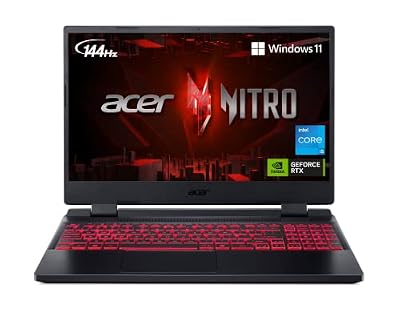
- Best Value: Acer Nitro V Gaming Laptop | Intel Core i5-13420H Processor | NVIDIA GeForce RTX 4050 Laptop GPU | 15.6" FHD IPS 165Hz Display | 8GB DDR5 | 512GB Gen 4 SSD | Wi-Fi 6 | Backlit KB | ANV15-52-586Z
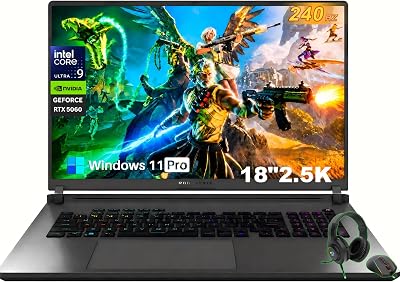
- Premium Choice: Acer Nitro V Gaming Laptop | Intel Core 7 Processor 240H | NVIDIA GeForce RTX 5050 Laptop GPU | 16" WUXGA IPS 180Hz Display | 16GB DDR5 | 1TB Gen 4 SSD | Wi-Fi 6 | Backlit KB | ANV16-72-73EW
Picking the right Acer gaming laptop in 2026 means cutting through a crowded lineup of Nitro and Aspire models that all look similar on paper but differ wildly in real-world performance. GPU tier, VRAM, display refresh rate, and even RAM configuration can make the difference between a laptop that handles modern titles at high settings and one that struggles within a year.
This guide breaks down six current Acer gaming laptops, from budget-friendly entry points to high-end AI Copilot+ powerhouses, so you can match specs to your budget and the games you actually play.


As an Amazon Associate we earn from qualifying purchases at no extra cost to you.







🎮 Get More From Your Setup — Free
Prime Gaming gives you free PC games every month, in-game loot, and a free Twitch channel sub — plus fast free shipping on all the gear above. New members get a 30-day free trial.
Watch: Best Acer Gaming Laptop — Video Review
How to Choose an Acer Gaming Laptop (2026)
- GPU tier and VRAM: An RTX 5050 or 4050 is fine for 1080p esports and mid-settings AAA gaming, while an RTX 5070 Ti is built for 1440p/4K and ray tracing; more VRAM matters more at higher resolutions and texture settings.
- Display refresh rate and resolution: A 165Hz–180Hz panel is worth prioritizing over raw resolution for competitive games, since smoother motion improves reaction time more than extra pixels.
- RAM and upgradeability: 16GB DDR5 is the practical minimum for gaming plus background apps in 2026; 8GB configurations will bottleneck newer titles, so check if RAM is user-upgradeable before buying.
- Storage speed and capacity: Gen 4 NVMe SSDs load levels noticeably faster than SATA drives, and 1TB or more prevents constant uninstall-reinstall cycles as game sizes grow.
- CPU class for your workload: A Core i5/Ryzen mid-tier chip is enough for pure gaming, but streamers, video editors, or anyone running AI-assisted tools should step up to a Core i7/Core 7 or Ryzen AI 9 for smoother multitasking.
The Best Acer Gaming Laptop (2026)s Reviewed
Acer Nitro 16S AI Copilot+ (RTX 5070 Ti)
This is the flagship of the lineup, pairing a Ryzen AI 9 365 with an RTX 5070 Ti and a 180Hz WQXGA display for genuinely high-end 1440p gaming and creator work. The 32GB of DDR5 and 2TB Gen 4 SSD mean it’s ready for demanding workloads without immediate upgrades.
Acer Nitro V (RTX 4050, 8GB RAM)
A solid entry point for 1080p gaming at 165Hz, though the 8GB RAM configuration is a real limitation for multitasking or newer titles. Budget-conscious buyers should plan on adding a RAM stick soon after purchase if the slot is accessible.
Acer Nitro V 16 (RTX 5050, Core 7 240H)
The larger 16-inch WUXGA panel and 180Hz refresh rate make this a strong middle-ground pick, and the Core 7 240H keeps pace well with the RTX 5050 for 1080p-to-1440p gaming. 16GB RAM and a 1TB SSD round it out as a well-balanced everyday gaming rig.
Acer Nitro V 15.6″ (RTX 5050, 8GB GDDR7)
The GDDR7 VRAM on this RTX 5050 variant gives it a meaningful edge in memory bandwidth over standard GDDR6 configs, translating to smoother frame pacing in demanding titles. The bundled mouse pad is a nice touch, but it’s the GPU memory upgrade that makes this model stand out at its price point.
Acer Nitro V 15 (i7-13620H, 1TB SSD)
Built around a Core i7-13620H, this configuration favors CPU-heavy tasks like streaming and video encoding alongside gaming, with 16GB RAM and a full 1TB SSD as sensible defaults. It’s a dependable all-rounder for gamers who also multitask outside their games.
Related Guides
- Best Cheapest Gaming Laptop in 2026
- Best Laptop With Long Battery Life (2026)
- Top Gaming Laptop Computers in 2026
- Best Windows 2 In 1 Laptop in 2026
Frequently Asked Questions
Is an Acer Nitro laptop good for gaming in 2026?
Yes. The Nitro series remains Acer’s dedicated gaming line, and current models span from budget RTX 4050 configurations to RTX 5070 Ti powerhouses, covering everything from esports to AAA gaming at 1440p.
How much RAM do I need for gaming on an Acer laptop?
16GB is the realistic baseline for 2026 titles running alongside Discord, browsers, and background apps; 8GB models will feel tight almost immediately and are best treated as upgrade candidates.
What’s the difference between the Nitro V and Nitro 16S lines?
The Nitro V is Acer’s mainstream gaming line built around mid-tier GPUs like the RTX 4050 and 5050, while the Nitro 16S sits at the premium end with higher-tier GPUs, AI-accelerated processors, and higher-resolution displays.
Is the Acer Aspire Go 15 suitable for gaming?
Not really. It relies on integrated AMD Radeon graphics rather than a dedicated GPU, so it’s better suited to light gaming, schoolwork, or general productivity than modern AAA titles.
Final Thoughts
For most gamers, the Acer Nitro V 16 with the RTX 5050 and Core 7 240H offers the best balance of price and performance, while anyone chasing high-refresh 1440p gaming or creator workloads should stretch toward the Acer Nitro 16S with its RTX 5070 Ti. Budget shoppers who don’t mind a quick RAM upgrade can still get solid value from the entry-level Nitro V configurations.