A gaming room lives or dies by its lighting. Monitors and RGB strips handle the desk, but the wall behind your setup is where the room gets its identity, and nothing fills that space like a neon sign. Modern LED neon signs use flexible light tubes mounted on an acrylic or plastic backboard, so they deliver the glow of classic glass neon without the heat, fragility, or high-voltage wiring. They hang with a couple of hooks, plug into USB or a wall adapter, and turn a bare wall into the backdrop your stream deserves.
This guide covers five signs that suit gaming rooms: two text signs, two gamepad-shaped signs, and one fully custom option. Every pick is a wall-mounted sign, not a strip light.
As an Amazon Associate, we earn from qualifying purchases.
How to Choose a Neon Sign for a Gaming Room
Size and wall space. Most gaming neon signs land between 14 and 17 inches wide, roughly the size of a small poster. Measure the wall section above your desk or beside your monitor before ordering. A sign that is too small disappears against a big wall, while one that is too wide crowds shelving and posters.
LED flex versus real glass neon. Every sign in this guide uses LED flex tubing, and that is the right call for a gaming room. Real glass neon runs hot, breaks easily, and needs a specialist to repair. LED flex tubing is shatter-resistant, runs cool, and sips power, and it looks very close to glass at normal viewing distance.
Power source and cable routing. Most gaming neon signs are USB powered, so you can run one from a spare port on your PC, a monitor hub, or a power bank. Many ship without a wall adapter, so you need to supply your own USB adapter or a powered port. A few use a 12V plug adapter instead, which comes included and gives a steadier feed for larger or custom signs. Check the required output: a sign that asks for 5V/2A can flicker on a weak 5V/1A port. Most signs ship with a USB cord around 6 feet long, which reaches a desk-level outlet in most rooms, but measure from the mounting spot to the nearest outlet before you commit.
Dimming and controls. A sign that is perfect during a daytime stream can feel like a floodlight at 2 a.m. Some signs include a dimmer switch or a remote with brightness levels, while others are simply on or off. If your gaming room doubles as a bedroom or you play late, dimming is worth prioritizing.
Mounting. Nearly every LED neon sign arrives with pre-drilled holes in the backboard, plus hooks or a hanging chain. Light signs under about a pound and a half hang easily from adhesive hooks or small nails, which keeps rental walls intact. Heavier signs deserve screws into a stud or a proper wall anchor.
Design and color. Text signs like “Game On” or “Arcade” read clearly on camera and from across the room, which makes them strong choices if you stream. Shaped signs like gamepads work as graphic accents and pair well with shelves and collectibles. If you want your gamertag on the wall, a custom sign is the only route, and it costs a few extra days of production time.
1. Kavaas Gaming Neon Sign “Game On” (Blue)

The Kavaas “Game On” sign is the classic gaming-room neon sign: bold blue lettering on a clear plastic backboard, sized to sit above a monitor without overwhelming the wall. It is the lightest sign in this guide at 12 ounces, so it hangs from adhesive hooks with no trouble, and the pre-drilled holes make mounting a two-minute job. The LED flex tubing is rated to last at least 50,000 hours and stays cool to the touch even after long sessions.
Power comes from a 5.9-foot USB cord, and the wall adapter is not included, so plan to use a spare USB port on your PC or a phone charger you already own. The blue glow photographs well on camera, a real plus if the sign sits in your stream background.
Specs
- Size: 15.35 x 13.1 inches
- Weight: 12 ounces
- Material: Clear plastic backboard, LED flex neon tube
- Power: USB cord, 5.9 feet; wall adapter not included
- Lifespan: At least 50,000 hours
- Mounting: Wall mount, pre-drilled holes
- Model: KNS-GOB
- ASIN: B09SZBVQ1Y
2. Kavaas Arcade Neon Sign (3D Engraved)
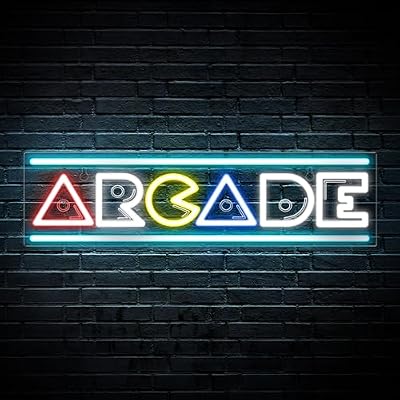
If your gaming room leans retro, the Kavaas Arcade sign is the pick. It spells out “Arcade” in a wide, low profile that fits neatly above a shelf, a cabinet, or a row of consoles where a tall sign would not work. The 3D engraved lettering catches the light differently from flat printed signs, giving the text depth even when the sign is switched off.
The Arcade sign needs a 5V/2A USB port or adapter, and the listing warns that a mismatched output can cause flickering or damage, so check your adapter before plugging in. The wall adapter is not included, and the sign is for indoor use only. One note on availability: an indexed crawl of the listing showed no featured offers at the time of writing, so confirm the listing is in stock before ordering.
Specs
- Size: 16.93 x 4.45 inches
- Weight: 1.05 pounds
- Material: Plastic backboard, LED flex neon tube, 3D engraved lettering
- Power: USB cord, 5.9 feet; requires 5V/2A output; wall adapter not included
- Lifespan: At least 50,000 hours
- Mounting: Wall mount, pre-drilled holes
- Use: Indoor only
- ASIN: B0F3J5XTF4
3. iQuincy Gamer Neon Sign (Gamepad Shape)

The iQuincy Gamer sign trades text for shape: a gamepad outline in blue that reads instantly as gaming decor, even from across the room. It is built on an acrylic backboard and comes with hooks, a hanging chain, and a USB cord in the box. At 16 by 10.8 inches it is a true poster-sized accent, large enough to anchor the wall behind a desk on its own.
Dimming is the feature that sets this sign apart from the two Kavaas picks. You can turn the glow down for late-night sessions instead of living with full brightness or switching the sign off. One note on availability: an indexed crawl of the listing showed no featured offers at the time of writing, so confirm the listing is in stock before ordering.
Specs
- Size: 16 x 10.8 inches
- Weight: 1.01 pounds
- Material: Acrylic backboard, LED neon flex tube
- Power: USB powered
- Controls: Dimmable
- Mounting: Wall mount, pre-drilled holes; hooks and hanging chain included
- Model: X2437
- ASIN: B0DM4FRW4K
4. JIARODEY Gamer Neon Sign (Game Controller)

The JIARODEY sign is the second gamepad-shaped pick here, and it earns its place with the remote control. Instead of reaching behind the sign for a switch, you adjust brightness from your chair, which matters when the sign hangs above a monitor and out of easy reach. The sign uses silicone LED strips on an acrylic backing and comes with stick hooks for hanging.
The listing states a height of 13.78 inches but does not publish full dimensions, so measure your wall space with that height in mind. The sign is USB powered at 5V DC, the power adapter is not included, and it comes in blue and pink colorways.
Specs
- Size: 13.78 inches tall (full dimensions not stated in the listing)
- Weight: 1.23 pounds
- Material: Silicone LED strips, acrylic backing
- Power: USB, 5V DC; power adapter not included
- Controls: Remote switch, dimmable
- Mounting: Wall mount, pre-drilled holes; stick hooks included
- Model: FS-SWSB
- ASIN: B0CNVZKGMG
5. IbayNawi Custom Neon Signs

The IbayNawi custom sign is the only pick here that lets you put your own words on the wall. You choose the text or logo, pick from 20 fonts and 10 colors, and select one to three lines with a backboard cut to the shape of the letters, a rectangle, or a heart. Sizes run from 10 inches up to 28 inches, so the same listing covers everything from a small gamertag above a monitor to a large sign spanning a full wall. The sign is made to order, which takes two to three days of production, and delivery runs seven to twelve days, so order ahead.
Unlike the USB-powered signs above, the IbayNawi ships with its own 12V power adapter, included in the box along with chains and screws for hanging. Dimming comes in two forms: an inline dimmer with three brightness levels, or a remote dimmer with three brightness levels plus dynamic modes. One note on availability: an indexed crawl showed no featured offers, while search listings show it in stock with thousands of recent orders, so confirm the listing before ordering.
Specs
- Size: 10 to 28 inches, custom
- Material: LED flex neon tube, polycarbonate backboard
- Power: 12V power adapter included (AC 110-240V, DC 12V 5A)
- Customization: 1 to 3 lines, 20 fonts, 10 colors, custom text or logo
- Backboard: Cut to shape of letters, rectangle, or heart
- Controls: Inline dimmer (3 brightness levels) or remote dimmer (3 brightness levels plus dynamic modes)
- Mounting: Wall, window, tabletop, or door; chains and screws included
- Production: 2 to 3 days; delivery in 7 to 12 days
- ASIN: B0BHP4RM3K
Comparison: Which Neon Sign Fits Your Room?
If you want the simplest, most recognizable gaming sign, the Kavaas “Game On” is the default pick: light, easy to hang, and readable on camera. The Kavaas Arcade sign is the better choice for retro rooms and wide, low wall spaces, though it demands a 5V/2A power source.
For shaped signs, the iQuincy and JIARODEY gamepads split on controls. The iQuincy is the larger of the two and includes a hanging chain, while the JIARODEY adds a remote, which is genuinely useful when the sign hangs out of reach. Both are dimmable and USB powered.
The IbayNawi custom sign is in a class of its own. It is the only option for a gamertag, a clan name, or a logo, and the only pick with a 12V adapter in the box. The trade-off is lead time: you wait a week or more for production and delivery, and you should double-check your spelling before submitting the design.
FAQ
Are LED neon signs safe to leave on all night?
LED flex neon signs run cool to the touch and draw very little power, so leaving one on overnight is far safer than leaving on a glass neon tube or an incandescent lamp. Even so, switch the sign off when you leave the house or go to sleep, and plug it into a switched outlet or a smart plug if you want it on a schedule. Check the listing for any indoor-use-only warning and keep the sign away from damp areas.
Do neon signs need a wall adapter?
Most gaming neon signs are USB powered, and many ship without a wall adapter in the box. You can power one from a spare USB port on your PC, a monitor hub, or a phone charger you already own. Check the required output: a sign that asks for 5V/2A may flicker on a 5V/1A port. Signs with a 12V plug adapter, like the custom IbayNawi, include the adapter and plug straight into a wall outlet.
How do I hang a neon sign without damaging the wall?
Almost every LED neon sign has pre-drilled holes in the backboard and ships with hooks or a hanging chain. For signs under about a pound and a half, adhesive hooks or small nails are usually enough, and adhesive hooks leave no holes when removed. Heavier signs deserve screws into a stud or a wall anchor. Check the sign’s weight and the included hardware before you start.
Can I dim a neon sign?
It depends on the model. The iQuincy and JIARODEY signs in this guide include dimming, and the IbayNawi custom sign offers an inline or remote dimmer with three brightness levels. The two Kavaas signs are on-or-off only. If late-night glare is a concern, pick a sign with dimming built in.
Conclusion
A neon sign is one of the cheapest ways to give a gaming room a finished look, and LED flex tubing makes it safe, cool-running, and easy to hang. The Kavaas “Game On” is the straightforward pick for most rooms, the Arcade sign suits retro setups and wide walls, the iQuincy and JIARODEY gamepads add shape and dimming, and the IbayNawi custom sign puts your own name on the wall. Whichever you choose, confirm the power requirements and measure your wall before you order.