- Top Pick: ASUS TUF Gaming GeForce RTX 5090 32GB GDDR7
- Runner-up: Lian Li LANCOOL 217 Mid-Tower Case (Black)
- Also consider: Recommended product
An RTX 5090 build is not a normal shopping list, because the graphics card dictates almost every other decision: the power supply wattage, the power connector, the case clearance, and even which CPU platform makes sense. Buying parts in the wrong order is how builders end up with a flagship card that does not fit their case or a power supply that lacks the right native connector.
Black Friday rewards a sequence, not a splurge. Some parts in this build are genuinely time-sensitive because specific models and variants sell through first, while others sit in deep, stable supply all year. Offers change throughout the sale, so treat this guide as a buying order: check the current price and current offers on each Amazon product page, and work through the tiers in order.
As an Amazon Associate, we earn from qualifying purchases.
Quick answer
Buy the RTX 5090 graphics card first, because the exact model you secure sets your power connector, card length, and slot width. Buy the ATX 3.1 power supply and the high-airflow case second, once those dimensions are fixed. Lock the CPU platform third. Memory and storage can wait until last, since compatible kits and drives stay widely available.
Buy first: the graphics card
Everything in an RTX 5090 build is downstream of the card. Board partners sell several distinct models that differ in length, thickness, cooler design, and connector placement, and the variant you actually get determines the case and power supply that follow. That is why the GPU is the one part to prioritise while the sale is young: the specific model matters more here than anywhere else in the build.
ASUS TUF Gaming GeForce RTX 5090 32GB GDDR7
The TUF card is a sensible anchor model: a triple-fan air cooler with a vapor chamber, a protective PCB coating, and a reinforced frame, in a 3.6-slot design. It uses a single 16-pin power connector, so it pairs cleanly with a native 12V-2×6 cable and no adapter chains. At 348 mm long it is large but not the largest 5090 variant, which keeps case choice manageable.
Specs:
- GPU: NVIDIA GeForce RTX 5090, Blackwell architecture
- Memory: 32GB GDDR7, 512-bit interface
- Card size: 348 mm long, 3.6-slot, PCIe 5.0
- Power connector: 1x 16-pin (12V-2×6)
- Cooling: triple axial-tech fans, vapor chamber, phase-change thermal pad
- Outputs: HDMI 2.1 and DisplayPort 2.1
- Maker guidance: NVIDIA lists 1000 W recommended system power for the RTX 5090
Compatibility checkpoint — before you pay: write down three numbers from the product page of the exact variant you are buying: card length, slot width, and connector type. Every later purchase is checked against those three numbers. If you switch 5090 models later, re-check all three, because lengths vary between board partners.
Buy second: the power supply and the case
With the card fixed, the next two purchases are the parts that must physically and electrically agree with it. A power supply bought too early risks missing the native connector or the wattage headroom; a case bought too early risks a card that overhangs the drive cages. Buy these two together, right after the GPU.
Corsair RM1000x 1000W ATX 3.1 Power Supply
The RM1000x in its current ATX 3.1 revision is built for exactly this class of card: a native 12V-2×6 connector, PCIe 5.1 compliance, and 1000 W of fully modular output that matches NVIDIA’s recommended system power for the RTX 5090. Fully modular cabling matters in a big case, because you only run the cables the build needs.
Specs:
- Output: 1000 W, fully modular
- Standard: ATX 3.1 and PCIe 5.1 compliant
- GPU connector: native 12V-2×6 cable included
- Efficiency: 80 Plus Gold and Cybenetics Gold rated
- Fan: 140 mm with Zero RPM mode
- Model: CP-9020271-NA
Compatibility checkpoint — power: confirm the listing is the ATX 3.1 revision with the native 12V-2×6 connector, not the older ATX 2.x revision sold under a similar name. Seat the 12V-2×6 plug fully at both ends and avoid sharp bends near the connector; a partially seated plug is the most common power mistake in 50-series builds.
Lian Li LANCOOL 217 Mid-Tower Case (Black)
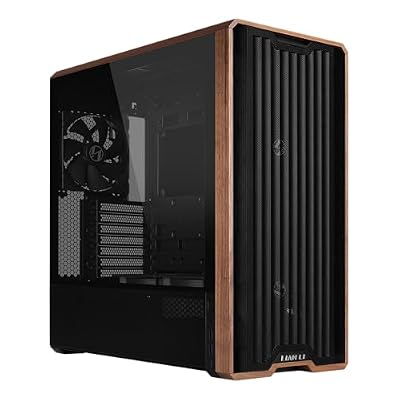
The LANCOOL 217 is an airflow-first mid-tower with a mesh front, genuine walnut trim, and five pre-installed PWM fans, including two large 170 mm front intakes that feed a long graphics card directly. Its maker-stated graphics card clearance of up to 380 mm swallows the 348 mm TUF card with room to spare.
Specs:
- Form factor: mid-tower, ATX motherboard support
- GPU clearance: up to 380 mm (maker-stated)
- Pre-installed fans: 5 PWM (2x 170 mm, 2x 120 mm, 1x 140 mm)
- Front panel: mesh with walnut wood trim
- Model: LAN217X (Black)
Compatibility checkpoint — fit: compare your card’s length against the case’s stated GPU clearance, then subtract the depth of any front-mounted radiator you plan to add. Also check card height: tall 5090 coolers plus a 12V-2×6 cable need side-panel room, so confirm the cable bend fits before closing the panel.
Buy third: the CPU platform
Only once the GPU, power, and case are settled should you commit to a processor, because the CPU choice locks the motherboard socket and memory type for the whole build. For a gaming-first RTX 5090 system, the AM5 platform with a 3D V-Cache chip is the natural anchor, with an upgrade path on the same socket.
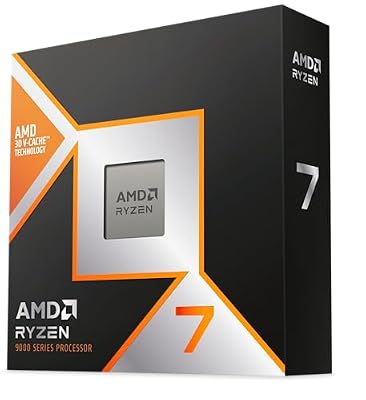
AMD Ryzen 7 9800X3D
The 9800X3D pairs 8 cores with a stacked 3D V-Cache for 96 MB of L3 cache, the specification that matters most for gaming workloads. It runs on the AM5 socket, so it needs a DDR5 motherboard — there is no DDR4 option on this platform, which is exactly why the platform decision comes before the memory purchase.
Specs:
- Cores and threads: 8 cores, 16 threads
- Cache: 96 MB L3 with AMD 3D V-Cache technology
- Clocks: 4.7 GHz base, up to 5.2 GHz boost (maker-stated)
- Socket: AMD AM5
- Memory support: DDR5
- TDP: 120 W (maker-stated)
Compatibility checkpoint — platform: your motherboard must be an AM5 board with a BIOS version that supports Ryzen 9000-series processors. If you prefer an Intel platform instead, the same logic applies in mirror image: pick the LGA1851 processor and board as one decision, then buy memory to match.
Can wait: memory and storage
DDR5 kits and NVMe drives are standardised, stocked in depth, and interchangeable between equivalent models in a way that graphics cards are not. Nothing about the choices above changes if you buy storage a week later, so these parts belong at the end of the order.
Samsung 9100 PRO 2TB PCIe 5.0 NVMe SSD
The 9100 PRO is Samsung’s Gen5 flagship: a PCIe 5.0 x4 M.2 2280 drive with maker-stated sequential speeds of up to 14,700 MB/s read and 13,400 MB/s write. The 2TB capacity leaves room for a large game library, and the standard 2280 form factor fits the primary M.2 slot on any current AM5 or LGA1851 board.
Specs:
- Capacity: 2TB
- Interface: PCIe 5.0 x4, NVMe, M.2 2280
- Sequential read: up to 14,700 MB/s (maker-stated)
- Sequential write: up to 13,400 MB/s (maker-stated)
- Model: MZ-VAP2T0B/AM
Compatibility checkpoint — lanes: a Gen5 drive only runs at Gen5 speed in a Gen5 M.2 slot, and on some boards that slot shares lanes with the graphics card slot. Check your motherboard manual’s lane-sharing table before assuming both run at full width. For DDR5, buy a two-stick kit rated for your platform’s EXPO or XMP profiles, and confirm it is on the board maker’s memory support list.
Common mistakes
- Buying the case first. A beautiful case with 330 mm of GPU clearance is a return waiting to happen when your 5090 variant measures 348 mm.
- Reusing an older power supply with adapter cables. Stacked 8-pin adapters add failure points; a native 12V-2×6 cable from an ATX 3.1 unit is cleaner.
- Underbuying wattage. The RTX 5090 alone is a 575 W board by NVIDIA’s specification; transient peaks argue for the full 1000 W class, not a smaller unit that seems close enough.
- Mixing up PSU revisions. Several brands sell older and newer revisions under near-identical names. The connector and standard on the listing decide, not the family name.
How to choose
Work the tiers in order and let each purchase answer one question. The GPU answers which model and dimensions you are building around. The PSU answers whether you have the wattage and the native connector. The case answers whether the card fits with airflow to spare. The CPU answers which socket and memory generation you are committed to. Storage and memory answer nothing structural, so they wait. At each step, verify the specification on the product page itself, because variant names in this market are deliberately similar. If a part in an early tier is unavailable in the exact variant you planned, pause the later tiers rather than substituting blindly — a different 5090 model can change both case and cable decisions.
Who should skip this buying order
Skip this sequence if you are not building around an RTX 5090 at all — the order is shaped by that card’s power and size, and a mid-range build can be bought in almost any order. Skip it if you plan to buy a complete prebuilt system, where the parts are already matched. Skip the GPU-first rush if you have no fixed build plan yet; buying a flagship card before the plan exists is how expensive parts end up stored in a cupboard. And if your current PC only needs one upgrade, buy that part and ignore the tiers entirely.
FAQ
Should I buy the RTX 5090 or the power supply first?
The graphics card first. The card’s connector type, length, and slot width decide which power supply and case are compatible, so the PSU purchase is only safe once the exact GPU variant is known.
Is a 1000 W power supply enough for an RTX 5090 build?
NVIDIA lists 1000 W as the recommended system power for the RTX 5090, and a quality ATX 3.1 unit of that rating with a native 12V-2×6 connector is the standard pairing. Builders planning heavy overclocks can step up a class for headroom.
What if the 5090 model I want is not available during the sale?
Hold the first tier rather than reordering the build. A different variant changes length and sometimes connector placement, so confirm the substitute’s dimensions against your planned case before buying anything downstream.
Can I reuse my existing case and DDR4 memory?
The case only if its stated GPU clearance exceeds your card’s length with room for cables and front fans. DDR4 cannot be reused on AM5 or current Intel platforms, which are DDR5-only, so memory from an older build will not carry over.
Final verdict
An RTX 5090 build succeeds or fails on sequencing. Secure the graphics card first and record its dimensions, then match it with a 1000 W ATX 3.1 power supply with a native 12V-2×6 connector and a case whose clearance genuinely fits it. Commit to the CPU platform third, and let memory and storage close out the build. Follow that order, and the sale becomes a checklist instead of a scramble.