- Top Pick: Thermalright HR10 2280 SSD Heatsink
- Runner-up: Thermalright TR-M.2 2280 Type A G SSD Heatsink
- Also consider: EZDIY-FAB Shield ARGB M.2 SSD Heatsink
Modern NVMe drives run hot. A fast Gen4 or Gen5 drive can heat up enough during a long game install or a big file transfer that its controller slows down to protect itself, and that slowdown shows up as stuttering load times. A standalone M.2 heatsink is the simplest fix: a shaped piece of metal, sometimes with a small fan, that pulls heat off the drive and gives it somewhere to go.
This guide covers five standalone heatsinks that mount on an M.2 2280 drive you already own. None of these picks include a drive, so you are paying only for cooling. Each pick states the M.2 lengths it fits.
As an Amazon Associate, we earn from qualifying purchases.
Quick Answer
For most builders, the Thermalright HR10 2280 is the best M.2 SSD heatsink: its twin heatpipes and tall fin stack handle hot Gen5 drives without a fan. The Sabrent Rocket is the premium passive alternative with copper heat pipes. Budget builders should look at the Thermalright TR-M.2 2280 Type A G, while the EZDIY-FAB ARGB and WAVLINK 880F add small fans for drives under heavy load.
Thermalright HR10 2280 SSD Heatsink

The HR10 2280 is a miniature tower cooler for a single M.2 drive, and the strongest passive pick here. Two 5 mm copper heatpipes run through a dense stack of aluminum fins, moving heat from the controller and NAND chips into far more surface area than any flat slab offers. Double-sided pads rated at 14.8 W/mK cover both faces of a double-sided drive.
At 43.8 mm tall, this is a big cooler, and that height is the main thing to plan around. It will not fit under a motherboard’s integrated M.2 armor, and it can clash with a graphics card below or a wide CPU air cooler, so measure the space above your M.2 slot first. In a standard ATX case with a clear slot, though, the HR10 simply works: no cables, no noise, nothing to configure. It suits a Gen5 drive that spends hours at full speed.
Specs
- Form factor: M.2 2280 only
- Cooling: Passive, 2 x 5 mm AGHP heatpipes, aluminum fin stack
- Dimensions: 90.3 x 23.7 x 43.8 mm
- Weight: 85 g
- Thermal pads: Double-sided, 14.8 W/mK
- Fan: None
Sabrent Rocket M.2 2280 SSD Heatsink (SB-HTSK)
Sabrent’s Rocket heatsink has been a familiar name in PC building for years, and it earns its place here with a copper-and-aluminum design that stays much lower than the tower-style picks. Three copper heat pipes run the length of an aluminum heat spreader, with a matching aluminum tray underneath, so the drive is sandwiched between two metal surfaces. Copper moves heat quickly away from the controller, while the grooved aluminum top gives that heat plenty of area to leave from. The whole unit measures about 3.1 by 1 by 0.9 inches.
The kit fits single-sided and double-sided M.2 2280 drives, and it is made for desktop computers rather than laptops or consoles. Installation is a screw-together sandwich with thermal tape in the box, and there is no software or cabling involved. Watch out for motherboard armor: many boards ship with their own M.2 cover, and this heatsink is meant to replace it, so check whether your board’s cover is removable before you buy.
Specs
- Form factor: M.2 2280, single-sided and double-sided
- Cooling: Passive, 3 copper heat pipes, aluminum spreader and tray
- Dimensions: About 3.1 x 1 x 0.9 in
- Thermal pads: Thermal tape included
- Fan: None
- Material: Copper heat pipes, aluminum
- Warranty: 1 year limited, 2 years with registration
Thermalright TR-M.2 2280 Type A G SSD Heatsink
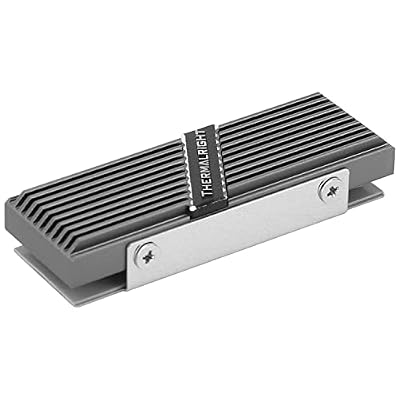
The TR-M.2 2280 Type A G is the budget pick, and it shows how far a simple aluminum block can go when it is shaped well. The finned aluminum body clamps over a 2280 drive with two thermal pads, one per side, so double-sided drives get cooled on both faces. At 70 by 24 by 13 mm it is barely larger than the drive itself, so it fits under most motherboard armor and beside most graphics cards.
This is the right pick when the goal is a modest temperature drop on a Gen3 or Gen4 drive that only gets hot during occasional heavy writes. It has no heatpipes and no fan, so it will not match the tower coolers on a sustained Gen5 workload, but it costs little, installs in minutes, and adds no noise or cables. For a second drive that mostly holds games, that is usually enough.
Specs
- Form factor: M.2 2280
- Cooling: Passive, finned aluminum body
- Dimensions: 70 x 24 x 13 mm
- Thermal pads: 2 included
- Fan: None
- Material: Aluminum alloy
- Color: Gray
EZDIY-FAB Shield ARGB M.2 SSD Heatsink

The EZDIY-FAB Shield is the only pick here that combines a small fan with addressable RGB lighting, and it is aimed at builders who want active cooling without a tall tower. A 20 mm PWM fan sits on top of an aluminum heatsink, and the fan speed follows the drive temperature through a standard PWM header, so it stays quiet at idle and spins up only when the drive is working hard. The 5V 3-pin ARGB lighting syncs with motherboard software, suiting windowed cases where the M.2 slot is on display.
Fitment is the most flexible in this guide: the kit supports 2280, 2260, 2242, and 2230 drives, so it works with shorter drives in compact boards as well as full-length ones. The trade-off is that it needs two motherboard headers, one PWM and one ARGB. For a Gen5 drive in a case with weak airflow, though, the active fan is a real advantage over passive slabs of the same size.
Specs
- Form factor: M.2 2280, 2260, 2242, 2230
- Cooling: Active, 20 mm PWM fan, aluminum heatsink
- Thermal pads: Included
- Fan: 20 mm PWM, 5V 3-pin ARGB sync
- Material: Aluminum
WAVLINK Heatsink 880F M.2 SSD Cooler

The WAVLINK 880F takes a different approach to active cooling: instead of a motherboard fan header, its small rotating fan runs from a SATA 15-pin power connector from the power supply. The fan spins at about 7,000 RPM, which moves a useful amount of air across the aluminum casing even in a case with almost no airflow over the M.2 slots. The aluminum body supports 2280 NVMe and SATA drives, and a thermal pad is included.
That SATA power connection is both the strength and the weakness of this design. It works on any board, even one with no free fan headers, but it means the fan runs at a fixed speed rather than following drive temperature, and a small fan at 7,000 RPM is audible in a quiet room. This is the pick for a drive in a hot, cramped case where the M.2 slot gets no airflow.
Specs
- Form factor: M.2 2280, NVMe and SATA
- Cooling: Active, rotating fan, about 7,000 RPM, aluminum casing
- Thermal pads: Thermal silicone pad included
- Fan: Small rotating fan, SATA 15-pin power
- Material: Aluminum
How to Choose
Start with the drive. A Gen3 drive that only reads games rarely needs more than a flat aluminum slab, while a Gen5 drive doing sustained writes benefits from heatpipes or a fan. Check the drive’s form factor first: almost every consumer NVMe drive is 2280, meaning 22 mm wide and 80 mm long, and every pick in this guide fits 2280. If your drive is shorter, only the EZDIY-FAB pick officially supports 2260, 2242, and 2230 lengths.
Next, measure clearance. Tower coolers like the HR10 stand 43.8 mm tall and need open space above the M.2 slot, while flat picks like the Thermalright TR-M.2 and the Sabrent Rocket stay under 25 mm and fit beneath most motherboard armor. Also check whether your board’s M.2 slot has its own cover, since a board cover and an aftermarket heatsink cannot share the same slot.
Then decide between passive and active cooling. Passive coolers are silent and need no cables, which suits most builds. A small fan helps when the drive sits in a dead-air pocket or runs at full speed for hours at a time. Fan picks need a header or a power lead, so confirm a spare PWM header or SATA power connector is within reach. Finally, check the thermal pads: double-sided pads matter for double-sided drives.
Who Should Skip It
Skip a standalone heatsink entirely if your motherboard already has a good integrated M.2 cooler, since adding a second cooler on top of it usually fits poorly and gains nothing. Laptop owners should also skip these desktop kits: the tall tower picks will not fit under a laptop base panel, and even the flat picks are often too thick for the tight space above a laptop drive.
A drive that only holds documents or a light operating system install can skip the upgrade too, since it rarely sustains heavy writes. If your drive already runs cool and your load times are steady, the money is better spent elsewhere in the build.
Frequently Asked Questions
Do I need a heatsink for a Gen4 NVMe drive?
Most Gen4 drives benefit from one during sustained writes, but a drive that mostly reads games may never get hot enough to throttle. If your board has an integrated M.2 cover, that is usually enough. A standalone heatsink is worth adding when the drive sits in a slot with no board cooling.
Will a tall heatsink fit under my graphics card?
It depends on the slot layout. The HR10 stands 43.8 mm tall, so it needs clear space above the M.2 slot and can clash with a graphics card in the slot directly below. Flat picks like the Thermalright TR-M.2 and the Sabrent Rocket stay low and fit in far more boards. Measure the gap before ordering a tower-style cooler.
Can I use a 2280 heatsink on a shorter M.2 drive?
Only if the heatsink lists that length. Most 2280 heatsinks are sized for an 80 mm drive and do not mount correctly on shorter ones. The EZDIY-FAB pick supports 2280, 2260, 2242, and 2230 drives, while the other four picks are 2280 only.
Does a fan-cooled heatsink need a motherboard fan header?
It depends on the model. The EZDIY-FAB fan uses a PWM header, so it needs a free fan header on the board. The WAVLINK 880F runs from a SATA 15-pin power connector instead, so it works on boards with no free headers but runs at a fixed speed. Passive heatsinks need no power at all.
Final Verdict
The Thermalright HR10 2280 is the best M.2 SSD heatsink for most PC builders, because its heatpipes and tall fin stack cool even hot Gen5 drives without adding noise or cables. The Sabrent Rocket is the premium passive alternative in a lower profile, and the Thermalright TR-M.2 2280 Type A G is the budget pick for everyday Gen3 and Gen4 drives. For drives under heavy load, the EZDIY-FAB ARGB adds a temperature-controlled fan, while the WAVLINK 880F suits hot, cramped cases.