Spinning hard drives are not glamorous, but they are still the cheapest way to hold a large pile of data on a desktop. Photo libraries, game installs you rarely touch, video projects, family backups and security footage all fit well on a mechanical drive, and a budget of under 200 dollars buys far more terabytes than any solid-state option. The decision for a desktop owner comes down to two forks: do you want a drive that bolts inside the tower or one that sits beside it on a cable, and how much speed and capacity do you actually need?
This guide is for people upgrading an older tower, building a budget PC, or adding a bulk-storage tier behind a fast boot drive. The picks below are limited to genuine desktop hard drives, meaning 3.5-inch internal models and a desktop-class external, and every one comes in under the cap. Portable pocket-sized drives were left out on purpose, since they are built for travel rather than for a desk. Shopping in 2026 means paying attention to interface speed, rotation speed, cache and whether a unit is new or renewed, and the five picks here were chosen to show those trade-offs side by side rather than to crown one drive for every situation.
Quick Picks

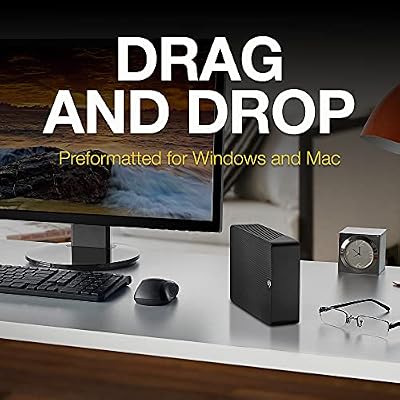
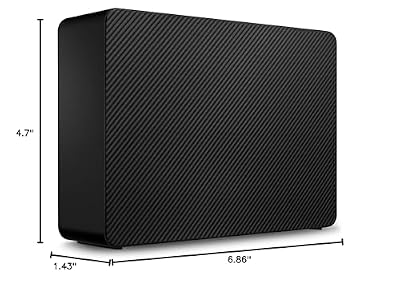
Seagate Expansion Desktop, 4TB, External Hard Drive, USB 3.0 (STKP4000400)




As an Amazon Associate we earn from qualifying purchases. Product prices and availability are accurate as of the date/time indicated.

MDD MAXDIGITALDATA 500GB 8MB Cache 5900RPM SATA 3Gb/s 3.5-inch Internal Desktop Hard Drive (Renewed)


As an Amazon Associate we earn from qualifying purchases. Product prices and availability are accurate as of the date/time indicated.
Seagate 1TB Desktop HDD Hard Drive - Internal (ST1000DM003)

As an Amazon Associate we earn from qualifying purchases. Product prices and availability are accurate as of the date/time indicated.
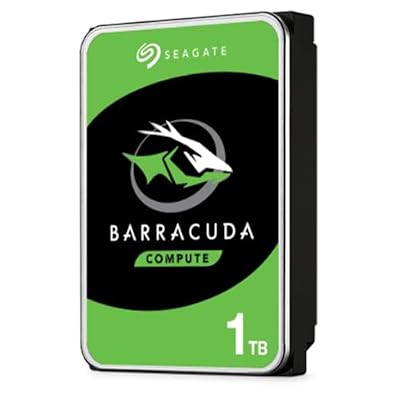
Seagate BarraCuda 1TB Internal Hard Drive HDD – 3.5 Inch SATA 6 Gb/s 7200 RPM 64MB Cache for Computer Desktop PC (ST1000DM010)


As an Amazon Associate we earn from qualifying purchases. Product prices and availability are accurate as of the date/time indicated.

Western Digital WD5000AVDS 500GB 5400RPM 32MB Cache SATA 3.0Gb/s 3.5inch Internal Hard Drive (for Desktop PC, Surveillance Storage) (Renewed)


As an Amazon Associate we earn from qualifying purchases. Product prices and availability are accurate as of the date/time indicated.
| Product | Best for | Key spec from the listing |
|---|---|---|
| Seagate Expansion Desktop 4TB | Big plug-in backup | 4TB, USB 3.0 external |
| MDD MAXDIGITALDATA 500GB | Tight-budget secondary drive | 500GB, 5900 RPM, 8MB cache, SATA 3Gb/s, renewed |
| Seagate 1TB Desktop HDD | Everyday internal storage | 1TB internal, model ST1000DM003 |
| Seagate BarraCuda 1TB | Fastest internal pick here | 7200 RPM, 64MB cache, SATA 6Gb/s |
| Western Digital WD5000AVDS 500GB | Camera and DVR storage | 500GB, 5400 RPM, 32MB cache, renewed |
How to Choose
Internal or external
An internal 3.5-inch drive needs a free bay, a SATA data cable and a SATA power connector. It costs less per terabyte and keeps the desk clear, but you must open the case. An external desktop drive plugs into a USB port and a wall outlet, and it can be moved to another computer in seconds. If your tower is a compact model with no spare bay, external is the realistic choice.
SATA speed, RPM and cache
Look at three numbers. SATA 6Gb/s is the current interface, while SATA 3Gb/s is the older one; both work on modern boards, but the older link caps peak transfers. A 7200 RPM spindle reads and writes faster than 5400 or 5900 RPM, which matters for game loading and large video files. Cache of 64MB helps with small repeated reads more than the 8MB or 32MB found on older drives. For cold storage, none of this matters much. For a library you edit or play from daily, it matters a lot, and the faster spindle is the cheapest upgrade available.
Capacity for your use
One terabyte holds a large photo archive and a handful of big game installs. Four terabytes suits a household that keeps every phone video and a complete backup of several computers. Avoid paying for capacity you will not fill, since an empty drive is wasted money and a half-full one is a hint to plan the next purchase; a cheap 500GB drive is plenty as a second drive for documents and downloads. When data matters, a second copy on a separate drive is worth more than extra size.
New versus renewed, and what budget drives skip
Renewed drives are refurbished and cost less, but they carry an unknown running history. Treat them as secondary storage and keep important files duplicated elsewhere. Budget drives skip features like extended warranties, vibration sensors and enterprise-grade error handling, so do not rely on a single cheap drive as your only copy of anything irreplaceable. Wedding photos, tax records and finished projects deserve a second home, whether that is another disk in a drawer or an online service.
The 5 Best Options
Seagate Expansion Desktop 4TB
This is the only external unit in the group, a 4TB desktop drive with a USB 3.0 connection, listed under model STKP4000400. It is built for an owner who wants a large backup target that sits next to the monitor and can be unplugged and carried to another computer.
- Strength: 4TB is the largest capacity here by a wide margin, enough for several computers’ worth of files.
- Strength: no case opening or cables inside the tower; it connects through a USB port.
- Trade-off: it needs a wall power adapter and desk space, and USB 3.0 transfer speeds are below those of an internal SATA 6Gb/s link.
Skip it if you want a hidden internal drive or need the quickest possible game loading. It also makes less sense for someone with a single laptop and a few gigabytes of files, since most of the 4TB would sit empty. For a family archive, though, the sheer headroom is the whole point of buying it.
MDD MAXDIGITALDATA 500GB
This is a renewed 3.5-inch internal drive with a 5900 RPM spindle, 8MB cache and a SATA 3Gb/s interface. It is the minimal option in the group, suited to a tower that needs one more place for documents, downloads and music rather than a serious archive.
- Strength: the lowest cost of entry among the internal drives, thanks to the renewed status.
- Strength: 500GB is ample for a data-only secondary drive.
- Trade-off: the 8MB cache and older SATA 3Gb/s link mean slower, less responsive transfers than the BarraCuda.
Skip it if you plan to run games from the drive or want a unit with a clean usage history. Pair it with a small solid-state boot drive and it works well as a quiet dumping ground for downloads, scanned paperwork and old project folders that you open only occasionally.
Seagate 1TB Desktop HDD
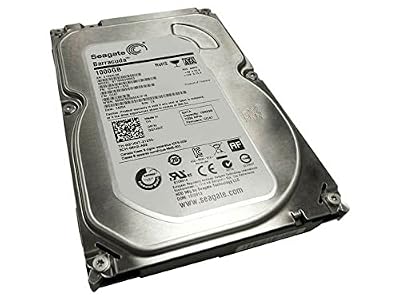
Listed as an internal drive under model ST1000DM003, this 1TB Seagate is a straightforward choice for upgrading an older tower or adding bulk space. It gives you double the capacity of the renewed 500GB drives without moving into the larger external category.
- Strength: 1TB of internal storage covers photos, documents and a modest media library.
- Strength: the Seagate desktop line is common, so compatibility with standard 3.5-inch bays is rarely a worry.
- Trade-off: the listing offers no cache or RPM figures, so you cannot compare speed directly against the BarraCuda.
Skip it if the spec sheet details matter to you and you would like to see RPM and cache stated clearly. Buyers who just want a familiar brand and a round terabyte for a family PC will find it easy to live with, and the capacity doubles what either renewed 500GB model can hold.
Seagate BarraCuda 1TB
The BarraCuda spells out its credentials: 3.5-inch, SATA 6Gb/s, 7200 RPM, 64MB cache, listed under model ST1000DM010 for desktop PC use. These specifications make it the performance pick among the internal drives in this group.
- Strength: 7200 RPM and 64MB cache give it the best responsiveness of the mechanical drives listed.
- Strength: the SATA 6Gb/s interface matches what current motherboards expect.
- Trade-off: it is still a mechanical drive, so boot times and app launches will lag behind a solid-state drive.
Skip it if your only goal is cheap cold storage and you do not need the faster spindle. If you do pick it, check that your motherboard offers a SATA 6Gb/s port so the drive can use its full interface, and plug it into that port rather than an older one.
Western Digital WD5000AVDS 500GB
This renewed 500GB drive spins at 5400 RPM with a 32MB cache over SATA 3.0Gb/s, and the listing names desktop PC and surveillance storage as intended uses. That focus on continuous recording makes it a natural fit for a home camera recorder or a small DVR build.
- Strength: the surveillance-oriented positioning suits steady, sequential writing.
- Strength: 32MB cache is a step above the 8MB found on the MDD drive.
- Trade-off: it is renewed and older in design, with a slower 5400 RPM spindle.
Skip it if you want a drive for demanding file work or a new unit with a fresh warranty. A home recorder that writes video around the clock does not need blazing speed, which is why a modest, older design can still make sense for that single job.
Which One Fits Your Situation
You are backing up a whole household
The Seagate Expansion Desktop 4TB gives the most space and can be shared across computers, so one drive covers every laptop and tower in the home. Set a recurring backup schedule and it becomes a quiet safety net rather than a box of forgotten files.
You are upgrading an old gaming tower
The Seagate BarraCuda 1TB, with its 7200 RPM spindle and SATA 6Gb/s link, is the better bulk-game library than the slower drives. Keep the games you play weekly on a solid-state drive and park the rest on the BarraCuda, where longer loading screens matter less.
You need a cheap second drive for documents
The MDD MAXDIGITALDATA 500GB or the Seagate 1TB Desktop HDD will do the job; pick the Seagate if you want double the room. Either one will hold years of spreadsheets, downloads and music without strain.
You are building a home camera recorder
The Western Digital WD5000AVDS is described for surveillance use, which makes it the sensible starting point. Capacity is modest at 500GB, so plan to overwrite old footage on a loop instead of keeping everything.
Common Mistakes
- Choosing a portable pocket drive for a permanent desktop role, then dealing with cables and bus-powered limits.
- Ignoring the SATA generation and expecting full speed from an older 3Gb/s drive.
- Treating a renewed drive as primary storage with no backup.
- Buying capacity first and forgetting that a second copy matters more than extra terabytes.
- Forgetting to check for a free 3.5-inch bay and a spare SATA power lead before ordering an internal drive.
Related guides
- Usb C Kvm Switch For Two Laptops And Two Monitors
- Vertical Laptop Stand For Dual Laptop Desk Setup
- Nvme Enclosure With Active Cooling For Mac Mini
Frequently Asked Questions
Is a hard drive still worth buying today?
For bulk storage, yes. Mechanical drives still cost much less per terabyte than solid-state drives, which makes them sensible for archives, backups and media libraries that do not need instant access.
Will a 7200 RPM drive feel much faster?
You will notice it in large file copies and game loading compared with 5400 or 5900 RPM models, but it will not match a solid-state drive for booting or launching apps.
Can I install an internal drive in any desktop?
You need a free 3.5-inch bay, a SATA data port on the motherboard and a SATA power connector. Many compact cases lack a spare bay, which is why an external drive can be easier. Cable length and a clear data route also matter, so measure from the tower to the SATA ports before you commit.
Are renewed drives safe to use?
They can work well, but their history is unknown. Use them for secondary data and keep important files copied to another drive or storage service.
Top picks from this guide
SeagateSeagate BarraCuda 1TB Internal Hard Drive HDD – 3.5 Inch…MDD MAXDIGITALDATAMDD MAXDIGITALDATA 500GB 8MB Cache 5900RPM SATA 3Gb/s 3.5-inch Internal…Western DigitalWestern Digital WD5000AVDS 500GB 5400RPM 32MB Cache SATA 3.0Gb/s 3.5inch…SeagateSeagate 1TB Desktop HDD Hard Drive - Internal (ST1000DM003)