A RAID enclosure is where a pile of loose drives becomes one tidy volume, and at under 200 dollars you are buying the box only, not the disks. That distinction trips people up. These are diskless hardware-RAID cases that connect to a computer over USB or eSATA, so the real budget also covers the drives you plan to slide inside. The enclosure decides how many bays you get, which RAID levels it can build, and how fast the link to your computer can run.
This guide suits video editors who want mirrored project drives, home-lab tinkerers building a small archive, and photographers tired of juggling loose external disks. Eight enclosures from the 2026 field are compared, from two-bay mirrors to four-bay boxes with eight RAID modes. One reminder before you shop: RAID protects against a single failed disk, but it is not a backup, so keep a second copy of anything you cannot replace.
Quick Picks

TERRAMASTER D2-320 USB RAID Enclosure 2-Bay (Diskless) | USB 3.2 Gen 2 10Gbps Type C Direct Attached Storage Supports RAID 0, 1, Single, JBOD (Diskless)


As an Amazon Associate we earn from qualifying purchases. Product prices and availability are accurate as of the date/time indicated.

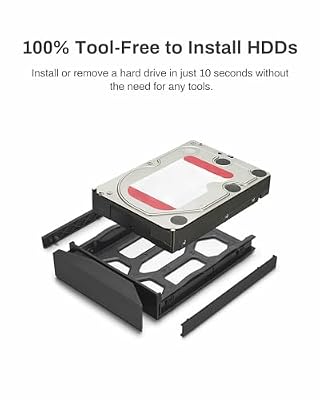
CENMATE Aluminum 2 Bay Hard Drive RAID Enclosure with Cooling Fan for 2.5“/3.5" SATA HDD/SSD with USB A/C 3.0, Tool-Free HDD Enclosure, 4 Modes


As an Amazon Associate we earn from qualifying purchases. Product prices and availability are accurate as of the date/time indicated.

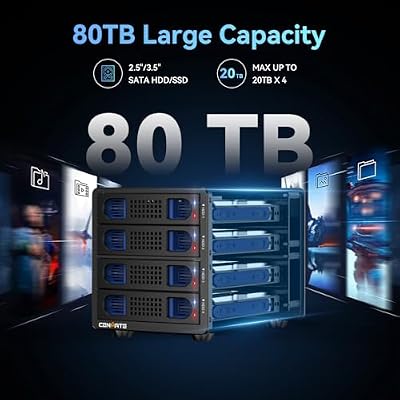
CENMATE Aluminum 4 Bay Hard Drive RAID Enclosure with Cooling Fan for 2.5/3.5" SATA HDD/SSD with USB A/C 3.0+eSATA Cable, 3.5 Hard Drive Reader Supports 80TB Capacity, 8 RAID Modes, DAS(NO NAS)


As an Amazon Associate we earn from qualifying purchases. Product prices and availability are accurate as of the date/time indicated.

MAIWO Aluminum 2 Bay Hard Drive RAID Enclosure, USB 3.0 5Gbps | Cooling Fan for 2.5/3.5 inch SATA SSD/HDD Enclosure, 4 RAID Modes, 48TB Capacity


As an Amazon Associate we earn from qualifying purchases. Product prices and availability are accurate as of the date/time indicated.
CENMATE Aluminum 2 Bay Hard Drive RAID Enclosure(ASM1156R chip) | 5Gbps RAID Enclosure with Cooling Fan for 2.5“/3.5" SATA HDD/SSD with USB A/C 3.0, Tool-Free HDD Enclosure, 4 RAID Modes


As an Amazon Associate we earn from qualifying purchases. Product prices and availability are accurate as of the date/time indicated.

MAIWO 4 Bay RAID Enclosure for 3.5" SATA HDD with Cooling Fan, 8 RAID Modes | 5Gbps,Raid Normal,0,3,5,1/10,Clone/Large(jbod),Up to 96TB Capacity,4 Bay DAS with RAIDs,12V/7A Power Supply,Aluminum Casing


As an Amazon Associate we earn from qualifying purchases. Product prices and availability are accurate as of the date/time indicated.

MAIWO Dual Bay Hard Drive Enclosure for 2.5 Inch SATA SSD/HDD with RAID 0/1/JBOD/NORMAL, SSD to USB 3.0 Adapter with UASP, 16TB Capacity, Tool Free External HDD Enclosure Reader


As an Amazon Associate we earn from qualifying purchases. Product prices and availability are accurate as of the date/time indicated.

CENMATE Aluminum 2 Bay Hard Drive Enclosure with Cooling Fan for 2.5“/3.5" SATA HDD/SSD with USB A/C 3.0, Support Hot Swappable, Tool-Free HDD Enclosure, DAS(NO RAID/NAS)


As an Amazon Associate we earn from qualifying purchases. Product prices and availability are accurate as of the date/time indicated.
| Product | Best for | Key spec from the title |
|---|---|---|
| TERRAMASTER D2-320 | Fastest two-bay link | USB 3.2 Gen 2 10Gbps Type C, RAID 0, 1, Single, JBOD |
| CENMATE 2 Bay (ASM1156R) | Simple 5Gbps mirror | ASM1156R chip, 5Gbps, cooling fan |
| CENMATE 2 Bay RAID | Tool-free everyday use | 2.5/3.5 inch SATA, USB A/C 3.0, 4 modes |
| MAIWO 2 Bay RAID | Large-capacity mirrors | USB 3.0 5Gbps, 4 RAID modes, 48TB |
| MAIWO Dual Bay 2.5 inch | Laptop-drive and SSD builds | RAID 0/1/JBOD/NORMAL, UASP, 16TB |
| CENMATE 4 Bay RAID | Four-disk setups with eSATA | USB 3.0 plus eSATA cable, 2.5/3.5 inch |
| MAIWO 4 Bay RAID | RAID 5 and 10 builds | 8 RAID modes, 5Gbps, up to 96TB |
| ORICO 4 Bay RAID | Direct attached expansion | 8 RAID modes, 3.5 inch HDD, up to 88TB |
How to Choose
Bay count and RAID levels
Two bays can mirror (RAID 1) or stripe (RAID 0). Four bays open RAID 5 and 10, which keep working after a single disk failure while giving more usable space than a mirror. If a listing names only a few modes, that is all it offers. Choose bays by how much data you must protect today, plus a year of growth.
Interface and speed
Interfaces range from 5Gbps USB 3.0 links to 10Gbps USB 3.2 Gen 2 over Type-C. A pair of spinning disks seldom saturates 5Gbps, so the faster link mainly helps with SSD builds and large sequential copies. Check your computer’s ports before paying for a faster link you cannot use, and note that eSATA only helps if a host port exists.
Drive compatibility and capacity ceilings
Some units accept both 2.5 and 3.5 inch SATA drives, others only one size. Listings quote maximum capacity, such as 16TB, 48TB, or 96TB, which is a total across the bays, so divide by the bay count to see the per-drive limit. Mixed-size disks in a mirror waste the extra space.
Cooling, noise, and corner-cutting
A fan helps when several drives run for hours, but it adds noise on a desk. Budget cases often skip hot-swap trays, so replacing a drive means powering down. Ignore claims about speed that omit the interface name, and expect a power adapter and cable in the box rather than premium extras.
The 8 Best Options
TERRAMASTER D2-320
The D2-320 pairs two bays with USB 3.2 Gen 2 at 10Gbps over Type-C and supports RAID 0, 1, Single, and JBOD. That makes it the pick for editors and photographers who want a fast mirrored working volume on a modern laptop, and who plan to fill it with SSDs or high-capacity hard drives. The Single and JBOD options also let you treat the two bays as separate disks on days when a mirror is not needed, which makes it flexible for a mixed workflow.
- Strength: The fastest listed link in the group, at 10Gbps.
- Strength: Clear RAID mode list including JBOD and Single.
- Trade-off: Only two bays, so no RAID 5.
Skip it if you want four-disk redundancy or the option to build RAID 5.
CENMATE 2 Bay (ASM1156R)
This CENMATE lists the ASM1156R chip, a 5Gbps link, a cooling fan, and support for 2.5 and 3.5 inch SATA drives over USB A or C. It suits someone who values knowing the controller before buying and wants a straightforward mirror for family photos and documents. A named chip makes it easier to look up driver notes and user reports before you commit, which is a real advantage when you will trust the box with data you cannot recreate.
- Strength: The controller chip is named in the title.
- Strength: Works with both drive sizes and both USB cable ends.
- Trade-off: Limited to two bays and a 5Gbps link.
Skip it if you need a faster interface than 5Gbps.
CENMATE 2 Bay RAID
A near sibling without the chip callout: aluminum, a cooling fan, tool-free installation, USB A/C 3.0, and four modes. It is easy for first-time builders, since drives drop in without a screwdriver and the case dissipates heat through its metal shell. It makes sense for a small office that wants a shared mirrored drive on one desktop and nothing more complicated than that.
- Strength: Tool-free design speeds up drive installs.
- Strength: Aluminum shell and fan help with cooling.
- Trade-off: The title offers fewer controller details than the other CENMATE.
Skip it if you want the chip or speed reassurance.
MAIWO 2 Bay RAID
MAIWO lists USB 3.0 5Gbps, a cooling fan, 2.5 and 3.5 inch SATA support, four RAID modes, and a 48TB capacity ceiling. It suits buyers who plan to start with large hard drives and want room for upgrades without changing the case. Starting with two matching drives and swapping to larger ones later is a common upgrade path for a growing media library, since the enclosure stays put while the disks change.
- Strength: A 48TB ceiling leaves plenty of growth room.
- Strength: Four RAID modes cover mirror, stripe, and spanning.
- Trade-off: USB 3.0 only, with no faster option.
Skip it if you need the 10Gbps class link.
MAIWO Dual Bay 2.5 Inch
This enclosure is for 2.5 inch SATA SSD and HDD only, with RAID 0, 1, JBOD, and Normal modes, a USB 3.0 adapter with UASP, a 16TB capacity, and tool-free installation. It fits laptop-drive owners building a compact mirrored SSD pair. A mirrored pair of small drives suits a traveling photographer who wants a duplicate of each shoot in a case that fits in a camera bag, with no desktop-size disks to carry.
- Strength: UASP is named, which helps with SSD transfers.
- Strength: Small footprint for 2.5 inch drives.
- Trade-off: Cannot hold 3.5 inch drives.
Skip it if you own desktop-size hard drives.
CENMATE 4 Bay RAID
The four-bay CENMATE lists a cooling fan, support for 2.5 and 3.5 inch drives, and a USB A/C 3.0 plus eSATA cable. It is aimed at users who want to combine four disks and may have an eSATA port on an older desktop. The reader-style design that accepts both sizes of SATA drive also makes it handy for anyone migrating files off a shelf of old disks.
- Strength: eSATA cable adds a connection option.
- Strength: Four bays open more RAID choices.
- Trade-off: The visible title does not list the full set of RAID modes.
Skip it if you need a published RAID mode list.
MAIWO 4 Bay RAID
MAIWO states eight RAID modes (Normal, 0, 3, 5, 1/10, and Clone and Large JBOD), 5Gbps, a cooling fan, and a 96TB capacity for 3.5 inch SATA drives. It suits home-lab users who want RAID 5 or 10 and a lot of space. With four large disks, RAID 5 keeps the array alive after a single failure while giving more usable room than a mirror, which is the usual reason people step up from two bays.
- Strength: Eight modes including RAID 5 and 10.
- Strength: The highest capacity ceiling in the roundup.
- Trade-off: 3.5 inch drives only.
Skip it if you plan to use 2.5 inch drives.
ORICO 4 Bay RAID
ORICO lists eight RAID modes for 3.5 inch HDDs, up to 88TB, as external direct attached storage with efficient expansion. It suits buyers extending a desktop or laptop with a bulk archive. It is a sensible fit for a household that wants one box for years of video, scans, and backups and does not mind that the title leaves the connection details for the product page.
- Strength: Eight RAID modes in a four-bay case.
- Strength: Positioned as direct attached expansion.
- Trade-off: The visible title does not name the interface speed.
Skip it if you need to confirm 10Gbps connectivity.
Which One Fits Your Situation
You edit video on a modern laptop
The TERRAMASTER D2-320 offers the fastest listed link and a straightforward mirror or stripe. Pair it with two SSDs if scrubbing through footage matters, or two large hard drives if sheer space is the goal.
You want a family photo vault
A CENMATE 2 Bay model in RAID 1 gives a mirror with tool-free installation. Fill it with two identical drives, and store the phone-photo backup elsewhere too, because a mirror copies deletions as well as new files.
You are building a home-lab archive
MAIWO 4 Bay RAID or ORICO 4 Bay RAID, both with eight RAID modes. Choose MAIWO if you want the higher listed capacity ceiling and a published interface speed, and ORICO if the direct attached storage framing suits a single-desktop setup.
You have laptop SSDs lying around
MAIWO Dual Bay 2.5 Inch is built for exactly that. Two matching small drives turn leftovers from old laptops into a compact mirrored volume for documents and photos.
Common Mistakes
- Treating RAID as a backup, when a deleted file disappears from every disk in the set.
- Buying a 3.5 inch-only case for 2.5 inch drives, or the reverse.
- Mixing different drive sizes in a mirror and wasting the extra capacity.
- Paying for a 10Gbps link when the computer has no matching port.
- Forgetting a spare drive for the day one fails, then waiting a week for a replacement.
Related guides
- Usb C Kvm Switch For Two Laptops And Two Monitors
- Vertical Laptop Stand For Dual Laptop Desk Setup
- Nvme Enclosure With Active Cooling For Mac Mini
Frequently Asked Questions
Are these enclosures diskless?
Generally yes. The TERRAMASTER listing says so outright, and the others describe enclosures for SATA drives you supply yourself. Plan to buy the drives separately and match them in size and speed.
Which RAID level should I pick?
RAID 1 for safety, RAID 0 for speed, RAID 5 for balance on four bays. Remember that RAID 0 loses everything if either disk fails, so use it only for scratch data you can rebuild.
Do I need a fan?
For long copy sessions, a fan helps keep temperatures down, though it adds noise. Most listings here include one, so the decision is mostly about where the box will sit.
Can I move the array to another computer?
Often the RAID is built by the enclosure, so the set stays with the box. Plugging the same enclosure into another computer usually works, but moving the disks into a different brand of case may not, so keep the original housing.