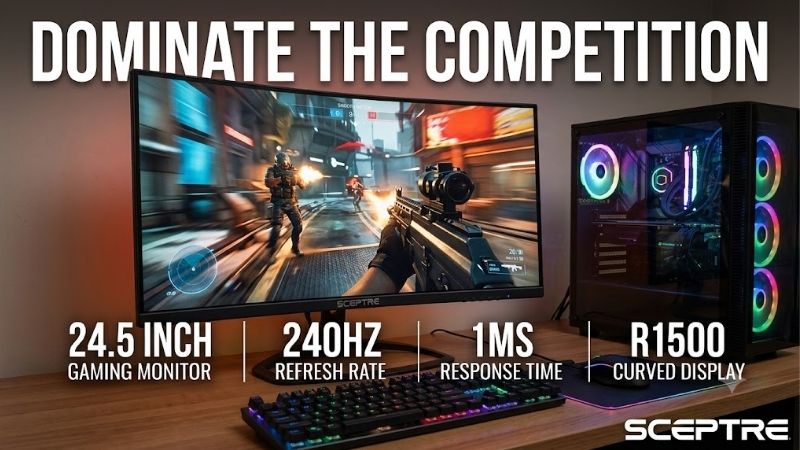
The sceptre 24.5 inch gaming monitor 240hz search most closely matches the Sceptre E255B-FWD240, a Full HD gaming monitor built around a high refresh rate, a VA panel, AMD FreeSync support, and multiple video inputs. It is worth considering for budget-conscious PC gamers who prioritize fast gameplay over high resolution, but the exact revision matters. Sceptre lists different specifications and prices for its 2024 and 2025 versions, and the newer model’s manufacturer-listed price makes competing monitors especially important to consider.
- Sceptre 24.5 inch gaming monitor 240Hz: verdict and value
- Specifications and model identification
- Design, build, and ergonomics
- Image quality: What the VA panel gets right
- Gaming performance: Is 240Hz enough to make a difference?
- Connectivity and everyday use
- Main drawbacks to consider before buying
- Who should buy it, and who should skip it?
- Alternatives worth considering
- Frequently asked questions
- Final verdict
Sceptre 24.5 inch gaming monitor 240Hz: verdict and value
The Sceptre E255B-FWD240 is a potentially useful 240Hz monitor for competitive gaming, particularly if you find the correct version at a substantially discounted retail price. Its 1920 × 1080 resolution is relatively easy for a gaming PC to drive at high frame rates, its VA panel offers a published 3,000:1 typical contrast ratio, and its two HDMI 2.0 and two DisplayPort 1.4 inputs provide flexibility when connecting different devices.
However, the 240Hz number does not tell the whole story. A monitor’s actual motion clarity depends on pixel transitions, overdrive behavior, overshoot, and input latency, not just how frequently the screen refreshes. I could not establish a reliable independent laboratory review with comprehensive response-time and input-lag measurements for this exact Sceptre revision. Its competitive performance therefore cannot be confidently ranked against the best-tested esports displays.
There is also a price problem. On October 20, 2026, Sceptre’s US product page displayed $299.99 for its 2025 E255B-FWD240 variant. That is the manufacturer’s displayed listing price, not a confirmed checkout price from an independent retailer. At that amount, a better-documented 240Hz IPS monitor with a more adjustable stand and a longer warranty can be a much stronger purchase. The Sceptre becomes more interesting when the actual retail offer is substantially lower.
My recommendation is to consider the E255B-FWD240 only after verifying the complete model revision, available return policy, and final selling price. Do not pay a premium simply because it advertises 240Hz and 1ms response time.
Specifications and model identification
Sceptre uses closely related E255B-FWD240 names for different versions. The manufacturer identifies one as the 2024 model and another as the 2025 version. Its product page URL for the latter includes the identifier E255B-FWD240T, even though the page heading displays E255B-FWD240 (2025).
The review below focuses on the 2025 specification listing where revision-specific details are available. Earlier versions may differ, so the following table should not be treated as a universal specification sheet for every E255B-FWD240 product listing.
| Specification | E255B-FWD240 (2025) |
|---|---|
| Screen size | 25-inch class, approximately 24.5 inches |
| Native resolution | 1920 × 1080 (Full HD) |
| Panel technology | VA |
| Aspect ratio | 16:9 |
| Maximum refresh rate | 240Hz |
| Advertised response time | 1ms blur reduction |
| Typical brightness | 300 cd/m² |
| Typical contrast ratio | 3,000:1 |
| Color coverage | 100% sRGB, manufacturer-listed |
| Adaptive sync | AMD FreeSync |
| HDMI inputs | 2 × HDMI 2.0 |
| DisplayPort inputs | 2 × DisplayPort 1.4 |
| Audio | 2 × 2W speakers; 3.5mm headphone output |
| VESA mounting | 100 × 100mm on the 2025 revision |
| Ergonomics | Tilt and swivel adjustment; fixed stand height |
| Warranty | One year, limited parts and labor |
Sceptre’s older product page and manual contain different details, including a different brightness figure and mounting pattern. That is why buyers should match the full product name and revision to the manufacturer’s specifications instead of relying on a generic marketplace title.
Design, build, and ergonomics
The E255B-FWD240 has a conventional flat-screen gaming monitor design. The 2025 model uses a black chassis, a matte display surface, and back-cover LED lighting. It is visually suited to a gaming desk, although the lighting should be considered a decorative feature rather than a substitute for adjustable RGB synchronization or elaborate ambient lighting.
The monitor is relatively light. Sceptre lists a weight of approximately 6.72 pounds with the stand and 5.89 pounds without it for the 2025 version. That makes it comparatively easy to reposition on a desk or install on a compatible monitor arm.
The stand allows tilt and a limited amount of swivel, but it does not provide the same height adjustment as more fully equipped gaming monitors. If the screen sits too low for your preferred viewing position, a compatible monitor arm can help. Check the revision before buying the arm: Sceptre lists a 100 × 100mm VESA pattern for its 2025 version, while the older manual and product documentation refer to a smaller 75 × 75mm pattern.
This difference matters because mounting compatibility is determined by the actual holes on the back of the monitor, not its screen size. You should also check the supported monitor weight and the arm’s range of movement.
The stand is adequate for a basic setup, but its limited adjustment options make the monitor less attractive for users who spend many hours a day switching between gaming, office work, and other desktop tasks. Competitors with height, tilt, and swivel adjustments offer more flexibility without requiring another accessory.
Image quality: What the VA panel gets right
The 2025 E255B-FWD240 combines a VA panel with a 1920 × 1080 native resolution. That is a practical configuration for a compact gaming monitor designed to prioritize high refresh rates.
Its main image-quality advantage is contrast. Sceptre lists a typical 3,000:1 contrast ratio, which is considerably higher than the approximately 1,000:1 typical ratio listed for many conventional IPS panels. A higher native contrast ratio can make dark scenes look more convincing and help separate shadows from brighter objects in games and movies.
However, contrast specifications alone do not establish black-level uniformity, local dimming performance, or HDR quality. The E255B-FWD240 does not support HDR according to its official 2024 specification page, and the 2025 version does not list HDR as a feature. Buyers should not expect the high dynamic range experience of a more advanced display.
Sceptre lists 300 cd/m² typical brightness and 100% sRGB coverage for the 2025 revision. These specifications are adequate on paper for everyday indoor gaming, web browsing, and general desktop use. A matte screen finish also helps reduce distracting reflections compared with a glossy screen in some lighting conditions.
The color coverage figure should not be confused with independently measured color accuracy. Coverage indicates how much of a defined color space the monitor can reproduce; it does not establish how closely its default colors match a reference standard. Professional photo editing, color grading, and print work require more evidence about calibration, uniformity, and accuracy than is available for this model.
Full HD resolution also creates a clear trade-off. On a roughly 24.5-inch display, 1920 × 1080 provides a reasonable balance between detail and gaming performance, but text and fine graphics will not look as sharp as they do on a similarly sized 1440p display. This is not necessarily a problem in competitive games, where high frame rates may be more valuable than additional pixels.
Overall, the panel specifications suggest a useful combination of contrast and gaming-oriented resolution. The lack of independent color and uniformity measurements means it is best treated as a general gaming display rather than a professional creator monitor.
Gaming performance: Is 240Hz enough to make a difference?
The monitor’s defining feature is its maximum 240Hz refresh rate. At 240Hz, the screen can refresh approximately 240 times per second, compared with 144 times per second on a 144Hz display or 60 times per second on a standard 60Hz monitor.
The interval between refreshes is approximately 4.17 milliseconds at 240Hz, 6.94 milliseconds at 144Hz, and 16.67 milliseconds at 60Hz. These intervals describe refresh timing, not the monitor’s complete response time or total input latency. They illustrate why a high-refresh screen can display new frames more frequently, but they do not guarantee a particular competitive advantage.
The E255B-FWD240 is best suited to games where high frame rates are realistic, such as competitive shooters, esports titles, and lighter multiplayer games. The Full HD resolution puts less rendering demand on a GPU than 1440p or 4K, giving compatible systems a better opportunity to approach high frame rates.
A 240Hz monitor cannot create additional frames that the computer does not render. If your PC produces 90 FPS in a demanding game, the monitor remains useful, but you will not experience the full benefit of 240 unique frames per second. Check your actual performance in the games you play before choosing an upgrade.
The monitor also supports AMD FreeSync, which is designed to synchronize display refresh behavior with compatible graphics output. This can reduce tearing when frame rates fluctuate. The exact supported variable-refresh range and compatibility behavior should be checked for the selected revision and connection.
Sceptre advertises a 1ms blur-reduction response time. This should not be interpreted as proof that all transitions take 1ms under normal operation. Blur-reduction marketing figures can refer to specific display modes rather than the complete range of pixel transitions. Overdrive settings can also trade slower transitions for overshoot, creating distracting inverse ghosting if configured aggressively.
This is the main limitation in assessing the Sceptre as a serious esports monitor. I could not verify standardized independent measurements of its input lag, pixel-transition times, or overshoot across refresh rates for the exact revision reviewed here. Published specifications establish that it supports 240Hz, but not that its motion clarity matches higher-performing competitive displays.
For casual competitive gaming, the specifications are promising. For tournament-focused players, the lack of reliable comparative measurements is a reason to favor a well-tested alternative unless the Sceptre is inexpensive and easy to return.
Connectivity and everyday use
The 2025 model lists two HDMI 2.0 ports and two DisplayPort 1.4 inputs. Sceptre specifies support for 1920 × 1080 at up to 240Hz over both connection types.
That arrangement is convenient if you use multiple devices, such as a gaming desktop, a second PC, or a compatible laptop with video output. The monitor also includes a 3.5mm headphone output for connecting an external headset or speakers.
The bundled DisplayPort cable is useful for a PC gaming setup, although you should verify the included accessories for the actual version you order. For a desktop PC, DisplayPort is a sensible first choice because it is widely supported by modern graphics cards and is suitable for the monitor’s maximum resolution and refresh rate.
The included speakers are rated at 2W each. They are convenient for basic system sounds or occasional video calls, but buyers should not expect dedicated gaming audio quality or strong bass. A gaming headset or external speakers will be more appropriate for games that rely on precise positional sound.
The monitor also offers FPS and RTS picture presets, adjustable gamma, overdrive, blue-light adjustment, anti-flicker functionality, and several general picture modes. These settings provide some flexibility to adjust the picture for different games and viewing conditions.
There is no listed USB-C video input or USB hub on the reviewed specification. This is not a major disadvantage for a dedicated gaming desktop, but it makes the monitor less convenient for a modern laptop workstation with one-cable docking requirements.
Main drawbacks to consider before buying
The most important downside is the absence of independently verified motion-performance measurements. A 240Hz maximum refresh rate is appealing, but pixel response, overshoot, and input latency determine how much of that potential translates into useful gaming performance.
The second issue is resolution. Full HD is practical for maintaining high frame rates, but buyers who also use their monitor for detailed text work, image editing, or expansive creative applications may prefer 1440p.
Third, the panel technology involves trade-offs. VA’s published contrast ratio is attractive, but VA panels can exhibit slower dark transitions on some models. Whether this causes noticeable smearing on the E255B-FWD240 cannot be established confidently without reliable measurements of this exact monitor.
Fourth, the stand offers fewer adjustments than some competitors. Buyers who require precise ergonomic positioning may need a monitor arm and must make sure the VESA pattern matches their revision.
Finally, the model’s price and specifications vary across revisions and listings. The official 2025 page displayed $299.99 during this research, while its older model page displayed a different amount. Neither figure proves the current price from a specific retailer. A price that looks attractive in an older review may no longer be available.
Who should buy it, and who should skip it?
Buy the Sceptre E255B-FWD240 if you want a compact Full HD monitor, value contrast for games and entertainment, and can obtain the exact model at a significantly discounted price. It is particularly relevant for gaming desktops built around high frame rates rather than demanding 1440p graphics.
It may also suit a secondary gaming setup where you want multiple inputs, basic speakers, and a high refresh-rate ceiling without investing in a premium display.
Skip it if you need measured esports performance, exceptional pixel response, professional color accuracy, USB-C docking, or extensive ergonomic adjustment. If the final selling price approaches that of a better-documented 240Hz IPS monitor, the Sceptre’s advantages become less persuasive.
Is the Sceptre 24.5 inch gaming monitor 240Hz worth it?
It can be worth considering at a low retail price, but not simply because the specification sheet lists 240Hz and 1ms. The value depends on the exact revision, the seller’s return policy, and how the price compares with established alternatives.
As an example, Dell’s SE2426HGS is a 23.8-inch Full HD IPS monitor with a 240Hz refresh rate, AMD FreeSync Premium, a height-adjustable stand, and a three-year limited warranty. Dell’s US listing displayed $109.99 during this research, although prices and availability can change. That makes the Dell particularly important to check before paying the Sceptre’s manufacturer-listed $299.99 price.
The Sceptre’s VA panel may appeal to buyers who prefer its higher specified native contrast ratio, while the Dell offers IPS technology and more flexible ergonomics. Neither panel type is automatically superior in every situation, but the Dell has a clearer specification and warranty advantage at its displayed price.
Alternatives worth considering
The LG UltraGear 24GS65F-B is worth considering if you prefer IPS image characteristics over VA contrast. LG specifies a 23.8-inch Full HD IPS panel with a 180Hz refresh rate, advertised 1ms gray-to-gray response time, and a stand that supports tilt, height, and pivot adjustment. It does not match the Sceptre’s 240Hz ceiling, but its ergonomics may be more useful for mixed gaming and desktop work.
The Dell SE2426HGS is the closer alternative if you want to retain the 240Hz target. It combines Full HD IPS, FreeSync Premium, two HDMI inputs, one DisplayPort input, and height, swivel, and tilt adjustments. Dell’s three-year warranty also gives it a more substantial stated warranty period than the Sceptre’s one-year limited parts-and-labor coverage.
These alternatives are not guaranteed to deliver better measured motion performance in every game without matched independent testing. Their appeal comes from the combination of documented specifications, ergonomic features, and manufacturer support.
Frequently asked questions
Can the Sceptre E255B-FWD240 actually run at 240Hz?
Yes. Sceptre lists up to 240Hz at 1920 × 1080 through the supported HDMI 2.0 and DisplayPort inputs. You still need a compatible GPU, cable, and software configuration, and you may need to select the refresh rate in your operating system or graphics settings.
Is the advertised 1ms response time real?
The manufacturer advertises 1ms blur reduction. That figure is not equivalent to a comprehensive measurement of normal pixel-transition performance. Without standardized independent tests for the exact revision, it should not be used to rank the monitor against other 240Hz models.
Does the Sceptre monitor support NVIDIA graphics cards?
You can connect a compatible NVIDIA graphics card through HDMI or DisplayPort. However, Sceptre’s listed sync technology is AMD FreeSync, and the page does not establish certified NVIDIA G-SYNC compatibility for this specific model. Check your intended GPU and variable-refresh requirements before purchasing.
Can I mount it on a monitor arm?
Yes, provided the arm supports the VESA pattern on your exact revision. Sceptre lists 100 × 100mm for the 2025 model, while older documentation identifies a 75 × 75mm pattern. Verify the back-panel mounting pattern before ordering an arm.
Does the monitor have HDR?
The official 2024 E255B-FWD240 specifications list no HDR support, and HDR is not listed as a feature on the 2025 specification page reviewed here. Do not purchase this monitor expecting HDR gaming performance.
Final verdict
The Sceptre E255B-FWD240 offers a straightforward combination of Full HD resolution, a VA panel, FreeSync, multiple video inputs, and a 240Hz refresh-rate ceiling. It can make sense for high-frame-rate gaming, especially when available at a substantial discount.
Its weaknesses are the limited independent performance evidence, basic ergonomic adjustment, model-revision differences, and uncertain value at the manufacturer’s displayed price. The Dell SE2426HGS is a particularly compelling alternative when its current selling price remains far below the Sceptre listing.
Before buying, confirm the exact revision, the supported refresh rate on your intended input, the VESA mounting pattern, and the final retail price. Those checks matter more than the 240Hz badge alone.