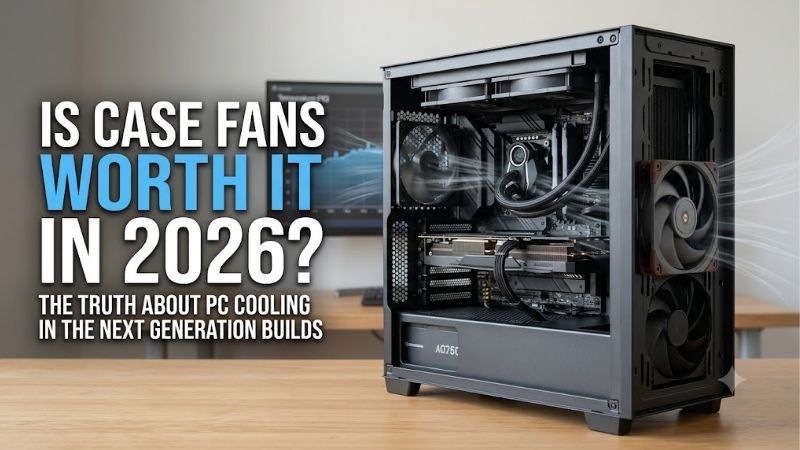
Is case fans worth it in 2026 depends on airflow demand, not fan count alone. A good fan can help a hot GPU, restrictive front panel, or sustained workload, while a well-ventilated case may need nothing extra. The smart move is to fix the actual case-airflow bottleneck instead of adding unnecessary hardware blindly.
How to Choose Case Fans
A useful case-fan purchase starts with the restriction the fan must overcome, how quietly it should run, and whether your case accepts its size. This guide compares four proven 120mm designs across airflow, pressure, control range, and thickness, so is case fans worth it in 2026 becomes a practical build-selection decision.
Airflow Rating
Airflow is the volume of air a fan can move under a stated-test-condition, usually shown in CFM. Higher airflow helps open-mesh cases and unobstructed exhaust positions, but filters and panels reduce real-world airflow. ARCTIC P12 PWM PST lists 56.3 CFM, making it a strong value pick for mainstream-gaming-case airflow.
Do not treat CFM as a final temperature forecast. Similar ratings can behave differently once resistance enters the path, so airflow matters most when the case is open and well vented. For straightforward intake or exhaust duty, ARCTIC P12 PWM PST is the practical match for straightforward, budget-friendly cooling overall.
Static Pressure
Static pressure indicates how well a fan maintains useful flow against resistance. It matters with dust filters, tight front panels, radiator fins, and dense grilles, where raw airflow can lose meaning. Noctua NF-A12x25 PWM reaches 2.34 mm H₂O, giving it strong versatility for restricted front-intake positions especially.
Pressure should not become an excuse to buy the strongest fan for every slot. A high-pressure design can add cost or noise without meaningful benefit in an open-rear exhaust position. Use pressure where resistance is real, making Noctua NF-A12x25 PWM especially valuable for demanding intake and radiator-facing positions.
Noise And PWM Control
Noise and control range matter because a fan rarely needs full speed all day. A broad PWM range lets the motherboard lower RPM during light work and raise it as temperatures climb. be quiet! Pure Wings 3 120mm PWM reaches 1600 RPM and supports low minimum speed, making it a strong quiet-build choice under sustained loads.
Look beyond one maximum-noise figure and consider the speed you will actually use. A quiet build benefits from smooth low-speed control more than a dramatic top-end performance rating. be quiet! Pure Wings 3 120mm PWM fits that priority, while Noctua NF-A12x25 PWM is the premium alternative when performance also matters.
Thickness And Clearance
Physical size is a compatibility issue, not merely a specification. Most 120mm case mounts expect a 25mm-deep fan, while thicker frames can conflict with radiators, brackets, or nearby components. Phanteks T30-120 measures 120 × 120 × 30 mm, so its extra depth requires explicit clearance before installation inside the chassis.
A 30mm frame can add performance potential, but that advantage matters only when the case can use it and the workload justifies it. Measure mounting depth before ordering. For standard clearance, ARCTIC P12 PWM PST, Noctua NF-A12x25 PWM, and Pure Wings 3 are easier fits; Phanteks targets performance-first builds in most cases.
Top Picks
The four picks below use distinct use-case roles rather than headline-RPM ranking. is case fans worth it in 2026 often comes down to affordable airflow, premium acoustic balance, or maximum cooling through resistance in demanding gaming systems. Each model has a clear buy-case and meaningful tradeoff before installation.
| Product | Best For | Key Spec | Watch Out For |
|---|---|---|---|
| ARCTIC P12 PWM PST | Best Value | 120mm; 200–1800 RPM; 56.3 CFM; 2.20 mm H₂O | More audible at high speed |
| Noctua NF-A12x25 PWM | Best Overall | 120 × 120 × 25mm; 2000 RPM; 60.09 CFM; 2.34 mm H₂O | Premium price and styling |
| be quiet! Pure Wings 3 120mm PWM | Best for Quiet Builds | 1600 RPM; 49.9 CFM; 1.45 mm H₂O | No zero-RPM mode |
| Phanteks T30-120 | Best for High-Performance Cooling | 30mm; 3000 RPM; 100.9 CFM; 7.37 mm H₂O | Requires extra clearance |
ARCTIC P12 PWM PST — Best Value
ARCTIC P12 PWM PST is the Best Value choice for builders who want strong all-purpose cooling without specialty-fan pricing. It runs from 200 to 1800 RPM, reaches 56.3 CFM and 2.20 mm H₂O, and uses a 4-pin PWM PST connection. Its strength is flexibility; its weakness is more audible operation at high speed for most builders.
For is case fans worth it in 2026, the P12 becomes compelling when several fans need synchronized PST chaining. It is 120 × 120 × 25 mm with a fluid dynamic bearing, so compatibility remains predictable across mainstream PC cases. The compromise is that its 1800-RPM ceiling is not aimed specifically at low-noise operation.
Noctua NF-A12x25 PWM — Best Overall
Noctua NF-A12x25 PWM is the Best Overall choice for builders who want premium engineering in a standard 25mm frame. Its 2000 RPM ceiling, 60.09 CFM airflow, 2.34 mm H₂O pressure, and 22.6 dB(A) maximum rating make it a strong all-rounder for mainstream-gaming systems. Its advantage is balance across open and restrictive applications.
For is case fans worth it in 2026, consider this fan when replacing one or two critical positions matters more than buying a large set. It uses Noctua’s SSO2 bearing and includes a low-noise adaptor, but premium construction raises total purchase cost. Brown-and-beige styling can also clash with a monochrome build.
be quiet! Pure Wings 3 120mm PWM — Best for Quiet Builds
be quiet! Pure Wings 3 120mm PWM is the Best for Quiet Builds when low-speed behavior matters more than extreme performance ceiling. It reaches 1600 RPM, produces 49.9 CFM, and delivers 1.45 mm H₂O pressure, with 25.5 dB(A) stated at full PWM. Its strength is efficient everyday cooling; its weakness is less pressure overall.
For is case fans worth it in 2026, Pure Wings 3 is logical in a mesh case where controlled airflow matters more than brute-force pressure. Its 120mm frame uses a rifle bearing rated for 80,000 hours, but this model has no zero-RPM mode. Motherboard fan-curve tuning therefore matters more when silence is the priority.
Phanteks T30-120 — Best for High-Performance Cooling
Phanteks T30-120 is the Best for High-Performance Cooling when a restrictive chassis, dense radiator, or sustained gaming workload can use extra pressure. It is 30mm thick and offers up to 3000 RPM, 100.9 CFM, and 7.37 mm H₂O, with three selectable PWM profiles. Its strength is headroom; its weakness is clearance and noise potential.
For is case fans worth it in 2026, the T30 earns its place when cooling demand justifies its unusual depth. Hybrid mode can stop the fan below 50% PWM, performance mode tops out at 2000 RPM, and advanced mode reaches 3000 RPM. The tradeoff is direct: excellent high-speed control and power, but not a universal drop-in fit.
Frequently Asked Questions
These questions cover the buying decisions after you know your case layout and cooling demand. is case fans worth it in 2026 has a different answer for a budget mesh case versus a compact-restricted chassis in practical builds, so the goal is to match the fan to the airflow problem rather than chase specifications in isolation.
Are Case Fans Worth It In 2026?
Yes, case fans are worth it in 2026 when your current cooling setup has a real airflow limitation. Adding or replacing a fan can move fresh air toward a hot GPU, improve exhaust, or overcome a restrictive intake path. If temperatures and fan speeds are already reasonable, extra fans may deliver only a small thermal gain.
The exception is a system that already has balanced intake and exhaust with acceptable temperatures and noise. In that situation, check fan curves, dust buildup, and cable obstructions before spending money. A few well-placed fans usually make more sense than filling every available mount simply because the chassis has room.
How Many Case Fans Do I Need?
You do not need four or five case fans just because a case supports them. Many gaming systems establish useful intake and exhaust with two or three fans, while a fourth can help a larger chassis or hotter GPU. The right count depends on airflow path, fan quality, case restrictions, and acoustics, not a universal formula.
Start with mounts aligned with the case’s ventilation openings, then add a fan only where temperatures or noise justify it. More fans also mean additional system-acoustics and unnecessary cabling. A balanced layout with manageable fan speeds is usually preferable to maximum occupancy of every physically-available mounting-point.
Should I Prioritize Airflow Or Static Pressure?
For an open-mesh case, prioritize balanced airflow and reasonable noise rather than extreme static pressure. For a filtered front panel, radiator, or dense grille, pressure matters more because the fan must maintain flow against resistance. Noctua NF-A12x25 PWM and Phanteks T30-120 are stronger choices when resistance is substantial.
Not every intake needs a high-pressure specialist. Using one on an unrestricted exhaust can waste part of its advantage, while a low-pressure design behind a restrictive panel can lose effectiveness. Match the fan to the position, and use different models in one build when the airflow-path requirements genuinely differ.
Are Expensive Case Fans Worth The Money?
No, a more expensive case fan is not automatically worth the money. Spending more makes sense when you need a quieter operating range, better pressure performance, superior materials, or extra control headroom. For an ordinary mesh case, the ARCTIC P12 PWM PST can cover the job at a much lower overall-investment level.
Premium models earn their cost in specific scenarios rather than universal upgrades. Noctua suits buyers prioritizing refined all-round performance, while Phanteks makes sense when the case and workload can exploit its 30mm frame and 3000-RPM ceiling. Buy usable capability, then tune the fan curve around temperatures today.
Final Thoughts
The practical answer to is case fans worth it in 2026 is yes when airflow limits cooling, and no when the case already runs well. Start with the problem, then choose ARCTIC for value, Noctua for premium balance, be quiet! for quiet builds, or Phanteks for demanding high-performance cooling throughout the full system.