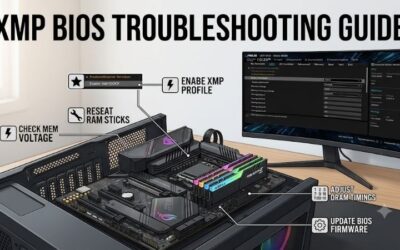
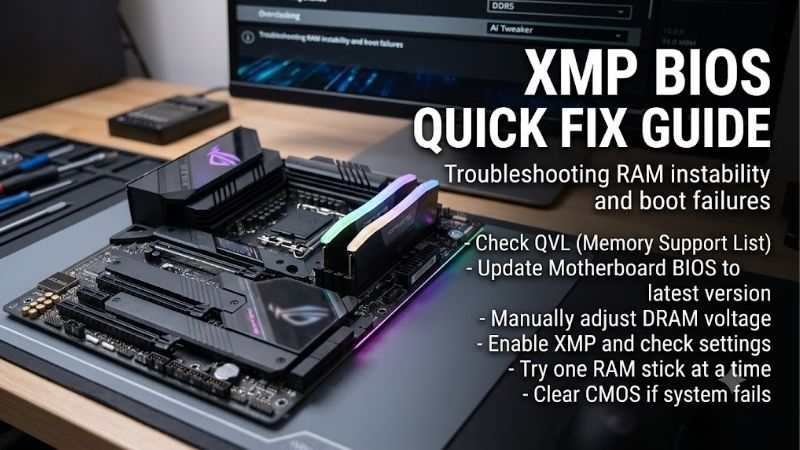
XMP bios quick fix guide readers need stability after memory-profile activation before considering upgrades. Restore default memory settings first, then check whether faults disappear. Preserve backups of important files and avoid unverified voltage increases; new RAM is justified after compatibility checks and fault isolation.
How to Choose RAM for XMP Troubleshooting
This xmp bios quick fix guide pairs troubleshooting with four replacement candidates. The selections cover retained DDR4 systems, validated Intel DDR5, a lower DDR5 profile target, and alternative stored profiles. Complete free diagnostics before shopping; no kit guarantees recovery from motherboard, firmware, or CPU limitations.
Confirm the Exact Memory Generation
DDR4 and DDR5 require different motherboard support and are not interchangeable, despite similar names or capacities. Identify your board’s complete model instead of assuming socket-based compatibility. Some motherboard families have separate DDR4 and DDR5 versions, making suffixes important during compatibility checks.
If your existing board uses DDR4, XMP failure alone rarely justifies motherboard replacement. Confirm firmware profile support and compatibility with existing RAM. Avoid socket-only matching. For a compatible DDR4 system that requires replacement memory, choose Corsair Vengeance LPX DDR4-3200 32GB to retain the platform.
Buy One Matched Kit With Enough Capacity
A practical xmp bios quick fix guide treats module count as part of compatibility. Two separately purchased pairs cannot establish four-module validation through matching labels. All four recommendations supply 32GB as two 16GB modules, avoiding mixed kits while providing practical gaming and daily multitasking capacity.
Capacity should match workloads before maximizing transfer rate. Four occupied slots can increase memory-controller demands compared with two, potentially limiting attainable profiles. Follow the board manual’s specific recommended slots. For validated Intel DDR5 requiring a matched pair, choose Corsair Vengeance DDR5-6000 32GB.
Select a Rate Your Platform Can Support
A headline speed is a profile target, without guaranteeing every motherboard and processor combination. Search the board’s qualified memory vendor list for exact part numbers, module counts, and processor families. An unlisted kit lacks that validation evidence; it is not automatically defective or universally incompatible.
A lower transfer-rate target suits platforms without higher-rate validation, but test appropriate lower settings before replacing existing memory. Budget for a supported configuration rather than speculative speed. Choose G.SKILL Ripjaws S5 DDR5-5600 32GB when its 5600MT/s profile matches your validated Intel configuration.
Check Stored Profiles and Their Voltages
Different matched kits store different combinations of speed, timings, and voltage. Verify exact specifications; Profile 2 does not universally indicate slower settings. Board-specific enhanced modes may depart from stored parameters. During basic troubleshooting, prefer documented profiles over copied manual tuning values.
Multiple stored targets provide alternatives without guaranteeing stability at lower rates or voltages. Confirm the firmware’s active selection and test each setting independently. Choose Kingston FURY Beast DDR5-6000 32GB, part KF560C30BBEK2-32, for documented 6000MT/s and 5600MT/s profiles supporting Intel XMP and AMD EXPO.
Top Picks
These selections support the xmp bios quick fix guide when replacement is warranted without promising universal overclock repairs. Rankings reflect specifications and task fit without hands-on benchmark claims. DDR4 and DDR5 serve separate platform paths; compare exact part numbers, motherboard validation, and checkout prices.
| Product | Best For | Key Spec | Watch Out For |
|---|---|---|---|
| Corsair Vengeance DDR5-6000 32GB | Best Overall for Validated Intel DDR5 Builds | CMK32GX5M2B6000C30; 2×16GB; CL30; 1.40V | 6000MT/s depends on motherboard and CPU support |
| Corsair Vengeance LPX DDR4-3200 32GB | Best Value for Retained DDR4 Systems | CMK32GX4M2E3200C16; 2×16GB; CL16; 1.35V | Cannot fit DDR5 motherboards |
| G.SKILL Ripjaws S5 DDR5-5600 32GB | Best For a Lower DDR5 Profile Target | F5-5600J3636C16GX2-RS5K; CL36; 1.20V | Lower rated bandwidth than the 6000MT/s picks |
| Kingston FURY Beast DDR5-6000 32GB | Best For Multiple Profile Options | KF560C30BBEK2-32; 6000 CL30; 5600 CL40 | Dual profiles do not guarantee cross-platform stability |
Corsair Vengeance DDR5-6000 32GB: Best Overall
Corsair Vengeance DDR5-6000 32GB, part CMK32GX5M2B6000C30, suits validated Intel DDR5 replacing incompatible or faulty memory. Corsair specifies two 16GB modules, 6000MT/s, CL30, and 1.40V. Clearly documented part identification simplifies compatibility comparisons, while compact construction helps limit cooler interference.
Its drawback is that profile performance depends on motherboard and CPU capability; it cannot correct unsupported memory tuning. Defaults run below the advertised rate before activation. Within this xmp bios quick fix guide, buy it for confirmed compatibility, not because 6000MT/s guarantees superior stability over existing memory.
Corsair Vengeance LPX DDR4-3200 32GB: Best Value
Corsair Vengeance LPX DDR4-3200 32GB, part CMK32GX4M2E3200C16, targets buyers keeping compatible DDR4 hardware. Its matched 32GB pair specifies a 3200MT/s CL16 profile at 1.35V and XMP 2.0 support. Retaining the motherboard reduces potential platform-replacement expense, and low-profile construction accommodates large air coolers.
The trade-off is that DDR4 cannot migrate into DDR5-only motherboards. Value therefore depends on platform longevity rather than universally low prices. The profile requires compatible firmware controls. Choose this kit when diagnostics justify replacement while retaining DDR4, remembering that CL16 alone cannot establish superiority over DDR5.
G.SKILL Ripjaws S5 DDR5-5600 32GB: Best For a Lower Profile Target
G.SKILL Ripjaws S5 DDR5-5600 32GB, part F5-5600J3636C16GX2-RS5K, suits compatible Intel systems targeting lower rates than 6000MT/s. Its two 16GB modules specify XMP 3.0, 5600MT/s, timings of 36-36-36-89, and 1.20V. The useful advantage is a documented lower-rate profile without inventing manual settings borrowed from another kit.
Its limitation is lower rated bandwidth than the 6000MT/s alternatives, affecting memory-sensitive workloads. Lower settings still require platform compatibility, so this is not a guaranteed stability upgrade. Consider it when exact-kit validation matches your requirements; brand changes alone cannot establish fault resolution.
Kingston FURY Beast DDR5-6000 32GB: Best For Multiple Profiles
Kingston FURY Beast DDR5-6000 32GB, part KF560C30BBEK2-32, provides two 16GB modules with XMP and EXPO support. Its documented targets include 6000MT/s CL30-36-36 at 1.40V and 5600MT/s CL40-40-40 at 1.25V. The practical advantage is having factory-stored alternatives for compatible firmware without manually entering individual parameters.
Profile flexibility cannot override hardware limitations; similar Beast variants can differ. In this xmp bios quick fix guide, this kit fits buyers prioritizing documented alternatives and platform validation. The slower stored profile sacrifices rated performance; it offers a configuration choice, without guaranteeing fault resolution.
Frequently Asked Questions
The diagnostic part of this xmp bios quick fix guide separates failed training, runtime crashes, absent profile controls, and confusing speed readouts. Record failure timing before adjusting settings. Successful startup provides evidence without replacing memory tests, cold starts, and application checks. Log errors too.
What Should I Do if My PC Will Not Boot After Enabling XMP?
Allow the motherboard’s documented memory-training period before declaring failure; post-change initialization may take longer than routine startup. If it still fails, restore defaults through manufacturer recovery instructions. When that requires clearing CMOS, follow documented power-disconnection steps without shorting unidentified pins.
A reset can alter other firmware settings, so preserve the BitLocker recovery key beforehand and record the original boot configuration. Once recovered, verify default stability before adjustments. Consult relevant BIOS release notes when considering an update, and use the manufacturer’s documented process without interrupting programming.
Why Does My PC Boot With XMP but Crash in Games?
Successful booting does not establish memory stability. The profile may exceed your CPU controller, board, or module-layout capability. Compare behavior at default memory settings and exclude unrelated overclocks. Crashes can also involve drivers, temperatures, or other hardware, so timing alone cannot establish causation.
Run a reputable memory test and your usual applications before trusting revised settings. In this xmp bios quick fix guide, any reported memory-test error requires investigation. For XMP-only failures, reduce the target or disable profiles. Persistent default-setting errors justify individual-module tests in recommended slots.
Why Is the XMP Option Missing From My BIOS?
The memory may lack a stored XMP profile, or firmware may restrict profile controls. Check the kit’s exact part number and BIOS memory-information page before assuming physically defective modules. AMD boards may use EXPO, DOCP, or another vendor label, so missing literal XMP labels cannot establish absent functionality.
A locked OEM system may restrict profile tuning despite stored XMP data. Faster memory cannot unlock restricted controls. Follow the computer manufacturer’s memory requirements, and distinguish desktop DIMMs from laptop SO-DIMMs; these desktop kits cannot replace laptop SO-DIMMs. These picks are unbuffered desktop memory.
Why Is My Memory Speed Lower Than the Number on the Box?
The advertised number usually describes activated profiles rather than default configurations. Some monitoring tools also display clock frequency instead of effective transfer rates: roughly 3000MHz can correspond to 6000MT/s. Check units and active settings before concluding your memory runs at half-speed. DDR means double data rate.
If firmware falls back after unsuccessful training, it may restore a lower setting despite earlier selections. Compare displayed settings against exact-kit specifications, and check again after firmware updates. A genuinely reduced rate is acceptable when eliminating errors; stable operation matters more than matching marketing figures.
Final Thoughts
Use this xmp bios quick fix guide to restore defaults, isolate faults, and validate settings before replacing RAM. Choose Vengeance for Intel DDR5, LPX for retained DDR4, Ripjaws S5 for validated 5600MT/s, or Beast for stored alternatives. Keep memory when testing confirms reliability, and prefer stable defaults over unsupported configurations.