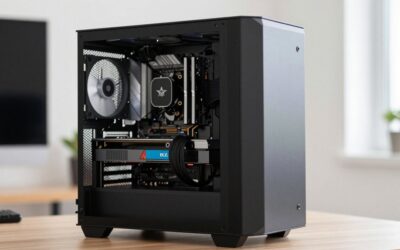
- Top Pick: AMD Ryzen 5 7600X 6-Core, 12-Thread Unlocked Desktop Processor
- Best Value: ASRock Intel Arc B580 Challenger 12GB OC Graphics Card, 2740 MHz GPU Clock, 12GB GDDR6, DisplayPort 2.1, HDMI 2.1a, Dual Fan Cooling, 0dB Silent Operation
- Premium Choice: Asrock B650M Pro RS AMD Socket AM5 Ryzen 7000/8000/9000 Series DDR5 7200+ (OC) MHz 256GB M.2 Key E for WiFi SATA3 6.0 Gb/s Micro ATX Motherboard 2.5G LAN BIOS Flashback
Warframe is one of the best-optimized games on PC, and Digital Extremes keeps it that way. Its Evolution engine scales from integrated graphics to flagships, supports every current upscaler, and loads its many small missions fast from an SSD. That means a Warframe build is about value, not brute force: the realistic target is 144 fps at 1080p and a smooth 100-plus at 1440p with settings high, plus enough headroom that the PC handles other popular games well. This build does it for roughly $800 to $950 with a fast six-core AM5 processor that leaves an upgrade path open, a 12GB Intel Arc card that punches above its price, 32GB of quick memory, and a case that keeps it all cool and quiet.
Parts List
| Part | Model | Approx. price | Why |
|---|---|---|---|
| CPU | AMD Ryzen 5 7600X | $170-200 | Fast six-core on the long-lived AM5 socket |
| GPU | Intel Arc B580 12GB | $250-280 | 12GB and 1440p-capable at a budget price |
| Motherboard | ASRock B650M Pro RS WiFi | $120-140 | Compact AM5 board with Wi-Fi and two M.2 |
| RAM | Corsair Vengeance 32GB DDR5-6000 CL30 | $100-120 | Sweet-spot EXPO kit for Ryzen |
| SSD | Kingston NV3 1TB | $55-70 | Fast enough for Warframe’s quick loads |
| PSU | MSI MAG A650BN | $60-75 | Reliable 650W Bronze with headroom |
| Case | Montech X3 Mesh | $60-75 | Six fans included, mesh front, low price |
AMD Ryzen 5 7600X

Warframe’s engine scales across cores but leans on one main thread in the busiest missions, and the Ryzen 5 7600X’s Zen 4 cores deliver strong single-thread speed for its price. TechPowerUp placed it within a few percent of the newer 9600X in gaming, which makes it the value pick on AM5 with a drop-in path to a Ryzen 7 9800X3D later. It ships without a cooler, so add a basic 120mm tower. Swap option: the Ryzen 5 9600X for a small performance step up if the price gap is narrow on the day.
As an Amazon Associate we earn from qualifying purchases at no extra cost to you.


Intel Arc B580 12GB
The Arc B580 is the budget standout of its generation. TechPowerUp and Hardware Unboxed placed it alongside last-generation mid-range cards at 1080p and ahead of them at 1440p, with 12GB of VRAM that comfortably covers Warframe’s textures and most other titles at 1440p. Warframe supports XeSS natively, and Intel’s drivers have matured considerably. Its Limited Edition cooler is quiet and around 270mm long. Swap option: the ASUS Dual GeForce RTX 5060 8GB for NVIDIA’s driver maturity and DLSS 4 at a modest premium.
ASRock B650M Pro RS WiFi
The B650M Pro RS WiFi is a compact micro-ATX AM5 board with a VRM that handles any Ryzen 5 or Ryzen 7, four DDR5 slots, a PCIe 4.0 x16 slot, two M.2 slots, 2.5-gigabit Ethernet, and Wi-Fi 6E. It fits the Montech X3 Mesh with room to spare and its BIOS enables EXPO in one setting. Swap option: the MSI B650 Gaming Plus WiFi if you prefer full ATX and a slightly beefier VRM for a future Ryzen 9.
Corsair Vengeance 32GB DDR5-6000 CL30
DDR5-6000 CL30 is the sweet spot for Ryzen, and Corsair’s Vengeance kit delivers it as a low-profile, EXPO-certified pair of 16GB sticks that clears any air cooler. Warframe itself is modest in memory use, but 32GB leaves room for Discord, a browser full of build guides, and heavier games without a second thought. Swap option: a 16GB kit at the same speed if the budget is very tight, though 32GB is worth the small difference for longevity.
Kingston NV3 1TB
Warframe loads dozens of small missions per session, and the Kingston NV3’s PCIe 4.0 speeds make each one quick without paying for a flagship drive. One terabyte holds Windows, Warframe, and a healthy library. It is DRAM-less, which is fine for gaming, and runs cool without a heatsink. Swap option: the WD Black SN770 1TB for a faster budget drive, or a 2TB NV3 if you keep many games installed; the board’s second M.2 slot allows adding one later.
MSI MAG A650BN
This system peaks around 300W under gaming load, so the MSI MAG A650BN’s 650W capacity leaves generous headroom while running quietly. It is 80 Plus Bronze rated, non-modular to keep the price down, and includes two PCIe 8-pin connectors for any mid-range GPU upgrade. MSI’s MAG series has a solid reliability record. Swap option: the Corsair RM650e if you want a modular, Gold-rated, ATX 3.1 unit with a 12V-2×6 cable for a future NVIDIA card.
Montech X3 Mesh
The Montech X3 Mesh is remarkable value: a mesh front, six RGB fans included, and support for graphics cards up to roughly 340mm and CPU coolers up to about 165mm. It fits the micro-ATX board, the Arc B580, and a 120mm tower cooler with room to spare, and the airflow is far more than this modest system needs. Cable management is adequate for the price. Swap option: the Montech Air 903 Max for a larger interior and 140mm fans if you plan a big GPU upgrade later.
Compatibility Check
Socket: the Ryzen 5 7600X is an AM5 processor and the ASRock B650M Pro RS WiFi is an AM5 board with mature support for Zen 4. RAM type: AM5 is DDR5 only and the Corsair Vengeance kit is EXPO-certified for DDR5-6000. PSU headroom: the Arc B580 is rated around 190W and the 7600X around 105W at peak, so the system stays near 300W and the 650W unit runs at half load with room for a future GPU. GPU length: the Arc B580 Limited Edition is about 270mm, well inside the X3 Mesh’s roughly 340mm clearance. Case clearance: a 120mm tower cooler up to about 165mm fits, the micro-ATX board mounts with room around it, and the NV3 uses the board’s primary M.2 slot.
Expected Performance
1080p
Warframe at high settings runs roughly 180-240 fps and is CPU-bound in the busiest missions, based on the Arc B580’s positioning in Hardware Unboxed’s and TechPowerUp’s testing. Fortnite in performance mode exceeds 200 fps, and DirectX 12 epic settings land near 70-90 fps. Apex Legends on high runs roughly 150-190 fps. Cyberpunk 2077 ultra without ray tracing lands around 70-80 fps.
1440p
Warframe at high settings holds roughly 150-200 fps, still comfortably above 144Hz. Fortnite DirectX 12 at high settings runs around 60-75 fps, with XeSS quality adding margin. Apex Legends on high lands near 110-130 fps. Cyberpunk 2077 ultra without ray tracing runs roughly 45-55 fps and needs XeSS to be smooth.
4K
Warframe at high settings runs roughly 80-100 fps natively, playable and smooth with XeSS quality pushing past 100. Fortnite DirectX 12 at medium lands near 45-55 fps. Apex Legends on medium-high runs roughly 60-70 fps. Cyberpunk 2077 at 4K is not realistic on this card without performance-mode upscaling.
Upgrade Path
Every part here leaves room to grow. The GPU is the first upgrade: an RX 9060 XT 16GB or RTX 5070 drops into the PCIe 4.0 slot within the 650W budget and turns this into a strong 1440p machine. The CPU path is a Ryzen 7 9800X3D drop-in on the same board. Storage expands through the second M.2 slot. The 32GB memory kit and case will not need replacing, and a modular power supply is a sensible swap when you move to a higher-end GPU.
FAQ
Is Warframe CPU or GPU intensive?
Neither by modern standards. It is exceptionally well optimized, with the CPU limiting frame rates in the busiest missions at 1080p and the GPU taking over at 1440p and 4K.
Can this build run Warframe at 144Hz?
Yes at both 1080p and 1440p on high settings, where it holds 150-240 fps depending on resolution and mission.
Is the Intel Arc B580 a good choice for Warframe?
Yes. Warframe supports XeSS natively and Intel’s drivers have matured, and the B580’s 12GB of VRAM gives it more headroom than 8GB cards at its price.
What should I upgrade first on this PC?
The GPU, if you move to heavier games at 1440p. For Warframe alone, this build is already balanced and the next step is a larger SSD as your library grows.
Sources and Methodology
The frame-rate ranges in this guide are approximate and reflect the relative positioning of the Intel Arc B580 and Ryzen 5 7600X in launch reviews published by TechPowerUp, Hardware Unboxed, Gamers Nexus, Tom’s Hardware, and TechSpot, including their Fortnite, Apex Legends, and Cyberpunk 2077 results. Where Warframe was not directly tested, we mapped those rankings onto the game’s well-documented light scaling behavior in 2026. None of these figures were measured by this site, and results vary with settings, drivers, and mission type. Prices are approximate and fluctuate.