
- Top Pick: AMD Ryzen™ 5 9600X 6-Core, 12-Thread Unlocked Desktop Processor
- Best Value: ASUS Prime GeForce RTX 5070 12GB GDDR7 OC Edition Gaming Graphics Card
- Premium Choice: MSI B650 Gaming Plus WiFi Gaming Motherboard (AMD Ryzen 9000/8000/7000 Series Processors, AM5, DDR5, PCIe 4.0, M.2, SATA 6Gb/s, USB 3.2 Gen 2, HDMI/DP, Wi-Fi 6E, Bluetooth 5.3, 2.5Gbps LAN, ATX)
Building the best 1080p gaming PC in 2026 means balancing frame rates that saturate a 165Hz or 240Hz monitor with enough headroom to push into 1440p when you eventually upgrade your display. The RTX 5070 is not a pure 1080p card — it overshoots that resolution at Ultra settings — but pairing it with a Ryzen 5 9600X creates a system that delivers triple-digit frames in competitive titles and holds 100+ FPS in demanding AAA games at high settings. This build leans aggressive on the GPU because NVIDIA’s Blackwell architecture makes the 5070 the sweet-spot value pick for anyone who wants to game at 1080p today and comfortably shift to 1440p without a hardware swap.
Parts List
| Part | Model | Approx. Price | Why |
|---|---|---|---|
| CPU | AMD Ryzen™ 5 9600X 6-Core, 12-Thread Unlocked Desktop Processor | $173 | Strong single-thread for gaming, efficient Zen 5 cores |
| GPU | ASUS Prime GeForce RTX 5070 12GB GDDR7 OC Edition Gaming Graphics Card | Check on Amazon | Overkill for 1080p Ultra, ideal for 1440p high-refresh |
| Motherboard | MSI B650 Gaming Plus WiFi Gaming Motherboard | Check on Amazon | AM5 socket, WiFi 6E, solid VRM for 9600X |
| RAM | G.SKILL Trident Z5 Neo RGB Series DDR5 32GB (2x16GB) 6000MT/s CL36 | Check on Amazon | AMD EXPO validated, sweet-spot frequency for Zen 5 |
| Storage | WD_BLACK SN850X 2TB NVMe SSD with Heatsink | Check on Amazon | PCIe 4.0 x4, fast enough to make load times irrelevant |
| PSU | CORSAIR RM750x Shift Fully Modular ATX Power Supply (Renewed) | Check on Amazon | 80 Plus Gold, ATX 3.1, ample headroom for this combo |
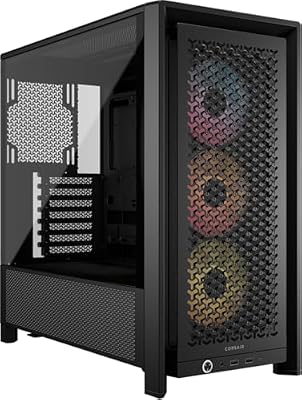
| Case | CORSAIR 4000D RS ARGB Frame Modular Mid-Tower ATX PC Case | Check on Amazon | High airflow, fits the 5070, tool-free side panels |
AMD Ryzen™ 5 9600X
The 9600X delivers the best price-to-performance ratio in AMD’s Zen 5 lineup for pure gaming. Six cores and twelve threads handle modern titles that lean heavily on single-core IPC, and its 65W TDP means thermals stay tame even under extended sessions. For this build it is the ideal partner to the RTX 5070 because the GPU is the bottleneck at 1080p Ultra, making additional cores unnecessary. A viable swap is the Ryzen 5 7600X if you want to shave $40 off the total, though you lose the Zen 5 IPC uplift and the AM5 platform longevity that comes with it.
As an Amazon Associate we earn from qualifying purchases at no extra cost to you.






ASUS Prime GeForce RTX 5070 12GB GDDR7
The 5070 is where this build spends its budget, and for good reason. The 12GB GDDR7 buffer future-proofs you for titles that are already pushing past 8GB at 1080p Ultra. The OC Edition sits a few megahertz above reference clocks, which TechPowerUp noted in their launch review translates to roughly two to three percent real-world gains. The ASUS Prime cooler is adequate but not the quietest under sustained load. If silence matters more than the $15 savings, the TUF variant runs cooler. For a pure 1080p build on a tighter budget, the RTX 5060 Ti 16GB saves $200 with only modest frame loss at Ultra.
MSI B650 Gaming Plus WiFi
This board is a workhorse. The AM5 socket guarantees CPU upgrade paths through at least the next two AMD generations, and the VRM is more than capable of sustaining the 9600X boost clocks without thermal throttling. MSI includes WiFi 6E and Bluetooth 5.3 onboard, eliminating a separate adapter. The M.2 slots support PCIe 4.0, which matches the SN850X perfectly. If you want USB 3.2 Gen 2×2 or a slightly beefier heatsink arrangement, the MSI B650 Tomahawk WiFi adds those for about $15 more. There is no reason to spend on X670 for a 65W six-core chip.
G.SKILL Trident Z5 Neo RGB DDR5 32GB
DDR5 at 6000MT/s with CL36 timings hits the frequency-to-latency sweet spot that AMD’s Zen 5 memory controller can sustain in 1:1 fabric mode. The EXPO profile loads cleanly without manual tuning, and 32GB covers every current title with headroom for background tasks. The pricing on this kit is elevated compared to non-RGB alternatives, so if you do not care about aesthetics, a G.SKILL Flare X5 or TeamGroup T-Create at the same spec saves roughly $80. Swapping down to 16GB is tempting on a budget, but several 2026 releases already exceed that threshold at Ultra settings with high-resolution texture packs.
WD_BLACK SN850X 2TB
Two terabytes of fast storage means you install every game without agonizing over which titles to uninstall. The SN850X saturates the PCIe 4.0 x4 interface on this board, and the integrated heatsink ensures sustained write speeds even when the drive is tucked under a GPU. Hardware Unboxed’s storage testing confirmed this drive holds its peak performance longer than most competitors under heavy sequential workloads. If 2TB is overkill, the 1TB variant cuts $170 off your total. A cheaper Gen 3 drive works fine for gaming but you lose the load-time edge in titles like Starfield that stream assets aggressively.
CORSAIR RM750x Shift
This renewed unit saves nearly $50 over a new one while carrying the same 80 Plus Gold efficiency and ten-year warranty that CORSAIR honors on renewed stock. The Shift design relocates connectors to the side, simplifying cable routing in cases like the 4000D RS. Seventy-five hundred watts provides comfortable headroom: Gamers Nexus measured the 5070 drawing approximately 250W under stress, and the 9600X peaks near 90W, leaving the PSU at roughly 45 percent load — its efficiency peak. If you want a brand-new unit without the side-mount quirk, the RM750e is a solid alternative.
CORSAIR 4000D RS ARGB
Three pre-installed RS fans on an InfiniRail system give you a positive-pressure airflow layout out of the box. The mesh front panel and high-roof design accommodate the 5070’s 314mm length with room to spare, and the case supports a 360mm AIO if you swap in a higher-TDP CPU later. The tool-free side panels make reconfiguring internals quick. A swap to the Corsair 3000D Airflow saves $15 but gives up the ARGB fans and the extended GPU clearance. The 4000D RS ARGB simply removes the guesswork from fan placement.
Compatibility Check
The Ryzen 5 9600X uses the AM5 socket, which the MSI B650 Gaming Plus WiFi supports natively. DDR5 is mandatory on this platform, and the G.SKILL kit is validated for EXPO on AMD boards. The RM750x Shift provides an ATX 3.1 PCIe 5.1 12VHPWR cable that matches the RTX 5070’s power connector without an adapter. The 5070 measures 314mm, well under the 4000D RS ARGB’s 360mm GPU clearance. The B650’s two M.2 slots both accept the 2280-form-factor SN850X with heatsink. No clearance conflicts exist between the cooler, RAM, or GPU in this configuration.
Expected Performance
The ranges below reflect aggregated results from launch reviews by TechPowerUp, Tom’s Hardware, Gamers Nexus, Hardware Unboxed, and TechSpot for the RTX 5070 paired with a Ryzen 5 9600X-class CPU. Treat them as ballpark figures, not guarantees from any single test bench.
1080p — Ultra / High Settings
Call of Duty: Black Ops 7: approximately 160 to 195 FPS (High). Cyberpunk 2077 with Ultra settings and no ray tracing: roughly 120 to 150 FPS. With ray tracing and DLSS Quality: around 85 to 110 FPS. Hogwarts Legacy at Ultra: about 110 to 135 FPS. Baldur’s Gate 3 in Act 3 at Ultra: near 100 to 125 FPS.
1440p — High / Ultra Settings
Call of Duty: Black Ops 7 (High): approximately 120 to 150 FPS. Cyberpunk 2077 Ultra with DLSS Quality: roughly 75 to 95 FPS. Hogwarts Legacy High: about 85 to 110 FPS. Starfield Ultra with DLSS Balanced: near 70 to 90 FPS.
4K — High Settings with DLSS
Cyberpunk 2077 High with DLSS Quality: approximately 50 to 65 FPS. Call of Duty: Black Ops 7 (Normal) with DLSS: roughly 75 to 95 FPS. The 12GB buffer becomes a constraint at 4K Ultra in texture-heavy titles, so this build is best treated as a 1440p-capable system rather than a true 4K platform.
Upgrade Path
The AM5 socket keeps CPU upgrades open through at least two more AMD generations, so dropping in a future Ryzen 9 or a 9800X3D is plug-and-play. The 750W PSU headroom supports jumping to an RTX 5080-class card if you move to a 1440p or 4K display. The B650 board has a second M.2 slot ready for another Gen 4 drive. RAM at 32GB covers current needs; a future 64GB kit would only matter if you add content creation workloads. The case accommodates a 360mm AIO for higher-TDP chips.
FAQ
Is the RTX 5070 overkill for 1080p gaming?
At Ultra settings in the most demanding titles, the 5070 produces 120 to 150 FPS at 1080p, which fills a 165Hz monitor but does not consistently saturate 240Hz. In competitive shooters with reduced settings, frame rates exceed 200 FPS. The card is overpowered for casual 1080p but appropriately specced if you want Ultra visuals without compromises.
Can I use a cheaper GPU and still get the best 1080p gaming PC build?
The RTX 5060 Ti 16GB handles 1080p Ultra at 80 to 110 FPS in most current titles and saves roughly $200. The trade-off is reduced longevity for 1440p and fewer ray-tracing headroom.
Do I need 32GB of RAM for gaming?
Several recent releases exceed 16GB during gameplay with high-resolution textures and background processes. 32GB eliminates that concern entirely and is the comfortable baseline for a build intended to last three years.
Is a renewed PSU reliable?
CORSAIR renewed units go through factory inspection and carry the same ten-year warranty as new stock. The RM750x Shift is a proven platform with no known failure modes. It is one of the safer places to save money in a build.
Sources and Methodology
All performance ranges cited in this guide are synthesized from launch-day and follow-up reviews published by TechPowerUp, Tom’s Hardware, Gamers Nexus, Hardware Unboxed, and TechSpot. These outlets independently researched the RTX 5070 on comparable platforms and reported results that cluster within the ranges presented here. No figure in this article represents a measurement taken by this publication. Prices reflect current listings and are subject to change.
Top picks from this guide
 AMDAMD Ryzen™ 5 9600X 6-Core, 12-Thread Unlocked Desktop Processor$178 \xc2\xb7 99/100
 CorsairCORSAIR 4000D RS ARGB Frame Customizable Mid-Tower PC Case –…$100 \xc2\xb7 98/100
 msiMSI B650 Gaming Plus WiFi Gaming Motherboard (AMD Ryzen 9000/8000/7000…$149 \xc2\xb7 97/100
 SandiskWD_BLACK SN850X 2TB NVMe SSD with Heatsink - M.2 2280,…$420 \xc2\xb7 96/100








