- Top Pick: OBSBOT Tiny 2 Webcam 4K Voice Control PTZ, AI Tracking Multi-Mode & Auto Focus, Web Camera with 1/1.5" Sensor, Gesture Control, 60 FPS, HDR Light Correction, Webcam for PC, Streaming, Meeting, etc.
- Best Value: OBSBOT Tiny 3 Lite AI-Powered Spatial Audio 4K Webcam – Compact AI Tracking
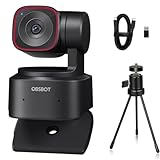
- Premium Choice: OBSBOT Tiny 2 AI-Powered PTZ 4K Webcam 1/1.5" CMOS 4X Faster Focusing USB 3.0 10x Faster Data Transmission Voice Control, W Table Mini Tripod
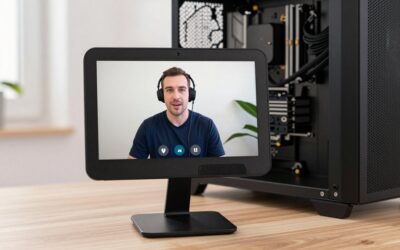
The OBSBOT Tiny 2 has earned a reputation as one of the smartest webcams available, blending professional 4K image quality with AI-powered tracking that follows you around the frame automatically. For streamers, content creators, remote workers, and presenters who move while they talk, it removes the need to constantly reposition a camera, keeping you perfectly centered and in focus no matter where you go.
- Watch: Obsbot Tiny 2 Ai-powered Ptz 4k Webcam: Review & Buyer’s Guide — Video Review
- Design & Build
- Performance
- Pros & Cons
- Alternatives to Consider
- What to Look For in an AI Tracking Webcam
- Why the USB Port Matters: A Bandwidth Example
- Which Version Suits You?
- Common Mistakes When Buying and Setting Up
- Troubleshooting Common Problems
- Frequently Asked Questions
- Verdict
- Related Articles
In this review we take a close look at the OBSBOT Tiny 2 and its family of PTZ webcams, including the standard Tiny 2 with voice and gesture control, bundle versions with a mini tripod or smart remote, the Tiny 2 Lite, and the newer Tiny 3 Lite. We will explain what sets the Tiny 2 apart, how the variants differ, and who will get the most out of this AI-driven camera.
As an Amazon Associate we earn from qualifying purchases at no extra cost to you.



🎮 Get More From Your Setup — Free
Prime Gaming gives you free PC games every month, in-game loot, and a free Twitch channel sub — plus fast free shipping on all the gear above. New members get a 30-day free trial.
Watch: Obsbot Tiny 2 Ai-powered Ptz 4k Webcam: Review & Buyer’s Guide — Video Review
Design & Build
The Tiny 2 lives up to its name with a compact, cube-like body mounted on a motorized gimbal that pans and tilts smoothly to track you. Its premium metal-and-plastic construction feels solid, and the pan-tilt-zoom mechanism moves quietly and precisely. Bundle options add useful extras, with one including a table mini tripod for flexible placement and another packaging the Tiny Smart Remote 2 for hands-off control. The Tiny 2 Lite trims some features for a lower price, while the Tiny 3 Lite adds spatial audio in a similarly compact form, giving buyers a clear ladder of options.
Performance
This is where the Tiny 2 truly shines. Its 1/1.5″ CMOS sensor captures sharp, vibrant 4K footage with excellent low-light handling thanks to HDR light correction, and the 4X-faster focusing keeps you crisp during movement. The standout AI tracking follows your face and body reliably across multiple modes, while gesture and voice control let you start tracking, zoom, or take a shot without touching anything. USB 3.0 with 10x faster data transmission ensures smooth high-resolution streaming. Compared with a static webcam, the Tiny 2 feels genuinely intelligent, making solo content creation far easier and more professional-looking, whether for streaming, video calls, or recording.
Pros & Cons
- Excellent 4K quality from a large 1/1.5″ sensor with HDR correction.
- Reliable AI tracking that keeps you centered hands-free.
- Voice and gesture control for effortless, touch-free operation.
- Fast autofocus and USB 3.0 for sharp, smooth high-res streaming.
- Premium pricing compared with basic fixed webcams.
- Feature overkill for users who only need a simple static camera.
- Variant confusion, since the Lite and bundle options differ in features.
Alternatives to Consider
If you do not need AI tracking, a high-quality fixed 4K webcam will save money while still delivering sharp image quality for stationary setups. Buyers on a tighter budget within the same family can look at the Tiny 2 Lite, which keeps the core PTZ tracking at a lower price. And for those wanting the newest features, the Tiny 3 Lite adds spatial audio, making it worth comparing against the Tiny 2 depending on whether tracking modes or audio matter more to you.
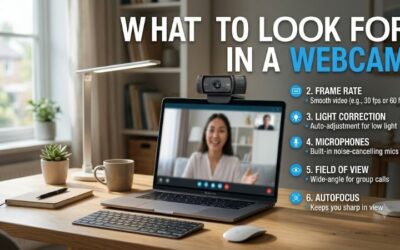
What to Look For in an AI Tracking Webcam
Sensor Size and Low-Light Behavior
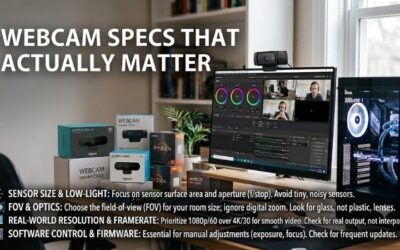
Spec sheets list the standard Tiny 2 with a 1/1.5 inch sensor and the Tiny 2 Lite with a smaller 1/2 inch class sensor. A larger sensor gathers more light per pixel, which generally means cleaner video in a dim room. Resolution is only half the story: a 4K label on a small sensor in a dark office often looks softer than a well-lit 1080p image.
Field of View and Zoom
The standard Tiny 2 is listed at about 85.5 degrees diagonal with 4x digital zoom. That is wide enough for one person at a desk, and tight enough that a second person needs to lean in. Digital zoom crops the image rather than adding optical detail, so zooming at 4K keeps more usable resolution than zooming at 1080p.
Frame Rate Options
Listed modes top out at 4K at 30 frames per second and 1080p at 60. Pick 1080p60 when motion matters, such as gesture-heavy presentations or game-camera overlays. Pick 4K30 for static talking-head shots and recorded interviews.
Tracking Behavior
A gimbal that follows you needs room to move. Place the camera where the pan and tilt range is not blocked by a monitor edge, and keep the background free of posters or mannequins that could confuse subject detection.
Lighting and Framing
Even a large sensor depends on light. A soft source placed just above and in front of the screen lifts shadows under the eyes and gives autofocus more contrast to lock onto. Leave some headroom above your head in the frame, because tracking tends to center on the face and a tight shot leaves little margin when you lean or stand.
Why the USB Port Matters: A Bandwidth Example
Raw video is large. Assume uncompressed 4K at 3840 by 2160 pixels, 2 bytes per pixel and 30 frames per second:
- 3840 x 2160 = 8,294,400 pixels per frame.
- Times 2 bytes = about 16.6 million bytes per frame.
- Times 30 frames = about 498 million bytes per second, close to 4 gigabits per second.
USB 2.0 carries 480 megabits per second at its theoretical best, and USB 3.0 carries 5 gigabits. This is why webcams compress video in the camera and why the Tiny 2 family expects a USB 3.x port for 4K modes. Plugging into a USB 2.0 port or a hub shared with other devices commonly results in lower resolution or dropped frames.
Which Version Suits You?
| If you… | Choose… |
|---|---|
| Stream or present in a dimly lit room | The standard Tiny 2, because of its larger sensor |
| Mostly join video calls in a bright home office | The Tiny 2 Lite, where the sensor gap matters less |
| Need a stand, tripod or remote on day one | A bundle version of the Tiny 2 |
| Already own a good microphone and mount | The camera alone, with no accessories |
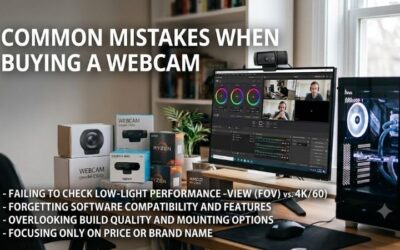
Common Mistakes When Buying and Setting Up
- Using a USB 2.0 port or a crowded hub. It limits the available modes and can make the camera fall back to lower quality.
- Mounting it too low. A camera below chin level angles upward and works the tracking harder; aim for eye level.
- Relying on auto exposure under mixed light. A window behind you can darken your face. Put the main light source in front.
- Expecting the built-in microphones to match a dedicated one. Treat them as a backup for casual calls.
- Forgetting software updates. Tracking and control features are often refined through firmware and companion app releases.
Troubleshooting Common Problems
- Camera not recognized: switch to a direct rear motherboard port and use the supplied cable.
- Tracking jumps to the wrong person: reset the target and reduce clutter behind you.
- Choppy video in a meeting app: lower the output to 1080p, since many meeting services compress the stream anyway.
- Gimbal hits an object: move the camera so its full range is clear.
Frequently Asked Questions
Is the OBSBOT Tiny 2 good for streaming?
Yes, its 4K quality, fast autofocus, AI tracking, and USB 3.0 connection make it excellent for streaming. The automatic framing is especially helpful for solo creators who move while presenting.
What is the difference between the Tiny 2 and Tiny 2 Lite?
The Lite version keeps the core PTZ AI tracking but trims some features and sensor capabilities to hit a lower price. The standard Tiny 2 offers the fuller feature set and larger sensor.
Do I need a separate microphone?
The Tiny 2 focuses on video, so serious streamers usually pair it with a dedicated mic for the best audio. If you want built-in spatial audio, the Tiny 3 Lite is worth considering.
How does the AI tracking work?
The motorized gimbal pans and tilts to follow your face and body across the frame using AI, with multiple modes and gesture control to start or stop tracking hands-free as you move.
Verdict
The OBSBOT Tiny 2 is a standout AI-powered PTZ webcam that delivers professional 4K quality and genuinely useful automatic tracking, making it ideal for streamers, creators, and presenters who move as they work. Its voice and gesture control, fast autofocus, and strong low-light performance justify the premium over basic webcams. Budget-conscious buyers can opt for the Tiny 2 Lite, while the Tiny 3 Lite tempts with spatial audio. If hands-free framing and top-tier image quality matter to you, the Tiny 2 is an easy recommendation.