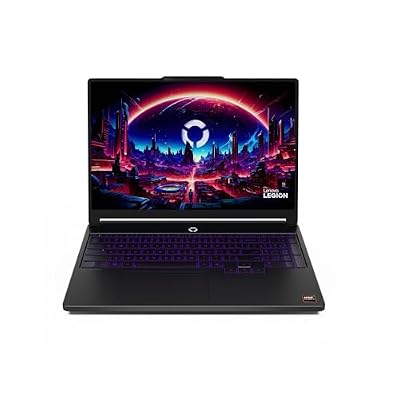
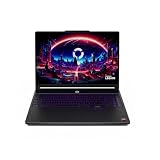
- Top Pick: Lenovo Legion 5i – Gaming Laptop – Intel® Core™ i7-14700HX – 15" 2.5K WQXGA PureSight OLED Display–165Hz Refresh Rate–NVIDIA® GeForce RTX™ 5070 – 16 GB Memory – 1 TB Storage – 3 Months of PC GamePass
- Best Value: Lenovo Legion LOQ AI-Powered Gaming Laptop – Intel Core i7-13650HX, 15.6" FHD IPS 144Hz Display, GeForce RTX 5050, 16GB Memory, 1TB Storage, G-Sync, Luna Grey
- Premium Choice: Lenovo Legion 5 16" WQXGA 240Hz Gaming Laptop, Intel Core Ultra 9 275HX; NVIDIA GeForce RTX 5060 8GB GDDR7; 32GB DDR5 RAM; 1TB NVMe M.2 SSD; Gigabit LAN, 2×2 WiFi 7
Lenovo’s Legion line has earned a reputation as one of the smartest choices in gaming laptops, blending serious RTX performance with build quality and cooling that often outclasses rivals at similar prices. For anyone weighing a Legion purchase, the lineup spans everything from the value-focused LOQ series to the flagship Legion Pro 7i, with a range of processors, GPUs, and display options that can make the decision genuinely tricky.
- Watch: Lenovo Legion Laptop Review: Review & Buyer’s Guide — Video Review
- Design & Build
- Performance
- Pros & Cons
- Alternatives to Consider
- What to Look For in a Legion Configuration
- Which Legion Should You Buy?
- Common Mistakes When Buying a Legion Laptop
- Pre-Purchase Checklist for Any Legion
- Matching the Tier to How You Play
- Frequently Asked Questions
- Verdict
- Related Articles
- Related Guides
In this review we take a close look at Lenovo’s current Legion family, from RTX 5050 and 5060 equipped mainstream models to the OLED-toting Legion 5 and the RTX 5080 flagship Legion Pro 7i Gen 10. Whether you want an affordable entry into RTX gaming or a top-tier machine for high-refresh and creative work, this breakdown will help you find the Legion that fits your budget and ambitions.
As an Amazon Associate we earn from qualifying purchases at no extra cost to you.



🎮 Get More From Your Setup — Free
Prime Gaming gives you free PC games every month, in-game loot, and a free Twitch channel sub — plus fast free shipping on all the gear above. New members get a 30-day free trial.
Watch: Lenovo Legion Laptop Review: Review & Buyer’s Guide — Video Review
Design & Build
Legion laptops are known for understated, premium designs that look at home in a dorm or an office. The Legion 5i and Legion 5 models feature sturdy chassis with excellent cooling and displays ranging from fast WQXGA 240Hz IPS panels to gorgeous OLED options on the 16-inch models. The Legion Pro 7i Gen 10 steps up to a flagship build with a 16-inch OLED display, while the Legion LOQ offers a more budget-conscious but still solid design. Effective thermal engineering across the range keeps these machines running cool and quiet under load.
Performance
This is where the Legion range shines. The flagship Legion Pro 7i Gen 10 pairs an Intel Core Ultra 9 with an RTX 5080 for elite gaming and creative performance, while the Legion 5 with a Core Ultra 9 275HX and RTX 5060, 32GB of DDR5, and a 240Hz display is a superb high-refresh all-rounder. The Legion 5i with a Core i7-14700HX and RTX 5070 targets serious gamers, the Legion 7a Gen 11 brings AMD Ryzen AI 9 power with an OLED panel, and the LOQ with an RTX 5050 offers an affordable entry point.
Pros & Cons
- Strong performance: RTX options from the 5050 up to the flagship 5080.
- Excellent cooling: Legion’s thermal design keeps clocks high and noise low.
- Premium displays: High-refresh IPS and stunning OLED panel choices.
- Solid value: Legion often delivers more performance per dollar than rivals.
- Battery life: Powerful GPUs shorten unplugged runtime.
- Weight: These gaming machines are heavier than ultraportables.
- Flagship cost: The Legion Pro 7i commands a premium price.
Alternatives to Consider
Buyers who prefer a more aggressive gamer aesthetic might look at an ASUS ROG or Acer Nitro machine, while those wanting maximum portability could consider a thinner gaming ultrabook. Creators who prioritize color accuracy above all should ensure they pick an OLED Legion configuration. But for a dependable blend of performance, cooling, and value, the Legion line is a top recommendation.
What to Look For in a Legion Configuration
The Same GPU Name Can Perform Differently
Laptop graphics chips run inside a power limit called total graphics power (TGP), and manufacturers choose where to set it. NVIDIA lists the RTX 5070 Ti Laptop GPU with 12 GB of GDDR7 on a 192-bit bus and a power range of 60 to 115 W. The RTX 5060 Laptop GPU is listed with 8 GB of GDDR7 on a 128-bit bus and 45 to 100 W. That spread is wide enough that two laptops sharing a GPU name can differ noticeably in sustained frame rate. Laptop makers can also add boost headroom on top of the base figure, so find the wattage on the spec sheet of the exact model rather than trusting the chip name alone.
The Tier Ladder: LOQ, Legion 5i, Pro 5i, Pro 7i
Lenovo’s lineup is broadly a ladder. The LOQ is the value tier, the Legion 5i and Legion Pro 5i sit in the middle, and the Legion Pro 7i is the flagship. Published teardowns report that the Pro 7i adds a third fan and a larger vapor chamber design compared with the Pro 5i, and that the same processor holds its speed better there under repeated load. Reviewers commonly describe the LOQ as having less cooling headroom in long sessions, and the flagship as the loudest at full load. Higher tiers are not always the right choice for every player, since the extra cooling brings extra weight and noise.
Display Choices That Change the Experience
Match the panel to the GPU. A 16-inch screen with a high refresh rate and a resolution around 2560 by 1600 suits mid-high graphics chips, while a 1080p panel pairs with entry cards that cannot push more pixels. Confirm the refresh rate, response time and whether the panel is IPS or OLED on the listing. OLED improves contrast, but it can reflect more light in bright rooms and static elements may need care over time. Many 16-inch Legion models use 16:10 panels, which add vertical space for work, but check each configuration.
Memory, Storage and Power Adapter
Aim for at least 16 GB of RAM and a fast NVMe drive. Confirm on the listing whether memory is socketed for later upgrades, since some thin laptops solder it. The charger should match the class of GPU, so a high-power configuration normally ships with a much larger adapter than an entry one.
Which Legion Should You Buy?
| If you… | Choose… |
|---|---|
| want a first gaming laptop and plan to play at 1080p | An LOQ configuration with RTX 5060-class graphics |
| want the best balance of cooling and cost | Legion 5i or Legion Pro 5i |
| play demanding games at high settings on a 16-inch screen | Legion Pro 5i with an RTX 5070 Ti-class GPU |
| need top thermal headroom and do creative or heavy work | Legion Pro 7i |
| mostly game at a desk and value portability less | A Legion desktop tower rather than a laptop |
Configurations change often, so verify the GPU, TGP, RAM and display on the listing before ordering.
Common Mistakes When Buying a Legion Laptop
- Comparing laptop and desktop GPU names. A laptop RTX 5070 Ti has 12 GB of memory, while the desktop card is a different product.
- Ignoring the power limit. A lower-wattage version of a chip can trail a higher-tier one by a visible margin.
- Buying the flagship for esports. Competitive 1080p games rarely need top-end graphics, so a mid-tier model can be a better fit.
- Skipping the battery reality. Gaming laptops are designed for plugged-in play, and battery life during games is short.
- Overlooking port layout. Check for HDMI output and Ethernet if you plan a docked setup.
Pre-Purchase Checklist for Any Legion
- Find the graphics chip name and its power limit in watts on the spec sheet.
- Confirm the panel size, resolution, refresh rate and panel type.
- Check how much RAM is installed and whether it can be upgraded.
- Look at the number and type of storage slots, since a second NVMe drive is an easy upgrade.
- Verify the ports you need, including HDMI, USB-C and Ethernet.
- Note the power adapter wattage and whether the laptop charges over USB-C.
- Read the warranty terms and what the seller covers.
Matching the Tier to How You Play
Competitive players at 1080p benefit from refresh rate and low latency more than from top graphics, so a mid-tier model with a fast screen can be the best use of the budget. Players who want high settings at 1440p, or who edit video and render 3D scenes, gain more from the higher tiers, because the larger cooling system lets the processor and graphics chip sustain their clocks. Anyone who carries the machine daily should weigh weight and charger size alongside performance, since a flagship is heavy and its adapter is large.
Frequently Asked Questions
Which Legion laptop offers the best value?
The Legion LOQ with an RTX 5050 is the most affordable entry, while the Legion 5 with an RTX 5060 and 240Hz display offers an excellent balance of price and high-refresh performance.
Is the OLED display worth it on a Legion?
For gaming and creative work, yes. The OLED panels on the Legion 5 16-inch and Legion 7a deliver deep blacks and vivid color that elevate both games and content creation.
Can Legion laptops handle creative workloads?
Absolutely. With powerful RTX GPUs, fast processors, and ample RAM, models like the Legion Pro 7i and Legion 7a handle video editing, 3D work, and rendering alongside gaming.
Do Legion laptops run cool?
Yes. Lenovo’s Legion cooling systems are among the best in class, sustaining high clock speeds while keeping noise and temperatures well managed during extended gaming sessions.
Verdict
Lenovo’s Legion lineup is one of the strongest in gaming laptops, offering excellent performance, cooling, and value across every tier. The Legion Pro 7i Gen 10 is the flagship pick for elite power, the Legion 5 with an RTX 5060 and OLED or 240Hz display is the best all-rounder, and the LOQ is the smart budget entry. Match the GPU and display to your gaming goals, and a Legion rarely disappoints.