Wrist and forearm strain from long hours at a desk pushes many people toward vertical mice, and Anker has become the go-to affordable entry point into this ergonomic category. A vertical mouse rotates your hand into a more natural handshake position, easing the pronation that a flat mouse forces on your forearm.
This review looks at Anker’s vertical mouse range, from the wireless 2.4G ergonomic model to the wired CE100, and compares them with popular ergonomic rivals. If you’re curious whether a budget vertical mouse can genuinely help, here’s what to expect.
As an Amazon Associate we earn from qualifying purchases at no extra cost to you. Product prices and availability are accurate as of the date shown and are subject to change.




🛒 Best Price Today on Amazon
Prime members get fast, free shipping on everything above, plus member-only deals. New members get a 30-day free trial — cancel anytime.
Design & Build
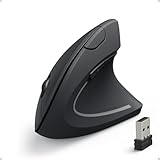
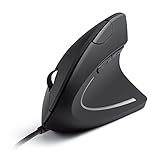
Anker’s vertical mice adopt the classic angled body that keeps your wrist in a neutral, thumbs-up posture. The wireless 2.4G model is right-hand shaped with a plug-in USB receiver, while the wired versions, including the optical CE100, connect directly and skip battery concerns entirely. Build quality is solid for the price, with a comfortable thumb rest and buttons placed within easy reach.
These are functional rather than flashy, targeting comfort and value over premium materials. The adjustable DPI options (1000/1600 on the CE100) let you tune tracking speed, and the overall footprint suits medium to large hands best.
Performance
The ergonomic benefit is the main event, and it delivers: after a short adjustment period, the vertical grip noticeably reduces the twisting strain of a conventional mouse. Optical tracking is accurate for everyday browsing, office work, and light photo editing, and the extra buttons handle back and forward navigation smoothly.
These aren’t gaming mice, they lack high-DPI sensors and rapid polling, but for productivity and comfort they do exactly what’s asked. The wireless model’s receiver connection is stable, and the wired versions offer lag-free, charge-free reliability.
Pros & Cons
- Genuine ergonomic relief from wrist and forearm strain.
- Affordable entry into the vertical mouse category.
- Wired and wireless options to match your setup.
- Adjustable DPI and handy navigation buttons.
- Right-hand shaping only on most models.
- Not suited to gaming or high-precision design work.
- Adjustment period before the new grip feels natural.
Alternatives to Consider
If you want a premium build with rechargeable power and quieter clicks, the Logitech Lift is a refined step up, and the ProtoArc EM11 offers a rechargeable Bluetooth option at a middle price. Those needing Bluetooth with high DPI and long battery life should look at the TECKNET ergonomic vertical mouse, which adds multi-device flexibility.
Related Guides
- Best Mice For Work (2026)
- Best Gaming Mice Brands (2026)
- Best Gaming Mouse For Csgo (2026)
- Best Computer Mouse For Travel (2026)
Frequently Asked Questions
Do vertical mice actually help with wrist pain?
Many users report real relief because the neutral handshake position reduces forearm twisting. It’s not a medical cure, but it eases the strain a flat mouse creates.
Is there an adjustment period?
Yes, most people need a few days to adapt to the vertical grip before it feels natural and their accuracy returns to normal.
Are Anker vertical mice good for left-handed users?
Most are right-hand shaped, so left-handed users should confirm the specific model or consider an ambidextrous alternative.
Can I use one for gaming?
They’re built for comfort and productivity, not gaming. For competitive play, a dedicated gaming mouse with a high-DPI sensor is a better choice.
Verdict
An Anker vertical mouse is an inexpensive, effective way to test whether ergonomic posture eases your wrist strain. For everyday office use it’s an easy recommendation, and if you fall for the form factor, the Logitech Lift or ProtoArc EM11 offer premium upgrades down the line.