Upgrading to the best budget SSD is the single most cost-effective way to make a computer feel faster. Whether you are reviving an aging laptop still stuck on a mechanical hard drive or adding cheap, roomy storage to a gaming PC, a modern solid-state drive delivers near-instant boots, snappy app launches, and shorter game load times for very little money. The best budget SSD balances real-world speed, endurance, and price per gigabyte. This guide rounds up the standout affordable drives and explains how to match one to your system.
As an Amazon Associate I earn from qualifying purchases.
As an Amazon Associate we earn from qualifying purchases at no extra cost to you. Product prices and availability are accurate as of the date shown and are subject to change.





Every drive below is a real, currently sold model popular with value-focused buyers. The table lists the defining spec, the use case each drive suits best, and a rating out of five to speed up your decision.
| Product | Key Spec | Best For | Rating |
|---|---|---|---|
| Crucial P3 Plus | PCIe 4.0 NVMe, up to 5000 MB/s | Best overall budget SSD | 4.6/5 |
| Samsung 990 EVO | PCIe 4.0, reliable firmware | Brand trust and endurance | 4.6/5 |
| WD Blue SN580 | NVMe, low power draw | Laptop upgrades | 4.5/5 |
| Kingston NV2 | PCIe 4.0, aggressive pricing | Cheapest cost per GB | 4.3/5 |
| TeamGroup MP44 | DRAM-less, up to 7000 MB/s | Fast sequential speeds | 4.3/5 |
| SK Hynix Platinum P41 | High sustained performance | Enthusiast-grade budget pick | 4.7/5 |
| Crucial MX500 | 2.5″ SATA | Older PCs without M.2 | 4.5/5 |
🛒 Best Price Today on Amazon
Prime members get fast, free shipping on everything above, plus member-only deals. New members get a 30-day free trial — cancel anytime.
How to Choose the Best Budget SSD
Picking the best budget SSD starts with knowing what your machine can accept, then matching capacity and speed to how you use it. The sections below break down interfaces, endurance, and value, while the frequently asked questions settle the specific doubts that come up during an upgrade.
Know your interface: NVMe vs SATA
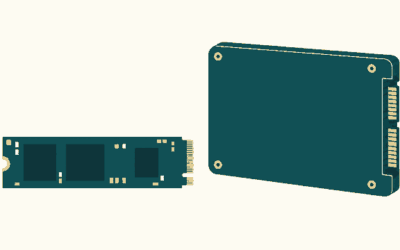
Before buying the best budget SSD, confirm what your system supports. Modern desktops and laptops use M.2 NVMe drives, which are far faster than the older 2.5-inch SATA format. If your machine is older and lacks an M.2 slot, a SATA drive like the Crucial MX500 is still a massive upgrade over a hard drive. Check your motherboard or laptop manual to be sure.
PCIe 4.0 versus PCIe 3.0
NVMe drives come in PCIe 3.0 and PCIe 4.0 flavors. A PCIe 4.0 drive such as the Crucial P3 Plus offers higher peak speeds, but for everyday use and gaming the real-world difference over a good PCIe 3.0 drive is smaller than the numbers suggest. Buy a PCIe 4.0 drive if your system supports it, since prices are similar, but do not overpay chasing headline speeds you will rarely feel.
Capacity and the cost per gigabyte
For the best budget SSD value, 1TB is the current sweet spot, offering the lowest cost per gigabyte while holding your operating system and a healthy game library. A 500GB drive works for a boot drive or a laptop, but games fill it fast. The Kingston NV2 is a good choice when you want maximum capacity for the lowest price.
Endurance and DRAM cache
Budget SSDs often skip a dedicated DRAM cache to cut costs, like the TeamGroup MP44. For typical consumer and gaming use this is fine, and such drives still feel very fast. If you write huge amounts of data daily, a drive with DRAM and a higher endurance rating, such as the SK Hynix Platinum P41, holds up better. Check the drive’s TBW (terabytes written) rating for a sense of its lifespan.
Real-world speed versus benchmarks
Advertised sequential speeds up to 7000 MB/s look impressive, but daily tasks like booting and launching apps rely more on random performance. A solid budget NVMe drive already feels near-instant for these jobs, so do not obsess over peak numbers. The jump from a hard drive to any SSD is dramatic; the jump between two good SSDs is subtle, as the endurance section above reflects.
Warranty and reliability
Reputable budget SSDs from Crucial, Samsung, and Western Digital come with three to five year warranties, a good sign of the manufacturer’s confidence. Stick to established brands rather than unknown names to avoid firmware issues and premature failures. A slightly higher price for a trusted drive with a long warranty is worth the peace of mind for the best budget SSD.
Installing your new SSD
Installing an M.2 NVMe drive is simple: power down, unscrew the small mounting screw, slot the drive into the M.2 connector at an angle, and secure it. A SATA drive connects with a data cable and a power cable. After installation you can clone your old drive with free software or do a fresh operating system install for the cleanest result and best long-term performance.
Matching the best budget SSD to your needs
If you want the best all-around value, the Crucial P3 Plus in 1TB is hard to beat. For a laptop, prioritize the low-power WD Blue SN580. For an old desktop without M.2, the Crucial MX500 SATA drive is the answer. Identify your interface and capacity needs first, then pick the drive that fits, and check the FAQ if any doubts remain.
Frequently Asked Questions
What is the best budget SSD overall?
The Crucial P3 Plus is the best budget SSD for most people, offering strong PCIe 4.0 speeds, a reliable reputation, and excellent value at 1TB. The Samsung 990 EVO is an equally strong pick if you prioritize brand trust and firmware stability. Both deliver near-instant boots and fast game loads for a modest price, making either a great everyday upgrade.
How much SSD capacity do I need on a budget?
For the best value, a 1TB SSD offers the lowest cost per gigabyte and comfortably holds your operating system plus a solid game library. A 500GB drive suffices for a boot drive or a light laptop, but modern games fill it quickly. If you store many large games or video files, consider a 2TB drive, since prices have fallen considerably.
Is a budget NVMe SSD much faster than a SATA SSD?
In benchmarks, NVMe drives are several times faster than SATA SSDs in sequential transfers, but for everyday tasks like booting and launching apps the difference is modest. Both feel dramatically faster than a mechanical hard drive. Choose NVMe if your system has an M.2 slot for the best speed; use a SATA drive like the Crucial MX500 only if your machine lacks that slot.
Do budget SSDs without DRAM perform well?
Yes, DRAM-less budget SSDs such as the TeamGroup MP44 perform very well for typical consumer and gaming use, feeling fast and responsive in daily tasks. The lack of DRAM mainly shows under sustained heavy write workloads. For gaming, general use, and storage, a DRAM-less drive is perfectly fine; only heavy content creators writing huge files daily should prioritize a DRAM-equipped model.
How long does a budget SSD last?
A quality budget SSD typically lasts many years under normal use, often outliving the computer it is installed in. Manufacturers rate endurance in terabytes written, or TBW, and typical consumer workloads use only a fraction of that over the drive’s life. Choosing a reputable brand with a three to five year warranty, like Crucial or Samsung, ensures dependable long-term reliability.
Related Guides
- Recommended Laptop For Home Use (2026 Guide)
- Best Gaming Laptop Brand (2026 Guide)
- The Best Gaming Laptop (2026 Guide)
Ready to decide? Our #1 pick for 2026 is the Crucial P3 Plus.
Live price & availability on Amazon.