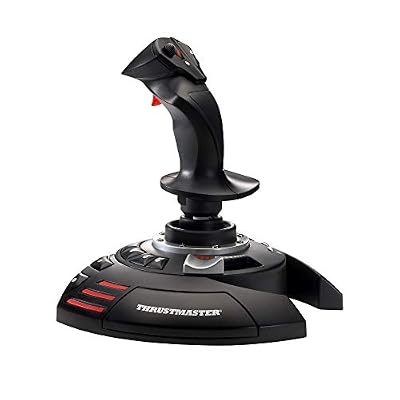
- Top Pick: Thrustmaster T-Flight Hotas X USB Flight Sim Stick & Throttle – PC
- Best Value: Logitech G X56 H.O.T.A.S Throttle and Joystick Flight Simulator Game Controller, 4 Spring Options, +189 Programmable Controls, RGB Lighting, 2x USB, PC – Black
- Premium Choice: Thrustmaster T-Flight Hotas One Flight Stick & Throttle – XBOX & PC
If you’re chasing real immersion in flight sims, combat flyers, or space games, a flight stick does what no gamepad ever will — it puts genuine precision under your hand. Heading into 2026 the choices span everything from all-in-one HOTAS bundles to modular setups you build piece by piece. Below are the flight sticks and HOTAS rigs worth your money on PC.
- Best Flight Sticks of 2026
- Flight Stick Comparison Table
- Best for Space Sims: Logitech X56
- Best Value HOTAS: Thrustmaster T.16000M
- Best Precision: VKB Gladiator
- How to Choose a Flight Stick
- Flight Stick Buying Considerations for 2026
- Which Flight Stick Fits Your Use Case?
- HOTAS Explained
- Frequently Asked Questions
- Related Articles
🛒 Best Price Today on Amazon
Prime members get fast, free shipping on everything above, plus member-only deals. New members get a 30-day free trial — cancel anytime.
As an Amazon Associate we earn from qualifying purchases at no extra cost to you.





Best Flight Sticks of 2026
Flight Stick Comparison Table
| Flight Stick | Type | Throttle | Best For | Price |
|---|---|---|---|---|
| Logitech X56 | HOTAS | Included | Space sims | ~$249 |
| Thrustmaster T.16000M | HOTAS | Included | Value HOTAS | ~$129 |
| VKB Gladiator | Stick only | Separate | Precision | ~$129 |
Best for Space Sims: Logitech X56
For deep, system-heavy space sims like Elite Dangerous and Star Citizen, the Logitech X56 HOTAS is hard to beat — it’s loaded with buttons, switches, and axes, plus adjustable stick tension and RGB. The feature-packed throttle hands you fine control over every subsystem, which is exactly why long-haul space pilots keep reaching for it. The dual-throttle design suits multi-engine ships, the swappable spring tension lets you tune resistance to your preference, and the sheer number of programmable inputs means you can bind nearly every ship function without touching the keyboard.
Best Value HOTAS: Thrustmaster T.16000M
Want HOTAS flying without the premium outlay? The Thrustmaster T.16000M nails it. Its Hall-effect sensors are genuinely accurate, the throttle is solid, and the ambidextrous stick suits everyone. For the price, the durability and precision punch way above their weight — a smart first rig for newcomers and veterans alike. The stick’s H.E.A.R.T Hall-effect magnetic sensors resist the drift and wear that plague potentiometer-based sticks, and the four included swappable hand rests make the ambidextrous grip comfortable for both left- and right-handed pilots.
Best Precision: VKB Gladiator
The VKB Gladiator is the enthusiast’s pick, prized for its build quality, dead-accurate sensors, and customizable mechanics. Bolt it to a separate throttle and you get a premium feel with pinpoint control that combat-sim pilots swear by — the stick to buy when stick quality is your top priority. VKB’s contactless sensors and swappable cams let you change the stick’s centering feel, and the metal gimbal delivers a smooth, precise motion that outclasses most bundled sticks in this price range.
How to Choose a Flight Stick
- HOTAS vs stick-only: HOTAS includes a throttle; stick-only pairs with a separate throttle
- Sensors: Hall-effect sensors resist wear and stay accurate over time
- Buttons & axes: More controls help in complex sims with many systems
- Build quality: Sturdy construction improves feel and longevity
Combine a flight stick with a VR headset for the most immersive cockpit experience.
Flight Stick Buying Considerations for 2026
Beyond the headline choice of HOTAS versus stick-only, several factors shape how a flight stick performs over time. Sensor technology tops the list: Hall-effect and contactless magnetic sensors don’t physically touch, so they resist the dreaded center drift that potentiometer sticks develop after months of use. Twist rudder versus separate pedals is another consideration — many sticks include a twist axis for yaw, but serious sim pilots eventually add dedicated rudder pedals for finer control. Count the number of buttons, hats, and axes you’ll actually bind; complex space sims reward more inputs, while an arcade flyer needs far fewer. Lastly, weigh desk mounting: a heavy base with rubber feet or clamp holes stays put during aggressive maneuvers, which cheaper lightweight sticks struggle to do.
Twist Rudder vs Dedicated Pedals
Most HOTAS sticks let you twist the grip left and right to control yaw, which is fine for casual flying and saves desk space. But for precise coordinated turns in combat sims or realistic rudder work in DCS World, dedicated rudder pedals give you smoother, more intuitive control using your feet — freeing your hand to focus on pitch and roll. If you’re starting out, a twist stick is plenty; if you go deeper, pedals are a natural next upgrade.
Which Flight Stick Fits Your Use Case?
Match the hardware to what you fly. Space-sim pilots deep in Elite Dangerous or Star Citizen want the button-heavy Logitech X56, whose abundant switches and dual throttle map cleanly to complex ship systems. Newcomers and value-focused pilots get outstanding accuracy from the Thrustmaster T.16000M, an ideal first HOTAS that grows with you. Dedicated combat-sim enthusiasts flying DCS World or IL-2 who prize stick feel above all should invest in the VKB Gladiator paired with a standalone throttle, building a modular rig tuned exactly to their preferences.
HOTAS Explained
HOTAS is shorthand for “Hands On Throttle And Stick” — joystick in one hand, throttle in the other, just like a real cockpit. It lets you juggle flight and engine power at once without diving for the keyboard, which is what makes immersive flight and space sims click. All-in-one kits like the T.16000M ship both halves, while enthusiasts tend to pair a premium stick such as the VKB Gladiator with a dedicated standalone throttle.
Frequently Asked Questions
What is a HOTAS and do I need one for flight sims?
HOTAS stands for Hands On Throttle And Stick, a two-piece setup with a separate joystick and throttle unit. It lets you control aircraft pitch, roll, and thrust without reaching for the keyboard. For serious flight or space sims like DCS World or Star Citizen, a HOTAS dramatically improves immersion and precision, but a standalone stick is fine for casual play.
Are flight sticks compatible with Xbox or PlayStation?
Most PC flight sticks connect over USB and are plug-and-play with Windows. Console support is limited: only a handful of officially licensed sticks work with Xbox for titles like Microsoft Flight Simulator, and PlayStation support is rarer still. Always check the product listing for explicit Xbox Series or PS5 licensing before buying if you plan to fly on console.
What is the difference between Hall effect and potentiometer sensors?
Potentiometer sensors use physical contact that wears over time and can develop spikes or drift. Hall effect sensors are contactless magnetic sensors that resist wear, offering smoother input and a much longer lifespan. If you fly frequently or want precision that lasts for years, a Hall effect stick is worth the extra cost and is now common on mid-range models.
How much should I spend on a good flight stick?
Entry-level sticks start around $50 to $70 and cover casual flying well. A solid HOTAS bundle runs $130 to $200 and adds a throttle plus more buttons. Enthusiast-grade metal sticks with Hall sensors and modular grips can exceed $400. Match your budget to how often you fly and how many switches your favorite sims demand.
Do flight sticks include rudder control?
Many sticks feature a twist axis on the grip that acts as rudder yaw, which is adequate for casual flying. However, twist rudder can feel imprecise for combat or landings. Dedicated rudder pedals give far better control and separate your yaw input from stick movement. Consider adding pedals later if you progress to serious simulation.
Ready to decide? Our #1 pick for 2026 is the Logitech X56.
Live price & availability on Amazon.