By 2026 wireless gaming mice have flat-out caught wired ones on performance. Logitech Lightspeed, Razer HyperSpeed and the rest run 1ms polling exactly like a cable does — at matching polling rates the latency difference between wired and wireless is simply not measurable while you game. Add 70–300+ hours of battery and weights that go toe-to-toe with wired models, and wireless has become the default I’d suggest for a desk setup. This guide runs through the best wireless gaming mice from budget to flagship.


| Mouse | Sensor | Weight | Battery | Price |
|---|---|---|---|---|
| Logitech G305 | HERO 12K | 99g | 250hr (AA) | $30.99 |
| Razer Viper V3 HyperSpeed | Focus X 26K | 82g | 280hr | $49.99 |
| Logitech G703 | HERO 25K | 95g | 60hr | $69.99 |
| Logitech G Pro X Superlight 2 | HERO 2 32K | 60g | 95hr | $129.99 |
🛒 Best Price Today on Amazon
Prime members get fast, free shipping on everything above, plus member-only deals. New members get a 30-day free trial — cancel anytime.
Start 30-Day Prime Free Trial →See Today’s Amazon DealsQuick answer: For most people in 2026, the best wireless gaming mouse is the Logitech G305 — our #1 rated choice. See the full ranked comparison, alternatives and buying advice below.
Is Wireless Gaming Mouse Latency Actually a Problem?
Today’s wireless gaming mice on 2.4GHz tech (Logitech Lightspeed, Razer HyperSpeed, SteelSeries Quantum Wireless) run at 1ms polling — identical to a wired USB mouse. The old “wireless means lag” idea came from Bluetooth mice sitting at 10–20ms. A dedicated high-frequency 2.4GHz gaming mouse has 1ms end-to-end latency, which is under what you can perceive and irrelevant to performance. Pro esports players run wireless in competition, including at Logitech-backed events. The performance gap is zero.
Best Budget Wireless: Logitech G305
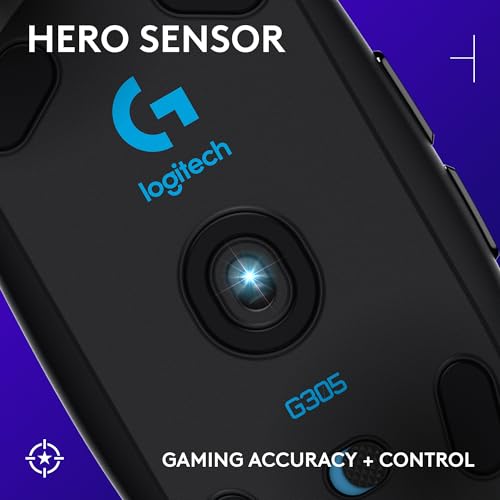
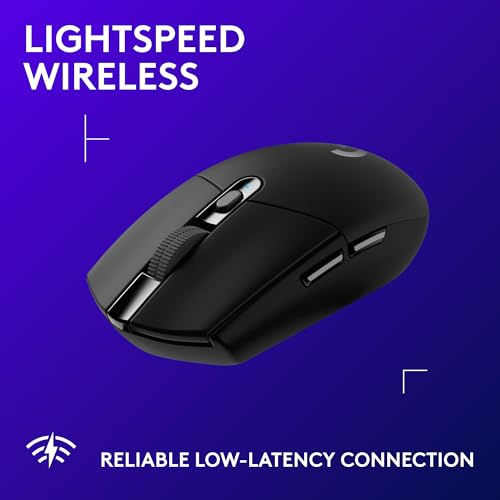
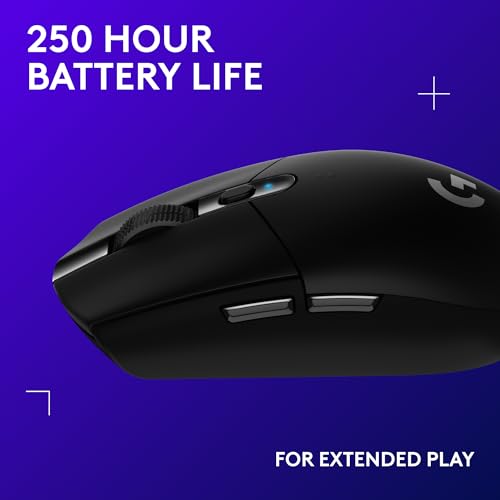
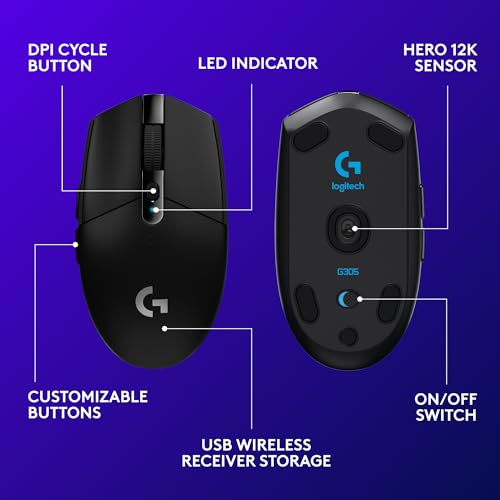
The Logitech G305 Lightspeed is still one of the best deals in gaming at $30.99. You get the HERO 12K sensor with 400 IPS tracking, Lightspeed 1ms wireless, and 250-hour battery off a single AA — all in a light shell. Running on AA means no charging cable and effectively endless battery: toss a spare AA in your bag and you’ll never get caught with a dead mouse mid-match. The G305’s compact shape suits claw and fingertip grips nicely.
Prime Logitech G305 Lightspeed Wireless Gaming Mouse, Hero Sensor, 12,000 DPI, Lightweight, 6 Programmable Buttons, 250h Battery, On-Board Memory, Compatible with PC, Mac - Black | Hero Sensor 12, Lightspeed 1ms Wireless, Up to 250h on 1xaa, 6 Programmable Buttons, 99g with Battery




As an Amazon Associate we earn from qualifying purchases. Product prices and availability are accurate as of the date/time indicated.
Best Mid-Budget: Razer Viper V3 HyperSpeed
The Razer Viper V3 HyperSpeed at $49.99 is an 82g ultralight running Razer’s Focus X 26K optical sensor over HyperSpeed 1ms wireless. The symmetrical low-profile shape plays well with palm, claw and fingertip grips, and you get 280-hour battery off a AA. The Focus X tracks as accurately as sensors that cost twice as much. If you want ultralight wireless without paying flagship money, the Viper V3 HyperSpeed leads the $50 bracket.
Best Flagship: Logitech G Pro X Superlight 2
The Logitech G Pro X Superlight 2 at $129.99 is the pro-grade mouse more esports players reach for than any other — at 60g it’s the lightest high-end wireless mouse going, and the HERO 2 32K sensor is Logitech’s best, with zero smoothing or prediction. Lightspeed 2 wireless trims the already-tiny latency further. If you want the exact spec the pro CS2, Valorant and Apex crowd runs, this is it. The price is justified by the build, the proven sensor and the weight edge.
Frequently Asked Questions
Is a wireless gaming mouse as fast as a wired one in 2026?
Yes. Modern 2.4GHz dongles from Logitech, Razer, and Corsair deliver 1ms or lower latency that is indistinguishable from wired in blind testing. The old wireless lag concern no longer applies, so competitive players now use wireless without any measurable disadvantage in reaction-based titles.
How many polling rate Hz do I actually need?
Most gamers are fully served by 1000Hz, which reports position every millisecond. The newer 4000Hz and 8000Hz modes reduce click-to-motion jitter slightly but drain battery faster and demand a strong CPU. Unless you play at 240Hz or higher, 1000Hz is the practical sweet spot.
How long should the battery last on a charge?
Expect 70 to 100 hours at 1000Hz with RGB off on flagship mice like the Razer Viper V3 Pro or Logitech G Pro X Superlight 2. Enabling 4000Hz polling or lighting can cut that in half, so most players charge weekly rather than daily.
Does mouse weight really matter for gaming?
Yes, especially for FPS aiming. Sub-60-gram mice reduce fatigue during flick shots and long sessions, letting you move faster with less effort. Heavier mice around 80 grams feel more stable for slower, tracking-heavy games, so the ideal weight depends on your genre and grip.
Should I choose an optical or mechanical switch?
Optical switches use light beams instead of metal contacts, eliminating debounce delay and double-click failures that plague older mechanical switches over time. Nearly every 2026 flagship uses optical switches rated for 90 million clicks, making them the more durable and reliable long-term choice.
Ready to decide? Our #1 pick for 2026 is the Logitech G305.
Live price & availability on Amazon.