What to look for in a mechanical keyboard determines your overall typing comfort, productivity, and long-term satisfaction. Selecting the right peripheral requires balancing switch feel, chassis rigidity, and modern wireless connectivity. Choosing quality hardware elevates your everyday desk experience across modern work setups.
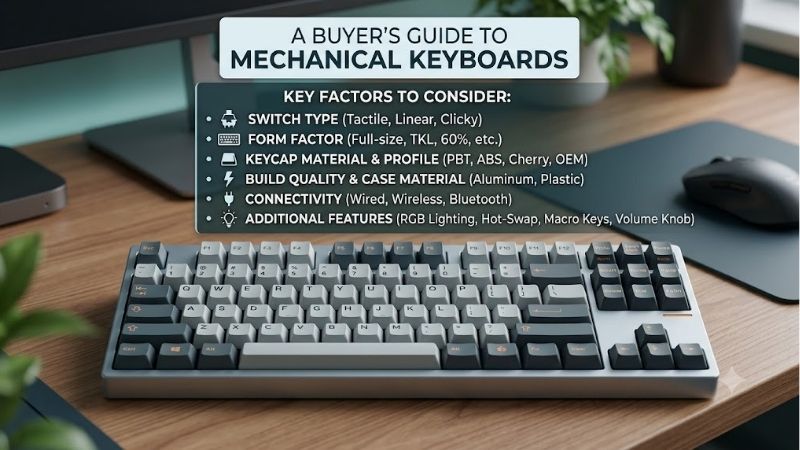
How to Choose the Right Mechanical Keyboard
Understanding what to look for in a mechanical keyboard allows you to build an efficient typing environment tailored to your needs. Evaluating structural components and board geometry ensures maximum ergonomics during long working hours. Implementing a gasket mount design provides superior shock absorption for daily tasks.
Selecting the Ideal Switch Type
Choosing the right switch type directly controls your daily tactile feel and typing accuracy. Linear switches offer smooth, quiet strokes that rapid gamers favor for fast reaction times. Tactile options provide a subtle physical bump that helps typists confirm key actuation without bottoming out keys excessively on desk surfaces.
Clicky switches produce crisp audible clicks that appeal to solo writers wanting distinct noise feedback. Testing different stem designs and spring weights prevents finger fatigue during extended work sessions. Selecting suitable internal switches forms the absolute core foundation of an exceptional custom desktop typing experience.
Evaluating Hot-Swappable PCB Compatibility
Opting for a hot-swappable PCB grants total modular freedom to customize your board over time. You can replace individual switches instantly without heating up soldering irons or damaging circuit traces. This modular feature allows effortless experimentation with different switch brands, spring weights, and lubricated stems.
Selecting hot-swappable sockets ensures long-term hardware repairability if a single switch degrades. You simply pull out the malfunctioning switch and insert a fresh replacement in seconds. Investing in modular sockets guarantees your desk peripheral remains versatile and fully functional for years of heavy daily typing.
Determining Layout and Form Factor
Selecting an appropriate layout depends heavily on your available desk space and workflow demands. A compact form factor like a 75 percent or tenkeyless design frees up valuable mouse surface space. Reducing overall keyboard width allows your arms to rest in a more natural position, reducing shoulder strain during long hours.
Full-size boards remain essential for accountants and data entry specialists needing dedicated numpads. Compact models retain essential arrow keys while removing unused extra numeric sections for portability. Balancing functional key availability with physical desk dimensions ensures optimal workspace efficiency every day.
Checking Keycap Material and Durability
Keycap material plays a critical role in long-term surface texture, acoustics, and wear resistance. Investing in durable PBT keycaps prevents unsightly oil shine and legend fading caused by repetitive finger contact. Dense plastic construction enhances lower acoustic pitch while offering a pleasant matte texture that resists oils.
Standard ABS keycaps often feel slippery and develop greasy wear spots after minimal daily typing. Double-shot molding processes fuse two distinct plastic layers together, ensuring key legends never rub off over time. Selecting premium keycap materials maintains a clean look and satisfying surface feel across years of heavy usage.
Assessing Wireless and Wired Connectivity
Selecting modern wireless connectivity keeps your desktop clean and completely free of cable clutter. Multi-mode options featuring Bluetooth 5.1 and low-latency 2.4GHz wireless offer seamless device pairing. High-capacity internal batteries keep wireless keyboards operating for weeks without needing frequent power recharges.
Detachable USB-C cables provide reliable wired connectivity with zero signal delay during intense competitive sessions. Versatile keyboards support instant toggling between Windows desktop PCs and macOS laptops using simple shortcut keys. Flexible connection modes ensure uninterrupted typing productivity across all your hardware.
Top Picks on Amazon
When analyzing what to look for in a mechanical keyboard, evaluating verified Amazon choices simplifies buying decisions. We selected top-rated models that deliver reliable performance, exceptional build materials, and strong user support. The table below compares key technical specifications before diving into detailed individual reviews.
| Model | Form Factor | Switch Type | Connectivity | Best For |
| Keychron Q1 Max | 75% Layout | Gateron Jupiter (Hot-swappable) | 2.4GHz / Bluetooth / USB-C | Enthusiast Typists & Developers |
| Razer BlackWidow V4 Pro 75% | 75% Layout | Razer Tactile Orange | 2.4GHz / Bluetooth / USB-C | Competitive & Customization Gamers |
| Keychron C3 Pro | Tenkeyless (TKL) | Red Linear | Wired USB-C | Budget-Conscious First Buyers |
| Logitech G PRO X TKL | Tenkeyless (TKL) | GX Tactile / Linear | Lightspeed 2.4GHz / Bluetooth | Esports & Competitive Gaming |
| Epomaker TH80 Pro | 75% Layout | Gateron Pro Yellow | 2.4GHz / Bluetooth / USB-C | Custom Acoustics on a Budget |
Keychron Q1 Max Wireless Mechanical Keyboard
The Keychron Q1 Max is an outstanding premium choice for software developers and long-form writers. Featuring a heavy CNC aluminum chassis and pre-lubed switches, it delivers an acoustic typing experience right out of the box. Its compact form factor preserves desk space while offering full custom QMK firmware remapping options.
Its substantial metal chassis makes this keyboard less practical for daily backpack commuting between remote workspaces. However, double-shot keycaps and double-gasket acoustic mounting justify its higher cost for desktop setups. Evaluating what to look for in a mechanical keyboard shows why this board excels for daily power users.
Razer BlackWidow V4 Pro 75% Keyboard
The Razer BlackWidow V4 Pro 75% targets gamers who desire high performance combined with modular features. It features hot-swappable orange tactile switches, vibrant chroma lighting, and a multi-function programmable dial. Seamless wireless connectivity allows easy switching across multiple gaming machines and work devices.
Razer Synapse software requires noticeable system resources when running complex RGB lighting effects continuously. However, a magnetic padded wrist rest and gasket-mounted acoustics ensure supreme comfort during extended sessions. It stands out as an exceptional flagship gaming keyboard for enthusiasts demanding total control.
Keychron C3 Pro Wired Mechanical Keyboard
The Keychron C3 Pro serves as the absolute best budget option for first-time mechanical keyboard buyers. Equipped with smooth linear switches and acoustic dampening foam, it offers remarkable typing performance under fifty dollars. It proves that upgrading from membrane office keyboards does not require spending high amounts.
Its fixed USB-C cable and lightweight plastic frame feel less substantial than premium full-aluminum options. Nevertheless, shine-through keycaps and programmable QMK software support yield unbeatable everyday value for entry-level setups. It is an ideal budget peripheral that delivers impressive typing feel for modern desks.
Logitech G PRO X TKL Lightspeed Keyboard
The Logitech G PRO X TKL Lightspeed is engineered specifically for esports players demanding fast wireless performance. Powered by LIGHTSPEED 2.4GHz technology and media controls, it performs flawlessly under tournament pressure. Standard durable PBT keycaps resist shine and wear during intense competitive gaming sessions.
The fixed non-hot-swappable board prevents swapping individual switches if you prefer custom aftermarket options later. Still, remarkable battery life and rock-solid wireless connectivity make this a top choice for serious competitive players. It provides dependable pro-grade performance across all fast-paced gaming genres.
Epomaker TH80 Pro Wireless Keyboard
The Epomaker TH80 Pro appeals to hobbyists seeking custom acoustic profiles without spending high custom prices. Featuring a hot-swappable PCB, pre-lubed switches, and a metal volume knob, it delivers deep thocky typing sound signatures. Triple connection modes provide reliable wireless performance for laptops and desktops.
Setting up custom key combinations through proprietary software requires initial setup time and user patience. However, a long-lasting battery and sound-absorbing foam layers yield exceptional value for daily office work. It proves that feature-packed wireless custom designs can remain accessible to everyday buyers.
Frequently Asked Questions
Reviewing what to look for in a mechanical keyboard addresses common buyer questions regarding long-term maintenance and value. We answered frequent technical queries to help you make an informed purchasing decision. Read through these questions to determine which switch types and layouts align with your daily routine.
Are Mechanical Keyboards Better for Daily Typing?
Yes, mechanical keyboards offer far greater stroke consistency and precise tactile feedback than standard rubber dome keypads. Internal metal springs cushion every keypress, significantly reducing finger fatigue during extended writing sessions. Determining what to look for in a mechanical keyboard helps typists find optimal comfort.
Consistent actuation points enable faster typing speed while reducing accidental key presses across long working hours. Durable internal switches maintain their original spring resistance for millions of presses without feeling squishy over time. Upgrading to a mechanical model creates an enjoyable daily typing environment.
What Is the Best Switch Type for Office Environments?
Silent linear or gentle tactile switches are ideal for shared office spaces because they generate minimal acoustic noise. Tactile feedback provides physical confirmation of a keystroke without producing loud sharp clicks that disturb surrounding co-workers. Pairing silent switches with internal acoustic foam creates a quiet desk setup.
Avoiding clicky switches prevents loud noise disruptions during phone calls and team meetings at work. Testing light spring weights ensures comfortable typing without straining fingers during long data entry shifts. Quiet mechanical options deliver all the ergonomic benefits of mechanical keys while keeping noise muted.
Does Hot-Swappable Technology Save Money Long-Term?
Yes, hot-swappable boards protect your peripheral investment by allowing single switch replacements whenever keys wear out. If a single key stops responding, you simply replace that specific switch instead of purchasing an entirely new board. Incorporating custom acoustic dampening further protects internal electronics from dust.
Modular sockets allow you to upgrade switch feel and sound over time without buying full replacement keyboards. This flexibility lets your desktop hardware adapt seamlessly to your changing ergonomic preferences over years of use. Hot-swappable design maximizes long-term financial value for demanding computer users.
Why Are Custom Mechanical Keyboards More Expensive?
Higher pricing reflects premium structural materials like CNC-machined aluminum cases and heavy steel mounting plates. Multi-layer custom acoustic dampening, hot-swappable circuit boards, and pre-lubed switches increase production costs significantly. Quality internal construction guarantees superior durability and refined sound profiles.
Inclusion of tri-mode wireless chips, custom RGB lighting, and thick keycaps further elevates overall build quality. Investing in high-grade desktop hardware delivers long-term durability and ergonomic benefits that far outweigh cheap office keyboards. Premium keyboards remain a lasting investment for your daily desk setup.
Final Thoughts
Mastering what to look for in a mechanical keyboard leads to the perfect balance of typing comfort, durability, and desktop style. Whether you choose a compact model or a hot-swappable layout with a gasket mount design, quality gear enhances daily productivity. Upgrading your keyboard delivers lasting ergonomic rewards for work and play.