
🛒 Best Price Today on Amazon
Prime members get fast, free shipping on everything above, plus member-only deals. New members get a 30-day free trial — cancel anytime.
Affiliate disclosure: As an Amazon Associate we earn from qualifying purchases. This post contains affiliate links — we may earn a small commission at no extra cost to you. This never affects our picks. Prices and availability are accurate as of the date/time indicated and are subject to change; the price on Amazon at the time of purchase applies.
We are a build site. We almost always tell you to source the parts yourself, run a careful sub-$500 component spreadsheet, and get more performance per dollar than a prebuilt could ever deliver. Almost. The under-$500 bracket in May 2026 is the one place where that math breaks. GPU pricing remains stubbornly high, bulk-buy prebuilt vendors still get supplier discounts the rest of us can’t touch, and the cost of acquiring a single brand-new tower component-by-component now exceeds the cost of a complete entry-level prebuilt in many configurations. So this month, against character, we are publishing a prebuilt buyer’s guide. Six picks under $500, ranked with a builder’s eye for upgrade paths and parts longevity, with honest notes on what a DIY equivalent would actually cost.
Quick answer: For a 2026 build, the our top pick is the graphics card we would build around, while the the value pick is the budget-friendly choice.
Throughout this guide you’ll see “vs DIY” notes on each pick. The comparison assumes brand-new parts from major retailers, not Marketplace or eBay used components. If you can source used parts well, your DIY budget shrinks substantially — but most readers we hear from at this tier don’t have the patience or the local market for used parts, and the prebuilts win on convenience.
This is a 1080p tier. None of these PCs carry RTX cards, none will do meaningful ray tracing, none target 1440p. What they will do is give you a real desktop with a real upgrade path and an honest entry point into PC gaming.
Prebuilt versus DIY at $500: the honest math
Before we get to the picks, here’s the build math for an equivalent DIY spec, put together from new parts at May 2026 prices:
| Component | DIY equivalent | New retail price |
|---|---|---|
| CPU | Intel Core i5-12400F | $120-140 |
| Motherboard | Budget B660M | $90-110 |
| RAM | 16 GB DDR4-3200 | $40-50 |
| Storage | 500 GB NVMe | $45-55 |
| GPU | RX 6600 (used, near-equivalent of RX 580 8GB) | $150-180 |
| PSU | 500W 80+ Bronze | $50-65 |
| Case | Budget ATX | $40-55 |
| OS | Windows 11 license | $30-100 |
| Total | $565-755 |
The cheapest builds in this guide ship at $359. The priciest sits right at $500. A DIY build approximating the middle-tier prebuilt comes in $60-250 more. That’s the gap that justifies prebuilt at this price.
The six worth considering
STGAubron Gaming PC with i7 + RX 580 8 GB — about $472
What you’re getting. Pairing an i7 boosting to 3.9 GHz, 16 GB of memory, and an RX 580 with the full 8 GB VRAM configuration is the strongest “balanced for AAA gaming” pick under $500. The RX 580 is a 2017-generation card, but the 8 GB variant gives you the headroom to actually run 2024 AAA games at 1080p medium without VRAM-related stutter. God of War, Forza Horizon 5, Hogwarts Legacy at medium settings are realistic, not aspirational.
vs DIY. Building the equivalent yourself with a new RX 6600 (the modern RX 580 successor) would run $580-620. At $472, this prebuilt wins by $100-150.
Pros
- 8 GB VRAM future-proofs you for 2-3 years of mid-tier AAA
- i7/8 GB-VRAM balance is rare at this price
- RX 580 has mature, stable AMD drivers
Cons
- RX 580 power draw is high — any future GPU upgrade likely forces a PSU upgrade too (browse our PSU bestsellers)
- No ray tracing, no DLSS
Upgrade path notes. The first upgrade most builders make on this chassis is the GPU (probably an RX 6700 XT used). That will demand 550W minimum, so plan PSU and GPU as a pair. The DDR4 motherboard limits long-term memory upgrades — see RAM picks.
Verdict: Best Performance per Dollar.
Gaming PC i7 to 4.0 GHz, RX 590 8 GB, DDR5, 512 GB M.2 — about $500

OKAMUS Gaming PC Desktop Computer, i7-6700 Up to 4.0GHz, RX 590 8GB GDDR5 Graphics, 16GB RAM, 512GB M.2 SSD, 4 ARGB Fans, Win 11 Home, 400W PSU, Prebuilt Gaming Tower (i7+RX590+16GB+512GB)


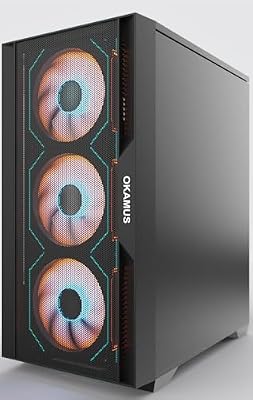


As an Amazon Associate we earn from qualifying purchases. Product prices and availability are accurate as of the date/time indicated.
What you’re getting. The RX 590 is the slightly quicker refresh of the RX 580 — same 8 GB VRAM, ~5-10% better rasterization, ~10% more power draw. The interesting wrinkle is the DDR5 memory and 512 GB M.2 NVMe drive paired with a 4.0 GHz i7. DDR5 in a $500 prebuilt is genuinely unusual. M.2 NVMe storage at this capacity is the smart pick for a single OS-and-games drive.
vs DIY. A DIY DDR5 build with an equivalent GPU starts around $700, since DDR5 motherboards and memory both carry premiums. This prebuilt represents the largest DIY-vs-prebuilt gap on our list.
Pros
- Strongest GPU at this tier
- DDR5 + M.2 NVMe is forward-compatible with later CPU upgrades
- 4.0 GHz i7 boost keeps modern engines comfortable
Cons
- RX 590 still has no ray tracing, no DLSS, partial FSR 3 support
- “DDR5 at $500” is unusual — verify against the seller’s photos before committing
Upgrade path notes. DDR5 motherboards typically support 13th/14th gen Intel or recent AMD socket platforms, so a CPU jump in 2027 is realistic without replacing the motherboard. The GPU is the limiting factor for ~24 months, after which an RTX 4060 or RX 7600 swap unlocks meaningful gains. Plan PSU capacity first — see our PSU guide.
Verdict: Best Futureproof Pick.
STGAubron Prebuilt Gaming PC with Radeon RX 550 4 GB — about $408

STGAubron Gaming PC Desktop,Core I5,RX 550 4G,16G RAM,512G SSD | Gaming Computer Tower for Streaming,Video Editing,Home,School,I5 up to 3.6G,ARGB Fan,WiFi 6,BT 5.0,4K DP,HDMI,Win11 Home

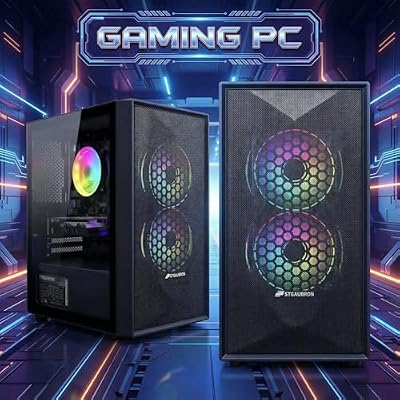


As an Amazon Associate we earn from qualifying purchases. Product prices and availability are accurate as of the date/time indicated.
What you’re getting. RX 550 is the floor of “real discrete graphics” — 4 GB of VRAM and a meaningful step above integrated. The Core i5 boost to 3.6 GHz and 16 GB of RAM are reasonable for a 1080p esports machine. Valorant, CS2, League, Apex Legends on low all run cleanly above 60 FPS, often above 100 in the lighter titles. 2024+ AAA games aren’t the target here.
vs DIY. A DIY build with a new RX 6400 (the modern RX 550 equivalent) would land around $470-510. The prebuilt at $408 wins by $60-100.
Pros
- Lowest-power discrete GPU pick — cool and quiet operation
- i5 paired with RX 550 is well-balanced for esports
- Tight budget that leaves room for a better monitor
Cons
- 4 GB VRAM is a hard wall for any 2024+ AAA
- Limited FSR 3 support
Upgrade path notes. The natural first upgrade is the GPU. A drop-in RX 6600 stays inside the same power envelope and triples raw performance. From there the rest of the chassis is fine for another 2-3 years.
Verdict: Best Esports Floor.
STGAubron Gaming PC with RX 560 4 GB GDDR5 — about $475

STGAubron Gaming PC Desktop,Core I5,RX 560 4G,16G RAM,512G SSD | Gaming Computer Tower for Streaming,Video Editing,Home,School,I5 up to 3.6GHz,ARGB Fan,WiFi 6,BT 5.0,4K DP,HDMI,Win11 Home


As an Amazon Associate we earn from qualifying purchases. Product prices and availability are accurate as of the date/time indicated.
What you’re getting. RX 560 is a step up in shader count and memory bandwidth from the RX 550 — better in shader-heavy esports titles and emulation up through PS3. Pair it with an i5 boosting to 3.6 GHz and 16 GB of RAM and the configuration is reasonable. The pricing problem: at $475, this competes directly with the RX 580 8 GB pick. The 8 GB VRAM advantage of the RX 580 build is a genuinely big deal, so this pick only makes sense if the bundle (peripherals, case design, included monitor) tips the balance.
vs DIY. A DIY build matching this is $510-560. The prebuilt wins by $35-85.
Pros
- Better esports performance than RX 550
- STGAubron case design and RGB are above the price point’s average
- Emulation up through PS3 is comfortable
Cons
- Priced same as RX 580 8 GB pick — VRAM gap is hard to ignore
- 4 GB VRAM bottleneck
Upgrade path notes. Same upgrade story as the RX 550 build — GPU first, plan PSU. The case is genuinely usable for a long time, so the chassis investment is not wasted even when components swap out. See our case buyer’s guide for similar options.
Verdict: Best Chassis-First Pick.
STGAubron Gaming PC with i7 Xeon E5, RX 550, 512 GB — about $475

STGAubron Gaming PC Desktop,Intel i7 Xeon E5,RX 550 4G,16G RAM,512G SSD | Gaming Computer Tower for Streaming,Video Editing,Home,School,ARGB Fan,WiFi,BT 5.0,4K DP,HDMI,Win11 Home


As an Amazon Associate we earn from qualifying purchases. Product prices and availability are accurate as of the date/time indicated.
What you’re getting. The “Xeon E5” label here usually means repurposed server-class CPUs — high core count, weaker single-thread performance than modern desktop chips. Pair that with a Radeon RX 550, 16 GB of memory, and a 512 GB drive. The strongest case for this build is multitasking: streaming software, browser, OBS, voice chat, and game all open at once. The Xeon shines in that scenario; in pure gaming it trails newer desktop i5/i7s on modern engines.
vs DIY. A DIY Xeon E5 build using a used motherboard + CPU could come in cheaper than this prebuilt — Xeon E5 platforms are the bargain bin of DIY. But sourcing reliable Xeon E5 motherboards is a hobby in itself. The prebuilt wins on convenience, not cost.
Pros
- Largest storage in the tier (512 GB)
- Multi-core advantage in streaming/encoding/multitasking
- Good balance of components for the streamer-on-a-budget scenario
Cons
- Xeon E5 single-thread lag becomes a real issue in newer game engines
- Same RX 550 VRAM ceiling as the cheaper RX 550 pick
Upgrade path notes. This is the trickiest upgrade story in the tier. Xeon E5 motherboards are LGA 2011 / LGA 2011-3 — useful CPU upgrade options exist but mostly used. The GPU is the easier upgrade target. Drop in a higher-tier card before you touch anything else. See our CPU bestsellers for context on modern alternatives.
Verdict: Best Storage-and-Cores Combo.
suevery 16 GB Core i7 NVMe Tower — about $359

suevery Gaming PC Core I7 Prebuilt Desktop Computer | 16G, 256G, Black
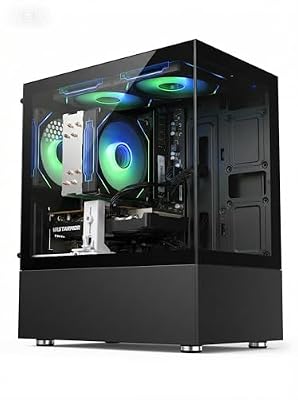
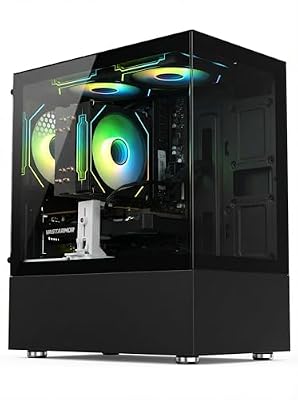
As an Amazon Associate we earn from qualifying purchases. Product prices and availability are accurate as of the date/time indicated.
What you’re getting. The platform-only pick. A 3.6 GHz quad-core i7, 16 GB of system memory, and a 256 GB NVMe SSD in a desktop tower for $359 is the lowest cost of entry to a genuine PC. No discrete GPU — integrated graphics only. That covers esports at low settings, emulation up through PS2/GameCube, indie games, and productivity. Modern AAA gaming means adding a GPU later.
vs DIY. A DIY no-GPU equivalent build is $380-450. The prebuilt wins by $20-90, but the more important point is what this PC lets you do: you save $140 versus the higher-tier prebuilts, which goes straight toward a used RX 6600 or similar mid-range GPU in 6-12 months. Net cost of the “platform now, GPU later” approach: ~$500-540 in 12 months for a meaningfully better gaming PC than any prebuilt in this tier today.
Pros
- Lowest barrier to entry on a real PC platform
- NVMe storage is the right choice for the OS drive
- 16 GB RAM is the modern minimum and you get it
- Quad-core i7 leaves headroom for a substantial GPU drop-in
Cons
- No GPU means no modern AAA gaming until you upgrade
- 256 GB storage is tight — plan a 1 TB SATA SSD addition (~$50)
Upgrade path notes. This is the most “builder-friendly” PC in the list because the upgrade is mandatory and obvious. Verify the PSU wattage on the listing before assuming a GPU upgrade is straightforward — most $359 prebuilts ship with 350-400W PSUs, which limits you to lower-tier discrete cards. A used RX 6600 (~150W) usually fits; a used RTX 4060 (~115W) also fits. Pull our GPU buyer’s guide for the picks. Add an M.2 NVMe storage upgrade from our SSD list when you fill the 256 GB.
Verdict: Best Upgrade Platform.
How to think about this tier as a builder
If you’re reading a build site, you probably already think about hardware in upgrade-cycle terms rather than out-of-box terms. That mindset reshapes how to read this tier. The four levers that matter most:
PSU headroom is the gate. Every $500 prebuilt ships a PSU “just big enough” for the bundled GPU. The moment you want to upgrade the GPU later, the PSU becomes the actual ceiling. A 400W unit means you cap at the RX 6600 class. A 500W unit opens up RX 6700 / RTX 4060. A 600W+ unit opens up RX 7700 XT and RTX 4060 Ti. Read the PSU rating before purchase, every single time. Our PSU bestsellers covers the replacement options.
Case and motherboard are sleeper longevity factors. A modern mid-tower with two extra fan mounts and a motherboard with even one extra M.2 slot will outlast three generations of GPUs in your hands. The STGAubron cases in this list are surprisingly well-designed for the price. The motherboards are basic but functional. Don’t expect to swap motherboards within the same chassis if you keep this PC for years — most prebuilts use proprietary mounting patterns that limit your upgrade options. See our case guide.
RAM is the cheap, easy upgrade. 16 GB is fine in 2026 for 90% of gaming workloads. By 2027-2028, 32 GB will be the realistic baseline. A second 16 GB kit added later is the cheapest performance upgrade in the entire stack — usually $35-50. Don’t pay extra now for 32 GB unless you stream actively. Our RAM guide has the timing details.
Cooling matters when you upgrade the GPU. A higher-tier GPU pushes 30-50W more heat into the case. Most $500 prebuilts ship with one intake fan and one exhaust. Adding a second intake fan ($10-15) is the cheapest noise-and-thermal upgrade you’ll ever make. If you’re really pushing the platform with an upgraded CPU later, an entry-level AIO from our CPU cooler bestsellers is worth the spend.
Builder FAQ
If DIY costs $60-200 more, why ever buy prebuilt at this tier?
Three reasons we hear from build-site readers who still go prebuilt under $500: (1) zero assembly time and zero troubleshooting when something arrives broken, (2) an included Windows license — often a real $100-140 line item in DIY math, (3) supplier discounts on the chassis/PSU/case that DIY can’t reach. The break-even point where DIY clearly wins sits around $700-800, not below.
What 2026 game will absolutely require an upgrade beyond this tier?
GTA VI is the obvious one — even at 720p low, the minimum-viable hardware is likely an RTX 3060 / RX 6600 with 8 GB VRAM, which the RX 580 8 GB and RX 590 8 GB picks here approximate. Anything heavier (Unreal Engine 5 showcase titles, Hellblade 2-class fidelity) will need a GPU upgrade. Plan accordingly.
How long should I budget for the first upgrade?
12-24 months is the realistic window for a GPU swap. Save $20-30 a month from day one and you’ll have $300-500 ready exactly when you need it. That money buys a used RX 6700 XT or RTX 4060 in 2027, which is a transformative upgrade on any of these chassis.
Are these prebuilts under warranty if I crack the case to upgrade?
Generally yes for “consumer-replaceable parts” — RAM, GPU, storage, fans. Tampering voids apply to motherboard-level modifications. STGAubron and suevery don’t seal the case with warranty stickers in our experience. Document the original configuration before swapping anything, in case you ever need to RMA.
The 24-month upgrade roadmap
A prebuilt under $500 isn’t a static purchase. The whole reason to choose it over a console is that you can incrementally improve it. Here’s a realistic, monthly-budgeted upgrade roadmap for the median buyer in this tier — someone who picks the RX 580 8 GB build and wants to grow it over two years.
Month 0 — Day of arrival. Cost: $0. Inspect, set up, install drivers. Run benchmarks to baseline performance. Note the PSU wattage, GPU model, and motherboard form factor — you’ll need all three for upgrade planning.
Month 1 — Storage and a quiet fan. Cost: ~$60. Add a 1 TB SATA SSD ($45-55) for game library overflow. Add a single 120 mm intake fan ($10-15) to improve thermals. These are the cheapest, most impactful upgrades you will ever make on this chassis. Browse our SSD bestsellers for the price-per-GB winners.
Month 3-4 — Better peripherals. Cost: ~$100. Upgrade the keyboard, mouse, and headset if the bundled ones are subpar. These carry over to your next PC and immediately lift your daily experience.
Month 6 — PSU pre-upgrade. Cost: ~$80. If your prebuilt shipped with a 400-450W PSU and you plan a GPU upgrade in the next year, swap to a 650W 80+ Bronze unit now. It is one of the easiest internal jobs and means you are GPU-ready when prices drop. Our PSU guide covers the modern picks.
Month 12-14 — GPU upgrade. Cost: ~$200-280. A used RX 6700 XT or RTX 4060 transforms this chassis into something genuinely capable at 1440p medium or 1080p high. This is the upgrade that takes a $500 prebuilt to a $1,000-equivalent gaming PC. Pull our GPU guide for the picks.
Month 18 — RAM bump. Cost: ~$50. Add a second 16 GB kit for 32 GB total. By 2027 this will be the realistic baseline for AAA and content creation workloads. Make sure your motherboard supports the speed and timing of your existing modules. See RAM bestsellers.
Month 24 — Decision point. Cost: $0 or $400-600. By now you’ve spent roughly $850-900 total on a system that competes with $1,200-1,500 prebuilts in raw gaming performance. The decision: are you happy with the platform, or is the CPU/motherboard starting to feel limiting? If the former, ride another 12-24 months. If the latter, you have a clean upgrade path to a modern motherboard and CPU — and crucially, you carry forward the GPU, RAM, storage, PSU, case, and peripherals you already own.
This roadmap is the actual reason to buy prebuilt at this tier over a console. Console buyers spend $500 in year zero and another $500-700 in year five for the next generation. PC buyers spend $500 in year zero and roughly $50-100 a month over two years, ending up with a markedly stronger machine that lasts another two to four years after that.
Common upgrade traps to avoid
Five mistakes we see new owners make over and over when they start upgrading their first $500 prebuilt. Avoid these and your upgrade dollars actually buy performance.
1. Upgrading the CPU first. The CPU is almost never the bottleneck at 1080p on these GPUs. Dropping $150 on a CPU upgrade before replacing the GPU is wasted money. Always upgrade the GPU first.
2. Buying a GPU your PSU can’t feed. An RX 7700 XT in a 400W PSU is asking for unstable shutdowns and possibly a fried PSU. Calculate total system power draw with the new GPU and add at least 100W of headroom. Our PSU guide has the headroom math.
3. Adding RAM at the wrong speed. Mixing DDR4-3200 and DDR4-3600 modules downclocks both to the slower speed and sometimes refuses to boot. Match speed, capacity, and ideally manufacturer when adding a second kit.
4. Upgrading the case prematurely. The case is often the longest-lived component you’ll own. The case that came with your $500 prebuilt is probably “fine” for 5+ years. Spend the money on components that drive framerate instead.
5. Buying a new motherboard without checking CPU support. If you ever motherboard-swap, the new board must support both your current CPU and your future CPU. Otherwise you double-spend. Our motherboard guide includes socket and chipset compatibility tables.
The build-site verdict
Our builder’s pick is the STGAubron i7 + RX 580 8 GB at $472 (B0BK539D4V). It’s the most balanced configuration in the tier, the 8 GB VRAM is non-negotiable for 2026 AAA, and the savings versus a DIY equivalent are the largest in the group. If you want the absolute top end of the bracket, the RX 590 + DDR5 build (B0G5FTTWHM) at $500 is the futureproof upgrade.
For the patient builder who wants the lowest entry cost and maximum upgrade headroom, the suevery NVMe i7 tower at $359 is the smartest long-term play — buy the platform now, add a used GPU in 12 months, and end up with a stronger PC than any pure-prebuilt pick in this tier.
Avoid the 4 GB VRAM picks unless your library is permanently esports-only. The price gap to 8 GB is small and the future-proofing gap is enormous. Keep an eye on the PSU rating, plan one upgrade ahead, and a $500 prebuilt in 2026 will give you three to five honest years of PC gaming with steady, modest upgrades along the way.
Related Guides
Related Articles
Want to dig deeper on this? Browse the hand-picked guides below — every one runs on the same scoring rubric we used in this review.
Frequently Asked Questions
Can you really game on a sub-$500 PC in May 2026?
Yes, for esports and lighter titles. A well-chosen sub-$500 machine runs games like Valorant, CS2, League of Legends, and Rocket League smoothly at 1080p, often above 60 FPS. Demanding AAA titles require low settings and reduced resolution. It is an entry point into PC gaming rather than a high-fidelity experience, but genuinely playable.
Is it cheaper to build or buy prebuilt under $500?
At this tier, prebuilts and refurbished units sometimes win because manufacturers buy components in bulk and clear older stock cheaply. DIY can match performance but savings are thin, and used or refurbished business PCs with an added budget GPU frequently offer the best value. Compare carefully, as the usual DIY advantage shrinks at rock-bottom prices.
What compromises come with a $500 gaming PC?
Expect an entry GPU or strong integrated graphics, 16GB of RAM, a smaller 500GB SSD, and a modest CPU. You will game at 1080p on medium-to-low settings and skip ray tracing. Upgrade paths matter most here, so prioritize a build with a decent PSU and an open GPU slot for future improvements.
Should I consider a used or refurbished PC instead?
Often yes. A refurbished small-form-factor office PC plus a low-profile GPU can outperform a new $500 build. Buy from sellers offering warranties and inspect the specs closely. The main risks are aging parts and limited PSU headroom, so confirm the power supply can support any graphics card you plan to add.
Will I need to upgrade soon?
Likely within a year or two if you want higher settings or newer AAA games. Budget builds prioritize getting you gaming now over longevity. Plan your first upgrade around the GPU and RAM, since those deliver the biggest gains. Choosing a build with a quality PSU and spare slots makes those future upgrades far cheaper and easier.
Ready to decide? Our #1 pick for 2026 is the CPU.
Live price & availability on Amazon.
Top picks from this guide
STGAubronSTGAubron Gaming PC Desktop,Core I5,RX 560 4G,16G RAM,512G SSD |…$430 \xc2\xb7 99/100STGAubronSTGAubron Gaming PC Desktop,Core I5,RX 550 4G,16G RAM,512G SSD |…$370 \xc2\xb7 97/100OKAMUSOKAMUS Gaming PC Desktop Computer, i7-6700 Up to 4.0GHz, RX…$480 \xc2\xb7 96/100STGAubronSTGAubron Gaming PC Desktop,Intel i7 Xeon E5,RX 550 4G,16G RAM,512G…$420 \xc2\xb7 95/100








