How to choose an am5 cpu is easier when you match cores, cache, power, and motherboard support to the work you actually do. This guide compares four Ryzen options across value, mixed use, gaming, and heavy creation, so you can spend on useful performance instead of paying for headroom your PC will rarely use.
How to Choose an AM5 CPU
How to choose an AM5 CPU starts with the PC around it. Ryzen 9000 uses Zen 5, DDR5, and PCIe 5.0, while AMD says AM5 boards support Ryzen 7000, 8000, and 9000. Older 600-series boards may require a BIOS update, so verify motherboard readiness and processor compatibility before committing to the CPU purchase.
Core Count
The first practical step in how to choose an am5 cpu is deciding how much CPU work your games and applications create. Six modern cores suit gaming and everyday desktop use, while eight or sixteen make more sense for rendering, compiling, streaming, virtual machines, or sustained multitasking across demanding workloads.
Core count is useful, but more cores are not automatically a better long-term buy for every buyer. They increase expense and can raise overall cooling demand, so pay for cores only when software uses them. The Ryzen 5 9600X is the value-oriented start; the Ryzen 7 9700X adds headroom across multifaceted mixed-use workloads.
Boost And Cache
Clock speed still matters after you choose a sensible core count. Boost frequency can help lightly threaded applications, but architecture, cache, cooling, and power limits also shape results. The Ryzen 5 9600X boosts to 5.4 GHz, while the Ryzen 7 9700X reaches 5.5 GHz, keeping both credible all-around choices today.
Do not choose from the boost-clock number alone. A lower-clocked X3D chip can excel in games because a large cache can reduce some memory trips, while more cores can win threaded production work. The Ryzen 7 9800X3D is therefore the cache-focused gaming choice; the 9700X fits mixed mainstream desktop and productive desktop workload usage across demanding everyday applications.
Cooling And Power
Thermal design power is a particularly useful practical warning signal for cooling-planning needs. It is not an exact direct measure of actual package power, but it separates easier-to-cool mainstream chips from more demanding desktop parts. The 9600X and 9700X are rated at 65W, the 9800X3D at 120W, and the 9950X at 170W.
Cooling can change system cost and noise, so budget for it before committing to the processor. AMD lists no thermal solution and recommends premium air cooling for the 9600X and 9700X, while liquid cooling is recommended for the 9800X3D and Ryzen 9 9950X. That makes the Ryzen 5 9600X and Ryzen 7 9700X the simpler value choices.
Motherboard Compatibility
The platform check is motherboard chipset, BIOS readiness, memory, and expansion requirements. All four use AM5 and DDR5, but the selection is the processor your board can properly support without an expensive disruption. AMD lists extensive AM5 chipset support, including B650, B850, X870, and X870E for long-term stability.
For a new build, a well-engineered B650 or B850 motherboard can keep overall platform expenditure controlled while accommodating these CPUs, pending BIOS support. The 9600X and 9700X suit cost-conscious systems, while the 9800X3D and 9950X need stronger cooling. For value builds, the 9600X and 9700X match naturally.
Top Picks
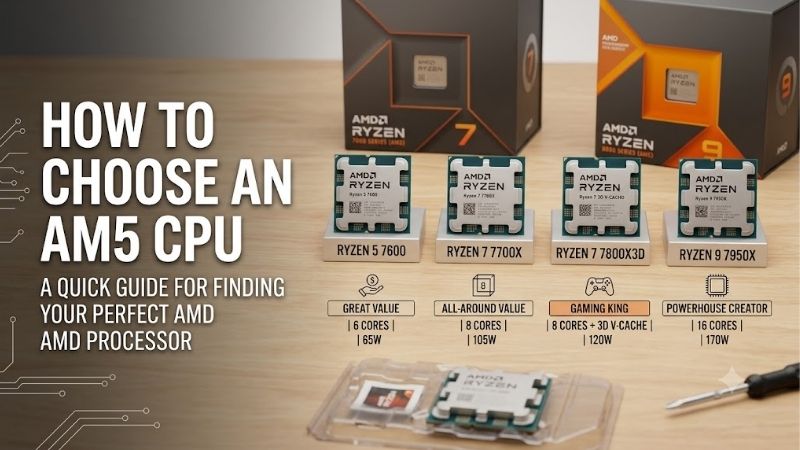
How to choose an AM5 CPU means comparing clearly separated buying cases. The Ryzen 5 9600X is Best Value, the Ryzen 7 9700X is Best Overall, the Ryzen 7 9800X3D is Best for Gaming, and the Ryzen 9 9950X is Best for Heavy Creation. Their listed specifications clearly substantiate each role for varied priorities.
| Product | Best For | Key Spec | Watch Out For |
|---|---|---|---|
| AMD Ryzen 5 9600X | Best Value | 6 cores / 12 threads, up to 5.4 GHz, 32MB L3, 65W | No included cooler |
| AMD Ryzen 7 9700X | Best Overall | 8 cores / 16 threads, up to 5.5 GHz, 32MB L3, 65W | No included cooler |
| AMD Ryzen 7 9800X3D | Best For Gaming | 8 cores / 16 threads, up to 5.2 GHz, 96MB L3, 120W | Liquid cooling recommended |
| AMD Ryzen 9 9950X | Best For Heavy Creation | 16 cores / 32 threads, up to 5.7 GHz, 64MB L3, 170W | Liquid cooling recommended |
AMD Ryzen 5 9600X — Best Value
AMD Ryzen 5 9600X — Best Value. This Zen 5 desktop processor has 6 cores, 12 threads, up to 5.4 GHz boost, 32MB of L3 cache, and a 65W default TDP. In how to choose an am5 cpu, it fits buyers wanting excellent gaming and everyday desktop system performance without needless overprovisioning or excessive cooling requirements.
Its main advantage is efficient mainstream performance: the 65W rating keeps cooling demands reasonable, and AMD recommends premium air cooling. The drawback is no included thermal solution, and six cores provide less room for heavy threaded work. It is a weaker choice than the 9950X for sustained rendering or compute.
AMD Ryzen 7 9700X — Best Overall
AMD Ryzen 7 9700X — Best Overall. It has 8 cores, 16 threads, up to 5.5 GHz, 32MB of L3 cache, and a 65W default TDP, giving it a particularly practical middle ground. For how to choose an am5 cpu, it fits builders balancing gaming, productivity, multitasking, and reasonable cooling demands without enthusiast-class power.
Its primary advantage is eight Zen 5 cores with modest thermal behavior, giving broader flexibility than the 9600X versus 120W or 170W CPUs. The downside is no included cooler, so the computer requires capable aftermarket cooling for typical sustained desktop workloads today. It is also less gaming-specialized than the 9800X3D.
AMD Ryzen 7 9800X3D — Best for Gaming
AMD Ryzen 7 9800X3D — Best for Gaming. It combines Zen 5 architecture with 8 cores and 16 threads, up to 5.2 GHz boost, 96MB of L3 cache, and a 120W default TDP. The second-generation 3D V-Cache design targets lower-latency gaming performance, making it the clearest pick when highest frame rates in demanding high-refresh gaming matter most.
Its key advantage is the unusually large cache on an eight-core Zen 5 design, but that specialization brings higher cooling demands than mainstream parts. AMD recommends liquid cooling and includes no thermal solution. The tradeoff is clear: it is a focused gaming choice, not the best match for every productivity-heavy budget.
AMD Ryzen 9 9950X — Best for Heavy Creation
AMD Ryzen 9 9950X — Best for Heavy Creation. This highly demanding 16-core, 32-thread Zen 5 desktop processor can boost to 5.7 GHz, carries 64MB of L3 cache, and has a 170W default TDP. In how to choose an am5 cpu, it makes strong sense for rendering, encoding, compiling, virtualization, and other heavily threaded workloads.
The advantage is processing capacity: sixteen cores can handle parallel work better than six- or eight-core options. The downside is system cost, since AMD recommends liquid cooling and supplies no thermal solution. For a gaming-only PC, those extra cores are harder to justify than the 9800X3D during sustained workloads.
Frequently Asked Questions
How to choose an AM5 CPU also means resolving practical questions that specs alone cannot answer. An AM5 CPU is not a standalone purchase: the right pick changes with the GPU, motherboard, cooler, memory, and software. Start with workload, then check platform and cooling before relying on benchmark headlines.
Is an AM5 CPU worth buying for a new PC?
Is an AM5 CPU worth buying for a new PC? Yes, when you want a current AMD desktop platform for new systems using DDR5 and supporting Ryzen 7000, 8000, and 9000 processors. AM5 boards range from cost-conscious budget to enthusiast-class designs, supporting restrained builds and high-end enthusiast configurations today.
The exception is an upgrade where your existing platform already meets the workload at a lower total cost. For a fresh build, match the CPU to the motherboard tier rather than overspending on a flagship processor and then cutting the board or cooler budget to preserve balanced system performance and upgrade room later.
Is six cores enough for gaming?
Is six cores enough for gaming? For many gaming PCs, yes, often in current games. Six modern cores can pair efficiently with a capable graphics card when the CPU is not the primary frame-rate limit. The Ryzen 5 9600X shows why core count should be judged with architecture, boost frequency, cache, and the games you play.
Choose eight cores when you stream, record, multitask, or want more headroom for heavier desktop software. Move beyond eight only when the workload can use it, because the Ryzen 9 9950X is built for sustained threaded work rather than a larger core count on a gaming-focused parts list for real-world workloads today.
Does more cache matter more than higher clock speed?
Does more cache matter more than higher clock speed? Neither wins universally. More cache can help workloads that reuse data, while higher clock speed can help lightly threaded tasks. The 9800X3D pairs 96MB of L3 cache with up to 5.2 GHz, showing why gaming-focused CPUs need different priorities from general-purpose chips.
For a PC, prioritize the pattern your applications reward instead of one benchmark. If gaming dominates, the X3D design deserves consideration; if rendering or compiling dominates, core count may matter more. This keeps a cache-focused purchase from becoming an expensive mismatch when software needs parallel throughput.
Do I need liquid cooling for an AM5 CPU?
Do I need liquid cooling for an AM5 CPU? Not automatically for every AM5 build. AMD recommends premium air cooling for the 9600X and 9700X, while it lists liquid cooling as recommended for the 9800X3D and 9950X. Cooler choice depends on case airflow, noise targets, and sustained CPU load over long sessions.
One useful recommendation is to choose the cooler at the same time as the processor, then verify secure AM5 mounting support. That prevents a socket-compatible chip from forcing an expensive cooler change later, especially when a higher-TDP processor will spend long sessions rendering, encoding, or compiling workloads directly.
Final Thoughts
How to choose an AM5 CPU comes down to workload, cooling, and platform fit more than raw model numbers. The 9600X is the value entry point, the 9700X is balanced, the 9800X3D is the gaming specialist, and the 9950X is the heavy-workload option. Their distinct roles make the final buying choice easier for most builders.