How to choose a micro atx case becomes complicated when motherboard compatibility hides conflicts between graphics cards, cooling equipment, and power supplies. A compact enclosure can demand expensive replacements. Identify your component dimensions first, then compare ventilation, assembly access, and total expense before purchasing.
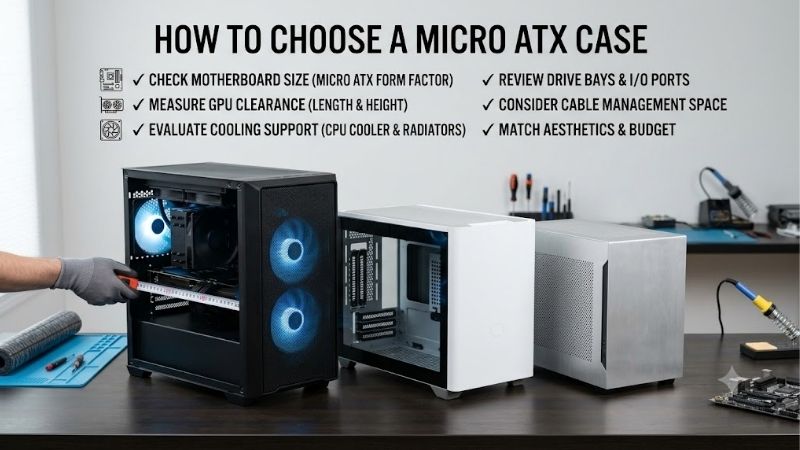
How to Choose a Micro ATX Case
Understanding how to choose a micro atx case requires four checks: component clearance, cooling layout, assembly access, and total build cost. Confirm simultaneous compatibility across your chosen hardware. These four picks explain the practical tradeoffs behind liquid cooling, easier installation, and compact dimensions before purchasing.
Component Clearance and Shared Space
Motherboard support is only the starting point. Compare GPU length, thickness, and connector position against manufacturer diagrams. Front radiators and PSUs can overlap. Reserve adequate connector clearance rather than assuming a published maximum guarantees simultaneous compatibility across your intended components.
If you are researching how to choose a micro atx case for gaming, prioritize graphics clearance before appearance. Fractal Design Pop Mini Air accepts cards up to 365 mm with front fans installed. Radiators reduce that clearance, making this case particularly appropriate for extended graphics cards alongside conventional processor air cooling.
Cooling Layout and Radiator Support
Ventilation depends on clear airflow paths rather than fan counts. Evaluate intake placement around your graphics hardware and identify exhaust locations. Mesh panels create fewer restrictions but provide little sound isolation. Favor open ventilation for hot hardware, while recognizing that additional openings increase audible component noise.
For liquid cooling, how to choose a micro atx case requires evaluating surrounding clearance alongside radiator size. Tubing connections, motherboard heatsinks, and connectors can compete overhead. ASUS Prime AP201 supports a 360 mm radiator in its 33 L shell, making it useful when a large AIO defines your cooling configuration.
Assembly Access and Cable Routing
Assembly access affects setup and later maintenance. Inspect removable panels, access to board connectors, and cable routing space before purchasing. Restricted space complicates upgrades, especially around large coolers. A slightly larger case can justify its footprint when subsequent upgrades require extensive component disassembly.
When considering how to choose a micro atx case, accessible board connectors deserve attention if this is your first build. Restricted access becomes frustrating around large CPU coolers. Cooler Master MasterBox TD300 Mesh provides a removable top panel, making it a practical choice when assembly access outweighs minimal external dimensions.
Complete Cost and Desktop Footprint
Purchase cost should include the accessories required for your configuration. Extra fans, a replacement PSU, and optional front connectors can undermine a cheap case. Check board header support before paying for USB-C connectivity. Favor useful included equipment over decorative extras adding little to your intended computing requirements.
Compact dimensions deserve consideration alongside layout tradeoffs and accessory costs. Measure your installation area, leaving room for ventilation and external connections. LIAN LI A3-mATX provides a 26.3 L enclosure, making it appealing when reduced size justifies closer fit checks and careful planning around internal component placement.
Top Picks
Knowing how to choose a micro atx case helps distinguish these recommendations by their advantages. Each selection serves a different buying priority rather than universal superiority. Compare part compatibility and complete configuration expense first; the roles below reflect documented layout rather than independent performance testing.
| Product | Best For | Key Spec | Watch Out For |
|---|---|---|---|
| ASUS Prime AP201 | Best Overall | 33 L; 360 mm radiator support | Front PSU and GPU layout interactions |
| Fractal Design Pop Mini Air | Best Value | Three included 120 mm fans | 150 mm PSU limit; optional USB-C module |
| Cooler Master MasterBox TD300 Mesh | Best for Assembly Access | Removable top; 344 mm GPU clearance | No front USB-C or included rear fan |
| LIAN LI A3-mATX | Best for Compact Desks | 26.3 L; up to 415 mm GPU clearance | Maximum clearances depend on configuration |
ASUS Prime AP201: Best Overall
ASUS Prime AP201 earns the best overall role for builders prioritizing accessible panels and substantial radiator support. Its 33 L shell supports a 360 mm radiator and graphics clearance reaching 338 mm. Clip-mounted side panels simplify access during maintenance without repeatedly removing panel screws during component inspections.
The compromise involves overlapping space around the front-mounted PSU. Longer supplies, bulky plugs, and extended graphics cards need coordinated planning. Choose the mesh AP201 for flexible cooling layouts, but validate the build using exact part measurements rather than assuming separate advertised limits remain achievable simultaneously.
Fractal Design Pop Mini Air: Best Value
Fractal Design Pop Mini Air receives the best value recommendation because its included fans reduce extra cooling purchases. Two 120 mm front fans and a matching rear fan provide a ready intake and exhaust layout. Its 170 mm CPU cooler clearance also accepts many conventional tower designs without requiring additional liquid cooling equipment.
The stated 150 mm maximum PSU length restricts support for longer units, potentially complicating reuse. Front USB-C also requires a separately purchased module. Favor this case for an air-cooled gaming build with a compatible short supply, while including optional connectivity equipment in your final cost comparison when connectivity matters.
Cooler Master MasterBox TD300 Mesh: Best for Assembly Access
Cooler Master MasterBox TD300 Mesh is recommended for convenient component installation through its removable top panel. Two included 120 mm ARGB front fans and a control hub provide bundled equipment. Published limits allow graphics cards measuring 344 mm and CPU coolers measuring 166 mm, subject to configuration compatibility.
Missing front USB-C and the lack of a bundled rear fan are meaningful limits for some builds. Extra exhaust equipment changes the total purchase cost. Select this case for accessible assembly and a conventional tower layout, while evaluating required accessories before allowing decorative lighting to dominate your enclosure purchasing decision.
LIAN LI A3-mATX: Best for Compact Desks
LIAN LI A3-mATX is recommended for compact desktop installations requiring layout planning. Its 26.3 L shell accepts CPU coolers up to 165 mm tall and graphics cards reaching 415 mm in suitable arrangements. Mesh side panels suit buyers who favor ventilation and smaller dimensions over a glass panel for component visibility.
Advertised limits depend on PSU placement and cooling layout, creating a compatibility complication. Long graphics cards, larger supplies, and bottom fans cannot automatically share their maximum allowances. Choose the A3-mATX for its compact dimensions, but validate the complete arrangement against configuration diagrams before ordering.
Frequently Asked Questions
The final stage of how to choose a micro atx case involves challenging assumptions that can undermine compatibility. Motherboard support does not prove GPU clearance, while radiator dimensions cannot confirm surrounding component accessibility. These buying questions address uncertainties before you order a case or transfer existing hardware.
Can a Micro ATX Case Fit a Full-Size Graphics Card?
Yes, many micro ATX cases fit full-size graphics cards, provided their dimensions match the clearance. Thickness can restrict bottom fans or obstruct board connections even when length fits. Compare manufacturer length, height, and thickness specifications against your intended layout before committing to enclosure compatibility.
For larger GPUs, how to choose a micro atx case also means identifying power connector orientation. Side-facing plugs need panel clearance, while end-facing connections require extra space longitudinally. Follow manufacturer cable bending guidance; choose a wider enclosure when connector accommodation would become restricted.
Can You Use an ATX Power Supply?
Yes, all four recommended cases support ATX power supplies within their respective size and layout restrictions. ATX describes a format rather than guaranteeing identical PSU depth. Higher-capacity supplies can extend farther than shorter alternatives, so verify the maker’s dimensions instead of assuming that the format alone establishes fit.
Modular PSUs need extra clearance beyond their housings for plugs and cable routing. Shorter replacement cables can simplify assembly, but support must match the exact supply model. Verify existing supply dimensions before choosing a case, since an unexpected PSU replacement can substantially increase complete configuration expenditure.
Does a Micro ATX Gaming PC Need Liquid Cooling?
No, compact gaming systems do not automatically need liquid cooling. A suitable air cooler can serve your CPU without extra pump hardware, provided clearance and cooling capacity suit the build. Consider an AIO when sustained processor workloads or mounting constraints justify the added expense and additional installation complexity.
Radiator fit requires checking radiator and fan thickness alongside length. Top installations can interfere with taller RAM, while front installations reduce available GPU clearance. Compare the cooler’s measurements with case mounting restrictions; matching nominal radiator sizes alone cannot establish complete assembly compatibility.
How Many Case Fans Should You Buy?
Buy fans to establish a practical airflow layout rather than fill every available mount. Required quantities depend on heat output, room conditions, and included equipment. For less demanding builds, evaluate the supplied cooling first, then assess temperatures and noise under representative games or productivity workloads.
Extra fans should address an observed cooling limit rather than an unused mount. Configure gradual speed changes to reduce reactions to brief temperature spikes. Accessible dust filters simplify maintenance in dusty rooms. Consider cleaning access before purchase because restricted filters can make routine upkeep unnecessarily inconvenient.
Final Thoughts
Once you understand how to choose a micro atx case, prioritize your strongest fit constraint. ASUS Prime AP201 favors large liquid coolers, Fractal Design Pop Mini Air includes useful fans, Cooler Master MasterBox TD300 Mesh improves access, and LIAN LI A3-mATX reduces size. Validate the full layout and accessory cost before purchasing.