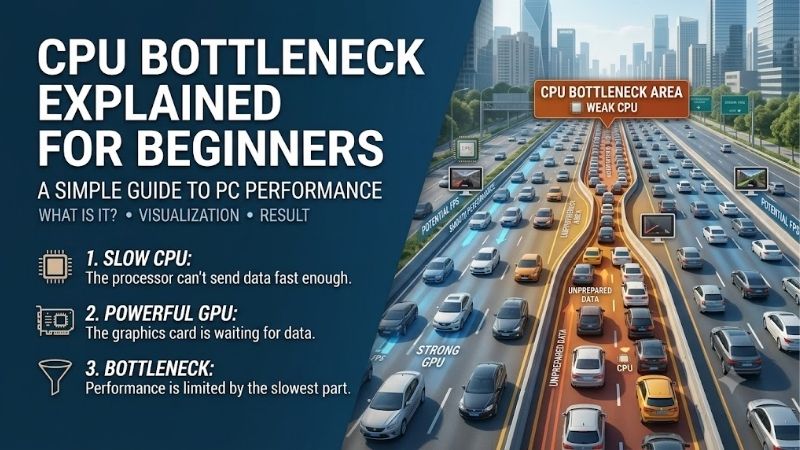
CPU bottleneck explained for beginners means your processor cannot prepare game frames quickly enough for the graphics card to stay fully occupied. A faster GPU may then deliver little additional FPS. However, low GPU usage alone is not proof: frame caps, software limits, and other problems can produce similar symptoms.
How to Choose CPU Upgrades
This guide delivers cpu bottleneck explained for beginners alongside four conditional processor upgrades. First establish whether CPU performance prevents your desired frame rate, then compare platform compatibility and total cost. These picks address different purchasing situations; none promises to eliminate every limit in every game.
Diagnostic Evidence
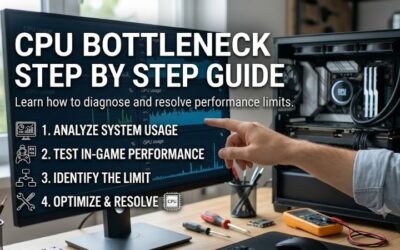
Begin with a repeatable game scene, checking FPS, frame times, GPU activity, and processor behavior. Temporarily remove frame-rate caps for diagnosis, then reduce resolution while keeping the scene and CPU-related settings unchanged. Little FPS improvement alongside unused GPU capacity supports investigating a CPU-side limitation.
That comparison is evidence rather than a diagnosis: thermal throttling, memory problems, and engine limits still deserve attention. Check temperatures and clock behavior before purchasing. Choose the AMD Ryzen 5 9600X for a balanced replacement only when relevant game benchmarks support improvement over your current processor.
Platform Compatibility
Socket and memory requirements determine which parts survive the upgrade. AM4 processors use DDR4, while the AM5 models here require DDR5 and a compatible motherboard. Even matching sockets need specific BIOS support. Retaining a supported board can reduce costs, but BIOS compatibility and board power delivery still need verification.
An existing AM4 machine deserves a different shopping calculation from a new build. Confirm the motherboard’s CPU support list and required BIOS revision before deciding on platform reuse. Choose the AMD Ryzen 7 5700X3D for a confirmed supported AM4 gaming upgrade when authentic stock and pricing make retention worthwhile.
Complete Upgrade Cost
Processor pricing excludes expenses when changing platforms, including motherboard, memory, and compatible cooling. A cheaper chip can still require a more expensive rebuild. Conversely, an included cooler may reduce initial spending. Compare component costs together rather than treating the CPU price as the upgrade bill.
The boxed AMD Ryzen 5 7600 includes a Wraith Stealth cooler, while the other three selections require aftermarket cooling. Existing hardware may be reusable only with confirmed mounting compatibility and adequate cooling. Choose the AMD Ryzen 5 7600 when its bundle leaves enough budget for the graphics hardware required.
Gaming and Cache
Game-specific results matter more than core count alone because simulation, draw calls, and memory access behave differently across engines. Additional cache can help relevant workloads, but does not replace testing. Compare average FPS alongside frame times at settings that expose CPU differences rather than saturating the GPU.
The 5700X3D and 9800X3D both list 96MB of L3 cache, yet their architectures and platforms differ substantially. Equal cache capacity therefore does not imply equal performance. Choose the AMD Ryzen 7 9800X3D for demanding high-refresh gaming when benchmarks for your titles justify its premium over the conventional Ryzen 5 options.
Top Picks
With cpu bottleneck explained for beginners, these picks become upgrade routes rather than guaranteed cures. The 9600X balances new builds, the 7600 emphasizes total value, the 5700X3D preserves supported AM4 hardware, and the 9800X3D targets demanding gaming. Best Overall refers to purchasing balance, not the fastest processor universally.
| Product | Best For | Key Spec | Watch Out For |
|---|---|---|---|
| AMD Ryzen 5 9600X | Best Overall: balanced AM5 replacements | 6 cores, 12 threads; up to 5.4 GHz; 65W default TDP | DDR5 and compatible motherboard required; no cooler included |
| AMD Ryzen 5 7600 | Best Value: economical AM5 configurations | 6 cores, 12 threads; 32MB L3; boxed Wraith Stealth cooler | Older Zen 4 architecture; basic bundled cooling |
| AMD Ryzen 7 5700X3D | Existing AM4 gaming systems | 8 cores, 16 threads; 96MB L3; DDR4 support | Verify BIOS, authentic availability, pricing, and cooling |
| AMD Ryzen 7 9800X3D | Demanding high-refresh gaming | 8 cores, 16 threads; 96MB L3; up to 5.2 GHz | Premium expense; benefits depend on the workload |
AMD Ryzen 5 9600X: Best Overall
The AMD Ryzen 5 9600X suits readers seeking cpu bottleneck explained for beginners before an AM5 rebuild. Its six Zen 5 cores, 12 threads, and boost up to 5.4 GHz provide documented mainstream specifications. A 65W default TDP supports practical cooling, while game-specific comparisons establish whether it improves your system.
Its drawback is paying for a motherboard and DDR5 when coming from another platform, plus a cooler because none is included. Six cores also offer fewer resources than the eight-core picks for parallel work. Select it when verified gains and build cost justify the transition rather than upgrading solely for model numbering.
AMD Ryzen 5 7600: Best Value
The AMD Ryzen 5 7600 helps make cpu bottleneck explained for beginners actionable on a tighter platform budget. It offers six Zen 4 cores, 12 threads, boost up to 5.1 GHz, and 32MB of L3 cache. Its practical advantage is the boxed Wraith Stealth cooler, which removes one separate purchase from a basic AM5 configuration.
Its compromise is older Zen 4 architecture and a basic bundled cooler that may be less appealing for sustained loads or quiet desks. AM5 still requires compatible DDR5, so the bundle does not make migration free. Choose it when substantial savings remain after comparing the 9600X with cooling and identical board and memory.
AMD Ryzen 7 5700X3D: Best for AM4 Owners
The AMD Ryzen 7 5700X3D gives cpu bottleneck explained for beginners a reuse option for compatible AM4 owners. Eight Zen 3 cores, 16 threads, and 96MB of L3 cache address gaming workloads that benefit from cache. Its main purchasing advantage is retaining a supported motherboard and DDR4 instead of funding an AM5 rebuild.
The drawback is an older platform, a 105W default TDP, and no bundled cooler. Availability and seller pricing must also be checked rather than assumed low. Buy only when an authentic unit from credible sellers meaningfully undercuts migration; this is an existing-system recommendation, not a reason to build new on AM4.
AMD Ryzen 7 9800X3D: Best for High Refresh Rates
The AMD Ryzen 7 9800X3D belongs in cpu bottleneck explained for beginners when high-refresh gaming makes CPU performance a priority. Its eight Zen 5 cores, 16 threads, 96MB of L3 cache, and boost up to 5.2 GHz target demanding gaming configurations. It is the specialized option here when relevant benchmarks support the extra expense.
Its disadvantage is additional expenditure, including separate cooling and an AM5 platform if your current system lacks one. Its 120W default TDP also differs from the 65W Ryzen 5 models. A premium gaming CPU cannot accelerate frames already limited by the GPU, so match its benefits to your games and refresh-rate target.
Frequently Asked Questions
Questions about cpu bottleneck explained for beginners involve utilization readings, calculator percentages, settings changes, and upgrade priority. The answers below separate useful clues from purchasing shortcuts. A bottleneck describes a particular workload and configuration, not a permanent fault attached to a processor model.
Must CPU Usage Reach 100%?
No, total CPU usage need not reach 100% for CPU-limited gaming. A critical thread or small thread group can constrain progress while other cores remain available. Task Manager’s overall reading averages total processor activity, so modest aggregate utilization does not establish spare capacity for important game tasks.
Inspect individual logical-processor utilization alongside GPU behavior and frame times, but avoid demanding that one core remain saturated. Threads can migrate between cores, and sampling intervals can obscure short events. The practical question is whether CPU-side work delays frame delivery under your relevant workload.
Are Bottleneck Calculators Accurate?
No, a bottleneck calculator’s percentage cannot reliably describe every game, scene, resolution, and setting on your computer. Those variables change which component limits performance. Treat an estimated score as insufficient purchasing evidence, especially when it recommends replacing otherwise adequate hardware without measurements.
Look for benchmarks using your games and comparable configurations, then verify your machine’s behavior. A calculator cannot observe background software, thermal behavior, memory configuration, or enabled frame caps. Likewise, one benchmark result cannot guarantee identical behavior after game patches or settings changes.
Can Settings Reduce a CPU Bottleneck?
Yes, some settings can reduce CPU-side work, although the relevant controls depend on the game. Crowd density, simulation detail, and draw distance may matter more than resolution. Lowering resolution mainly reduces graphics rendering load, so it often reveals a CPU limit instead of solving it. Change one relevant option at a time.
A frame-rate cap can reduce unnecessary CPU demand and make pacing consistent, but it does not increase the processor’s maximum throughput. Close avoidable background workloads and address cooling problems before buying hardware. Avoid treating manual voltage adjustments as a beginner remedy for unexplained performance limits.
Should I Upgrade the CPU or GPU?
Upgrade the component preventing your desired performance in your games and settings. If graphics hardware remains heavily loaded and reducing GPU-related demands improves FPS substantially, a GPU upgrade may offer better value. If CPU-side work constrains an otherwise capable graphics card, evaluate a compatible processor upgrade.
The answer can change between competitive low-detail gaming and demanding higher-resolution play on one machine. Set a realistic frame-rate target before shopping, and retain hardware that already reaches it satisfactorily. Some stutter comes from shader compilation or asset loading, which a CPU upgrade may not resolve.
Final Thoughts
Keep cpu bottleneck explained for beginners focused on evidence: confirm the limiting workload before shopping. Consider the 9600X for balance, the 7600 for value, the 5700X3D for worthwhile AM4 reuse, or the 9800X3D for justified high-refresh gaming. An upgrade should address measured requirements instead of calculator percentages.