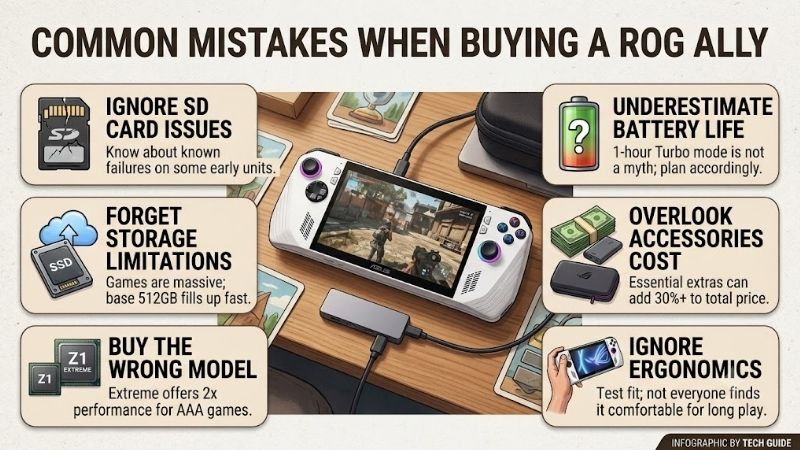
Common mistakes when buying a rog ally can lead to wasted money and poor performance. Many buyers pick the wrong model version or overlook crucial accessory needs during setup. Investing in compatible storage and adequate power chargers transforms your mobile experience. This guide helps you build a solid handheld gaming setup.
How to Choose the Right ROG Ally Setup
Understanding common mistakes when buying a rog ally helps gamers choose better hardware. Focus first on processor capabilities, thermal safety, and power delivery requirements before ordering gear. Choosing components with realistic expectations ensures your mobile handheld setup delivers smooth framerates without costly mistakes.
Selecting the Correct APU Processor
Selecting the right chip architecture prevents major regrets when playing demanding titles. Avoiding common mistakes when buying a rog ally starts with comparing the standard Z1 against the Extreme version. The entry Z1 chip handles lightweight indie titles smoothly, but hardware specs check shows AAA titles need Extreme power.
If you intend to play graphical blockbuster games on a 1080p screen, extra core count matters significantly. Buying the lower tier model for high end titles results in disappointing frame rates and forced resolution scaling. Match your personal gaming library against processor capability to maximize long term value for your money.
Choosing Compatible M.2 NVMe Storage
Upgrading internal storage requires precise form factor matching to ensure safe hardware installations. Many buyers purchase standard 2280 NVMe drives without noticing the handheld requires compact 2230 drives. Checking storage expansion options prevents physical clearance issues inside the tight chassis during drive upgrades.
Installing improper drive dimensions forces risky modification adapters that crowd interior cooling channels. Stick to dedicated 2230 M.2 PCIe 4.0 SSDs with fast read speeds for dependable system boot times. Proper storage upgrades protect internal components while providing ample space for modern library downloads without hassle.
Verifying Power Delivery and Docks
Selecting external chargers and desktop docks requires careful inspection of maximum wattage output ratings. Standard phone chargers fail to provide sufficient wattage needed to sustain high performance profile modes. Checking power delivery specs ensures connected peripherals stay energized alongside full system operation.
Insufficient power bricks trigger battery drainage even while connected to wall outlets during heavy gaming. Look for USB-C docks supporting minimum 65W passthrough power, though 100W setups offer better reliability. Adequate power delivery allows continuous 30W Turbo Mode gameplay without frustrating performance drops.
Top Picks for Avoiding Buying Mistakes
Addressing common mistakes when buying a rog ally requires choosing proven gear for your setup. We compared top hardware options to verify real performance, thermal management, and accessory compatibility. The verified picks below help you build a reliable mobile system while avoiding common buyer pitfalls and poor accessory choices.
| Product Name | Category | Key Highlight | Best For |
| ASUS ROG Ally Z1 Extreme | Console | 8-Core RDNA 3 APU, 120Hz Display | High Performance AAA Gaming |
| Corsair MP600 Mini 1TB SSD | Storage | PCIe 4.0 NVMe, M.2 2230 | Internal Storage Upgrade |
| JSAUX 6-in-1 Docking Station | Accessory | 4K 120Hz HDMI, 100W PD Port | Desktop PC Transformation |
| Anker 737 Power Bank | Accessory | 24,000mAh, 140W Fast Charge | Extended Travel Playtime |
| SanDisk 1TB Extreme MicroSD | Storage | UHS-I U3, V30 Speeds | Lightweight Secondary Storage |
ASUS ROG Ally Z1 Extreme (512GB)
Buyers avoiding common mistakes when buying a rog ally usually prefer the Z1 Extreme model for serious handheld gaming. Its 8-core AMD APU delivers impressive 1080p graphics rendering across demanding AAA blockbusters. Smooth framerates on the 120Hz screen combined with turbo mode performance make it the premier handheld choice.
However, high energy draw drains the internal 40Wh battery quickly when operating at maximum wattage profiles. Operating thermals also run warm under heavy workloads, requiring custom fan curve adjustments in Armoury Crate. It remains the top handheld console buy when paired with a reliable fast charger for extended gaming sessions.
Corsair MP600 Mini 1TB PCIe 4.0 NVMe 2230 SSD
This compact M.2 2230 SSD is designed specifically for handheld systems needing internal storage expansion. Delivering fast read speeds up to 7,000 MB/s, it slashes game loading screen times dramatically. Smart shoppers hunting open box discounts on the console use this drive to build a massive storage setup affordably.
Installing an internal drive requires opening the back housing and executing a system cloud recovery process. Drive operating temperatures can also rise under heavy sustained write workloads during large game installs. Despite minor installation steps, it represents the safest path to expanding storage without risky adapter mods.
JSAUX 6-in-1 Docking Station for ROG Ally (HB0603)
This sleek aluminum dock converts your handheld console into a powerful desktop gaming station effortlessly. It features HDMI output, triple USB 3.0 ports, Gigabit Ethernet, and 100W power passthrough capacity. Matching your docking station needs to proper passthrough specs ensures steady power during full desktop display use.
The built-in top USB-C connector cable length is short, requiring precise placement when mounting the unit. It also lacks an included power adapter brick, meaning you must supply your own high wattage charger. Nevertheless, it offers superior port expansion and cooling slot ventilation for home gaming setups on a budget.
Anker 737 Power Bank (PowerCore 24K 140W)
This high capacity portable power charger keeps your handheld running during travel without unexpected shutdowns. Packed with a 24,000mAh capacity and 140W max output, it enables full 30W Turbo Mode on the go. Satisfying battery life expectations becomes easy when traveling with this rapid fast charging power brick.
The dense brick enclosure adds substantial weight and bulk inside travel bags during daily commutes. It carries a premium price point compared to standard power banks, though frequent sales improve overall value. For mobile enthusiasts needing continuous power away from wall outlets, its rapid output justifies the investment.
SanDisk 1TB Extreme MicroSDXC UHS-I Card
This fast expansion memory card offers convenient secondary storage without requiring manual internal installation. With read speeds reaching 190 MB/s, it handles indie games, media files, and retro emulation smoothly. Using an external power charger alongside flexible storage expansion keeps your media library portable.
Intense heat near internal exhaust vents can degrade MicroSD reliability during long heavy gaming sessions. Large AAA titles also suffer from longer loading times when executed directly from memory card storage. It serves best as a secondary drive for emulation collections and smaller titles rather than primary AAA installs.
Frequently Asked Questions
Researching common mistakes when buying a rog ally prevents buyer remorse down the road for new owners. Understanding system power profiles, cooling setup choices, and storage upgrades keeps your console operating smoothly. The answers below clarify essential questions regarding hardware compatibility and daily system maintenance.
Is the base ROG Ally Z1 chip worth buying for gaming?
Many users analyze common mistakes when buying a rog ally before upgrading accessories or picking consoles. The standard Z1 model handles lightweight indie games, office tasks, and retro emulation smoothly. However, demanding AAA titles require significant resolution drops and heavy temporal scaling to achieve playable framerates.
If you want to play modern blockbuster games at native 1080p resolution, save for the Z1 Extreme model. The base unit works well for casual gamers on tight budgets who focus primarily on lightweight indie libraries. Choosing the correct processor upfront prevents immediate dissatisfaction with handheld gaming performance.
How can you safely expand internal ROG Ally storage?
Expanding internal storage safely requires choosing native M.2 2230 form factor drives for proper fitment. Avoiding long 2280 drives with cheap adapter boards prevents overcrowding internal thermal ventilation channels. Checking the micro sd card slot condition also helps manage secondary drive storage for non-demanding titles.
Disconnecting the internal battery connector before swapping SSD drives prevents dangerous electrical short circuits. Performing Asus Cloud Recovery through BIOS restores factory Windows 11 installation automatically without extra key drives. Following standard upgrade protocols protects your hardware investment and maintains system warranty.
Why does Turbo Mode drop power on standard chargers?
Standard chargers often lack sufficient wattage output required to maintain peak handheld performance profiles. The console demands 65W power directly, while connected USB docks consume extra power for hub operation. Configuring a custom power profile helps balance system wattage draw against connected dock accessories.
Using a 100W Power Delivery wall charger through your USB dock guarantees stable 30W Turbo Mode gameplay. Lower wattage phone chargers cause battery discharge even while plugged into external power sources. Investing in high wattage power adapters prevents unexpected frame rate drops during heavy gaming sessions.
Can you use third-party docks without damaging the device?
Third-party USB-C docks operate safely provided they support high quality Power Delivery standard specifications. Look for docks featuring aluminum bodies, unobstructed rear intake airflow, and minimum 65W passthrough support. Reliable dock options protect internal circuits while delivering clean display output to external monitors.
Avoid ultra cheap unbranded USB hubs that lack proper over-current protection or thermal dissipation design. Quality docks from established brands allow seamless desktop conversion for work and gaming tasks alike. Selecting tested accessories guarantees reliable operation without risking electrical damage to your console.
Final Thoughts
Preventing common mistakes when buying a rog ally ensures long term gaming satisfaction and maximum value. Choosing the Z1 Extreme chip, proper 2230 NVMe storage, and 100W PD power gear creates an incredible setup. With smart planning, you build a high performance handheld gaming setup ready for mobile and desktop action.