
- Top Pick: MUSETEX ATX PC Case 7 PWM ARGB Fans Pre-Installed, Type-C Mid Tower Computer Case with Full-View Dual Tempered Glass, Gaming PC Case, Black(K2)
- Best Value: CORSAIR 4000D RS ARGB Frame Modular Mid-Tower ATX PC Case, High Airflow, 3X Pre-Installed RS Fans, InfiniRail™ Mounting System, ASUS BTF, MSI Zero, Gigabyte Stealth, Black
- Premium Choice: MOROVOL PC Case Pre-Install 4 RGB Fans, ATX Gaming Computer Case with Diamond-Shaped Mesh Front & Tempered Glass Side Panel, USB 3.0 Airflow Mid Tower case,621
A great PC case does far more than look good — it provides the airflow that keeps components cool, the room for your hardware, and the cable management that keeps a build clean. By 2026 the best gaming cases balance thermals, looks, and build quality. Here are our top picks.
- Watch: Best PC Case 2026 — Top Gaming Cases for Airflow & Style — Video Review
- Best PC Cases of 2026
- PC Case Comparison Table
- Best Showcase Build: Lian Li O11 Dynamic EVO
- Best Style: Fractal North
- Best Value: Corsair 4000D Airflow
- Best Clean Build: NZXT H7 Flow
- How to Choose a PC Case
- Form Factor: Match the Case to Your Build
- Airflow Matters More Than RGB
- Frequently Asked Questions
- Related Articles
⚡ Save on Your Next PC — Amazon Prime
Prime members get fast free shipping on the systems above, plus early access to Prime Day & Black Friday PC deals. New members get a 30-day free trial.
As an Amazon Associate we earn from qualifying purchases at no extra cost to you.





Watch: Best PC Case 2026 — Top Gaming Cases for Airflow & Style — Video Review
Best PC Cases of 2026


PC Case Comparison Table
| Case | Form Factor | Airflow | Style | Price |
|---|---|---|---|---|
| Lian Li O11 Dynamic EVO | Mid Tower | Excellent | Showcase | ~$169 |
| Fractal North | Mid Tower | Very Good | Wood accent | ~$139 |
| Corsair 4000D Airflow | Mid Tower | Excellent | Minimalist | ~$104 |
| NZXT H7 Flow | Mid Tower | Excellent | Clean | ~$129 |
Best Showcase Build: Lian Li O11 Dynamic EVO
The O11 Dynamic EVO is the go-to for showcase builds, with dual tempered glass panels, exceptional water-cooling support, and a layout designed to put your hardware on display. Its flexible fan and radiator mounting make it a favorite for custom loops and high-airflow air builds alike.
What makes the EVO special is its reversible dual-chamber layout: you can flip the whole design to left or right orientation and mount radiators on the top, side and bottom simultaneously. That means room for a 360mm AIO up top and another in front without choking the GPU. The trade-off is that it ships with no fans, so budget for a set of intakes — the case rewards a proper fan loadout with excellent temperatures. It’s the right pick if the build itself is part of the room’s aesthetic.
Best Style: Fractal North
The Fractal North blends real walnut accents with excellent airflow and build quality, standing out in a sea of glass-and-RGB designs. It’s a fantastic pick if you want your PC to read as a piece of furniture while still keeping components cool.
Beyond the looks, the North is a genuinely practical build. The mesh side option (over the tempered-glass version) pulls extra air straight onto the GPU, and the interior has plenty of clearance for tall air coolers and long cards. Cable routing is tidy thanks to a generous rear channel and Velcro straps. It’s the case to buy when you want a warm, understated machine for a living room or a desk in a shared space rather than a light show.
Best Value: Corsair 4000D Airflow
The Corsair 4000D Airflow is still the value champ. Its high-airflow front panel, roomy interior, excellent cable management, and clean look make it ideal for first-time builders and veterans alike — premium build quality and thermals at a budget-friendly price.
First-time builders in particular gravitate to the 4000D because it’s forgiving to work in: a wide rear cavity, a hinged cable bar that hides a multitude of sins, and a spacious PSU shroud. It includes two fans out of the box and has mounts for up to six, plus support for a 360mm front radiator. For the money, nothing makes a mid-range build look and run better with less effort.
Best Clean Build: NZXT H7 Flow
The NZXT H7 Flow rounds out the list for anyone who wants that signature minimalist NZXT look without sacrificing thermals. The perforated front and top panels feed cool air to the components while the cable-management channel and pre-installed bar keep the interior looking flawless behind the glass. It’s roomy enough for the largest GPUs and 360mm radiators front and top, making it a strong all-rounder for a high-power CPU and graphics card pairing.
How to Choose a PC Case
- Airflow vs silence: Mesh front panels maximize cooling; solid panels reduce noise
- GPU clearance: Verify your case fits modern long graphics cards
- Cooler clearance: Check CPU air cooler height or radiator support for AIOs
- Cable management: Look for routing channels, tie points, and a PSU shroud
Match your case airflow to your cooling solution from our best CPU cooler guide.
Form Factor: Match the Case to Your Build
Most gaming builds land on a mid-tower ATX case for the best balance of space, cooling and price — all four picks above are mid-towers. Go for a full tower only if you’re running E-ATX motherboards, custom loops or a lot of drives. Consider a Mini-ITX case for a compact, portable build, but know that small cases run hotter, cost more per litre, and demand careful component selection (SFX power supply, low-profile cooler, short GPU). Confirm three numbers before you buy: maximum GPU length, maximum CPU cooler height, and radiator support — these three specs cause the most build-day surprises.
Airflow Matters More Than RGB
RGB and tempered glass look great, but airflow is the factor that matters most for component longevity and performance. Mesh-front cases like the 4000D Airflow and NZXT H7 Flow get cool air to your GPU and CPU and head off thermal throttling. Put good intake and exhaust ahead of a case that only looks pretty. A simple positive-pressure setup — more intake fans than exhaust — also keeps dust out and reduces the cleaning your build needs over the years.
Frequently Asked Questions
How do I choose the right case size for my build?
Cases come in full tower, mid tower, mini tower, and small form factor. Mid tower is the most popular, fitting standard ATX motherboards, large GPUs, and good cooling with room to build. Full towers suit big radiators and lots of drives, while SFF cases prioritize compactness over expansion. Match the case to your motherboard size, GPU length, and cooling ambitions.
Is airflow or a tempered glass front better?
Solid or glass front panels look sleek but restrict airflow, raising temperatures, while mesh fronts let fans pull in cool air freely for lower temps. Modern airflow-focused cases balance looks and cooling with fine mesh. If you run a hot GPU and CPU, prioritize a mesh front for thermals; a glass front suits cooler builds or those valuing aesthetics over a few degrees.
How many fans do I need for good cooling?
A solid baseline is three fans: two intake at the front and one exhaust at the rear, creating front-to-back airflow. Adding a top exhaust helps hot air escape. Many cases include some fans, but you often add more for a hot build. Ensure the case supports enough fan mounts and radiator space for your components, and aim for slightly positive pressure.
Will my graphics card and cooler fit in the case?
Always check the case’s maximum GPU length and CPU cooler height clearance against your parts, since modern graphics cards and air coolers are large. Case listings specify these limits in millimeters. Also confirm radiator support if you use liquid cooling. A part that is even a few millimeters too long will not fit, so verifying clearances is the most important compatibility step.
Does a good case help with cable management?
Yes, quality cases include a spacious rear compartment, rubber grommets, tie-down points, and a PSU shroud to route and hide cables. Clean cable management improves airflow, eases future upgrades, and looks tidy behind glass. Look for adequate clearance behind the motherboard tray, typically 20mm or more, since cramped rear space makes closing the side panel over bundled cables frustrating.
Ready to decide? Our #1 pick for 2026 is the Lian Li O11 Dynamic EVO.
Live price & availability on Amazon.
Top picks from this guide
 Lian LiLian Li V100-ATX Mid-Tower PC Case-Black-V100RX | Side I/O USB-C…$75 \xc2\xb7 99/100
 HYXNHYXN H1 HYXN ATX PC Case - Pre-Installed with 7…$85 \xc2\xb7 99/100
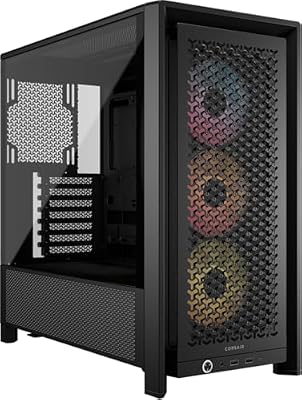 CorsairCORSAIR 4000D RS ARGB Frame Customizable Mid-Tower PC Case –…$100 \xc2\xb7 98/100
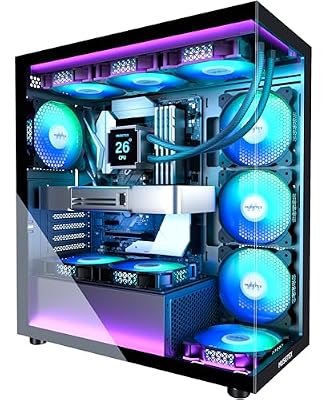 MUSETEXMUSETEX ATX PC Case 7 PWM ARGB Fans Pre-Installed, Type-C…$80 \xc2\xb7 98/100








