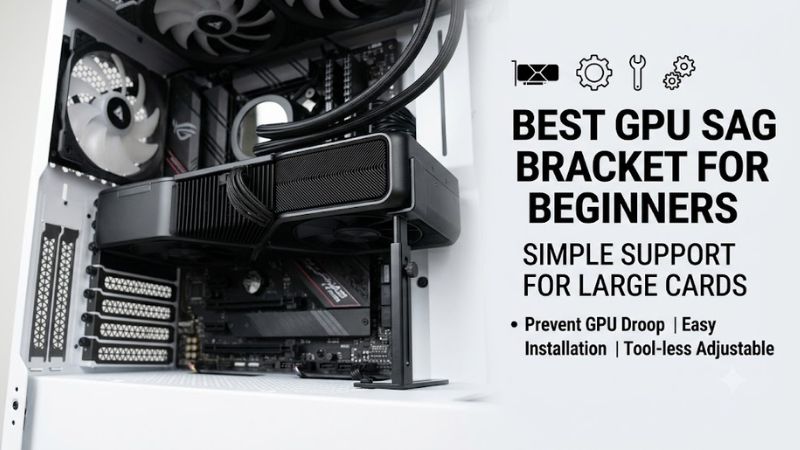
Best gpu sag bracket for beginners should solve one problem: supporting a heavy graphics card without forcing a first-time builder to improvise with books, zip ties, or loose case parts. The right pick depends on clearance, mounting style, and adjustment precision, so match the bracket to your case before anything is tightened.
How to Choose GPU Sag Brackets
Choosing best gpu sag bracket for beginners starts with the space under your graphics card, not the feature list. A good bracket must fit the case, contact a sturdy GPU area, and stay stable without excessive upward force. For beginners, correct clearance and predictable adjustment matter more than RGB, branding, or extra hardware.
Height Range
Measure the vertical gap between the case floor or mounting point and the solid underside of the GPU. A wider range adapts to more builds, while a short range can be ideal when clearance is known. Best gpu sag bracket for beginners selection becomes easier once that measurement is written down before shopping.
Height range matters most in tall cases or when card dimensions differ. ASUS ROG Herculx covers 72–128 mm, while upHere GB26K covers 26–50 mm, so Herculx suits taller gaps and GB26K suits compact clearance. Select the range that gives firm contact without forcing the card upward during final positioning and installation.
Mounting Style
Check how the bracket attaches to the case. Magnetic bases are fast for first-time builders, while motherboard-mounted designs can suit fixed layouts but need more careful positioning before final tightening. The case floor, chassis material, and board layout determine which mounting style is actually practical for your build.
For minimal assembly, Cooler Master ARGB GPU Support Bracket combines a magnetic base with tool-free adjustment. For board mounting, Lian Li GB-002 is the better match because it attaches to ATX or E-ATX motherboards. That distinction matters more to a beginner than decorative features or brand preference in a first build.
Positioning Flexibility
Check whether the support reaches a strong GPU contact point without touching fans, cables, or fragile trim. Best gpu sag bracket for beginners works best when the brace stays clear of moving parts and supports solid structure. More positioning freedom helps with long, thick, or offset cards that do not line up with the case floor.
Cooler Master adjusts from 41 to 171 mm and includes two support orientations, giving beginners extra placement freedom. Lian Li GB-002 also allows vertical and horizontal adjustment for awkward layouts. Those differences matter when a simple post cannot reach the card cleanly or would interfere with the case interior.
Setup Aids And Extras
Consider extras only after fit is solved. A spirit level helps a new builder set the card evenly, while RGB is mainly cosmetic. Extra hardware earns its place when it reduces mistakes; it should never substitute for stable contact. Keep the finished setup firm, level, and clear of moving components throughout operation.
ASUS ROG Herculx adds a magnetic spirit level and 3D ARGB for a refined first build. upHere GB26K stays simpler with aluminum construction, a magnetic base, and a 26–50 mm window. Select Herculx for setup aids; choose GB26K when compact simplicity matters more than lighting, personalization, or software.
Top Picks
Our best gpu sag bracket for beginners picks target four beginner needs instead of repeating one design. ASUS is the easiest all-rounder, upHere keeps the brace compact, Cooler Master gives placement freedom, and Lian Li favors motherboard mounting. The table shows each model’s strength, specification, and trade-off before the reviews.
| Product | Best For | Key Spec | Watch Out For |
|---|---|---|---|
| ASUS ROG Herculx Graphics Card Holder | Best Overall | 72–128 mm; 183 g; spirit level; 3D ARGB | Taller upright design |
| upHere GB26K GPU Support Bracket | Best Value | 26–50 mm; aluminum; magnetic base | Limited height range |
| Cooler Master ARGB GPU Support Bracket | Best For Flexible Case Layouts | 41–171 mm; 2 supports; 58 × 58 × 177 mm | ARGB controller not included |
| Lian Li GB-002 Graphic Card Anti-Sag Bracket | Best For Multi-GPU Builds | Steel; supports up to 2 GPUs; ATX/E-ATX; vertical/horizontal adjustment | More involved mounting |
ASUS ROG Herculx Graphics Card Holder — Best Overall
ASUS ROG Herculx is the Best Overall for a first-time build where effortless adjustment matters more than minimal footprint. This best gpu sag bracket for beginners option provides 72–128 mm of support height, tool-free wheel adjustment, a release button, and an included spirit level for precise alignment.
Its biggest advantage is simple setup with broad vertical reach without occupying a PCIe slot. The trade-off is a taller upright profile and additional 3D ARGB hardware that a minimalist build may not need. ASUS lists the holder at 183 g, with thermoplastic and zinc construction, packed as one piece.
upHere GB26K GPU Support Bracket — Best Value
upHere GB26K is the Best Value when only 26–50 mm is available beneath the GPU. Its aluminum body, magnetic base, telescoping screw adjustment, and cushioned pad keep the design space-efficient and easy to comprehend. It supports mainstream NVIDIA and AMD graphics cards and avoids lighting configuration.
The narrow height range is also its main weakness. A 50 mm maximum can exclude cases with deeper clearance, and the short brace gives less flexibility if you change chassis afterward. Measure first; when dimensions match, this simple design avoids the learning curve of larger, feature-heavy GPU support systems.
Cooler Master ARGB GPU Support Bracket — Best For Flexible Case Layouts
Cooler Master ARGB GPU Support Bracket is Best For Flexible Case Layouts because its arm adjusts from 41–171 mm and the package includes two orientations. That helps when the ideal support point is not directly under the GPU tail, especially where side-panel or floor clearance changes the best position for installation.
The bracket is tool-free and uses a magnetic base, keeping setup friendly for newcomers. Its downside is that the ARGB controller is not included, while the tempered-glass structure is more ornamental than a simple metal post. Listed dimensions are 58 × 58 × 177 mm, so check footprint and height for clearance.
Lian Li GB-002 Graphic Card Anti-Sag Bracket — Best For Multi-GPU Builds
Lian Li GB-002 is Best For Multi-GPU Builds because its steel support bracket supports up to two graphics cards and mounts to ATX or E-ATX motherboards. Vertical and horizontal adjustment lets you position cards before tightening. That makes it particularly valuable in stationary configurations with multiple GPUs installed.
Its trade-off is installation complexity. Unlike a magnetic floor stand, Lian Li GB-002 mounts on the motherboard and requires a more deliberate setup, so it is not the first choice for absolute beginners. Its strengths are steel construction, dual-GPU support, and adjustable positioning once the layout is established.
Frequently Asked Questions
These best gpu sag bracket for beginners questions cover recurring installation problems after opening a new case: whether a brace is needed, where it should touch, how much pressure is enough, and what to check when it will not fit. The answers focus on safe, practical installation rather than unnecessary complexity.
Do Beginners Really Need A GPU Support Bracket?
Yes, a GPU support bracket is worthwhile when a heavy card visibly sags or sits at an angle. It supports the card from below instead of leaving the PCIe area to carry GPU leverage, which is useful with long, thick modern cards. The goal is level support, not lifting force or visible upward pressure.
You do not need a support bracket for every graphics card. If the card is short, light, and already level, a brace may add little value. For visible GPU sag, choose a support that matches measured clearance and case structure. Proper compatibility matters more than buying the most elaborate holder available for beginners.
Where Should A GPU Sag Bracket Touch The Card?
Place the support under a sturdy part of the GPU structure, away from moving fan blades, loose cables, or delicate trim. The goal of best gpu sag bracket for beginners is to hold the card level, not lift it aggressively or change how the cooler sits. Check the contact point before closing the case and powering on.
Before closing the case, confirm the support remains vertical and does not shift when the panel is installed. A magnetic base such as Cooler Master or upHere simplifies placement, while Lian Li requires a more deliberate first setup. Recheck the card after moving or transporting the finished PC, especially after long trips.
How Tight Should A GPU Support Bracket Be?
Do not crank the support upward until it visibly lifts the GPU. A good setting removes noticeable sag and keeps the card level with only firm contact. Excess force can add stress to the card, bracket, or mounting area. Stop when the brace is seated securely instead of trying to preload the GPU during installation.
After adjustment, view the GPU from the case side and compare its edge with the motherboard or slot line. The ASUS ROG Herculx spirit level can simplify this for beginners, but clear visual alignment is enough. Then verify that every GPU fan remains unobstructed and able to spin freely without interference or cable contact.
What If The GPU Support Bracket Does Not Fit?
If the bracket does not fit, measure the gap again and check for interference from the power supply, case floor, GPU fans, or a vertical radiator. A mismatch is usually a clearance issue, not a product fault. Also confirm the mounting surface, case compatibility, and support position suit the chosen design before forcing hardware or closing the panel.
A wider-range model is the safer fallback when measurements are uncertain. Cooler Master reaches 41–171 mm, while ASUS covers 72–128 mm; compact upHere support is better reserved for cases inside its 26–50 mm range. Lian Li remains the alternative when motherboard mounting fits the build better and provides fixed positioning.
Final Thoughts
The right best gpu sag bracket for beginners matches your case clearance and mounting layout without unnecessary complexity. ASUS ROG Herculx is the easiest overall choice, upHere GB26K suits compact spaces, Cooler Master offers placement freedom, and Lian Li fits fixed multi-GPU builds. Measure first, then buy for fit and stability.