1440p (2560×1440) has taken over as the go-to resolution for PC gaming in 2026 — a real step up in sharpness from 1080p while staying within reach of high frame rates on mid-range GPUs. Whether you’re after a budget IPS panel at $160, a premium VA at $180, or an OLED at $549, the 1440p monitor scene has never had better choices. Here’s the best 1440p gaming monitor at every price point in 2026.
As an Amazon Associate we earn from qualifying purchases at no extra cost to you.





| Monitor | Panel | Refresh | Response | Price |
|---|---|---|---|---|
| Acer Nitro 27″ IPS | IPS | 165Hz | 1ms (MPRT) | Check on Amazon |
| SANSUI 27″ VA | VA | 200Hz | 1ms (MPRT) | Check on Amazon |
| Samsung Odyssey G5 | VA | 165Hz | 1ms (MPRT) | Check on Amazon |
| LG 27GP850-B | IPS | 165Hz | 1ms (GtG) | Check on Amazon |
| ASUS ROG 27″ OLED | OLED | 240Hz | 0.03ms | $549 |
| ASUS ROG 26.5″ QD-OLED | QD-OLED | 240Hz | 0.03ms | $599 |
🛒 Best Price Today on Amazon
Prime members get fast, free shipping on everything above, plus member-only deals. New members get a 30-day free trial — cancel anytime.
Start 30-Day Prime Free Trial →See Today’s Amazon DealsWhy 1440p Is the Sweet Spot for Gaming in 2026
At 27 inches, 1440p works out to 108 PPI — clearly sharper than 1080p’s 82 PPI on the same panel. That density renders fine in-game detail, UI text, and map elements crisply where they’d look fuzzy at 1080p on a big screen. Today’s mid-range GPUs (RTX 5060 Ti, RTX 5070, RX 9070) push 1440p past 100fps in AAA titles and 200fps+ in esports — which makes 1440p/144Hz+ a realistic, hittable target for $1,000–1,500 builds. It’s the jump from 1080p that most PC gamers genuinely notice day to day.
Best Budget 1440p: Acer Nitro 27″ 1440P
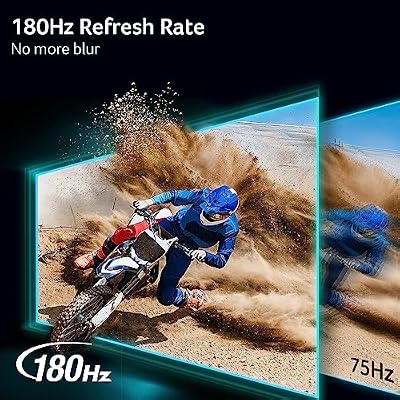
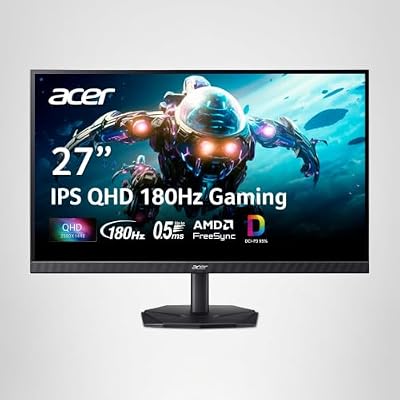
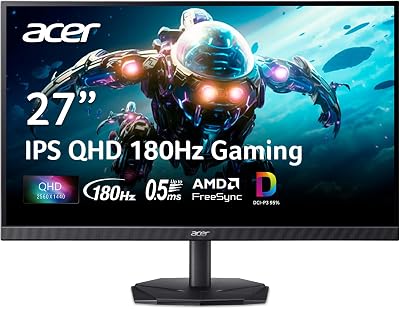
The Acer Nitro XV275K is the value king of 1440p monitors in 2026 — IPS panel goodness (wide viewing angles, accurate color, none of the backlight bleed VA panels can suffer) at a price that would’ve been a fantasy two years ago. Its 165Hz refresh sits right in the 1440p sweet spot for modern GPUs, and the 1ms MPRT response keeps motion clean in fast games. FreeSync Premium and G-Sync Compatible certification mean it plays nice with both AMD and NVIDIA. For a budget 1440p setup, this one gets you the resolution bump without a big price hit.

Acer Nitro 27in QHD 2560x1440 IPS 180Hz Gaming Monitor KG271U N3bmiipx | 0.5ms, AMD FreeSync, DCI-P3 95%, 2xHDMI, DisplayPort, Speaker, VESA Mountable, Bluelight Filter, Flickerless Technology




As an Amazon Associate we earn from qualifying purchases. Product prices and availability are accurate as of the date/time indicated.
Best Mid-Budget: SANSUI 27″ 1440P 200Hz
The SANSUI 27-inch VA panel at around $180 brings a 200Hz refresh and VA’s deep blacks to the budget 1440p tier. VA panels post noticeably stronger contrast than IPS (3000:1 versus the typical 1000:1), so dark game worlds feel more atmospheric. The 200Hz ceiling leaves headroom for competitive titles at 1440p on an RTX 5070 or better. If you split your time between immersive AAA games and esports, the VA contrast edge at this price is hard to argue with.

SANSUI Gaming Monitor 27" 1440P 200Hz 180Hz WQHD 2560×1440-AMD FreeSync 1ms DCI-P3 95% Fast IPS Computer Monitor,Height Adjustable Vertical/Horizontal Rotating, 2×DisplayPort/HDMI 丨HDR丨Low Motion Blur





As an Amazon Associate we earn from qualifying purchases. Product prices and availability are accurate as of the date/time indicated.
Best Premium: LG 27GP850-B IPS
LG’s 27GP850-B is still a benchmark 1440p IPS gaming monitor at around $250. The 1ms GtG (the real figure, not the MPRT marketing number on cheaper panels) wipes out ghosting in fast motion, and the Nano IPS panel delivers a wider gamut (98% DCI-P3) and better color accuracy for gaming and creative work alike. HDR400 certification covers moderate HDR. This is the 1440p monitor I point people to when they want proven panel quality without paying OLED money.
Best OLED 1440p: ASUS ROG Strix 27″ OLED
OLED is a genuine leap over regular LCD for gaming — infinite contrast gives you truly black pixels in dark scenes, the 0.03ms pixel response all but kills motion blur, and OLED’s natural color accuracy makes games look lifelike. The ASUS ROG Strix 27″ 1440P OLED at $549 brings that premium experience at 240Hz with G-Sync Ultimate. For anyone running an RTX 5070 Ti or higher who wants the best image fidelity at 1440p, this OLED is real value next to 4K IPS alternatives.


ASUS ROG XG27AQDMG 27 Inch 1440p 240Hz Glossy OLED Gaming Monitor | Custom Heatsink, Anti-Flicker, Uniform Brightness, 0.03ms, G-SYNC Compatible, 99% DCI-P3, for PS5 and Xbox


As an Amazon Associate we earn from qualifying purchases. Product prices and availability are accurate as of the date/time indicated.
Frequently Asked Questions
Why is 1440p the sweet spot for PC gaming?
1440p delivers roughly 78 percent more pixels than 1080p for a visibly sharper image, yet demands far less GPU power than 4K. This balance lets mid-to-high-end cards push high frame rates while still looking crisp on 27-inch panels, which is why most enthusiasts land here.
What GPU do I need for 1440p gaming?
For high frame rates at 1440p, an RTX 5070, RTX 5070 Ti, or AMD RX 9070 XT is ideal in 2026. These cards handle demanding titles at 100fps or more with upscaling, while an RTX 5060 Ti works well for esports and lighter games.
What refresh rate should a 1440p monitor have?
Aim for at least 165Hz, with 180Hz and 240Hz widely available at 1440p now. Higher refresh sharpens motion and lowers input lag for competitive play. If you mostly play story-driven games, 144Hz to 165Hz is plenty and keeps the price and GPU demands lower.
Is OLED worth it for a 1440p monitor?
OLED offers perfect blacks, instant response, and vivid color that transforms immersive games, and 1440p OLEDs are more affordable in 2026. The trade-offs are higher cost and burn-in risk from static UI elements, so mixed desktop users should weigh those against the stunning image quality.
What screen size is best for 1440p?
27 inches is the standard because it delivers a sharp pixel density around 109 PPI without needing scaling. 32-inch 1440p panels feel more immersive but look slightly softer up close. For competitive gaming many still prefer 27 inches so the whole screen stays in view.
Ready to decide? Our #1 pick for 2026 is the Acer Nitro 27" IPS.
Live price & availability on Amazon.
Top picks from this guide
 SamsungSamsung 27" Odyssey G5 (G51F) Series QHD (1440P) Gaming Monitor…$150 \xc2\xb7 99/100SANSUISANSUI Gaming Monitor 27" 1440P 200Hz 180Hz WQHD 2560×1440-AMD FreeSync…$150 \xc2\xb7 99/100AcerAcer Nitro 27in QHD 2560x1440 IPS 180Hz Gaming Monitor KG271U…$160 \xc2\xb7 99/100
 ASUSASUS TUF Gaming VG27AQ3A 27 Inch 1440p 180Hz G-SYNC Gaming…$179 \xc2\xb7 99/100