
A white gaming setup looks best when its monitor matches the rest of the desk without sacrificing smooth gameplay, sharp visuals, or useful connectivity. The search term gaming monitor white covers everything from affordable Full HD displays to premium OLED panels, but the right choice depends on your games, graphics card, budget, and preferred screen size. These six monitors offer different strengths for competitive gaming, everyday play, and high-end PC builds, with particular attention to verified specifications and practical limitations.
- Quick verdict: Which white gaming monitor should you buy?
- Quick comparison of the best white gaming monitors
- How we selected these white gaming monitors
- Best overall: ASUS ROG Strix XG27ACG-W
- Best compact option: Pixio PX248 Wave
- Best for competitive FPS: Pixio PX279 Wave
- Best dual-mode monitor: ASUS ROG Strix XG27UCG-W Gen2
- Best premium OLED: MSI MAG 272QPW QD-OLED X28
- Best feature-rich OLED: ViewSonic XG272-2K-OLED
- What to consider before buying a white gaming monitor
- Frequently asked questions
- Final verdict
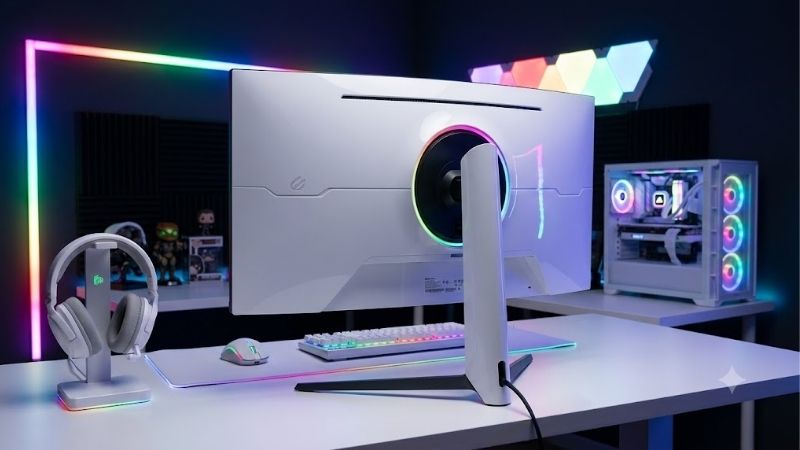
Quick verdict: Which white gaming monitor should you buy?
For most PC gamers, the ASUS ROG Strix XG27ACG-W is the strongest starting point. Its 27-inch 1440p Fast IPS panel, 180Hz refresh rate, ergonomic stand, and USB-C connectivity provide a useful balance of visual detail and speed. Its verified US manufacturer-store listing also makes it a particularly attractive candidate for buyers trying to keep costs under control.
The other recommendations serve more specific needs. The Pixio PX248 Wave suits compact setups and competitive players who prefer a smaller Full HD screen. The PX279 Wave prioritizes 240Hz gameplay on a 27-inch display, while the ASUS ROG Strix XG27UCG-W Gen2 offers an unusual combination of 4K gaming and extremely high refresh rates at Full HD.
For more demanding buyers, MSI’s MAG 272QPW QD-OLED X28 combines a white finish with 280Hz QHD OLED performance. The ViewSonic XG272-2K-OLED is another premium option, distinguished by its OLED panel, extensive connectivity, integrated speakers, and remote control.
A white chassis is only part of the decision. Resolution, refresh rate, panel technology, and the ability to drive your chosen settings matter far more to everyday gaming satisfaction.
Quick comparison of the best white gaming monitors
The following table compares the exact models and their primary strengths. Manufacturer-listed prices were checked on October 19, 2026, where a current US price was publicly available. Prices can change and exclude applicable taxes unless otherwise stated.
| Monitor | Best use | Resolution and refresh rate | Panel | Observed US price |
|---|---|---|---|---|
| ASUS ROG Strix XG27ACG-W | Best overall | 2560 × 1440, 180Hz | Fast IPS | $229 |
| Pixio PX248 Wave | Compact gaming | 1920 × 1080, 200Hz | Fast IPS | $199.99 |
| Pixio PX279 Wave | Competitive FPS | 1920 × 1080, 240Hz | Fast IPS | $289.99 |
| ASUS ROG Strix XG27UCG-W Gen2 | Dual-mode versatility | 3840 × 2160 at 162Hz or 1920 × 1080 at 485Hz | Fast IPS | $349 sale listing; $429 reference price |
| MSI MAG 272QPW QD-OLED X28 | Premium OLED gaming | 2560 × 1440, 280Hz | QD-OLED | $529.99 |
| ViewSonic XG272-2K-OLED | Feature-rich OLED gaming | 2560 × 1440, 240Hz | OLED | Current public price not established |
The ASUS XG27ACG-W is the default recommendation for mixed gaming because it balances resolution, refresh rate, and cost. The dual-mode ASUS is better for gamers who genuinely need two distinct operating modes, while either OLED model makes more sense for buyers who prioritize contrast and pixel response.
How we selected these white gaming monitors
The shortlist prioritizes genuine white-finish gaming monitors with documented specifications rather than black displays paired with separate white accessories. Eligibility also depends on having a meaningful gaming advantage, whether that means higher resolution, a competitive refresh rate, OLED contrast, or flexibility between gaming modes.
Manufacturer documentation establishes each model’s screen size, native resolution, panel type, maximum advertised refresh rate, connectivity, and available features. Those specifications are useful for confirming eligibility, but they do not automatically establish measured motion clarity, input lag, HDR quality, or color accuracy.
Independent testing is available for the ViewSonic XG272-2K-OLED. Tom’s Hardware evaluated its gaming performance, image quality, and motion handling, while PCWorld also reviewed the display and identified its connectivity and design advantages alongside its price and HDR limitations. The other models are assessed primarily from their exact manufacturer-listed specifications because comparable independent laboratory measurements for every white-finish variant were not established.
This distinction matters. A claimed 1ms response time is not equivalent to an independently measured average pixel transition time, and an advertised HDR certification does not guarantee impressive HDR images. The recommendations therefore emphasize documented capabilities, likely use cases, and realistic drawbacks rather than fabricated benchmark results.
Best overall: ASUS ROG Strix XG27ACG-W
The ASUS ROG Strix XG27ACG-W is the best starting point for most white gaming builds because it delivers a balanced combination of resolution, refresh rate, connectivity, and ergonomics without requiring a premium OLED budget.
Its 27-inch Fast IPS panel runs at 2560 × 1440, giving you more workspace and finer detail than a 27-inch Full HD display. The maximum refresh rate is 180Hz, and ASUS specifies a 1ms gray-to-gray response time. That combination suits fast-paced shooters, action games, racing titles, and general desktop use.
The manufacturer lists 95% DCI-P3 coverage and a typical brightness of 400 nits. These figures suggest a reasonably versatile display for gaming and everyday media consumption, although gamut coverage alone does not establish color accuracy. Its advertised DisplayHDR 400 certification should also be treated as an entry-level HDR feature rather than a guarantee of OLED-like contrast.
Connectivity is a particular strength. The monitor includes DisplayPort 1.4, HDMI 2.0, and USB-C with DisplayPort Alt Mode. USB-C can simplify a laptop-based setup, although its listed 7.5W power delivery is too limited to replace the charger for most gaming laptops.
There is one important connection detail: ASUS lists a maximum vertical refresh rate of 180Hz through DisplayPort and USB-C, but 144Hz through HDMI. Desktop gamers seeking the full refresh rate should connect through an appropriate DisplayPort connection.
The stand offers height adjustment up to approximately 4.7 inches and tilt adjustment. VESA 100 × 100mm mounting support also leaves room for a separate white monitor arm.
The main compromise is that this remains an LCD with a typical 1,000:1 contrast ratio. Dark scenes will not have the pixel-level black control of OLED, and demanding HDR games will look less impressive than on a suitable OLED display.
Buy if you want a versatile white 1440p monitor for mixed gaming and everyday work. Skip if you specifically want OLED contrast, 4K detail, or an exceptionally high competitive refresh rate.
Best compact option: Pixio PX248 Wave
The Pixio PX248 Wave is worth considering for gamers who want a smaller white display for a compact desk, secondary gaming station, or esports-focused setup.
This 23.8-inch monitor uses a Full HD Fast IPS panel and supports a 200Hz refresh rate. Pixio also lists a 1ms gray-to-gray response time. The refresh rate gives competitive players a smoother potential presentation than conventional 60Hz or 75Hz monitors when their systems produce enough frames.
Full HD is a practical resolution at this size. It requires less GPU power than 1440p or 4K, making it easier for entry-level and older gaming PCs to maintain high frame rates in demanding multiplayer games. The trade-off is that small text and detailed scenes will not look as sharp as they do on a comparable 1440p screen.
Its white Wave design provides a consistent aesthetic for buyers building around white keyboards, mice, cases, and desk accessories. Pixio’s official US listing showed a price of $199.99 during research and lists a three-year limited warranty for the Wave product family.
However, the PX248 Wave is not automatically the best choice for every budget. The ASUS XG27ACG-W was listed only $29 more at the time of checking, yet it offers a larger 1440p screen and an extensive feature set. Buyers who play a broad mix of games should carefully consider whether the smaller screen and lower resolution are worth the savings.
Buy if compact dimensions, Full HD compatibility, and a 200Hz refresh rate matter most. Skip if you want a sharper 1440p image or prefer one monitor for gaming and productivity over several years.
Best for competitive FPS: Pixio PX279 Wave
The Pixio PX279 Wave targets players who value high refresh rates and a clean white finish more than pixel density.
It is a 27-inch Full HD Fast IPS monitor with a maximum refresh rate of 240Hz and a manufacturer-rated 1ms gray-to-gray response time. Adaptive Sync is listed as a supported feature, helping compatible systems coordinate the display’s refresh with the GPU’s frame delivery to reduce tearing.
For competitive games such as Counter-Strike 2, Valorant, and other fast multiplayer shooters, 240Hz can be useful when your PC consistently produces high frame rates. A higher refresh rate allows the display to present new frames more frequently, although the benefit depends on the game, graphics settings, system performance, and player’s sensitivity to motion.
The compromise is resolution. A 27-inch Full HD display has a relatively low pixel density compared with a 27-inch 1440p model. Edges, fine textures, and text will look less defined at a typical desk distance. This can make the PX279 Wave less appealing as an all-purpose screen for office work, content creation, or detailed single-player games.
Price is another consideration. Pixio’s US website listed the white PX279 Wave at $289.99 during research, making it more expensive than the ASUS XG27ACG-W. You should therefore choose it for its 240Hz Full HD focus, not because it automatically offers better overall value.
A 240Hz monitor also does not guarantee that a game will run at 240 FPS. Less demanding esports titles may approach that target on modest systems, but demanding modern releases can require substantial GPU and CPU performance to maintain similarly high frame rates.
Buy if competitive multiplayer is your priority and you deliberately prefer 240Hz Full HD. Skip if 1440p clarity is more important than the extra refresh-rate headroom.
Best dual-mode monitor: ASUS ROG Strix XG27UCG-W Gen2
The ASUS ROG Strix XG27UCG-W Gen2 is the most flexible option on this list because it supports two distinct display modes. It can operate at 3840 × 2160 resolution up to 162Hz or switch to Full HD at up to 485Hz.
This dual-mode design allows one monitor to support different gaming priorities without requiring a separate display. The 4K mode suits detailed single-player games, high-resolution textures, and general desktop work. The Full HD mode is designed for competitive titles in which extremely high refresh rates take priority over image sharpness.
Its 27-inch Fast IPS panel includes a manufacturer-rated 1ms gray-to-gray response time, with 0.3ms also listed under a minimum response-time specification. The model supports Adaptive Sync, ELMB Sync, HDR, DisplayPort 1.4, HDMI 2.1, and USB-C with DisplayPort Alt Mode.
USB-C power delivery is listed at 15W, which can be useful for lightweight connected devices but is still insufficient to power most gaming laptops under load. The stand supports tilt and swivel adjustment, while a VESA 100 × 100mm mount provides another mounting option.
ASUS’s US product page showed a $349 sale listing against a $429 reference price during research. That observed offer makes the monitor particularly interesting, although prospective buyers should recheck the live listing before purchasing.
There are two important caveats. First, Full HD at 485Hz is a different operating mode from 4K at 162Hz; you should not treat the two maximum figures as simultaneously available. Second, taking advantage of such a high refresh rate requires a suitable connection and a game that can produce enough frames. Many visually demanding titles will not come close to 485 FPS at your preferred settings.
Buy if you want one white monitor for both high-detail games and competitive esports. Skip if you mainly play single-player games and will rarely use the highest-refresh mode.
Best premium OLED: MSI MAG 272QPW QD-OLED X28
The MSI MAG 272QPW QD-OLED X28 is the premium pick for gamers who want deep blacks, high refresh rates, and a metallic-white finish.
Its 26.5-inch QD-OLED panel provides a 2560 × 1440 resolution and a 280Hz maximum refresh rate. MSI specifies a 0.03ms gray-to-gray response time, while the manufacturer identifies the screen as a third-generation QD-OLED panel.
OLED technology controls light at the pixel level rather than relying on a conventional LCD backlight. This produces the near-black performance and extremely high contrast that make dark scenes, night-time environments, and cinematic games especially attractive. The fast pixel transitions of OLED also make the technology well suited to motion-heavy games.
MSI lists DisplayHDR True Black 400, VESA ClearMR 15000 certification, and OLED Care 2.0 features. These are relevant signals of the monitor’s capabilities, but independent measurements would still be necessary to compare its actual HDR brightness, motion performance, and color accuracy with competing OLED displays.
For console gaming, the monitor includes HDMI 2.1 inputs with support for 120Hz output, variable refresh rate, and Auto Low Latency Mode. It also includes DisplayPort connectivity and USB-C video input. MSI advertises three-year OLED coverage that includes burn-in protection, an important point for buyers concerned about long-term ownership.
The official MSI US store displayed a price of $529.99 during research. Although premium pricing is still a consideration, that listing positions the model as a more attainable option than some high-end OLED monitors.
OLED does require sensible ownership habits. Static desktop elements displayed for long periods can contribute to uneven pixel wear over time. Built-in panel-care functions reduce risk but do not make the technology immune to burn-in. Buyers who spend nearly every working hour in static productivity applications may prefer an LCD instead.
Buy if strong contrast, 280Hz gaming, and an OLED-focused experience matter more than minimizing cost. Skip if your budget is limited or your use involves prolonged static screen content without regular gaming.
Best feature-rich OLED: ViewSonic XG272-2K-OLED
The ViewSonic XG272-2K-OLED combines a distinctive white design with 1440p OLED gaming and a more extensive set of convenience features.
Its 27-inch QHD OLED panel runs at 240Hz. ViewSonic lists a 0.01ms pixel response specification, support for NVIDIA G-SYNC Compatible and AMD FreeSync Premium, and HDMI 2.1 connectivity. The specification also includes USB-C with up to 15W power delivery and a USB hub.
The physical design is one of its strongest selling points. The monitor includes customizable rear RGB lighting, an ergonomic stand with height, tilt, swivel, and pivot adjustment, and a remote control for operating the on-screen menu. Dual integrated speakers offer basic audio for desktop use, although dedicated speakers or headphones remain preferable for a more immersive gaming experience.
Tom’s Hardware independently reviewed the display in 2024, reporting strong HDR brightness for its class, broad color coverage, and excellent motion processing. Its reviewer also identified some HDR image-quality shortcomings. PCWorld similarly praised the overall design and connectivity but considered the monitor expensive for a 1440p, 240Hz OLED display.
These reviews support the model’s inclusion as a feature-rich alternative, but they should not be mistaken for a current comparative ranking against every newer OLED product.
One purchasing detail deserves special attention: ViewSonic’s US product page does not establish a current public retail price. Its historical review prices should not be treated as today’s price. Check the live US offer and applicable warranty terms before comparing it directly with MSI’s more recently listed model.
The monitor also carries OLED-specific ownership considerations. ViewSonic documents burn-in prevention features, including pixel movement and automatic dimming when the display is idle. Buyers should still confirm the precise warranty coverage that applies to their purchase rather than assuming all OLED-related damage is covered.
Buy if you want OLED visuals, extensive connectivity, integrated audio, and a fully adjustable white design. Skip if a lower price or the highest available refresh rate is your main priority.
What to consider before buying a white gaming monitor
Choosing the best white gaming monitor is easier when you work through the specifications in the order that most affects your actual experience.
Resolution and screen size
A 24-inch Full HD monitor is a practical choice for compact setups and competitive gaming. It places less demand on the GPU and keeps the entire image easy to view without excessive head movement.
For a 27-inch screen, 1440p is generally the most balanced starting point. It provides more workspace and sharper details than Full HD without the same rendering burden as 4K.
A 27-inch 4K monitor delivers the highest pixel density among these options, but it demands a powerful graphics card if you intend to run demanding games at high frame rates and native resolution. Upscaling technologies can help, but image quality and performance vary by game and implementation.
Refresh rate and response time
Refresh rate specifies how many times per second the display can refresh its image. A 180Hz panel is a strong everyday gaming choice, while 240Hz and 280Hz displays suit players who can take advantage of the extra refresh-rate headroom.
Advertised response time is a separate specification. A quoted 1ms response time does not tell you how every pixel transition behaves or whether the selected overdrive setting introduces overshoot. Independent measurements are more useful when motion clarity is a deciding factor.
Match the monitor to your actual games. A 485Hz mode can make sense for a competitive player with a suitably fast system, but it is excessive for someone who mostly enjoys cinematic games at 60–120 FPS.
IPS versus OLED
Fast IPS panels are versatile, generally less expensive, and suitable for mixed gaming and desktop work. Their main weakness is contrast: black areas can appear grayish in dark rooms.
OLED panels deliver much stronger black levels, fast pixel transitions, and a high-contrast image. They generally cost more and require consideration of burn-in risk, especially for long productivity sessions involving static user interfaces.
QD-OLED also has particular image-quality characteristics, including wide color reproduction. However, results depend on panel generation, brightness conditions, coating, and ambient light, so the technology label alone cannot determine which monitor looks best.
Connections, ergonomics, and mounting
Check how the monitor reaches its maximum refresh rate. Some models have different refresh-rate limits over HDMI and DisplayPort, while dual-mode displays switch resolution and refresh behavior when changing operating modes.
USB-C is useful when connecting supported laptops, but verify its video capabilities and power delivery. A 7.5W or 15W USB-C power specification should not be mistaken for full laptop charging.
Height adjustment, tilt, swivel, and pivot matter when positioning the screen for long gaming sessions. If you use a monitor arm, confirm VESA compatibility and check that the mounting design suits the rest of your desk setup.
Finally, do not assume the back of a monitor is completely white because its front bezel and stand are white. Inspect product photographs from multiple angles and check the exact color variant if matching your PC case and accessories is important.
Budget and long-term value
The purchase price is only part of the decision. A higher-resolution monitor may require a GPU upgrade to achieve your desired frame rates, and a premium OLED may be unnecessary for a player who mostly uses low-detail competitive settings.
Also consider the stand, connectivity, warranty, and whether the model is available from an authorized retailer. A monitor with better ergonomics or a useful USB-C connection can reduce the need for separate accessories.
Avoid paying extra purely for a matching finish when a less expensive model already meets your resolution and refresh-rate needs. For most users, getting the right panel characteristics first and coordinating the remaining components second leads to a more satisfying build.
Frequently asked questions
Is a white gaming monitor worth buying?
Yes, when the finish is part of the setup you want. A white monitor can coordinate a themed gaming desk and reduce the visual contrast between the display and other peripherals. However, the color itself does not improve image quality or game performance. Prioritize panel specifications, connectivity, ergonomics, and warranty before paying an aesthetic premium.
Is 1440p better than 1080p for gaming?
For a 27-inch monitor used across different game genres, 1440p generally provides a sharper image and more desktop workspace. Full HD remains a sensible option for smaller screens, budget systems, and players who prioritize very high frame rates in competitive games. The better choice depends on your GPU and the games you play.
Is OLED better than IPS for a white gaming setup?
OLED is usually the stronger choice for contrast, black levels, and fast pixel transitions. IPS is often the more practical option for buyers who want a lower purchase cost and spend long periods displaying static desktop content. Neither technology is universally better; the trade-off depends on your budget and usage.
Do you need a 240Hz or faster monitor?
Not necessarily. A 180Hz monitor already provides a high refresh rate for most gaming needs. Moving to 240Hz or above is most useful when you play competitive games, your system can produce high frame rates, and you value the additional motion smoothness. It is usually less important than resolution or contrast for cinematic gaming.
Should you buy a monitor with HDR 400?
Treat HDR 400 as a feature specification, not a guarantee of excellent HDR. The actual experience depends on panel contrast, brightness behavior, local dimming or pixel-level light control, and how the display handles HDR content. Read independent reviews of the exact model before paying substantially more for HDR performance.
Final verdict
The ASUS ROG Strix XG27ACG-W is the best starting point for most buyers because its white finish, 1440p resolution, 180Hz refresh rate, and USB-C connectivity form a balanced package. The ASUS ROG Strix XG27UCG-W Gen2 is the more specialized choice for players who need both high-resolution gaming and extremely high-refresh-rate Full HD, while MSI’s MAG 272QPW QD-OLED X28 is the premium option for high-contrast OLED gaming.
Choose Pixio’s smaller PX248 Wave for a compact Full HD setup or the PX279 Wave if competitive 240Hz gaming takes priority. Consider the ViewSonic XG272-2K-OLED when its white design and feature-rich connectivity justify its price.
The best purchase is not necessarily the monitor with the highest refresh rate or most expensive panel. It is the one that fits your system, your games, your budget, and the white setup you intend to build.









