PSU wattage calculator step by step guide starts with one practical problem: turning an exact PC parts list into a realistic PSU target before you buy. The difficult part is knowing which components matter, how peak demand changes the result, and when the calculated figure needs extra headroom. Check the parts list again.
How to Choose a PSU Wattage Calculator
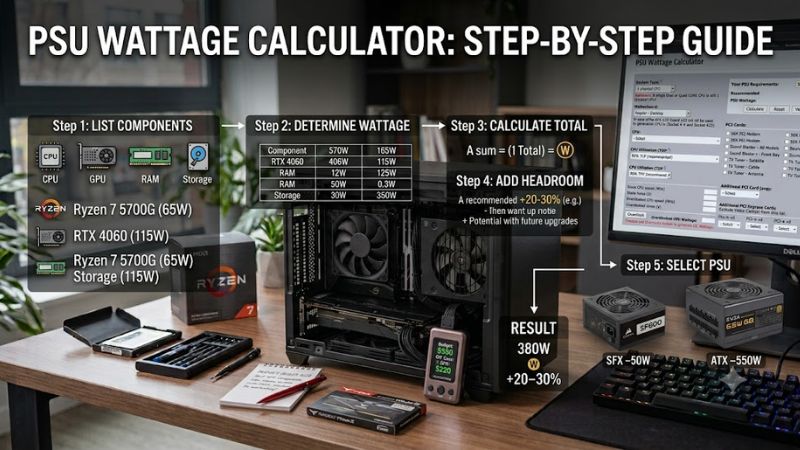
Begin with the hardware list, enter the CPU and GPU exactly, add memory and storage, then account for cooling and other devices. This psu wattage calculator step by step guide should show whether the estimate is a minimum and prepare you to verify connectors, form factor, and upgrade plans. Review the result before buying.
Component Detail
Record the exact CPU model, GPU model, storage count, memory, cooling type, and unusual expansion hardware. More specific selections reduce generic assumptions that can hide meaningful differences. Cooler Master fits well here because its calculator exposes CPU, motherboard, GPU quantity, RAM, SSD, HDD, and optical drive fields.
A simple office PC can tolerate fewer inputs than a workstation with several drives or add-in cards, but supported fields should still match the planned hardware. Avoid replacing an exact model with a vague performance class when the tool offers a closer choice. That makes Cooler Master practical for a complete mainstream build.
CPU And GPU Load
CPU and GPU should be entered first because they can dominate system demand. Use exact models and include overclocking when the calculator provides that field. This psu wattage calculator step by step guide treats those entries as the anchor for capacity, peak behavior, and sensible margin. Prioritize the GPU when it is the largest load.
Seasonic is useful for demanding configurations because its calculator can accept up to two CPUs and four GPUs, then adds SSDs, hard drives, fans, and the choice between ATX/EPS and SFX. That wider configuration space helps when one graphics card is not the whole story in a workstation. That makes Seasonic useful for multi-GPU planning.
Peak Demand And Headroom
Treat the calculated result as an estimate, not a guaranteed measurement of real draw. Peak behavior, power limits, firmware settings, and workload changes can push demand above an average figure. Leave practical room above the result, especially when a high-end GPU, overclock, or future upgrade is part of the plan for this build.
MSI is a strong baseline because its calculator uses the complete configuration rather than forcing you to estimate isolated component wattages manually. MSI’s own guidance says complete configuration input gives a more precise estimate. That makes MSI a useful checkpoint before choosing the final PSU capacity for a normal desktop build.
Form Factor And Connectors
Wattage is only one compatibility test. Confirm whether the case needs ATX, SFX, or another size, and check the required GPU and motherboard connectors. A calculator can produce a sensible wattage while the physical PSU still fails the build. be quiet! adds useful buying detail beyond the raw number. Verify the cable list.
be quiet!’s calculator includes filters for ATX, SFX/TFX, cable management, maximum wattage, and preferences such as silence, efficiency, price, and features. Its recommendations are brand-focused, but the workflow is useful when physical compatibility matters as much as capacity. That makes be quiet! useful for compatibility checks.
Top Picks
The best calculator depends on the build and the decision you want after the estimate. In this psu wattage calculator step by step guide, MSI is the Best Overall starting point, Cooler Master is Best Value for detailed mainstream entry, Seasonic suits complex systems, and be quiet! leads when the estimate must become a PSU shortlist.
| Product | Best For | Key Spec | Watch Out For |
|---|---|---|---|
| MSI Power Supply Calculator | Best Overall | CPU, GPU, memory, storage, cooling and connector filters | Still an estimate, so verify the final PSU |
| Cooler Master PSU Calculator | Best Value | CPU, motherboard form factor, GPU quantity, RAM, SSD and HDD inputs | Recommendations are tied to Cooler Master PSUs |
| Seasonic Wattage Calculator | Best For Workstations | Up to 4 GPUs, 2 CPUs, storage, fans, ATX/EPS or SFX | Treat the result as a minimum baseline |
| be quiet! PSU Calculator | Best For PSU Matching | Peak component demand plus form-factor and cable filters | PSU suggestions are brand-focused |
MSI Power Supply Calculator
MSI Power Supply Calculator is the Best Overall pick for builders who want a detailed but familiar workflow. Its current interface covers CPU, motherboard, GPU, memory, storage, optical drives, fans, and other inputs, then provides a recommended PSU wattage. It also offers connector and 80 PLUS filtering for the recommended supply.
The advantage is broad coverage without requiring a spreadsheet, which makes MSI practical for a gaming PC. The drawback is that it remains an estimate, so the final hardware still needs connector, form-factor, and quality checks. This psu wattage calculator step by step guide works best when inputs lead to a PSU shortlist.
Cooler Master PSU Calculator
Cooler Master PSU Calculator is the Best Value pick because its input flow is easy to follow while still covering useful details. It lets you specify CPU brand, socket and model, motherboard form factor, GPU brand and quantity, RAM, SSD, HDD, and optical drive information before producing a recommended wattage for the build.
The advantage is efficient entry for a normal desktop without specialist power knowledge. The limitation is that recommended PSU options are centered on Cooler Master products, so it is less brand-neutral as a buying screen. Use it when you want a detailed second opinion without turning a routine calculation into a technical project.
Seasonic Wattage Calculator
Seasonic Wattage Calculator is the Best For Workstations pick because it handles configurations that simple tools may describe poorly. It supports up to two CPUs and four GPUs, then includes storage, fans, and ATX/EPS or SFX selection. Use the planned configuration. That keeps the estimate auditable. Review the final connector list.
The advantage is flexibility for professional or multi-GPU systems where component counts can change the requirement. The trade-off is that Seasonic describes its output as a minimum requirement, so this psu wattage calculator step by step guide should not treat that result as the final target. Add capacity for upgrades.
be quiet! PSU Calculator
be quiet! PSU Calculator is the Best For PSU Matching pick because it goes beyond a simple wattage total. It uses peak component consumption data, includes CPU and GPU overclocking choices, and filters suggested units by maximum wattage, form factor, cable management, and preferences such as silence, efficiency, price, and features.
The advantage is a direct path from estimated demand to a filtered PSU shortlist. The disadvantage is brand focus: recommendations are be quiet! models rather than a market-wide selection. Use it when its filters match your buying priorities and you want calculation and PSU matching in one workflow. Check the final model.
Frequently Asked Questions
Questions usually appear after the wattage number is displayed because the estimate is only the middle of the decision. This psu wattage calculator step by step guide follows one rule: enter complete hardware data, interpret the result conservatively, then verify the PSU against connectors, form factor, and planned upgrades.
What Wattage Should I Choose After The Calculator Gives A Result?
Choose a PSU above the calculated requirement rather than matching the displayed wattage exactly. Extra capacity is especially useful for high-end GPUs, overclocking, and future upgrades. Seasonic explicitly describes its result as a minimum and recommends additional headroom in demanding situations. Let the hardware plan set the margin.
Avoid buying an enormous unit simply because a larger number sounds safer. Extra wattage cannot fix poor quality, missing connectors, or the wrong physical size. After calculating, choose a reputable PSU with the required cables and sensible efficiency, then keep enough capacity for realistic loads. Keep this result for comparison.
Should I Recalculate When I Change One PC Part?
Recalculate when the CPU or GPU changes, when you add several drives or expansion cards, or when an overclock changes the configuration. This psu wattage calculator step by step guide is most useful when repeated after meaningful hardware changes rather than treated as a one-time answer saved from the first draft of the build.
For a major upgrade, repeat the complete configuration instead of adding a guessed wattage to the old result. That avoids missing interactions between component counts, cooling, and power limits. Keeping the original parts list also gives you a clean before-and-after comparison when planning a future GPU or CPU replacement.
Do Fans, SSDs, And USB Devices Need To Be Counted?
Enter supported devices when the calculator provides fields for them, but prioritize the components that materially change demand. SSDs and case fans consume power, yet CPU and GPU usually have greater influence on a performance build. Detailed tools such as MSI, Seasonic, and be quiet! make those secondary inputs easy to include.
The practical trick is consistency rather than obsessing over one small accessory. If the tool asks for fans, storage, or USB power, enter the real count or closest planned count. Then compare the result with another calculator if the system is unusual. Cross-checking is more useful than inventing a large safety number.
Can Two Calculators Give Different PSU Recommendations?
Yes, two calculators can give different recommendations without either being broken. They may use different component databases, peak assumptions, safety margins, and recommendation logic. Compare the same CPU, GPU, storage, cooling, and form-factor entries first. If those match, the difference usually reflects each tool’s method.
For an expensive or unusual build, use MSI or Cooler Master for a mainstream baseline, Seasonic for complex configurations, or be quiet! when PSU form factor and cable filtering matter most. Do not automatically choose the lowest number. Choose a reasonable range that fits the real hardware, upgrade plan, and connector requirements.
Final Thoughts
The safest workflow is to treat the calculation as a repeatable sizing step, not a one-click verdict. Start with exact parts, enter the major loads, account for peak behavior, allow practical headroom, and verify connectors and form factor before buying. This psu wattage calculator step by step guide stays useful when the build changes.