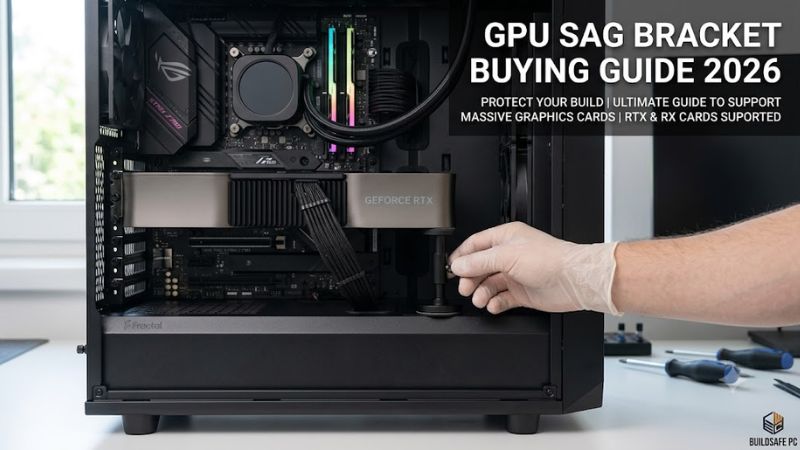
GPU sag bracket buying guide 2026 starts with a simple problem: heavy graphics cards can sag enough to strain the slot and make a new build look uneven, but the right support is not simply the tallest stand. Case depth, GPU-cooler shape, mounting points, and clearance beneath the card decide what actually fits without creating another problem.
How to Choose GPU Sag Brackets
For a gpu sag bracket buying guide 2026, start with four practical checks: height range, mounting method, load and material, and clearance around fans and cables. These filters separate useful support from a bracket that fits on paper but cannot reach the card cleanly in the case you actually own.
Height Range
The height range sets whether a support can touch the underside of your card without forcing it upward. Measure the lowest safe gap, then choose a bracket whose adjustment range surrounds that number. ASUS ROG Herculx is strong when you want broad adjustment without a complicated setup. Measure that gap first, too.
Height affects where the support can sit relative to the GPU-backplate and cooler. A short post may work in a compact-build but fail in a taller case, while an oversized post can crowd bottom-intake fans. DeepCool GH-01 stands out when you need unusually broad vertical adjustment in tall cases, around bottom fans.
Mounting Method
Mounting method determines how much the bracket can shift after installation. A magnetic base is quick to reposition, while a case-attached bracket can feel more planted but needs usable screw points. upHere GH05CK is a useful choice when flexible positioning matters, especially in crowded cases with rear-slot access.
The trade-off is convenience versus fixed stability: magnetic supports are easier to move during upgrades, while slot-mounted designs stay tied to the chassis. For a more locked-in solution, upHere GL7TC uses two expansion-slot mounting points and is worth choosing when that rear-slot fit is available under heavy cards.
Load and Material
Material and load design matter most with very large cards. A metal frame gives the support a rigid structure, but the useful number is how the manufacturer defines support range or load-capacity. DeepCool GH-01 is notable because its published maximum load reaches 5 kg, which suits oversized coolers for large GPUs only.
You do not always need the highest load rating, because a compact aluminum post may already handle your card while using less room. For a clean setup, ASUS ROG Herculx weighs 171 g and combines that modest footprint with an upright adjustable support structure, making it easier to place around other case hardware now.
Clearance
Clearance around fans, cables, and the case floor is the last filter. The support should contact a solid part of the GPU without reaching into a spinning fan-path or pinching cables. upHere GH05CK provides a 121 mm elongated base, which can help when bottom-fan clearance is already tight near the bottom intake fans, too.
A bracket can be a poor fit if the mounting arm lands in a fan’s path or the case cannot accept its screw position. upHere GL7TC has a narrower 40–65 mm height range and may interfere with fans in some combinations, so verify the physical path before installation and tightening before closing the case, finally, nearby.
Top Picks
Top Picks in this gpu sag bracket buying guide 2026 are divided by use case rather than vague claims. ASUS ROG Herculx is the overall choice, DeepCool GH-01 is the value pick, upHere GH05CK handles unusual clearance, and upHere GL7TC targets two-slot mounting with 5V ARGB for easier side-by-side product-fit comparison.
| Product | Best For | Key Spec | Watch Out For |
|---|---|---|---|
| ASUS ROG Herculx Graphics Card Holder | Best Overall | 72–128 mm support height; 171 g | ASUS lists RTX 40-series support |
| DeepCool GH-01 | Best Value | 5 kg max load; 47.2–154 mm or 161–255 mm | Manual hand-screw adjustment |
| upHere GH05CK | Best For Unusual Clearance | 28–200 mm; 360° rotation; 121 mm base | ARGB wiring adds setup complexity |
| upHere GL7TC | Best For RGB Builds | 40–65 mm height; 125 mm width; 5V 3-pin ARGB | Two-slot mounting and possible fan interference |
ASUS ROG Herculx Graphics Card Holder
ASUS ROG Herculx is the best overall choice for first-time builders who want precise adjustment without tools. In this gpu sag bracket buying guide 2026, it stands out for a 72–128 mm support range, an adjustable wheel, a release button, and an included magnetic spirit level.
The bracket uses a compact upright design rather than occupying a PCIe slot, and ASUS lists 171 g weight with 3-pin addressable RGB. Its main weakness is compatibility certainty on newer cards: ASUS specifically lists RTX 40-series support, so owners of later GPUs should verify physical dimensions with newer cards.
DeepCool GH-01
DeepCool GH-01 is the best value when you want sturdy mechanical support and do not care about RGB. Its published load rating reaches 5 kg, while Type A covers 47.2–154 mm and Type B covers 161–255 mm, giving this gpu sag bracket buying guide 2026 pick a notably wide adjustment window for larger cards.
The downside is a more manual installation approach, with hand screws and a saw-tooth adjustment system rather than quick tool-free control. That extra setup is minor once installed, but it makes GH-01 less convenient than Herculx when you routinely swap graphics cards or rebuild the system after final rebuilding.
upHere GH05CK
upHere GH05CK is the best pick for unusual case layouts because its support height spans 28–200 mm and its support arm can rotate 360 degrees. That makes this gpu sag bracket buying guide 2026 option useful when the GPU sits far above the case floor or needs support from an offset angle in awkward builds.
It also uses a 121 mm elongated base, anti-slip silicone feet, and 5V 3-pin ARGB with daisy-chain support. The practical drawback is cabling: the lighting needs a compatible ARGB connection or the optional SATA route, so this model can add more installation complexity than an unlit support before cable routing.
upHere GL7TC
upHere GL7TC is the best choice for an RGB-focused build that has usable rear expansion-slot mounts. It supports a 40–65 mm height range, up to 125 mm of width adjustment, and 5V 3-pin ARGB, making this gpu sag bracket buying guide 2026 pick especially suitable for newer large-card layouts with rear-slot space available.
The two-hole bracket fastens through the expansion-slot cover, which gives it a secure chassis connection but limits where it can be installed. The manufacturer also notes possible fan interference in some case and GPU combinations, so its narrower height range makes careful measurements essential before mounting before final mounting.
Frequently Asked Questions
These questions matter because GPU support is less about brand-preference than avoiding a mismatch between the bracket and your case. The models above use different mounting strategies, so the safest purchase in this gpu sag bracket buying guide 2026 is the one that matches measured space and the exact support point in real case layouts.
Which GPU sag bracket is easiest for beginners?
For most first-time builders, ASUS ROG Herculx is the easiest option because it adjusts without tools and includes a spirit level for alignment. The combination reduces guesswork during a first installation and makes small height corrections easier without needing a separate tool during first-time installation and setup.
The exception is a case with a very unusual gap or blocked floor area, where upHere GH05CK can be easier simply because its 28–200 mm range and rotating top provide more positioning freedom. Measure the contact point before choosing either model, then avoid lifting the card above its natural level in crowded cases.
Does a GPU sag bracket really matter?
A support bracket is useful when a heavy graphics card droops or places unnecessary leverage on the slot area. ASUS describes GPU holders as additional reinforcement against sagging or bending, so the practical goal is to support the card rather than clamp it upward against the cooler or backplate with gentle contact.
Support is most valuable when the card is long, thick, or installed horizontally with a noticeable downward angle. It should make contact gently under a sturdy section of the card; forcing the bracket upward can create the wrong pressure, so adjustment should stop as soon as the sag is corrected without lifting the card.
Can a GPU sag bracket hurt airflow?
Yes, but the bracket itself is not automatically an airflow problem. The risk comes from placing a post, arm, or base directly in a fan’s path or blocking intake space. That is why clearance belongs in a practical buying guide rather than being treated as a cosmetic detail in your case before case closure.
Compact supports usually make airflow management easier, but case layout still decides the result. upHere GH05CK’s elongated base is designed to avoid some bottom-fan conflicts, while GL7TC carries a manufacturer warning about possible fan interference, so physical clearance should outweigh lighting or appearance before the final install.
Do GPU support brackets fit every graphics card?
No, not every bracket fits every build, because support height, card thickness, mounting points, and fan placement vary. The practical buying approach is to match the bracket to the case and GPU together instead of treating a universal label as a guarantee of physical compatibility before any purchase.
Physical dimensions are the final check even when a maker lists broad compatibility. ASUS publishes support for RTX 40-series cards, DeepCool publishes defined height ranges, and upHere publishes specific mounting and adjustment limits, giving you measurable boundaries to compare before installation before buying in practice.
Final Thoughts
A good support bracket should correct the GPU’s angle with minimal contact, stay out of fans and cables, and fit the case without improvisation. This gpu sag bracket buying guide 2026 favors ASUS ROG Herculx for easy adjustment, DeepCool GH-01 for load capacity, and upHere models for specialized layouts and RGB builds.