CPU bottleneck step by step guide starts with one rule: test before you buy. Low GPU usage does not automatically mean a weak processor. Check FPS target, GPU load, frame times, and CPU threads together, then connect that evidence to an upgrade path instead of guessing from one utilization percentage. Keep a baseline for comparison.
How to Choose a CPU
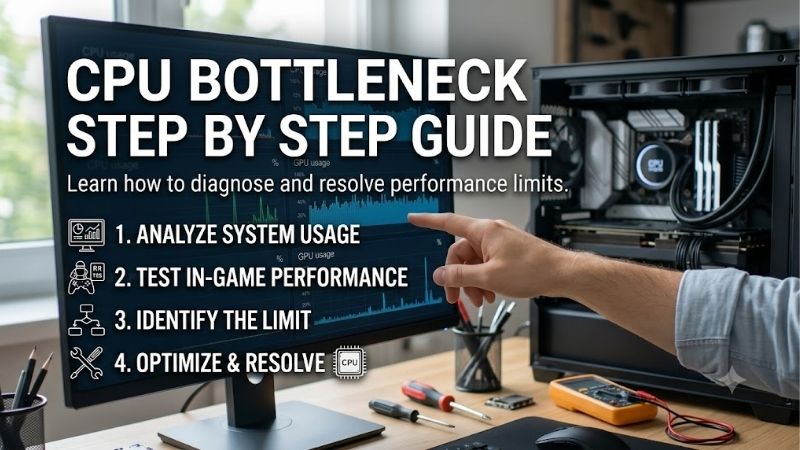
A CPU limit is easiest to spot through repeatable results rather than one utilization reading. This cpu bottleneck step by step guide starts with workload and monitor target, then checks GPU behavior, CPU thread load, and platform compatibility. That sequence keeps a misleading benchmark result from driving an unnecessary purchase.
Start With the Target FPS
Start with the monitor target because 1080p at 240Hz puts a different demand on a CPU than 4K at 60Hz. Write down your desired frame rate, then use it as the performance ceiling. The Ryzen 7 9800X3D is especially well matched to high-refresh gaming where processor headroom matters. That target should guide your spending.
Apply that target consistently because extra CPU performance has little value if the display cannot show the additional frames. A 144Hz monitor and a 360Hz esports display have different requirements. That makes the Ryzen 7 9800X3D the stronger fit when the target is exceptionally high. Higher refresh makes CPU headroom valuable.
Check GPU Usage And Frame Rate
Test the GPU at normal game settings. If lowering resolution or GPU-heavy settings adds little frame rate while GPU usage falls, the processor may be limiting performance. The Ryzen 5 9600X fits mainstream systems where the target is strong but not extreme, especially when the graphics card is already well matched. Repeat the measurement.
Run the same scene again at a lower resolution before buying hardware. If frame rate barely changes, investigate CPU threads and frame times. This test is valuable for budget systems because the Ryzen 5 9600X can remove a processor ceiling without paying for an eight-core X3D model. This prevents a GPU-bound test from misleading you.
Compare Per-Core CPU Load
Watch individual CPU threads instead of total utilization. A game can saturate a few important threads while overall CPU usage remains below 100 percent. That pattern matters more than the headline number, and the Ryzen 7 9850X3D provides extra headroom for CPU-heavy games and very high-refresh targets. Per-thread evidence is decisive.
Use frame-time graphs to confirm that CPU pressure repeats during the same scene. A single spike can come from loading, shaders, or background activity. When the pattern persists at high FPS, the Ryzen 7 9850X3D becomes a relevant upgrade because its eight-core X3D design targets demanding gaming behavior. Consistency matters most.
Check Platform And Cooling
Check the platform before ordering anything. Socket, BIOS support, memory type, cooler capacity, and motherboard power limits can turn a CPU swap into a larger rebuild. The Core Ultra 7 270K Plus is a strong mixed-workload option, but its LGA 1851 platform must fit your upgrade plan. Confirm platform compatibility before buying anything.
Platform cost changes real-upgrade-value. An AM5 CPU may fit an existing board after BIOS confirmation, while the Intel option requires a compatible LGA 1851 motherboard. If you already own that Intel platform and need heavier threaded performance, the 270K Plus becomes easier to justify. Existing hardware can change the value.
Top Picks
The four CPUs below serve different upgrade situations. This cpu bottleneck step by step guide uses Ryzen 7 9800X3D for balanced gaming, Ryzen 5 9600X for value, Ryzen 7 9850X3D for extreme refresh rates, and Core Ultra 7 270K Plus for mixed workloads. Spending more only helps when the workload can use it. Workload fit matters.
| Product | Best For | Key Spec | Watch Out For |
|---|---|---|---|
| AMD Ryzen 7 9800X3D | Best Overall | 8 cores, 16 threads, up to 5.2GHz, 96MB L3, 120W | Cooler not included; liquid cooling recommended for optimal performance |
| AMD Ryzen 5 9600X | Best Value | 6 cores, 12 threads, up to 5.4GHz, 32MB L3, 65W | Lower cache and core count than X3D options |
| AMD Ryzen 7 9850X3D | Best For Competitive Gaming | 8 cores, 16 threads, up to 5.6GHz, 96MB L3, 120W | Higher-end choice with greater power demand |
| Intel Core Ultra 7 270K Plus | Best For Streaming And Productivity | 24 cores, 24 threads, up to 5.5GHz, 36MB Smart Cache | LGA 1851 platform limits upgrade flexibility |
AMD Ryzen 7 9800X3D
cpu bottleneck step by step guide points to the Ryzen 7 9800X3D as Best Overall for gaming-first systems using a strong GPU. It has 8 cores, 16 threads, up to 5.2GHz boost, 96MB L3 cache, and 120W default TDP. Its large cache suits CPU-sensitive games. That balance suits strong gaming GPUs. The workload should determine that budget.
Its advantage is gaming headroom without moving to the highest-end X3D model. The drawback is cooling: AMD does not include a cooler and recommends liquid cooling for optimal performance. Choose it when your GPU and monitor target can expose a CPU limit, making the added processor capacity useful. Include the cooler in the total budget.
AMD Ryzen 5 9600X
cpu bottleneck step by step guide rates the Ryzen 5 9600X as Best Value for mainstream gaming rigs. AMD lists 6 cores, 12 threads, up to 5.4GHz boost, 32MB L3 cache, and 65W default TDP. Its efficient power envelope also keeps cooler requirements relatively modest. That efficiency favors space-efficient configurations.
Its weakness is lower cache and core count than the X3D eight-core options, which can matter in CPU-heavy games, high-refresh esports, or heavy multitasking. It is the better fit when your GPU and monitor target do not justify more. AMD also ships the processor without a boxed cooler. That tradeoff matters most at extreme frame rates.
AMD Ryzen 7 9850X3D
cpu bottleneck step by step guide gives the Ryzen 7 9850X3D the Best For Competitive Gaming role. It combines 8 cores, 16 threads, a 5.6GHz boost, 96MB L3 cache, and 120W default TDP for users chasing very-high-FPS where marginal gains matter. Incremental gains matter under ultra-high-refresh competitive-display targets.
The tradeoff is value. The uplift over the 9800X3D is generally modest relative to its higher power envelope, so it is not an automatic upgrade. Pick it when your display refresh rate, GPU class, and competitive games can actually use the extra CPU performance. Extra power consumption should remain within the system budget.
Intel Core Ultra 7 270K Plus
cpu bottleneck step by step guide places the Intel Core Ultra 7 270K Plus as Best For Streaming and Productivity. Intel lists 24 cores, 24 threads, up to 5.5GHz turbo, 36MB Smart Cache, and 40MB L2 cache for broad parallel workloads. High core count helps when tasks overlap. Cooling and board support belong in the budget.
Its main weakness is platform longevity. It uses LGA 1851 and can reach 250W maximum turbo power, so motherboard and cooling choices matter. It makes the most sense when gaming shares the desktop with encoding, compiling, rendering, or sustained threaded work that benefits from many cores. Existing hardware can change the value.
Frequently Asked Questions
A useful diagnosis should answer three questions: what limits performance, how often does it happen, and will a new CPU remove that limit? This cpu bottleneck step by step guide applies those questions to common gaming scenarios before you commit to a processor or platform. Repeat unclear tests before changing hardware.
Can Lowering Resolution Confirm A CPU Bottleneck?
Yes, but only after you rule out the GPU. Start with the same game scene, record average FPS and 1% lows, then lower resolution or GPU-heavy settings. If FPS barely changes and GPU usage falls while key CPU threads stay busy, the processor is a likely suspect rather than the graphics card. Expect clear results at high refresh rates.
The exception is a game that stays GPU-bound at usual settings. Lowering resolution should normally create more GPU headroom and raise frame rate there. A CPU upgrade will not fix that ceiling, so repeat the test across a demanding scene before changing hardware or assuming the processor is responsible. The test should remain repeatable.
Can CPU Usage Be Low During A Bottleneck?
Not necessarily. Total CPU usage can stay below 100 percent when one or two game threads are limiting performance. Check per-core activity with GPU utilization and frame-time graphs. A repeatable pattern of busy game threads plus unused GPU capacity is stronger evidence than one overall CPU percentage. Average FPS alone can hide stutter.
A high-core desktop can hide a CPU limit because idle cores pull down total utilization. Background tasks can create the opposite effect. Close idle work before testing, then use the result to decide whether your next upgrade needs more cache, single-thread performance, or more cores. Compare the same scene after background tasks stop.
When Should I Upgrade My CPU?
Usually when the CPU repeatedly prevents your GPU from reaching the frame rate you want. The strongest case is a high-refresh display where GPU utilization is not the limit and 1% lows remain below target. That is when a faster processor can deliver a measurable gain rather than a benchmark gain. A persistent ceiling is more actionable.
Do not upgrade because a bottleneck calculator reports a neat percentage. These tools cannot model every game engine, setting, memory setup, driver mode, or monitor target. Use them for rough screening, then confirm the diagnosis with a repeatable game test before spending money on new hardware. Confirm results at your actual resolution.
Which CPU Is Best After A Bottleneck Test?
Yes, but the choice depends on the reason for upgrading. The 9800X3D is the balanced gaming pick, the 9850X3D targets extreme refresh rates, and the 9600X is aimed at value systems. The 270K Plus becomes attractive when streaming, rendering, compiling, or other threaded work shares the PC. Buy the workload solution, not the highest tier.
Also check the rest of the platform. An AM5 upgrade needs compatible DDR5 memory and motherboard support, while the Intel chip requires an LGA 1851 board. Cooler capacity matters with high-power parts, so the cheapest CPU can become costly after needed platform changes or cooling upgrades. Firmware and cooling checks should happen first.
Final Thoughts
cpu bottleneck step by step guide ends with one rule: diagnose the ceiling before replacing hardware. Use monitor target, GPU behavior, per-thread load, frame times, and platform constraints together. Then choose the 9600X for value, 9800X3D for balanced gaming, 9850X3D for extreme FPS, or 270K Plus for mixed workloads.