Windows 11 install checklist 2026 starts with the USB drive, but the smartest choice is not simply the highest-capacity one. Microsoft requires a blank USB drive with at least 8GB for installation media, and the drive is formatted during creation. This guide compares four options for installs, upgrades, and recovery prep.
How to Choose A Windows 11 Installation USB Drive
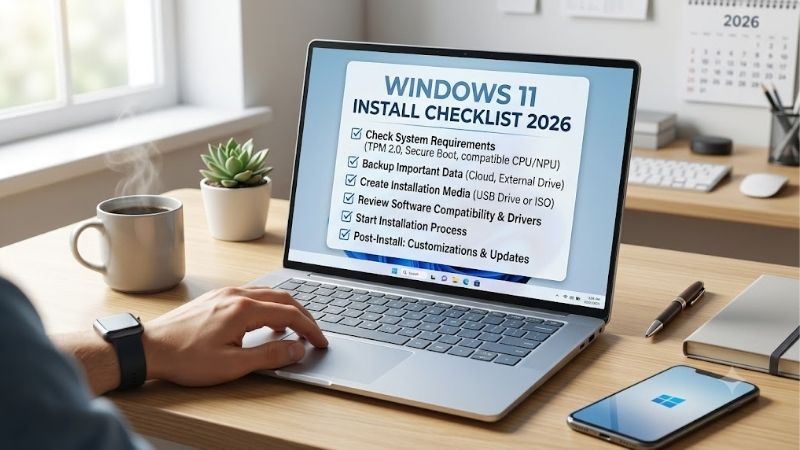
A windows 11 install checklist 2026 should flag failures caused by unsupported hardware, firmware settings, or a problematic drive. Microsoft requires UEFI, Secure Boot capability, TPM 2.0, at least 4GB of memory, and 64GB of storage, so verify those fundamentals before creating installation media for the current build.
Capacity
Capacity matters because installation media needs more than a minuscule emergency buffer, even though Microsoft’s minimum is 8GB. A 32GB or 64GB drive gives additional working headroom and reduces the chance of running short during setup. The 64GB SanDisk Ultra Flair is the sensible baseline for this purchase right now.
A higher-capacity drive does not make Windows install faster, so avoid paying for storage you will not use. For a dedicated installer, 64GB is generous; 128GB makes more sense when the same drive will hold drivers or utilities later. The Samsung BAR Plus 128GB and PNY DUO LINK 128GB serve that specific purpose effectively.
Connector Compatibility
Connector type is easy to overlook on newer PCs. Traditional desktops commonly provide USB-A, while many thin laptops emphasize USB-C. A dual-connector drive removes the adapter question and is useful when one installer must work across several machines. The PNY DUO LINK combines Type-A and Type-C in one device for that reason.
Do not assume USB-C automatically means faster transfers; the host port, controller, and flash hardware still determine performance. For a mostly USB-A desktop workflow, the Samsung BAR Plus is straightforward, while the PNY DUO LINK is better when your checklist includes both newer and older systems without carrying another adapter.
Transfer Speed
Speed matters, but rated read speed is not a direct estimate of installation time because creating media involves writing files and depends on the host. USB 3.x is a sensible target for modern PCs, especially when it also stores drivers or recovery files. The PNY PRO Elite V3 reports the fastest-published speed here.
SanDisk rates the Ultra Flair at up to 150MB/s read, Samsung rates the 128GB BAR Plus at up to 400MB/s sequential read, and PNY rates the DUO LINK at up to 200MB/s read. The PRO Elite V3 reaches up to 1000MB/s read and 800MB/s write on USB 3.2 Gen 2, making it performance-leading for professional large-file transfers between compatible PCs.
Build And Portability
Physical design matters when the drive travels between PCs or stays plugged into a crowded rear panel. Metal bodies feel more substantial, but compact dimensions also matter around tight ports. The Samsung BAR Plus has a space-conscious metal body, while the SanDisk Ultra Flair is about 1.69 inches long and easy to carry safely.
Pay close attention to the physical mechanism too. A sliding-cap design avoids losing a separate cap, while a swivel design keeps connectors protected when carried. The PNY PRO Elite V3 uses a metal sliding cap, and the PNY DUO LINK uses a metal swivel, giving two distinct practical choices for portable installation kits.
Top Picks
windows 11 install checklist 2026 becomes clearer once the USB choice is narrowed to use cases. The table favors drives that exceed Microsoft’s 8GB media requirement while adding differences in speed, connector flexibility, and design. Choose based on how often you install Windows, because capacity alone does not set value.
| Product | Best For | Key Spec | Watch Out For |
|---|---|---|---|
| SanDisk Ultra Flair 64GB | Best Overall | USB 3.0, up to 150MB/s read | Type-A only |
| Samsung BAR Plus 128GB | Best Value | USB 3.1, up to 400MB/s read | Type-A only |
| PNY PRO Elite V3 256GB | Best For Frequent Reinstalls | USB 3.2 Gen 2, up to 1000MB/s read, 800MB/s write | More capacity than a basic installer needs |
| PNY DUO LINK 128GB | Best For Mixed-Port PCs | USB 3.2 Gen 1, Type-A + Type-C, up to 200MB/s read | Slower than PRO Elite V3 |
SanDisk Ultra Flair 64GB
windows 11 install checklist 2026 ranks the SanDisk Ultra Flair 64GB as Best Overall for a straightforward installer that stays compact and simple. Its USB 3.0 interface supports up to 150MB/s sequential read, and the body measures about 1.69 inches long. For dedicated Windows media, that overall balance is sensible.
The main advantage is simplicity: 64GB gives ample space beyond Microsoft’s 8GB minimum without becoming bulky. The limitation is that SanDisk publishes a read rating rather than a headline write figure, so creation speed can vary by host and usage. Its five-year limited warranty is a useful extra for a dedicated toolkit.
Samsung BAR Plus 128GB
windows 11 install checklist 2026 makes the Samsung BAR Plus 128GB the Best Value pick when the installer drive will double as portable storage. Samsung rates this model for up to 400MB/s sequential read over USB 3.1 and gives it a space-conscious metal body about 1.6 inches long, making it easy to carry around every day.
Its advantage is the combination of 128GB capacity, strong published read performance, Type-A compatibility, and a five-year limited warranty. The drawback is connector-system flexibility: it is Type-A only, so USB-C-only systems may need an adapter. That compatibility limitation should be checked before placing an order.
PNY PRO Elite V3 256GB
windows 11 install checklist 2026 gives the PNY PRO Elite V3 256GB the Best For Frequent Reinstalls title because its USB 3.2 Gen 2 hardware targets high-speed data transfers. PNY rates the line at up to 1000MB/s read and 800MB/s write, with premium-grade metal housing and a protective sliding cap for routine handling.
The advantage is clear for technicians, creators, or enthusiasts who repeatedly move driver packages, ISOs, or backups. The tradeoff is overkill for a single Windows install, since you pay for performance you may rarely exploit. Its Type-A connector and two-year limited warranty still suit a traditional desktop PC toolkit.
PNY DUO LINK 128GB
windows 11 install checklist 2026 makes the PNY DUO LINK 128GB the Best For Mixed-Port PCs when the drive must move between USB-A desktops and USB-C laptops. It provides both connectors, uses USB 3.2 Gen 1, and reaches up to 200MB/s read, giving it practical cross-platform compatibility across a Windows installation kit.
The benefit is convenience rather than maximum speed: one drive covers two connector standards without a separate dongle. The drawback is that it is slower than the PRO Elite V3, and its one-year limited warranty is shorter than the five-year coverage on SanDisk and Samsung. Keep the drive clearly labeled as installation setup media.
Frequently Asked Questions
windows 11 install checklist 2026 should confirm the machine itself before you create boot media. Microsoft currently lists Windows 11 version 26H2 as available, while compatible hardware requires the UEFI security, processor, memory, storage, and graphics-processing support. A USB cannot make unsupported hardware compliant.
What Size USB Do I Need For Windows 11?
The best USB size for Windows 11 installation is 64GB, even though Microsoft specifies a blank drive with at least 8GB. Sixty-four gigabytes gives generous room without much downside for a dedicated installer. It also leaves space for drivers or diagnostic utilities if you keep the drive as a reusable maintenance tool.
An 8GB-capable drive can work when it meets the official requirement and has enough usable space, but capacity is not the only concern. The installation-media process formats the drive, so existing files must be backed up elsewhere beforehand. For repeated-use toolkits, 64GB or 128GB is more practical, especially when hardware drivers travel with the installer.
Can I Reuse The USB After Installing Windows 11?
Yes, you can reuse the same USB drive after installing Windows 11, but creating new installation media can format it again. A reusable drive is useful for technicians and enthusiasts who regularly reinstall or repair PCs, provided important files stay elsewhere before each session. Treat it as replaceable installation setup media.
A multi-purpose drive works best when you keep enough free space and avoid treating installer media as your only backup. A dedicated folder for hardware drivers can help, but keep the installation media clearly identifiable so you do not delete it accidentally. The Samsung BAR Plus and PNY DUO LINK fit this purpose neatly.
Is USB 2.0 Fast Enough For Windows 11 Installation?
USB 2.0 can function in some Windows setup workflows, but USB 3.x is the better 2026 target because modern systems utilize faster interfaces. A faster-rated drive will not guarantee a proportionally faster setup, yet it can reduce transfer time for the ISO, drivers, recovery files, and setup utilities on compatible ports.
The main exception is the host port itself. Plugging a modern USB 3.2 Gen 2 drive into an older USB 2.0 port can constrain performance, so the entire connection path matters as much as the drive specification. That is why the PRO Elite V3 makes more sense for newer PCs with compatible ports, where its rated speed is usable.
Do I Need A 128GB USB If My PC Has A Large SSD?
No, you do not need a 128GB or larger USB drive just because the PC has a very-large-capacity SSD. Microsoft’s installation-media guidance calls for a blank USB drive with at least 8GB, while the PC itself needs at least 64GB of available internal-system storage. The USB holds installation media; it does not match the SSD.
Choose more capacity when you have a second purpose, such as keeping drivers, troubleshooting utilities, or multiple installers together. For a dedicated setup drive, extra capacity mainly provides convenience. That makes 64GB the practical starting point and 128GB the sensible step-up for multipurpose use across several PCs.
Final Thoughts
windows 11 install checklist 2026 is easier to follow when you separate mandatory requirements from extras. Start with compatible hardware and a blank USB, then choose 64GB for a dedicated installer, 128GB for multipurpose use, or faster USB 3.2 hardware for frequent transfers. Buy for your workflow and keep the installer backed up.8