What to look for in a micro ATX case depends on the parts you plan to install, not just the outer size. GPU clearance, cooler height, PSU fit, radiator support, airflow, and cable space can decide whether a compact build is easy to assemble or difficult to upgrade. This guide turns those checks into four practical picks before purchase.
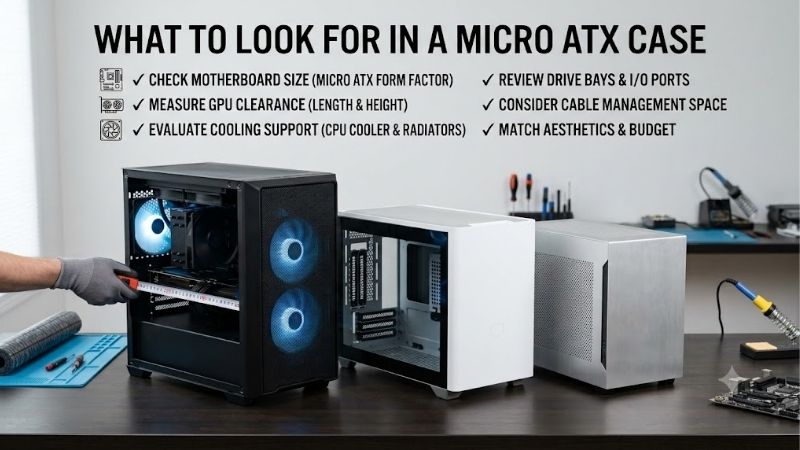
How to Choose a Micro ATX Case
What to look for in a micro ATX case starts with clearance for your GPU, cooler, and PSU, plus airflow and cable paths. The goal is not the smallest physical box. It is a space-efficient layout that avoids awkward compromises and leaves realistic upgrade-headroom for future hardware changes during installation and later upgrades.
GPU Clearance
GPU clearance is the first measurement to verify because modern graphics cards can be long and thick. Compare the case limit with card length and thickness, then account for connectors, fans, and radiators. Paper-thin clearance can disappear once every component is installed, especially in a finished configuration.
Clearance is a major part of what to look for in a micro ATX case. The A3-mATX reaches 415mm; AP201, AIR 100 ARGB, and Pop Mini Air list 338mm, 330mm, and 365mm. That makes the A3-mATX the most forgiving fit for oversized graphics-cards, especially triple-fan graphics cards for high-end gaming builds in configurations.
Cooling and Radiator Support
Cooling support matters because mATX cases differ sharply in radiator and fan space. Check cooler height first, then confirm AIO radiator size and position. Inspect included fans, mesh intake area, and whether a radiator could block a drive cage or reduce GPU headroom for the cooler-and-radiator combination you choose.
Radiator support can shape what to look for in a micro ATX case. A3-mATX supports 360mm; AP201 supports 360mm top; AIR 100 ARGB supports 280mm front or 240mm top. Pop Mini Air reaches 240mm top or front and ships with three cooling-fans, configuration-friendly when balancing CPU and GPU thermal load without wasted clearance.
PSU Compatibility
The PSU can be easy to overlook, yet length and mounting can affect GPU clearance, cable bends, and radiator placement. Check the case’s maximum power-supply length and mounting layout instead of assuming every ATX supply will fit comfortably. This matters in space-efficient layouts when components share limited internal room.
The A3-mATX supports ATX, SFX-format, and SFX-L supplies up to 220mm, while AP201 accepts 140-180mm units, AIR 100 ARGB lists 160mm, and Pop Mini Air 150mm. PSU fit is part of what to look for in a micro ATX case. The A3-mATX is the exceptionally flexible choice when power-supply options matter in space-constrained builds.
Cable Management and Storage
Cable space and storage shape how easy a build is to assemble and maintain. Wider routing can hide thick cables, while useful drive mounts help with multiple SSDs or high-capacity drives. Front-panel ports also deserve verification, including whether USB-C is included and how easily the system can be serviced afterward.
AP201 provides up to 32mm behind the motherboard tray; AIR 100 ARGB adds cable loops and Velcro straps. Pop Mini Air offers 19mm routing space and storage trays, and the A3-mATX uses removable panels and modular brackets. Prioritize the AP201 or A3-mATX when faster maintenance and flexible installation matter for serviceability.
Top Picks
These four picks show what to look for in a micro ATX case. LIAN LI A3-mATX favors broad component compatibility, ASUS Prime AP201 balances compact size with cooling, Montech AIR 100 ARGB emphasizes included airflow, and Fractal Design Pop Mini Air favors storage and conventional assembly for different build priorities.
| Product | Best For | Key Spec | Watch Out For |
|---|---|---|---|
| LIAN LI A3-mATX | Best Overall | 26.3L; 415mm GPU; 165mm CPU cooler; up to 220mm ATX/SFX/SFX-L PSU | GPU thickness changes with bottom-fan and radiator configuration |
| ASUS Prime AP201 | Best Value | 338mm GPU; 170mm CPU cooler; 360mm top radiator; 32mm cable space | Limited factory airflow and shorter GPU ceiling |
| Montech AIR 100 ARGB | Best For Airflow | Four 120mm ARGB fans; 330mm GPU; 161mm CPU cooler; 280mm front/240mm top radiator | No USB-C listed and 160mm PSU limit |
| Fractal Design Pop Mini Air | Best For Storage | 365mm GPU; 170mm CPU cooler; 150mm ATX PSU; three included 120mm fans | 150mm PSU limit and optional USB-C |
LIAN LI A3-mATX — Best Overall
LIAN LI A3-mATX — Best Overall suits builders who want a compact chassis without giving up large hardware. Its 26.3-liter body accepts mATX or ITX boards, 415mm GPUs, 165mm coolers, and ATX, SFX, or SFX-L PSUs up to 220mm. That gives broad part-selection freedom for compact gaming or workstation builds.
The A3-mATX suits powerful builds because it can take a 360mm radiator and multiple 120mm fans. The tradeoff is configuration: a 25mm bottom fan reduces GPU thickness clearance to 61mm, and some radiator layouts can remove GPU clearance. Check the layout before assuming every 360mm setup is equal.
ASUS Prime AP201 — Best Value
ASUS Prime AP201 — Best Value suits builders who want strong cooling in a compact chassis. It measures 205 x 350 x 460mm, fits 338mm GPUs, supports 170mm coolers, and takes a 360mm top radiator with 32mm of cable-management space. Its straightforward layout also leaves useful room for clean installation and routing behind the tray.
Its main limitation is factory airflow: the specification lists no front fan and only one 120mm rear fan, so heat-heavy builds may need extra airflow. The 338mm GPU ceiling is also less forgiving than the A3-mATX for oversized cards, making it better suited to compact builds before adding hotter components.
Montech AIR 100 ARGB — Best For Airflow
Montech AIR 100 ARGB — Best For Airflow targets builders who prefer strong out-of-box cooling. It includes four 120mm ARGB fans, supports a 330mm GPU and 161mm cooler, and takes a 280mm front or 240mm top radiator. Its fine-mesh front works with top and bottom dust filters, keeping its setup simple.
The AIR 100 ARGB is less flexible for very large hardware because the GPU limit is 330mm and the PSU limit is about 160mm. Its listed I/O has two USB 3.0 ports and one USB 2.0 port but no USB-C. That omission matters on modern desktops, while four included fans remain a strong airflow advantage.
Fractal Design Pop Mini Air — Best For Storage
Fractal Design Pop Mini Air — Best For Storage suits builders who want what to look for in a micro ATX case without giving up useful drive capacity. It supports 365mm GPUs, 170mm coolers, 150mm ATX PSUs, and includes two front and one rear 120mm fan for systems with multiple SSDs or hard drives.
The 150mm PSU length narrows supply choices versus the alternatives. USB-C is optional rather than standard, so check front-I/O needs before buying. Its 36.5-liter volume leaves generous assembly-space for storage and assembly, which can help builders using shorter PSUs when PSU length is restrictive.
Frequently Asked Questions
The right choice becomes clearer once you compare what to look for in a micro ATX case against your actual parts. Large GPU owners should favor clearance, AIO users radiator space, airflow-focused builders included fans, and storage-heavy systems drive room. Those priorities should guide the case before appearance becomes the deciding factor.
Can a Micro ATX Case Fit a Full-Size GPU?
Can a micro ATX case fit a full-size GPU? Yes, many can, but the answer depends on the exact case and card. GPU length is only one part because thickness, connectors, fans, and radiators can reduce usable space. Compare the installed layout directly; measurements matter more than category labels when parts are tightly packed.
The A3-mATX lists 415mm, but a 25mm bottom fan can reduce GPU thickness clearance to 61mm. A front radiator or large PSU can also change usable space around the graphics card. Treat the maximum as a starting point in your chosen fan and radiator configuration, especially with high-wattage cards.
Is a 360mm Radiator Worth Choosing for a Micro ATX Case?
Is a 360mm radiator worth choosing for a micro ATX case? It can be, but only when the layout leaves enough room for the radiator, fans, GPU, and motherboard components together. A large radiator is not better when it restricts GPU or PSU placement. Compact cases reward a balanced cooling plan rather than maximum capacity.
The A3-mATX and AP201 support 360mm radiators, while AIR 100 ARGB tops out at 280mm front and 240mm top, and Pop Mini Air reaches 240mm top or front. Match radiator size to CPU needs rather than buying capacity you cannot fit well. AIO space must be balanced against GPU and component clearance inside the final configuration.
Do I Need Extra Fans With a Micro ATX Case?
Do I need extra fans with a micro ATX chassis? Not always. Several well-placed fans can handle normal gaming, while minimal factory airflow may need extras for higher-wattage processors or graphics-cards. Placement matters more than fan count for consistent chassis temperatures and predictable thermal-performance behavior.
The AIR 100 ARGB ships with four 120mm fans, while Pop Mini Air ships with three. The AP201 lists one rear 120mm fan, making extra airflow more likely; A3-mATX offers many fan-mount options. Judge included fans by placement, thermal-load, and intake-exhaust balance rather than count alone in higher-wattage gaming builds.
Is a Smaller Micro ATX Case Always Better?
Is a smaller micro ATX case always better? No. Smaller dimensions save desk space, but they can reduce GPU thickness tolerance, PSU choice, radiator flexibility, storage room, and cable-routing ease. The best size fits your hardware without unnecessary upgrade limits; internal layout matters more than volume, so compatibility should beat raw size.
The A3-mATX is only 26.3 liters and still accepts large components, while Pop Mini Air is 36.5 liters and provides more conventional storage and assembly space. Volume alone is not the target; internal layout matters more than the printed number. Choose around the parts you keep longest.
Final Thoughts
Choosing what to look for in a micro ATX case comes down to matching clearance, cooling, PSU fit, and cable space to your exact parts. A3-mATX is strongest for compatibility; AP201 suits compact AIO builds, AIR 100 ARGB delivers ready-made airflow, and Pop Mini Air favors storage-focused systems when assembly space matters.