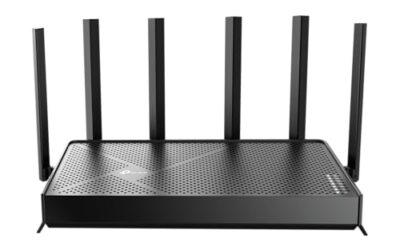
- Top Pick: TP-Link Tri-Band BE11000 Wi-Fi 7 Gaming Router Archer GE650 | 6-Stream 11 Gbps supports 320MHz | 2×5G + 3×2.5G Ports USB 3.0 | Game Acceleration, Dedicated Gaming Port & Panel, RGB Lighting|HomeShield
- Best Value: TP-Link BE6500 Dual-Band WiFi 7 Router (BE400) – Dual 2.5Gbps Ports, USB 3.0, Covers up to 2,400 sq. ft., 90 Devices, Quad-Core CPU, HomeShield, Private IoT, Free Expert Support
- Premium Choice: ASUS ROG Rapture GT-BE98 Pro WiFi 7 Gaming Router – Quad-Band, 30Gbps, Mesh
Choosing the best DNS for gaming in 2026 is one of the cheapest and fastest ways to sharpen your online experience. While DNS does not directly lower your in-game ping, the right resolver speeds up matchmaking, reduces connection hiccups, and can route you to servers more reliably, all without spending a cent on new hardware.
This guide explains how gaming DNS actually works, which providers lead the pack, and how to set everything up on your PC, console, or router. Because a fast resolver still relies on solid networking hardware, we also highlight gaming routers that let you apply custom DNS network-wide for consistent results.
As an Amazon Associate we earn from qualifying purchases at no extra cost to you. Product prices and availability are accurate as of the date shown and are subject to change.





⚡ Save on Your Next PC — Amazon Prime
Prime members get fast free shipping on the systems above, plus early access to Prime Day & Black Friday PC deals. New members get a 30-day free trial.
Watch: Best DNS For Gaming 2026 — Video Review
What DNS Does for Gaming
DNS, or the Domain Name System, translates human-readable addresses into the IP addresses your devices connect to. In gaming, faster DNS resolution means quicker connections to matchmaking servers, login services, and content delivery networks. It will not shave milliseconds off your in-match latency, but it eliminates the small delays that make a network feel sluggish before you even load in.
The Best Gaming DNS Providers
- Cloudflare (1.1.1.1): Consistently among the fastest public resolvers, with strong privacy and a gaming-friendly reputation for low lookup times.
- Google Public DNS (8.8.8.8): Extremely reliable and widely available, a safe default that performs well in nearly every region.
- Quad9 (9.9.9.9): Adds security filtering that blocks malicious domains, useful if you want protection alongside speed.
- OpenDNS: Offers customizable filtering and stable performance, a good pick for family setups that still need responsive gaming.
How to Change Your DNS
You can apply DNS at three levels. On a PC, edit your network adapter’s IPv4 settings and enter the resolver addresses manually. On consoles, most systems let you set custom DNS under network configuration. The most powerful approach is router-level: set your preferred DNS once on a capable router like the TP-Link Archer GE650, and every device on your network inherits it automatically.
Hardware That Makes DNS Count
A great resolver still needs a great router to shine. The tri-band Archer GE650 offers an 11Gbps ceiling and a dedicated gaming port, while the ASUS ROG Rapture GT-BE98 Pro delivers quad-band Wi-Fi 7 and 30Gbps of throughput for zero-compromise networks. Mid-range options like the TP-Link Archer AXE75 with its 6GHz band and the wide-coverage BE6500 (BE400) both make applying custom DNS across your home effortless, and the budget-friendly Archer AX21 handles the basics dependably.
Frequently Asked Questions
Does changing DNS reduce my ping?
Not directly. DNS speeds up connections and matchmaking rather than in-game latency, but a fast resolver removes small delays that make your whole network feel snappier.
Which DNS is fastest for gaming?
Cloudflare’s 1.1.1.1 is frequently the fastest, though the best choice varies by region. Testing a couple of providers on your own connection is the surest way to know.
Should I set DNS on my router or each device?
Router-level DNS is the most convenient, applying to every device including consoles automatically. A capable router like the ASUS ROG GT-BE98 Pro makes this simple and consistent.
Is it safe to use public DNS?
Yes. Reputable providers like Cloudflare, Google, and Quad9 are safe and often more private than your ISP’s default resolver, with some adding security filtering too.
Conclusion
The best DNS for gaming in 2026 is a fast, reliable resolver like Cloudflare or Google applied at the router level for whole-home consistency. Pair it with a strong gaming router such as the TP-Link Archer GE650 or ASUS ROG GT-BE98 Pro, and you get quicker matchmaking and steadier connections, a free upgrade that every gamer should take advantage of.