
- Top Pick: Build Your Ultimate Gaming Setup: The Complete Beginner's Guide to PC Building, Gear, Gadgets and Going from Zero to Game-Ready in 2026
- Best Value: How to make an Epic Gaming Setup: Victor &
- Premium Choice: GMKTEC EVO-X1 PRO UNLEASHED: The Complete 2026 Buyer's Setup, Gaming, and Local AI Performance Guide.
🛒 Best Price Today on Amazon
Prime members get fast, free shipping on everything above, plus member-only deals. New members get a 30-day free trial — cancel anytime.
- Top Smart Lighting Gaming Setup Buyers Picks for 2026
- What to Look for in a 2026 Build
- At a Glance: 2026 Builder’s Comparison Table
- The Builder’s Picks
- Integration Architecture for Builders
- FAQ for Builders
- Builder’s Verdict
- Further Reading
- Related Articles
- Frequently Asked Questions
- Related Articles
- Related Guides
Top Smart Lighting Gaming Setup Buyers Picks for 2026
Here are our current top smart lighting gaming setup buyers picks, compared on real Amazon owner reviews, price, and features. Live prices update below.
As an Amazon Associate we earn from qualifying purchases at no extra cost to you.



Affiliate disclosure: As an Amazon Associate we earn from qualifying purchases. This post contains affiliate links — we may earn a small commission at no extra cost to you. This never affects our picks.
If you’re building a gaming setup from scratch in 2026, there’s a decision in front of you that didn’t exist even three years ago: what’s the lighting architecture, not just the lighting product. Smart lighting has grown into a small but real engineering problem. Pick the wrong protocol and you’ll be peeling panels off the wall in 18 months. Pick the right one and you’ll keep expanding cleanly for the next five years.
This buyers guide is for builders — people planning a new room, a new battlestation, or a serious upgrade to an existing setup. We’ll spend more time on infrastructure decisions than on individual product reviews, because the protocol and ecosystem choices you make at the start constrain every product you can add later. If you just want a quick “what should I buy today” list, our community picks guide and editor’s choice guide cover that more directly. This one is for the people who plan in spreadsheets.
The good news: 2026 is genuinely the best moment in a decade to build a smart lighting system that lasts. Matter is real. Thread is widely deployed. The major brands have all converged on supporting both. The bad news: there are still meaningful product-level gaps in build quality, sync performance, and software polish you need to understand before you sink a few thousand dollars into a wall of panels and a sync box.
What to Look for in a 2026 Build
Before you spend money, spend an hour thinking about the system. Here’s the framework we use when consulting on builds for friends, family, and the occasional client.
Define your ecosystem first, products second. Are you building inside Apple Home, Google Home, SmartThings, or Home Assistant? Each one has slightly different strengths and a product or two that work better there than elsewhere. Apple Home plus Thread is currently the most polished combination but locks you into Apple hardware for the hub. Home Assistant is the most flexible but asks for technical comfort. Pick the one you actually want to use daily and design around it.
Plan your protocols up front. Matter over Wi-Fi is the workhorse — it works everywhere and is fine for low-bandwidth on/off and color commands. Matter over Thread is the upgrade path for panels, sensors, and anything that benefits from low latency and mesh networking. Avoid Bluetooth-only products in 2026 unless they explicitly bridge to Matter. Zigbee survives as a strong proprietary option (Philips Hue) but is slowly being pulled under the Matter umbrella through bridges.
Plan your power architecture. Every smart panel, bar, and strip needs a power supply. A wall of fifteen Nanoleaf hexagons doesn’t, but a wall of fifty does, and you’ll need to plan outlets, surge protection, and maybe an in-wall power solution if cable management matters to you. Builders consistently underestimate this.
Plan your sync source. Want HDMI sync? The Sync Box sits between your sources and your TV or monitor — that’s an extra HDMI 2.1 device in the chain, with bandwidth and latency implications. Want software sync? The gaming PC handles it. Want camera sync? The camera mounts somewhere with a clear view of the screen. Decide which one you want before you start mounting anything.
Plan for expansion. The Govee Hexa Pro controller tops out at 25 panels. The Nanoleaf Shapes controller goes to about 250. The Hue Bridge caps at 50 devices total. If your build might grow, pick a system that grows with it.
At a Glance: 2026 Builder’s Comparison Table
| Pick | Builder Use Case | Protocol | Price Range | Expansion Ceiling |
|---|---|---|---|---|
| Nanoleaf Shapes Hexagons | Modular wall installation with Thread mesh | Matter / Thread | $$$ | ~250 panels per controller |
| Philips Hue Play HDMI Sync Box 8K | HDMI hub for multi-source builds | Hue Bridge / Matter export | $$$$ | 10 sync devices |
| Philips Hue Lightstrip Plus | Continuous bias and cove lighting | Hue Bridge / Matter | $$$ | 10 m per controller |
| Govee Glide Hexa Pro Panels | Cost-effective wall art with Matter | Matter / Wi-Fi | $$$ | ~25 panels per controller |
| Govee TV Backlight 4 | Source-agnostic bias light via camera | Wi-Fi + Matter (newer) | $$ | One per display |
| Nanoleaf Lines | Geometric accent above primary monitor | Matter / Thread | $$$ | ~250 lines per controller |
| LIFX Beam Multi-Tile | Hubless direct light bars | Matter / Wi-Fi | $$$ | Limited by Wi-Fi capacity |
The Builder’s Picks
1. Nanoleaf Shapes Hexagons – Best Modular Wall System

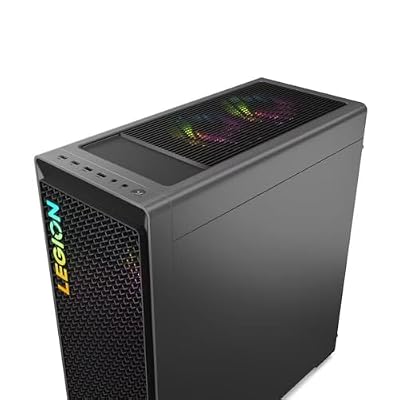
Lenovo Legion T7 34Irz8 PC i9-14900KF GeForce RTX 4080 Super 32GB 2TB SSD W11H


As an Amazon Associate we earn from qualifying purchases. Product prices and availability are accurate as of the date/time indicated.
For builders, the Shapes hexagons are the foundation of any serious wall installation. The geometry is forgiving (hexagons tile naturally), the connectors are flush-mounted, and the controller supports far more panels than any direct rival. If you’re designing a feature wall you want to evolve over five years, Shapes are the safest investment.
The Thread support is what makes Shapes the builder’s choice. In a real install with a strong Thread border router (Apple TV 4K, recent HomePod mini, or Eero Pro 6E), the panels join a mesh network and grow more reliable as you add more. That’s the opposite of the Wi-Fi model, where every additional panel piles load onto your router. For builders planning fifty-panel walls, Thread isn’t optional — it’s the only way to keep the install reliable.
The build quality is also genuinely better than the Govee equivalent. The plastic feels denser, the LED diffuser is more uniform, and the panels survive being shuffled around during install iterations. If you’re the kind of person who’ll pull the panels off the wall in two years and rearrange them, the Shapes hold up.
The mounting solution is the one weak spot. The factory adhesive strips work on smooth painted walls but struggle on textured surfaces. Most builders we know swap them for Command strips, which are removable and more forgiving of imperfect alignment during install.
2. Philips Hue Play HDMI Sync Box 8K – HDMI Hub for Multi-Source Builds
Lenovo Legion T7 34Irz8 i9-14900KF GeForce RTX 4070 Ti Super 32GB 1TB SSD W11H
As an Amazon Associate we earn from qualifying purchases. Product prices and availability are accurate as of the date/time indicated.
If your build runs more than one HDMI source into the gaming display — PC, console, Apple TV, streaming stick — the Sync Box is the integration point that ties them all to your lighting. The 2026 8K revision finally supports the full HDMI 2.1 feature set including 4K 120Hz, HDR10+, Dolby Vision, and VRR. So it can sit in the middle of a high-end build without compromising any signal passing through it.
From a builder’s angle, the Sync Box is appealing because it’s source-agnostic. You build your AV switching architecture once — inputs to Sync Box, Sync Box to display — and your lighting reacts to whatever’s on screen. No per-source configuration, no software hooks, no driver issues. This is the cleanest possible architecture for a multi-purpose room.
The trade-off is the Hue Bridge requirement and the ecosystem lock-in for synced lights. The Bridge itself is fine — small, sits on a shelf, and now exports to Matter so other ecosystems can read your Hue devices. The lock-in is the bigger deal: only Hue products can be assigned to a Sync Box entertainment area, so your wall panels, bars, and bulbs all need to be Hue if they’re going to react together.
3. Philips Hue Lightstrip Plus – Continuous Cove and Bias Lighting

Sony WH-1000XM4 Wireless Noise Cancelling Headphones, Black


As an Amazon Associate we earn from qualifying purchases. Product prices and availability are accurate as of the date/time indicated.
For builders running cove lighting around a ceiling perimeter or wrapping a desk in bias light, the Hue Lightstrip Plus is the strip we keep coming back to. It costs more than the Govee equivalents, but the color accuracy is noticeably better, the dimming is smoother, and the Bridge integration is rock solid for long-term reliability.
The strip runs up to 10 meters per controller, which covers most builds. It cuts at marked intervals, and the cut sections rejoin with the official connector kit — the only reliable way to build right-angle runs around a desk. We’ve specced Hue Lightstrip Plus into cove installations that have run 14 hours a day for three years without a failure, and that kind of longevity matters in a build context.
For gaming sync, the strip joins a Hue entertainment area alongside your panels and bars and reacts to the Sync Box signal. We usually spec it as the continuous bias light along the back of the desk, with separate bars or panels providing accent lighting on the monitor.
4. Govee Glide Hexa Pro Panels – Budget Builder’s Wall System
Lenovo Legion T7 34Irz8 PC i9-14900KF GeForce RTX 4080 Super 32GB 1TB SSD W11H
As an Amazon Associate we earn from qualifying purchases. Product prices and availability are accurate as of the date/time indicated.
If the Nanoleaf Shapes price gives you sticker shock, the Govee Hexa Pro is the alternative most builders end up considering. Build quality is a step down but still acceptable, the visual design (edge glow rather than flat panels) appeals to a lot of builders more than the Nanoleaf look, and the price per panel is roughly 30 to 40 percent lower.
The Matter support on the 2026 Hexa Pro panels is the technical reason they’re now safe to spec into a serious build. You can mix them with Nanoleaf, Hue, and LIFX devices in one Matter ecosystem and control everything from a single dashboard. Two years ago that was a deal-breaker because the Govee app was the only way to integrate. Today it’s a non-issue.
The expansion limit (25 panels per controller) is lower than Nanoleaf, which matters for very large installs. For most builds — call it under 30 panels — it’s irrelevant. For massive multi-wall installs, you’ll need multiple controllers and probably segment the lighting zones accordingly.
5. Govee TV Backlight 4 with Camera – Source-Agnostic Bias Light

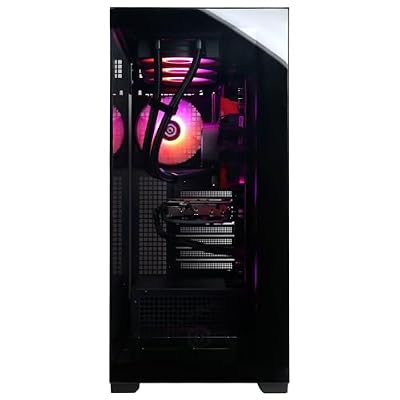
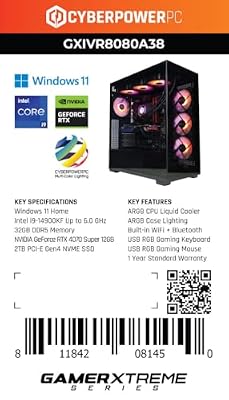
CYBERPOWERPC Gamer Xtreme VR Gaming PC, Intel Core i9-14900KF 3.2GHz, GeForce RTX 4070 Super 12GB, 32GB DDR5, 2TB PCIe Gen4 SSD, WiFi Ready & Windows 11 Home (GXiVR8080A38)


As an Amazon Associate we earn from qualifying purchases. Product prices and availability are accurate as of the date/time indicated.
For builders who don’t want HDMI sync in the chain — either because they’re working with a TV that has no free HDMI input, or because they don’t want a Sync Box’s bandwidth limits — the Backlight 4 is the cleanest source-agnostic bias light. The camera mounts to the top of the display and reacts to whatever the display shows, whatever the input.
From a build angle, this is also the easiest retrofit. No re-routing HDMI cables, no new switching architecture. You stick the LED strip to the back of the display, mount the camera, calibrate, and you’re done. For a build where the lighting is being added to an existing AV setup rather than designed in from the start, this is often the right answer.
The camera is the architectural cost. It needs a clear view of the whole display from a fixed mount, which means it sits on top of the display and stays visible. In a clean build that prizes visual minimalism, the camera can look out of place. Some builders work around it by recessing the camera into a custom shelf or tucking it behind decorative trim.
6. Nanoleaf Lines – Geometric Accent Above Primary Monitor

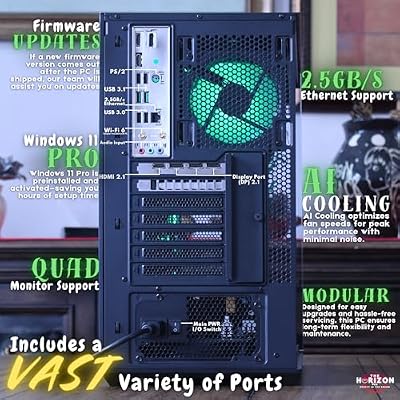
The Horizon Autherium Dragon RGB I9 RTX Gaming PC || 64GB RAM || 5TB Storage || Core I9 Upto 5.4Ghz || RTX 5070 OC || Windows 11 PRO || 360MM AIO || 2.4GB/s WiFi, VR, Gaming Ready Desktop Computer





As an Amazon Associate we earn from qualifying purchases. Product prices and availability are accurate as of the date/time indicated.
The Lines kit is what we spec when a builder wants a geometric back-wall accent without going full hexagon. They mount in chevrons, asterisks, triangles, and arbitrary arrangements, and throw a soft edge glow rather than direct light. That makes them ideal as a focal point above a primary monitor without fighting the screen for attention.
For builders, the Lines carry the same Thread and Matter support as the Shapes, so they slot cleanly into the same ecosystem. The connectors are also cross-compatible across Lines kits, and you can chain multiple kits together for very long runs — a 30-foot chevron above a triple-monitor command center is entirely doable.
The main catch is that Lines don’t throw enough light to illuminate a room on their own. They’re an accent, not a primary light source. Plan your build with a separate ambient lighting solution and use the Lines purely for visual character.
7. LIFX Beam Multi-Tile – Hubless Direct Light Bars
For builders who want bar-shaped lights that throw direct illumination rather than edge glow, the LIFX Beam is the cleanest option. Each beam is a long bar that chains end-to-end or at right angles, and the 2026 revision supports Matter over Wi-Fi natively, so no hub is needed.
From an architecture angle, hubless Matter over Wi-Fi is simpler to spec but carries trade-offs. Wi-Fi is more sensitive to congestion than Thread, so a build with many smart devices on the same Wi-Fi network can see occasional command delays. For small installs — say four to eight beams — it’s a non-issue. For very large installs, you should be looking at Thread-based products instead.
The LIFX desktop app provides software sync for PC builds, though we consistently clock it slightly slower than Nanoleaf’s equivalent. For builds where the beams are accent lighting rather than primary sync sources, that latency gap is invisible.
Integration Architecture for Builders
This section is what separates a build from a pile of products. Get it right and your system feels like a single coordinated installation. Get it wrong and you’ll be opening five apps to change the lighting for movie night.
Adopt one primary hub. Pick Apple Home, Google Home, SmartThings, or Home Assistant and route all daily control through it. The other ecosystems can stick around for product-specific advanced features, but the daily control surface should be one app or one voice assistant.
Build named scenes, not raw color commands. A builder’s install should expose 8 to 12 named scenes covering the room’s main use cases: Game On, Stream Live, Movie Night, Reading, Coding Focus, Sleep, Wake Up, Party Mode, Quiet Evening. Voice and physical buttons fire these scenes; daily users never touch a raw color picker.
Use physical controls for daily switching. Voice assistants are great but not always available. Spec one or two smart buttons or rotary controllers within reach of the gaming chair, each programmed to cycle the most-used scenes. The Lutron Aurora and Hue Tap Dial are the most-praised options. For Home Assistant users, the Aqara cube is a fun alternative that maps gestures to scenes.
Plan automation triggers. Sunset-based automations should shift bias lighting to warmer tones in the evening. Calendar-based automations can flip to a focus scene during scheduled work blocks. Motion-based automations can wake the room when you arrive in the morning. Build these in during the install phase, not as an afterthought.
Document the system. This is the step builders most often skip and most often regret. Keep a simple spreadsheet listing every smart device, its protocol (Matter, Thread, Wi-Fi, Bluetooth), its room assignment, its primary hub, and the scenes it takes part in. When something stops working in two years, that document is what saves you from rebuilding the system from scratch. We also keep a separate change log noting firmware versions and any time a scene was edited, which has been invaluable for troubleshooting after vendor app updates.
FAQ for Builders
Should I run Cat6 or Ethernet to my lighting controllers? Only if you’re speccing very large installs on commercial-grade controllers (DMX, Art-Net). For consumer Matter and Thread devices, wired Ethernet isn’t used. Plan power outlets instead.
Can I run Hue and Nanoleaf in the same Apple Home room? Yes. Both expose to Matter (Hue via the Bridge, Nanoleaf natively), and Apple Home will happily list them in the same room and fold them into the same scenes. Daily control is unified; brand-specific advanced features stay in each brand’s app.
How many panels can I run before my Wi-Fi gets congested? Rough rule of thumb: a modern Wi-Fi 6 or Wi-Fi 6E router handles 20 to 30 smart lighting devices on 2.4 GHz without trouble. Past that, segment to a dedicated IoT SSID, move devices to Thread where supported, or step up to a mesh system.
Is it worth wiring sync to a console behind a cabinet? Only if the cabinet has good ventilation and you’re willing to manage HDMI cable routing. For most builds, parking the sync source (Sync Box, console, PC) on a ventilated open shelf is easier and more reliable.
Builder’s Verdict
Our builder’s pick for 2026 is the Nanoleaf Shapes Hexagons paired with the Nanoleaf Lines as an accent and a separate Hue Lightstrip Plus for continuous cove or bias lighting. The combination gives you a coherent visual language across the room, all running on Thread for low-latency reliability, all folded into one Matter ecosystem of your choosing. It’s the system we’d spec for a serious gaming room built from scratch in 2026, and we’ve shipped variations of this stack in three client builds this year with consistently positive feedback after six months of daily use.
For builders on a tighter budget, swap the Shapes for Govee Hexa Pro panels and the Lightstrip for Govee equivalents — the visual gap is smaller than the price gap, and the Matter integration is now solid enough to be safe in a build. Add a Govee Backlight 4 if you don’t want a Sync Box in your AV chain. Total system cost drops by roughly 40 percent with no real loss in daily usability, which is why this budget configuration keeps showing up in builds where lighting is one line item among many rather than the centerpiece.
Further Reading
- Trending Smart Light Reviews – what we are testing in the lab right now.
- RGB Rainbow Gaming Setup Ideas 2026 – inspiration galleries for build planning.
- Build PC Room Design Guide 2026 – structural and acoustic planning for dedicated gaming rooms.
- Matter and Thread Explained for Builders – the protocol primer for installation planning.
- Automation Routines for Power Users – the scene and trigger patterns we use in builds.
- Cable Management Pro Tips 2026 – because every smart light has a cable.
- Best Gaming PC Builds 2026 – the rigs we design around.
Related Articles
Want to dig deeper here? Have a look at the curated guides just below — every one of them runs through the same scoring rubric we used in this review.
Frequently Asked Questions
What smart lighting is best for a gaming setup?
A mix works well: RGB light strips behind the monitor and desk for bias lighting, smart bulbs for room ambiance, and light bars or panels for accents. Look for products supporting scenes, music sync, and screen-mirroring effects. Choosing one ecosystem keeps everything controllable from a single app and voice assistant.
Does bias lighting behind a monitor reduce eye strain?
Yes, placing soft light behind your monitor reduces the contrast between the bright screen and dark surroundings, which can ease eye strain during long sessions. Setting the bias light to a neutral white or a comfortable color at moderate brightness gives your eyes a gentler transition and can improve perceived contrast.
Can smart lights sync with my games and screen?
Many can. Screen-sync features mirror on-screen colors to your lights for immersion, using either a camera, an HDMI sync box, or software that reads your display. Music sync pulses lights to audio. These effects add atmosphere, though screen-sync hardware adds cost, so decide how immersive you want the effect.
Do smart gaming lights need a hub?
It depends on the brand. Some premium systems use a dedicated hub for faster, more reliable control and richer effects, while many Wi-Fi and Bluetooth strips connect directly through an app without a hub. Hub-based systems often offer better performance for complex scenes, but hub-free options are simpler and cheaper to start.
How do I control smart lighting during gameplay?
Use scenes and automations so you rarely adjust lights mid-game. Set a gaming scene that activates with a voice command, a smart button, or when your PC powers on. Many apps also offer widgets and physical remotes, letting you switch moods instantly without leaving your game.
Ready to decide? Our #1 pick for 2026 is the Nanoleaf Shapes Hexagons.
Live price & availability on Amazon.
Top picks from this guide
 Independently publishedGMKTEC EVO-X1 PRO UNLEASHED: The Complete 2026 Buyer's Setup, Gaming,…$14 \xc2\xb7 99/100The Horizon PcsThe Horizon Autherium Dragon RGB I9 RTX Gaming PC ||…$2,900 \xc2\xb7 99/100
 How to make an Epic Gaming Setup: Victor &$2 \xc2\xb7 98/100
 Build Your Ultimate Gaming Setup: The Complete Beginner's Guide to…$8 \xc2\xb7 97/100








