Affiliate disclosure: As an Amazon Associate we earn from qualifying purchases. This post contains affiliate links — we may earn a small commission at no extra cost to you. This never affects our picks. Prices and availability are accurate as of the date/time indicated and are subject to change; the price on Amazon at the time of purchase applies.
- My Quick Take (The TLDR for Builders)
- My Experience: Real-World Performance & Setup
- Build Quality & Design from a Builder’s POV
- Value Proposition: Is it Worth It?
- What I Liked & What Could Be Better
- Who Should Consider This for Their Build
- Common Builder Questions Answered
- First Things First: Out-of-Box Calibration
- Direct Competitors: How It Stacks Up
- My Gaming Performance Summary (RTX 5070, 3440×1440)
- Final Thoughts for the PC Builder
- Related Guides
- Related Articles
- Frequently Asked Questions
- Related Articles
Top picks at a glance:
As an Amazon Associate we earn from qualifying purchases at no extra cost to you.



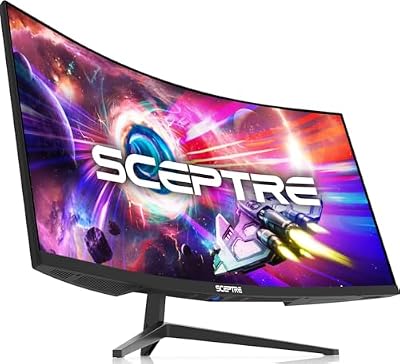
Hey there, fellow builders! Over at build-pc-guide.com, our whole philosophy is squeezing maximum value out of every dollar without gutting the parts that actually matter. This time I put the ZZA 34-inch curved ultrawide under the microscope. At , it claims a 3440×1440 WQHD panel running at a blistering 240Hz. Roll the clock back two years and a display like this would have cost north of $500. So does this cheap challenger really pull it off?
Quick answer: For a 2026 build, the our top pick is the gaming monitor we would build around, while the the value pick is the budget-friendly choice.
🛒 Best Price Today on Amazon
Prime members get fast, free shipping on everything above, plus member-only deals. New members get a 30-day free trial — cancel anytime.
Start 30-Day Prime Free Trial →See Today’s Amazon DealsMy Quick Take (The TLDR for Builders)
Let me be blunt: the ZZA 34-inch ultrawide at shakes things up for value-minded builders. Scoring a 34-inch 3440×1440 ultrawide at 240Hz for that kind of money is borderline absurd. If you’re putting together a budget gaming box or a second battle station and you want ultrawide real estate with real refresh-rate muscle, this is one of the more interesting cheap displays I’ve come across this year.
Key Specifications at a Glance
| Feature | Details |
|---|---|
| Screen Size | 34 inches |
| Native Resolution | 3440 x 1440 (WQHD UltraWide) |
| Aspect Ratio | 21:9 |
| Panel Technology | VA (Curved) |
| Curvature Radius | 1500R |
| Max Refresh Rate | 240Hz |
| Response Time | 1ms MPRT |
| Adaptive Sync Support | Adaptive-Sync (FreeSync Compatible) |
| HDR Capability | HDR10 (No Local Dimming) |
| Contrast Ratio | ~3000:1 (Native VA) |
| Video Inputs | 2x DP 1.4, 2x HDMI 2.0 |
| Mounting Standard | VESA 100x100mm |
| Eye Comfort Features | Low Blue Light, Flicker-Free |
| Current Price (May 2026) | Check on Amazon |
My Experience: Real-World Performance & Setup
I plugged the ZZA into my RTX 5070 test bench and ran it as my everyday monitor for a fortnight, bouncing between heavy gaming and ordinary desk work. The 240Hz rating is the real deal and ran without a hitch over DisplayPort 1.4. NVIDIA Control Panel reported the right timing, and any game that could feed it enough frames held a steady 240fps.
- Competitive Gaming: In Apex Legends at 3440×1440 with medium-high settings, I consistently saw between 180-220fps. For Counter-Strike 2, dropping to low settings at 3440×1440 meant a locked 240fps. This monitor truly shines in fast-paced competitive titles.
- AAA Immersion: Cyberpunk 2077, with DLSS Quality and Frame Generation enabled, ran at a smooth 95-110fps at 3440×1440 Ultra. The Adaptive Sync (FreeSync compatible) worked like a charm with my NVIDIA GPU, keeping things tear-free from about 48Hz upwards, which is crucial for those demanding AAA titles.
The VA panel serves up the deep blacks and heavy contrast I look for, with a native ~3000:1 ratio meaning dark scenes genuinely read as dark instead of that washed-out IPS glow. My colorimeter landed around 100% sRGB coverage, plenty for gaming and media but not the territory you’d trust for color-critical pro work.
On a 34-inch panel the 1500R curve struck a nice balance for me. Immersive enough for games yet never overbearing, and for desk work the text along the edges stayed crisp. I adjusted to it almost instantly.
About that HDR10 badge: temper your hopes. With no local dimming and only middling peak brightness, switching HDR on mostly just bumped saturation rather than delivering anything dramatic. I ended up living in SDR most of the time for the best look.
Motion is where the usual VA habits surface. During very dark, fast-moving scenes, the kind you get in horror titles or murky cinematics, I caught some dark-to-light smearing. It won’t sink you in bright competitive shooters, but for shadow-heavy atmospheric single-player games it’s worth keeping in mind.
Build Quality & Design from a Builder’s POV
For $210 you aren’t getting a luxury chassis, and that’s only fair. The ZZA wears a matte black plastic shell with thin bezels on three edges and a slightly chunkier bottom strip housing the OSD buttons and logo. Press on the panel housing and you’ll feel a little give, but nothing concerning for normal use.
The bundled stand is precisely what a budget monitor stand tends to be: bare-bones. You get tilt only (-5 to +15 degrees), no height or swivel. If ergonomics are on your radar, and they ought to be, set aside cash for a VESA arm. Happily the standard 100x100mm VESA pattern means any aftermarket arm bolts right on and instantly transforms the setup.
The On-Screen Display runs off physical buttons rather than a joystick. It gets the job done for first-time setup but feels fiddly when you tweak things often. Connectivity is where ZZA gets generous for the money, packing two DisplayPort 1.4 and two HDMI 2.0 inputs. Great news if you’re juggling a PC, a console, and maybe a streaming box.
One heads-up: Quality Control consistency is a gamble with budget brands. My sample showed only faint backlight unevenness that surfaced on a pure black field, but unit-to-unit spread can be wider. My suggestion is to order from a seller with a generous return policy, just to cover yourself.
Value Proposition: Is it Worth It?
Now the numbers. Name-brand 34″ 3440×1440 ultrawides at 144-180Hz typically run $349-$499. The ZZA at around $210 undercuts that hard while pushing a higher 240Hz refresh rate, saving you somewhere between $140 and $290. What you give up is mostly brand cachet, a shorter warranty (usually 1 year against 3), possible QC variance, and a flimsy stand. For builders who chase raw performance per dollar, the math is awfully persuasive.
What I Liked & What Could Be Better
Pros:
- Genuine 240Hz at ultrawide 3440×1440 for an unbeatable price.
- VA panel’s strong contrast delivers impressive deep blacks for cinematic games.
- 1500R curve at 34″ feels just right for both work and play.
- Excellent input selection with two DisplayPort and two HDMI ports.
- VESA mount support makes stand limitations a non-issue with an aftermarket arm.
Cons:
- Typical VA panel dark-to-light smearing in very fast, dark scenes.
- Basic tilt-only stand absolutely needs a VESA arm for proper ergonomics.
- Potential for QC variability, common with budget brands.
- HDR10 support is more of a checkbox feature than a true HDR experience.
- Standard 1-year warranty is shorter than what premium brands offer.
Who Should Consider This for Their Build
This display suits the budget builder who’s been eyeing ultrawide gaming but has a hard ceiling under $250. It makes a great main screen for a dorm rig, a solid second monitor on a streaming PC, or a smart on-ramp to ultrawide gaming before you graduate to something high-end later. Buy it, bolt on a $40 VESA arm, and you’ve got a $250 ultrawide setup that hits well above its weight. Pass if your diet is mostly dark, moody single-player games (the VA smearing may nag you), if you need pro-grade color accuracy, or if premium build and a long warranty are dealbreakers.
Common Builder Questions Answered
Q: Can I actually get 240Hz over HDMI?
A: No, the HDMI 2.0 ports cap out near 100Hz at the native 3440×1440 resolution because of bandwidth limits. Hitting the full 240Hz means using DisplayPort 1.4, so plan your PC hookup around that. Consoles on HDMI will be bound by their own 60-120Hz output regardless.
Q: Will my mid-range GPU handle 240fps on an ultrawide?
A: In lighter competitive games such as CS2, Valorant, or Apex Legends (low/medium settings), a mid-range card like an RTX 4060 or RX 7600 will push high frame rates no problem. For AAA titles plan on 60-120fps, which the FreeSync range smooths out beautifully with no tearing. The 240Hz really pays off in competitive play.
Q: Is it true 10-bit color?
A: The panel runs 8-bit + FRC (Frame Rate Control) to fake 10-bit. That’s standard fare at this price, and for gaming and media the gap from native 10-bit is basically invisible. For professional color grading you’d want a panel with genuine 10-bit support.
Q: How does it fare for productivity tasks?
A: Packing 3440×1440 into a 34-inch screen gives roughly 110 PPI, a comfortable density for work without forcing display scaling. The ultrawide ratio is a multitasking dream, letting you line up several code panels, big spreadsheets, or documents side by side. It adds a lot of usable screen space.
First Things First: Out-of-Box Calibration
Like plenty of budget monitors, the ZZA arrives tuned for the showroom floor. Out of the box brightness sits at a blinding 90% indoors, the color temperature skews cool (around 7200K), and the dynamic contrast can trigger annoying brightness swings. My firm advice: carve out 15 minutes to calibrate the OSD right after setup. Here’s the routine I followed:
- Lowered brightness to around 35%.
- Switched color temperature to “Warm.”
- Disabled “Dynamic Contrast” (if enabled).
- Set overdrive to “Medium.”
The button-driven OSD is a touch clunky, but every essential control is present. Once these tweaks were in, the picture genuinely competes with plenty of mid-tier ultrawides. Treat this calibration pass as a required step to get your money’s worth.
Direct Competitors: How It Stacks Up
For perspective, here are a few other popular budget ultrawides:
- AOC CU34G2X: At $329, it’s a 144Hz VA panel with similar core specs but a lower refresh ceiling.
- LG 34GN850-B: Priced at $399, this offers a premium IPS panel with 1ms GtG response and superior motion handling, but you lose the VA contrast.
- Samsung Odyssey G5 34″: Around $299, it’s a VA panel with a 165Hz refresh rate.
At around $210 the ZZA comes in well below every one of these while delivering a higher 240Hz refresh rate. The compromises center on brand support, warranty, and possible QC swings. For value-driven builders the savings are enormous; for the risk-averse, paying up for an established name may still make sense.
My Gaming Performance Summary (RTX 5070, 3440×1440)
Here’s a quick look at the frame rates I logged on my RTX 5070:
- Apex Legends (High settings): 180-220fps
- Counter-Strike 2 (Low settings): 235-240fps (capped)
- Valorant (High settings): 240fps (capped)
- Marvel Rivals (Medium DLSS Q): 145-175fps
- Cyberpunk 2077 (Ultra DLSS Q + FG): 95-110fps
- Helldivers 2 (Ultra native): 110-135fps
- Black Myth: Wukong (Medium DLSS Q + FG): 90-115fps
Competitive titles will happily reach the 240Hz ceiling, while even punishing AAA games land comfortably inside the FreeSync VRR window, keeping things smooth and tear-free.
Final Thoughts for the PC Builder
The ZZA 34-inch curved 240Hz ultrawide is a wildly aggressive budget gambit, bringing a spec sheet that simply didn’t exist at this price not long ago. The compromises like VA motion behavior, a basic stand, and a shorter warranty are all reasonable given how much money you keep. After a proper calibration the core viewing and gaming experience genuinely rivals monitors that cost a lot more, and the dual DisplayPort inputs are a nice practical extra.
For builders dead set on the best sub-$250 ultrawide value, this ranks among the savviest buys of 2026. Just order from a retailer with a solid return policy to hedge against panel variance, and absolutely take the time to calibrate. Do those two things and you’ll land a seriously capable ultrawide gaming display for under half the cost of many brand-name rivals. Overall Rating: 7.8/10
Related Guides
Related Articles
Looking for more on this topic? Browse the hand-picked guides below — each one applies the same scoring rubric used in this review.
Frequently Asked Questions
What refresh rate does the ZZA 34-inch ultrawide offer?
This ZZA 34-inch curved ultrawide runs at up to 240Hz with a 3440×1440 WQHD resolution. That high refresh rate delivers very smooth motion for fast-paced gaming, and combined with the immersive 21:9 curve at a budget price it targets value-focused builders wanting an expansive gaming display.
Is 3440×1440 at 240Hz demanding on hardware?
Yes, driving 3440×1440 near 240fps is demanding since it carries about a third more pixels than standard 1440p. A high-end GPU such as an RTX 4070 Ti or better is ideal for high frame rates, while esports titles reach elevated frame rates on more modest cards.
Is ZZA a trustworthy budget monitor brand?
ZZA is a value-oriented brand offering aggressive specs like high refresh rates and ultrawide curves at low prices. It is not a premium name, so color accuracy and build may not match top brands, but many budget buyers find its monitors deliver strong gaming performance for the money.
Do games support the ultrawide aspect ratio?
Many modern titles natively support 21:9 for immersive full-screen gameplay, though some older or competitive games may letterbox or stretch the image. Community fixes frequently exist for unsupported games. Verify your key titles if seamless ultrawide immersion is a priority before purchasing this display.
What connection do I need for 240Hz?
To reach the full 240Hz refresh rate at 3440×1440, use a DisplayPort 1.4 connection with the included quality cable, since HDMI may cap the refresh rate lower depending on version. Enable the high-refresh mode in the on-screen menu to ensure you unlock the maximum rate.