Affiliate disclosure: As an Amazon Associate we earn from qualifying purchases. This post contains affiliate links — we may earn a small commission at no extra cost to you. This never affects our picks. Prices and availability are accurate as of the date/time indicated and are subject to change; the price on Amazon at the time of purchase applies.
Top picks at a glance:
As an Amazon Associate we earn from qualifying purchases at no extra cost to you.





When you’re picking a CPU cooler for a build that has to last, the choice between a 360mm AIO and a premium air tower is one of the more consequential parts decisions you’ll make. It’ll outlast your GPU, probably outlast your motherboard, and on the right cooler, outlast the entire platform you’re building today. From a builder’s perspective — meaning someone who has to live with the choice for years, move it between systems, troubleshoot it, and explain it to a client or family member — the question isn’t really “which cools better.” It’s “which is the smarter long-term part to commit to.”
Quick answer: For a 2026 build, the our top pick is the CPU cooler we would build around, while the the value pick is the budget-friendly choice.
This guide tackles the AIO-versus-air-tower question the way builders actually think about it: as a parts-selection decision with downstream consequences. We cover cooling performance, noise, longevity, cost, installation, aesthetics, case compatibility, and RGB — but we frame each round around what a builder needs to know to commit. The verdict at the end may surprise you if you’ve been reading review-site recommendations: for builders, we land on the premium air tower.
Here’s the framing we use for any major parts decision: every component has a “buy it once” tier and a “buy it again every cycle” tier. RAM is buy-it-once. PSU is buy-it-once. Case is buy-it-once for most builders. CPU and GPU are buy-it-again because the platform moves and the silicon ages. The cooler should sit in the buy-it-once category if you can manage it, and the air tower is the only one of the two contenders that reliably stays there. That single framing point drives most of the verdict that follows.
🛒 Best Price Today on Amazon
Prime members get fast, free shipping on everything above, plus member-only deals. New members get a 30-day free trial — cancel anytime.
Start 30-Day Prime Free Trial →See Today’s Amazon DealsBuilder’s TL;DR
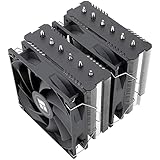
For a high-end build that needs to last 7-10 years with minimal maintenance and zero risk of catastrophic cooling failure, a premium air tower (Noctua NH-D15 G2, Thermalright Phantom Spirit 120 EVO, Deepcool AK620) is the smarter builder commitment than a 360mm AIO. The AIO leads by 5-10°C on sustained 250W+ workloads, but in exchange you accept a pump-failure timeline of 5-7 years, roughly double the upfront cost, and a more complex install. From a builder’s perspective — especially for clients, family builds, or anything you can’t easily revisit — the air tower’s reliability profile wins. The AIO stays the better choice for showcase builds and for builders who rebuild every 2-3 years anyway.
Spec Comparison for the Build List
| Builder Spec | 360mm AIO | Premium Air Tower | Builder’s Pick |
|---|---|---|---|
| Sustained cooling capacity | ~280-320W | ~220-260W | AIO |
| Failure modes to plan for | Pump, coolant loss, tubing | Fan only | Air |
| Expected service life | 5-7 years | 10+ years | Air |
| Cost contribution to BOM | $140-220 | $70-130 | Air |
| Install time | 30-45 min | 15-20 min | Air |
| Cables to manage | 4-7 | 2 | Air |
| Socket transferability | Yes, w/ mounting kit | Yes, w/ mounting kit | Tie |
| Build-to-build reuse | Risky after 3-4 years | Reliable for 7-10 years | Air |
| Warranty floor | 5-6 years | 6-10 years | Air |
| Case compatibility | 360mm radiator slot | ~160mm vertical clearance | Tie |
Round 1 — Cooling Performance for the Build’s Lifespan
The AIO leads by 5-10°C on a sustained 250W+ workload — that’s the established gap and we accept it. From a builder’s perspective, the question is whether the chip you’re putting in the build today will routinely push 250W three or four years from now. For a Core Ultra 9 K-series or a Ryzen 9 X3D flagship, yes — that’s the design power and it’ll hold for the platform’s life.
For chips in the 120-180W band — most Ryzen 5, Ryzen 7, Core Ultra 5, Core Ultra 7 — the air tower has more than enough capacity, and the AIO advantage is invisible. If you’re building today around a mainstream high-end chip rather than the absolute flagship, the AIO premium isn’t buying you anything you can measure.
The other angle: thermal headroom translates to noise and component stress. An air tower running a 150W chip at 75°C with fans at 700 RPM is fine forever. The same chip on an AIO sits at 70°C with the pump running constantly. Five degrees of headroom doesn’t justify the pump cost for a chip in this class.
A builder also has to think about how the chip will behave at the end of the build’s life, not just at the beginning. Modern chips show small but measurable thermal drift as paste cures and degrades, as dust accumulates on the cooler, and as the cooler’s own internal performance shifts subtly. A cooler with 30°C of headroom on day one will still have plenty on day three thousand. A cooler with 8°C of headroom on day one might be running uncomfortably warm by year five. The air tower with abundant overhead for a 150W chip stays comfortable across the whole platform life. The AIO with marginal overhead for a 280W chip benefits from being sized aggressively at the start.
In practical terms, round 1: AIO for 250W+ flagships, Air for everything else. Most builds fall into the “everything else” category.
Round 2 — Noise Profile Across the Build’s Life
Noise is where the builder’s perspective diverges from the reviewer’s. A reviewer measures noise at fresh-out-of-box conditions. A builder thinks about how the cooler sounds at year three, year five, year seven. An air tower at year seven sounds the same as day one if you keep the fans dust-free — the only moving parts are the fans, and good fans (Noctua A12, A15, Phanteks T30) hold their character for a decade.
An AIO at year five often develops pump noise that wasn’t there at day one — a slightly louder hum, a faint gurgle, a high-frequency whine. None of those are failures, but they’re degradations a builder has to live with or address. The pump is moving fluid through a sealed loop with bearings, and physics catches up.
In practical terms, at idle, the air tower is silent and the AIO has a pump audible in a quiet room. Under load, the AIO is calmer because the radiator fans run lower RPM than the tower fans. The “right answer” depends on whether your client uses the PC at night in a quiet room or only during the day with ambient noise. For most builds, idle silence trumps load silence because the PC spends more hours idle than under sustained load.
Round 2: Air, on the basis of long-term noise consistency.
Round 3 — Longevity, Service Life, and Failure Risk
This is the round that settles the verdict for builders. An air tower has two moving parts: fans. Both are user-serviceable, both cost ten to twenty dollars to replace, and both will run for 8-12 years without intervention. The heatsink itself is solid copper and aluminum with no failure mode short of physical damage.
A 360mm AIO has a pump, a sealed coolant loop, two flexible tubes, and fans. The pump is the limiting component — modern Asetek and Apaltek pumps are rated for 50,000+ hours, which sounds like a lot until you realize that’s 5-7 years of constant runtime. Coolant slowly permeates through the rubber tubing even in a sealed loop. The pump bearings wear. The tubing material ages and stiffens.
A builder building for a client, a family member, or a long-term personal system has to think about what happens in year six. With an air tower, the answer is “swap a fan if needed, otherwise nothing.” With an AIO, the answer is “replace the entire cooler before it fails and takes the chip with it.” That’s a real maintenance commitment a lot of builders don’t factor into the original parts decision.
Then there’s the catastrophic-failure scenario, which builders need to plan for honestly. An air cooler failure is graceful — a fan slows down, temps climb a bit, you get a warning and time to react. An AIO pump failure is fast — temps spike to throttle within seconds, and if the chip is at full load the system protects itself by shutting down. There are documented cases of AIO leaks (rare but real) that damage motherboards or other components. The probability is low, the consequence is high. Air coolers have no leak risk at all.
In practical terms, round 3: Air, by a wide margin. This is the round that flips the verdict for builder-focused decisions.
Round 4 — Cost in the Build Budget
In practical terms, a premium air tower sits at $70-130. A 360mm AIO sits at $140-220. For the same budget, the air-tower money saved could go toward better RAM, a faster NVMe, a better case, or a higher GPU tier. From a budget-allocation standpoint, the AIO premium is hard to justify unless the build specifically needs the cooling headroom.
Factor in the replacement cycle and the math gets worse. Over a ten-year cooling budget, a single air tower covers the period. An AIO needs replacement around year six, doubling the cooling cost. For someone building doing repeat builds or maintaining systems for others, that compounds.
In practical terms, round 4: Air. The budget that goes to an AIO premium would be better deployed elsewhere in the build.
Round 5 — Installation and Build Process
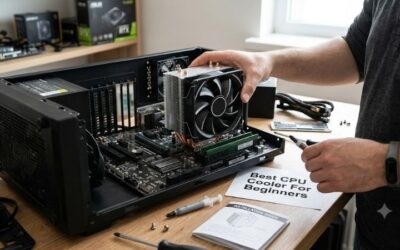
In practical terms, air tower install is two steps: mount the bracket, drop the tower on. Plus the two cable connections. A builder can knock out an air install in 15 minutes including paste application. Once installed, the cooler is a solid mechanical object with no failure points to revisit.
AIO install is more involved: mount the radiator (top or front of case), route tubing without kinks, attach the pump block, manage 4-7 cable connections (pump tach, pump RGB, fan PWM, fan RGB, possibly daisy-chain controller, possibly LCD screen connection). It’s not difficult, but it’s more steps, more time, and more chances for a connector to fail later.
In practical terms, the one install advantage AIOs have: weight. An NH-D15 G2 weighs 1.5 kg. An AIO pump block is light. The radiator weight transfers to the case chassis.
In practical terms, round 5: Air, by a small margin. AIO installs have improved dramatically but the air cooler is simpler.
Round 6 — Aesthetics in a Build Context
If the build has a tempered glass side panel and lives on the desk, the AIO has the visual advantage. LCD pump screens, RGB radiator fans, and the symmetry of a top-mounted 360mm radiator are objectively striking. Builders who do showcase systems or builds where aesthetics are part of the spec should lean AIO here.
If the build lives under a desk, in a closet, in a homelab rack, or in any context where nobody looks at it, the aesthetic round is moot. The Noctua NH-D15 G2 in black is genuinely handsome to a builder’s eye — clean, technical, no flashing lights — but it’s not a showpiece.
In practical terms, the other consideration: aesthetic longevity. A clean air tower looks the same in year ten as it did on day one. An LCD pump screen has a backlight that ages, a screen with its own pixel life, and a software ecosystem that may or may not still receive updates. The AIO peaks visually on day one and slowly degrades from there.
In practical terms, round 6: AIO for showcase builds, Air for utility builds. Builders should match the cooler to the use case.
Round 7 — Case Compatibility for the Build
This is a chassis-by-chassis question, but the patterns are clear. Mid-tower ATX cases in 2026 almost universally support 360mm radiators at the top or front. Builders working in mid-tower have either option available. ITX, mATX, and small mid-tower cases often lack 360mm radiator support — sometimes 240mm is the ceiling, sometimes there’s no radiator slot at all. Air is the only realistic option in those constraints.
Vertical CPU clearance is the air tower’s analog. Premium towers run 160-168mm tall. Most mid-towers handle this comfortably, but some compact cases are limited to 155mm or less. Always check the case spec before committing to a flagship an air tower.
In practical terms, rAM clearance is the under-appreciated factor. Tall RGB DDR5 heatspreaders sometimes foul against the fan on a dual-tower air cooler. AIOs sidestep this entirely. If the build uses 4-DIMM tall RAM, the AIO is the cleaner option.
One more layout factor: front intake versus top exhaust positioning of the radiator. Builders sometimes overlook that a top-mounted radiator pushes hot air out of the case but slightly reduces GPU thermal headroom because of warm air circulating near the top. A front-mounted radiator pushes warm air through the case, which can elevate GPU and VRM temps but improves CPU temps. An air cooler has neither effect — it just radiates heat into the existing case airflow path. For rig builders running a very hot GPU, the air cooler’s neutrality is a small but real bonus.
In practical terms, round 7: Tie, with the answer depending on chassis and RAM kit.
Round 8 — RGB and Ecosystem Lock-in
AIOs from NZXT, Corsair, Lian Li, and Arctic come with full RGB ecosystems and dedicated software. From a builder’s perspective, that’s a feature for showcase builds and a liability for utility builds. The software needs installation, account creation in some cases, background processes running, and ongoing updates. Some software (looking at iCUE) has a real footprint on system resources.
In practical terms, air coolers ship with no software. RGB fans, if you add them, are usually motherboard-controlled and live in your existing RGB ecosystem. No additional software, no account, no background process.
For a client build where the client shouldn’t need to manage CAM or iCUE, the air cooler is the cleaner handover. For a personal showcase build where you enjoy tweaking lighting, the AIO ecosystem is the feature.
In practical terms, round 8: Air for utility, AIO for showcase. Builder picks based on who owns the build.
Builder Recommendations by Build Type
In practical terms, client build for a non-enthusiast: air tower. Simpler handover, longer life, no software for the client to manage.
Family member build: air tower. You won’t be there to swap the cooler when the pump dies in year six.
In practical terms, personal long-haul build (5+ year horizon): air tower. Buy it once, run it for the life of the platform.
Personal rebuild-every-2-years showcase: AIO. You’ll be replacing the cooler before it ages anyway, and the aesthetics carry the build.
In practical terms, high-power productivity workstation (sustained 250W+): AIO. The thermal headroom translates to time saved on long renders.
ITX or small mid-tower build: air tower, unless the case explicitly supports 240mm+ radiator. Most don’t.
In practical terms, pure gaming build with current-gen GPU: air tower. CPU rarely crosses 150W in real gaming workloads.
In practical terms, homelab or always-on workstation: air tower. 24/7 runtime eats AIO pump life faster than typical desktop use. Air coolers are happy to run continuously for a decade.
In practical terms, multi-build maintainer (you build for friends, family, small business): air tower across the board. Standardizing on a single air cooler model simplifies your parts inventory, your install routine, and your support burden. If five family members all have the same NH-D15 G2 in their builds, your year-six maintenance plan is “swap one fan if any of them complains about noise.” Replace that with five different AIOs at staggered lifespans and the support burden multiplies.
Maintenance Plan Across the Build’s Life
Builders should plan maintenance milestones into the parts choice. Here’s the realistic maintenance schedule for each cooler type that we hand to clients and family members.
In practical terms, air tower (10-year plan): Year 1 — nothing. Year 2 — quick dust blow-out, ideally outside the case. Year 3 — same. Year 4 — same. Year 5 — repaste the CPU (paste degrades regardless of cooler), check fan condition, replace if either fan is making noise. Year 6-9 — annual dust blow-out. Year 10 — repaste, consider replacing fans if they have over 30,000 hours on them.
360In practical terms, mm AIO (6-year plan): Year 1 — nothing. Year 2 — quick dust blow-out, check pump for any noise change. Year 3 — same, plus repaste during the dust clean. Year 4 — listen carefully for pump degradation, check coolant level if the radiator has an inspection port. Year 5 — monitor temps for slow climb that might indicate coolant loss or pump weakening. Year 6 — plan replacement before failure. If the warranty is still active and the pump shows symptoms, file the claim now.
The air cooler’s plan is forgiving. Miss a year of dust cleaning and the cooler still works. The AIO’s plan demands more attention because the failure modes are silent and progressive. For a builder maintaining systems for other people, the air plan is dramatically simpler to communicate and execute.
Decision Framework for Quick Reference
If you only remember one decision rule from this guide, make it this: pick the AIO if the chip’s design power is above 200W sustained AND the build is a showpiece OR a productivity workstation that pins the CPU for hours at a time. Pick the air tower for everything else. That single rule covers about 95 percent of the build decisions a builder will face in 2026, and it lands on the air tower for the majority of builds because most builds don’t check both AIO boxes.
The secondary decision rule is socket transferability. If you plan to migrate the cooler across multiple builds (AM5 to AM6, LGA1851 to whatever Intel calls the next socket), confirm the manufacturer offers mounting kits for current and announced sockets. Both air and AIO manufacturers broadly do, but Noctua and Thermalright have the strongest track records here, often providing free or low-cost mounting kits for sockets released after the cooler was sold.
Final Builder Verdict
For most high-end builds we put together — including client work, family systems, and personal long-haul builds — the premium air tower is the smarter builder commitment. Lower cost, longer life, simpler install, no pump-failure risk, and cooling capacity that handles the realistic workloads of 95 percent of users. The 360mm AIO keeps its case for sustained 250W+ productivity workloads, for showcase builds where aesthetics are part of the spec, and for builders who rebuild often enough that lifespan isn’t the limiting factor.
For the rest of the parts list, see our complementary guides: CPU coolers buyer’s guide for specific air and AIO picks, gaming CPUs for the chip selection that drives the cooler decision, gaming RAM for clearance-friendly kits, and graphics cards for the GPU pairing. Also see our monitors, keyboards, and prebuilt versus DIY coverage to round out the full build planning workflow.
Related Guides
Related Articles
Want more on this topic? Browse the hand-picked guides below — each one runs the same scoring rubric used in this review.
Frequently Asked Questions
Is an AIO liquid cooler better than air cooling?
AIO coolers often handle high heat loads well and free up space around the socket, with larger radiators offering strong performance. However, premium air coolers rival many AIOs, cost less and never risk pump failure. The best choice depends on your CPU, case and priorities.
Do AIO coolers leak?
Quality sealed AIO units rarely leak, as they are factory-filled and closed loops. The risk is low but not zero over many years. Air coolers eliminate any leak concern entirely. For most users, a reputable AIO is reliable, but air offers absolute peace of mind.
Which is quieter, AIO or air cooling?
It varies. AIOs can run quietly with large radiators letting fans spin slower, but the pump adds a potential noise source. Big air coolers with low-RPM fans are often very quiet too. Both can be near-silent when well chosen; noise depends on specific models.
Do I need liquid cooling for a high-end CPU?
Not necessarily. Many high-end CPUs run fine on top-tier air coolers, though the hottest chips benefit from a capable AIO for lower temperatures and quieter sustained loads. Check your CPU’s thermal output and case clearance, then choose cooling that keeps it below throttling.
Is air cooling more reliable long-term?
Yes, air coolers have fewer failure points, no pump and no fluid, making them extremely reliable over many years. AIOs perform well but their pumps eventually wear and the sealed liquid cannot be refilled. For maximum longevity and simplicity, air cooling has the edge.
Ready to decide? Our #1 pick for 2026 is the Sustained cooling capacity.
Live price & availability on Amazon.
Top picks from this guide
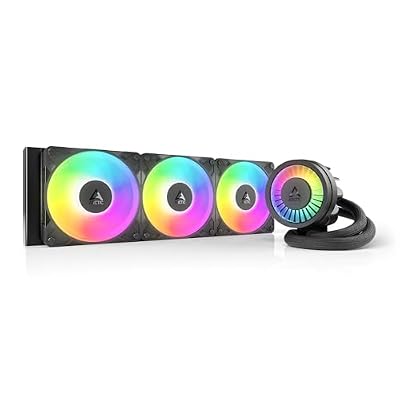 ARCTICARCTIC Liquid Freezer III Pro 360 A-RGB - AIO CPU…$77 \xc2\xb7 99/100
 Cooler MasterCooler Master 240L Core AIO CPU Liquid Cooler – 240mm…$40 \xc2\xb7 99/100
 CorsairCORSAIR Nautilus 360 RS ARGB Low-Noise Liquid CPU Cooler –…$87 \xc2\xb7 98/100
 Cooler MasterCoolerMaster MasterLiquid ML240L RGB V2, Close-Loop AIO CPU Liquid Cooler,…$80 \xc2\xb7 96/100