
🛒 Best Price Today on Amazon
Prime members get fast, free shipping on everything above, plus member-only deals. New members get a 30-day free trial — cancel anytime.
- Top Prebuilt Gaming Pcs Around 000 Picks for 2026
- Comparison: prebuilt vs DIY
- The DIY question: when does building still make sense?
- 1. CYBERPOWERPC Gamer Xtreme VR — Most builder-friendly prebuilt
- 2. Stormcraft Phantom — Best gaming performance per dollar
- 3. ZOTAC MEK — Boutique prebuilt with builder-grade internals
- 4. Horizon Autherium Dragon RGB — Maxed-out creator config
- 5. Alienware Aurora R16 (base i9) — Beautiful but constrained
- 6. Alienware Aurora R16 (higher-VRAM variant) — VRAM-first long-haul play
- How to choose at this tier (builder’s mindset)
- Prebuilt vs DIY: the honest math
- Frequently Asked Questions
- Final verdict (builder’s pick)
- Related Guides
- Related Articles
- Related Articles
Top Prebuilt Gaming Pcs Around 000 Picks for 2026
Here are our current top prebuilt gaming pcs around 000 picks, compared on real Amazon owner reviews, price, and features. Live prices update below.
As an Amazon Associate we earn from qualifying purchases at no extra cost to you.






Affiliate disclosure: As an Amazon Associate we earn from qualifying purchases. This post contains affiliate links — we may earn a small commission at no extra cost to you. This never affects our picks. Prices and availability are accurate as of the date/time indicated and are subject to change; the price on Amazon at the time of purchase applies.
If you’ve ever priced out a $3,000 enthusiast DIY build — Ryzen 7 9800X3D, RTX 5080, 32GB DDR5-6000, 2TB Gen4 NVMe, a quality 850W ATX 3.1 PSU, a 360mm AIO, a respectable mid-tower, plus Windows 11 — you’ve likely noticed the gap between the parts bill and a similarly-specced prebuilt has shrunk to roughly $150-300. That gap used to be $500-700. Component pricing pressure, OEM volume discounts on GPUs, and competitive shipping have all closed the spread. Which means: if you’d rather skip the build, here’s what’s genuinely worth it at this tier — and which prebuilt actually behaves like a system you could have built yourself, with all the upgrade freedom that implies.
Quick answer: For a 2026 build, the our top pick is the graphics card we would build around, while the the value pick is the budget-friendly choice.
We came at this round-up from a builder’s mindset. We asked: which of these six $2,600-$3,400 systems has a standard ATX motherboard you could swap parts onto, a standard ATX PSU you could replace in 2028 when ATX 3.2 lands, a CPU socket with a defined upgrade path, and a chassis that doesn’t hide a proprietary connector behind a piece of plastic? Then we weighed those engineering questions against the convenience of someone else mounting your cooler, applying thermal paste, and validating your XMP/EXPO profile before the box leaves the warehouse.
The result is a clear hierarchy. The CYBERPOWERPC Gamer Xtreme VR comes out on top for builders who want upgradeability — it’s the most “DIY-like” prebuilt in the round-up, with a standard chassis, standard ATX 3.1 PSU, standard motherboard, and a CPU that drops into widely-available LGA 1700 boards if you ever decide to rebuild. The Stormcraft Phantom and ZOTAC MEK are honourable mentions for upgrade-friendly designs. The Alienware Aurora R16 is gorgeous and silent but the proprietary PSU bracket alone disqualifies it from the “build-like” category. Below, we go through each system with the eye of someone who has built dozens of PCs and now appreciates the option of not building this one.
Comparison: prebuilt vs DIY
| Approach | Typical price | Build time | Warranty | Upgrade freedom | Hidden costs |
|---|---|---|---|---|---|
| DIY build (top-tier parts) | $2,550-2,850 | 4-8 hrs first time | Per-component (fragmented) | Total | Tools, thermal paste, Windows license |
| Stormcraft Phantom | $2,950-3,150 | 0 hrs | Unified warranty | High (standard ATX) | Optional cooler upgrade |
| ZOTAC MEK | $3,050-3,250 | 0 hrs | 3-year unified | High (standard ATX) | None notable |
| CYBERPOWERPC Gamer Xtreme VR | $2,500-2,700 | 0 hrs | 1-2 year unified | Highest (full standard chassis) | None notable |
| Horizon Autherium Dragon | $2,800-3,000 | 0 hrs | Varies by seller | High | Verify boot drive size |
| Alienware Aurora R16 (i9 base) | $3,100-3,300 | 0 hrs | Dell global | Medium (proprietary PSU) | PSU swap requires bracketry |
| Alienware Aurora R16 (VRAM variant) | $3,300-3,500 | 0 hrs | Dell global | Medium (proprietary PSU) | Same caveat |
The DIY question: when does building still make sense?
Be honest with yourself. DIY at the $3,000 tier still makes sense if any of these apply: you genuinely enjoy the build process; you have specific aesthetic preferences (custom watercooling, distro plates, white-themed parts); you want to source components on sale across two months to chase the absolute lowest price; you’re running niche workloads that demand specific motherboard features (10GbE, three M.2 slots, Thunderbolt 5); or you live somewhere prebuilt pricing is heavily inflated by import duties.
It does not make sense if you mostly want to play games and start playing them this weekend. The $150-300 you save on a DIY build is roughly the hourly value of your build time plus the cost of the inevitable single dead-on-arrival part that needs to ship back. Prebuilts at this tier are validated, pre-tuned, and warranty-unified — which is genuinely worth something. See the motherboard buyer’s guide for context on what board features actually matter at this price point.
1. CYBERPOWERPC Gamer Xtreme VR — Most builder-friendly prebuilt
Price band: $2,500-2,700

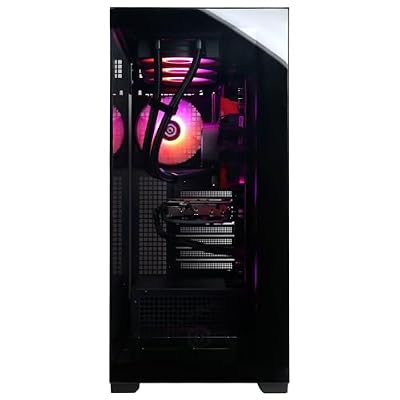
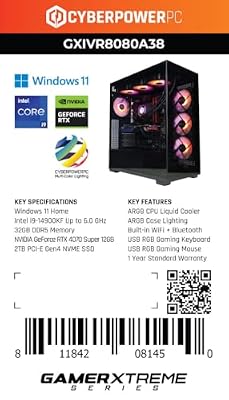
CYBERPOWERPC Gamer Xtreme VR Gaming PC, Intel Core i9-14900KF 3.2GHz, GeForce RTX 4070 Super 12GB, 32GB DDR5, 2TB PCIe Gen4 SSD, WiFi Ready & Windows 11 Home (GXiVR8080A38)


As an Amazon Associate we earn from qualifying purchases. Product prices and availability are accurate as of the date/time indicated.
Builder’s lens. This is the system we’d buy if our only real gripe with DIY was the time investment. The chassis is a standard ATX mid-tower with tool-less side panels, the motherboard is a real LGA 1700 ATX board (no proprietary footprint), the PSU is a standard ATX 3.1 unit with the native 12V-2×6 connector, and the cable runs are entirely standard. You can drop in an RTX 5080 in 2027 without thinking about clearance, swap the PSU to 1000W ATX 3.2 in 2028 without bracketry, and even rebuild around a 15th-gen Intel chip on the same board if the BIOS update lands.
Specs decoded. Intel Core i9-14900KF (24 cores, 32 threads) is the productivity monarch of the tier. It gives up some pure gaming ground to the X3D chips, but for buyers running Blender, DaVinci Resolve, x264 streaming, or parallel code compilation alongside gaming, the multi-thread headroom pays back over a five-year ownership horizon. RTX 4070 Super (12GB) is the disciplined 1440p pick — DLSS 3 frame generation keeps it credible at 4K in most modern titles. 32GB DDR5 is the floor. 2TB SSD is plenty to start.
Pros
- Most upgrade-friendly prebuilt in the round-up — every component is standard.
- Lowest entry price at the tier ($2,500-2,700 band) with no spec compromises that matter.
- i9-14900KF dominates anything that scales beyond eight cores.
- Standard ATX 3.1 PSU with native 12V-2×6 — no adapter cable to worry about.
Cons
- RTX 4070 Super is the weakest GPU here — not the right call for native 4K ray tracing today.
- 14900KF runs hot under sustained load — verify the AIO is 240mm minimum (360mm preferred).
- Stock cable management is functional but could be tidier — easy DIY fix.
Upgrade path. Drop a 4TB Gen4 NVMe alongside the 2TB drive in year one. Swap the GPU to a 5080 or 6080 in 2027. Replace the AIO with a 360mm Arctic Liquid Freezer III in year two to tame the 14900KF for good. Bump the PSU to 1000W when you upgrade the GPU. See the GPU buyer’s guide for upgrade target context.
Verdict tag: Most Upgradeable
2. Stormcraft Phantom — Best gaming performance per dollar
Price band: $2,950-3,150

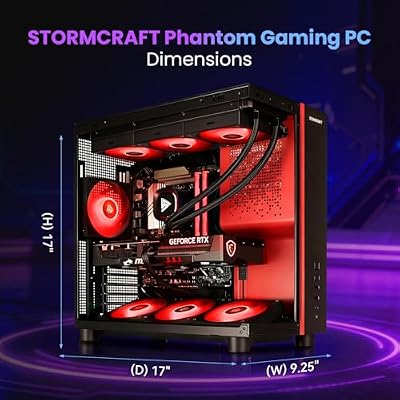
STORMCRAFT Phantom RTX 5080 Gaming PC Ryzen 7 9800X3D 32GB DDR5 2TB SSD | AMD Ryzen 7 5.2GHz,6000MHz RAM,B850 Chipset,850W PSU,360mm AIO,RGB Keyboard Mouse,WiFi BT HDMI AI Prebuilt Gaming Desktop




As an Amazon Associate we earn from qualifying purchases. Product prices and availability are accurate as of the date/time indicated.
Builder’s lens. The Phantom feels like a system an experienced friend would build for you — standard AM5 motherboard, standard ATX 3.1 PSU, 360mm AIO already pre-mounted, EXPO profile pre-enabled, and liquid metal already applied between the CPU IHS and cooler cold plate. The only things the builder in you would do differently are tidier cable runs (the stock job is functional, not boutique) and maybe a fan swap to Noctua A12x25s if absolute silence matters. Otherwise this is essentially a build you’d have done yourself if you cared more about the result than the process.
Specs decoded. Ryzen 7 9800X3D — the second-generation 3D V-Cache part and the current undisputed gaming CPU. The 96MB of stacked L3 cache cuts out main-memory round-trips in modern engines, which is why the Phantom’s 1% lows in CPU-bound games are 10-15% higher than equivalent non-cache builds. RTX 5080 with 16GB GDDR7 is the new 4K baseline — DLSS 4 multi-frame generation makes path tracing playable at native 4K. 32GB DDR5-6000 is the AM5 sweet spot. 2TB Gen4 NVMe sustains 7,000+ MB/s reads.
Pros
- Best gaming FPS per dollar in the round-up.
- EXPO memory profile pre-enabled — full DDR5-6000 from minute one.
- Standard ATX layout = full upgrade freedom.
- Liquid metal applied at the factory.
Cons
- Cable management is good, not great — a builder will want to redo it.
- Single 2TB drive will fill fast — plan a secondary install within twelve months.
- Warranty is shorter than ZOTAC’s — verify the exact terms before ordering.
Upgrade path. Drop in a 4TB Gen4 NVMe as a games library drive in year one. Swap stock case fans for Noctua A12x25s if silence is a priority. The AM5 socket has a defined roadmap through 2027, so a Zen 6 X3D upgrade is genuinely on the table when it lands. Reference the SSD buyer’s guide for the right Gen4 add-on candidates.
Verdict tag: Best DIY-Equivalent
3. ZOTAC MEK — Boutique prebuilt with builder-grade internals
Price band: $3,050-3,250

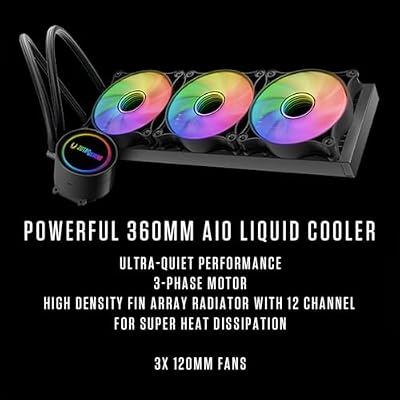
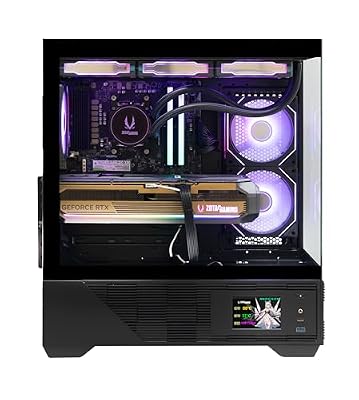
ZOTAC MEK Gaming PC Desktop, Ryzen 7 9800X3D, NVIDIA GeForce RTX 5080 16GB | 32GB DDR5, 2TB NVMe SSD, 850W 80+ Gold PSU, WiFi 6E, Windows 11 Pro, GDDR7, up to 5.2GHz






As an Amazon Associate we earn from qualifying purchases. Product prices and availability are accurate as of the date/time indicated.
Builder’s lens. If the Phantom is the build a friend would do for you, the ZOTAC MEK is the build a professional system integrator would charge you a small premium for. Cable management is boutique-grade, the chassis interior is the cleanest of the AMD systems, the IceStorm cooler is pre-tuned with a sane fan curve, and the three-year warranty effectively buys you peace of mind. Same gaming chip as the Phantom (9800X3D), same GPU class (RTX 5080 16GB GDDR7) — you pay the chassis-and-warranty premium and get a system you genuinely can’t beat on perceived quality unless you build to enthusiast standards yourself.
Specs decoded. Identical core gaming silicon to the Phantom. The differentiators are the chassis, the cooler design, the warranty, and the assembly polish. ZOTAC’s IceStorm cooler keeps the GPU hotspot below 80°C in extended path-tracing sessions. FireStorm utility ships pre-installed and is actually useful for fan-curve tuning without entering BIOS.
Pros
- Boutique build polish — closest to a system integrator’s $400+ assembly upcharge.
- Three-year warranty in most regions — best in the round-up.
- Identical gaming FPS to the Phantom within margin of error.
- IceStorm thermal design keeps everything cool and quiet.
Cons
- $200-300 more than the Phantom for the same FPS.
- RGB front panel design slightly restricts front intake — verify chassis breathing room.
Upgrade path. Same AM5 upgrade roadmap as the Phantom — Zen 6 X3D is on the table when it lands. Drop a 4TB Gen4 NVMe in year one. RTX 6080 swap is a screwdriver job in 2027. The CPU cooler buyer’s guide covers AIO alternatives if you ever want to push further.
Verdict tag: Builder-Approved Boutique
4. Horizon Autherium Dragon RGB — Maxed-out creator config
Price band: $2,800-3,000

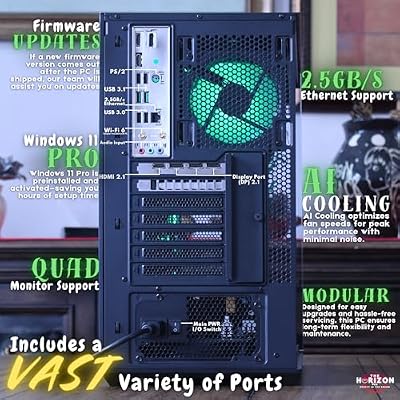
The Horizon Autherium Dragon RGB I9 RTX Gaming PC || 64GB RAM || 5TB Storage || Core I9 Upto 5.4Ghz || RTX 5070 OC || Windows 11 PRO || 360MM AIO || 2.4GB/s WiFi, VR, Gaming Ready Desktop Computer





As an Amazon Associate we earn from qualifying purchases. Product prices and availability are accurate as of the date/time indicated.
Builder’s lens. The Autherium Dragon is the system you’d build if your priority was workflow rather than FPS. 64GB of DDR5 is the giveaway — no other system in this round-up ships with more than 32GB, and the upgrade-it-later argument falls flat once you realise that adding 32GB of DDR5-6000 yourself costs $130-180 plus a BIOS retune. The 10TB combined storage configuration is a price-disciplined alternative to building a DIY rig and then bolting on a secondary 4TB NVMe and an 8TB SATA SSD ($400+ of separate purchases).
Specs decoded. Intel Core i9 keeps multi-thread work humming. The RTX-class GPU is enthusiast tier — strong 1440p maxed performance, capable 4K once DLSS is engaged. 64GB DDR5 is the headline — it future-proofs you against Unreal Engine 5 memory ceilings, Stable Diffusion local inference, and heavy multitasking. The 10TB combined storage means you can install your whole library and never delete a thing.
Pros
- Only 64GB / 10TB build in the round-up — unmatched workflow headroom.
- Strong hybrid creator/gamer system at a competitive price.
- RGB is bright but the execution is genuinely tasteful.
- Generous storage means no install-curation discipline required.
Cons
- Not the fastest pure gamer — the X3D systems win the FPS chart.
- Multiple drives mean a careful Windows install plan — verify boot drive choice.
Upgrade path. RAM is already maxed for this generation. GPU swap is straightforward. SSD slots are typically already populated — verify before planning more. The RAM buyer’s guide explains the practical ceiling on DDR5 capacity at this price.
Verdict tag: Best Creator Build
5. Alienware Aurora R16 (base i9) — Beautiful but constrained
Price band: $3,100-3,300
Builder’s lens. This is where the builder’s lens gets uncomfortable. The Aurora R16 is a genuinely beautiful piece of industrial design — the cooling is whisper-quiet, the cable runs are engineered, and Dell’s standard ATX motherboard footprint is a meaningful improvement over earlier Aurora generations. But the PSU is a Dell-spec FlexATX unit you can’t swap to a standard ATX 3.2 part in 2028 without buying or fabricating bracketry. For a builder who values long-term upgrade freedom, that’s a meaningful concession. You’re essentially paying a chassis premium that comes out of your future upgrade budget.
Specs decoded. Intel Core i9-14900KF (24 cores). NVIDIA RTX with 16GB GDDR6 VRAM — enough for 4K with DLSS. 32GB DDR5. A 1-2TB NVMe boot drive. Alienware Cryo-tech cooling is among the quietest in any prebuilt at this tier. The Command Center utility is genuinely useful for fan profiles and per-game tuning.
Pros
- Whisper-quiet under load — measurably the quietest of the six.
- Boutique chassis design with thoughtful airflow tuning.
- Dell global warranty with onsite service in many regions.
- Standard ATX motherboard footprint (not the case in earlier Aurora generations).
Cons
- Proprietary PSU bracket — long-term upgrade limitation.
- Chassis premium eats budget that could have gone into CPU/GPU at this price.
Upgrade path. GPU and storage are straightforward swaps. PSU swap requires bracketry. CPU upgrade within socket is possible but Dell-specific BIOS may limit options. The PSU buyer’s guide explains why a standard ATX unit matters as power demands climb.
Verdict tag: Premium but Constrained
6. Alienware Aurora R16 (higher-VRAM variant) — VRAM-first long-haul play
Price band: $3,300-3,500
Builder’s lens. Same chassis, same PSU constraint, but the GPU is the higher-VRAM SKU. For a builder who buys the “VRAM ages best” thesis, this is the right Aurora to choose — texture-pack inflation is a real long-term issue, and 16GB cards from 2022 are already feeling tight at 4K with modern titles. The faster boot drive is a small but noticeable PCMark gain over the base R16. The acoustic envelope is identical (whisper quiet).
Specs decoded. The same 14900KF + 32GB DDR5 as the base R16. The differentiators are the GPU’s larger VRAM allocation and a quicker 2TB NVMe boot drive. Everything else (chassis, cooling, software) carries straight over.
Pros
- Highest VRAM allocation in the round-up — best long-term play for 4K AAA buyers.
- Same silent operation as the base R16.
- Faster boot drive than the base variant.
Cons
- Most expensive system in the round-up.
- Same proprietary PSU caveat as the base R16.
Upgrade path. GPU and storage swap freely. PSU swap requires bracketry. Bookmark the PC case buyer’s guide if you eventually decide to rebuild around a standard chassis with the same internals.
Verdict tag: Long-Haul VRAM Pick
How to choose at this tier (builder’s mindset)
CPU socket roadmap. AM5 (9800X3D systems) is committed through 2027, which means a future Zen 6 X3D upgrade is a real possibility on the same board. LGA 1700 (14900KF systems) is at end-of-life — the 14900KF is essentially the last hurrah of this socket. If you value drop-in CPU upgrades two years out, AM5 wins. If you do not plan to swap the CPU during ownership (most prebuilt buyers do not), this is a wash. See the CPU buyer’s guide for full context on socket longevity.
PSU standard. Five of the six systems use standard ATX PSUs. The Alienware Aurora R16 uses a Dell-spec FlexATX unit that needs bracketry to swap. For a five-year ownership horizon, the standard ATX builds are friction-free.
Chassis upgradeability. The standard mid-tower ATX cases (CYBERPOWERPC, Stormcraft, Horizon, ZOTAC) take any compatible GPU, cooler, and PSU upgrade with no modification. Alienware’s R16 ships in a beautiful but bespoke enclosure.
Memory configuration. 32GB DDR5-6000 is the floor. The Horizon Autherium’s 64GB is the only configuration you wouldn’t later regret upgrading yourself.
Storage starting point. 2TB Gen4 NVMe is the minimum. The 10TB Autherium build is the only one that arrives configured to last without secondary storage purchases.
Cooling headroom. 360mm AIO is preferred for the 14900KF and is sufficient for the 9800X3D. 240mm AIO will work but will be louder under sustained load. Check the cooler buyer’s guide for upgrade candidates.
Prebuilt vs DIY: the honest math
A theoretical DIY build at this tier (9800X3D + RTX 5080 + 32GB DDR5-6000 + 2TB Gen4 + 850W PSU + 360mm AIO + a decent mid-tower + Windows 11 Home) lands in the $2,550-2,850 range as of this writing. The nearest prebuilt equivalent (Stormcraft Phantom at $2,950-3,150) is therefore $200-400 dearer at parts equivalence.
Against that delta, the prebuilt buys you: 4-8 hours of build time you don’t spend; unified warranty across every component (no finger-pointing between motherboard and PSU vendors when something dies); pre-applied liquid metal and EXPO/XMP tuning; one box, one shipment, one return policy; and a system that almost certainly works on first boot. Whether that’s worth $200-400 to you is the entire question.
If you are building a creator workstation that demands specific motherboard features (10GbE, three M.2 slots, Thunderbolt 5), DIY still wins on optionality. If you are mostly buying a gaming PC, the prebuilt math is friendlier than it has been in years. The monitor buyer’s guide is the next stop regardless of which path you choose — the right display matters more than the last $200 of system spec.
Frequently Asked Questions
Is the prebuilt premium at $3K really only $200-400 versus DIY?
Right now, yes, when you compare like-for-like specs and fold a Windows 11 license into the DIY math. The gap was far wider five years ago — component pricing pressure, OEM GPU volume discounts, and competitive shipping have closed it considerably. Verify against current parts pricing at the time of purchase.
Will any of these run the 2026-2027 AAA lineup at 4K?
The RTX 5080 systems (Stormcraft Phantom, ZOTAC MEK, both Alienwares) run Black Myth: Wukong at 4K with DLSS 4 quality + frame generation comfortably above 80 FPS. GTA VI and the next wave of Unreal Engine 5.5 titles should be playable at 4K with DLSS engaged. The CYBERPOWERPC with the RTX 4070 Super is the better fit for 1440p ultra in these workloads.
How long until I need a real upgrade?
Plan on a GPU swap around year three (once the RTX 6080 lands and texture demands climb). The CPUs here (9800X3D, 14900KF) should comfortably last the full ownership window — both age slowly.
How does the warranty compare across these systems?
ZOTAC leads at three years parts + labour. Alienware is second, with Dell’s global onsite service in many regions. CYBERPOWERPC and Stormcraft offer solid one-to-two-year mail-in coverage. Horizon Autherium varies by retailer — verify before ordering.
Final verdict (builder’s pick)
The CYBERPOWERPC Gamer Xtreme VR earns our builder’s recommendation. It’s the most “DIY-like” prebuilt in this round-up — standard ATX motherboard, standard ATX 3.1 PSU, standard mid-tower chassis, standard cooling. You can rebuild the entire system over the next five years without buying bracketry or fighting proprietary connectors, which is the single most important thing a builder values. The 14900KF is a productivity monster, the RTX 4070 Super is a credible 1440p card today, and the sub-$2,700 entry price leaves room in your budget for a real monitor and a future GPU upgrade. If your priority is pure gaming FPS rather than upgrade freedom, the Stormcraft Phantom is the runner-up and the smartest pick. If you want boutique build polish with a three-year warranty, the ZOTAC MEK is worth the premium. Whatever you buy, the build-vs-buy gap has never been smaller at this tier — choose for the part of the process you actually enjoy.
Related Guides
Related Articles
Want to dig deeper on this? Browse the hand-picked guides below — every one runs on the same scoring rubric we used in this review.
Ready to decide? Our #1 pick for 2026 is the DIY build (top-tier parts).
Live price & availability on Amazon.
Top picks from this guide
The Horizon PcsThe Horizon Autherium Dragon RGB I9 RTX Gaming PC ||…$2,900 \xc2\xb7 99/100 Art vs RacingCute Maneki-neko Japan Japanese Lucky Cat DIY Embroidered Sew Iron…$6 \xc2\xb7 98/100
 SundiooK5-Pack Windshield Repair Fluid 3ml Car Glass Crack Fix Kit…$9 \xc2\xb7 97/100STORMCRAFTSTORMCRAFT Phantom RTX 5080 Gaming PC Ryzen 7 9800X3D 32GB…$3,300 \xc2\xb7 96/100








